[Plugin][$] RoundCorner - v3.4a - 31 Mar 24




-
Please excuse my inexperience with both Sketchucation and this forum. I am I think replying to a thread when in fact I want to post a new thread for RoundCorner. I can't find a 'new thread' type button so again, my apologies.
My Post Title would be: "Help with RoundCorner toolbar size in Sketchup 2016"
Problem: I have had Round Corner installed for some time and always struggled with the fact that in my installation, the toolbar (the pop-up window for settings that appears after I select either S
harpCorner or say RoundCorner - Bevel) is so small that I can not enter parameters for my roundcorner use. I am able to use the extension, but my problem is with the 'settings window' that appears when I select one of the three main options.Any help or direction on how to properly ask this question (and your patience is appreciated) would be much appreciated.
Thank you in advance
-
You must have a high-resolution screen.
For Sketchup 2016, you have to indicate the scale factor manually.
Go to Window > LibFredo6 Settings > Default Parameters... to display the Default Parameters of LibFredo6.
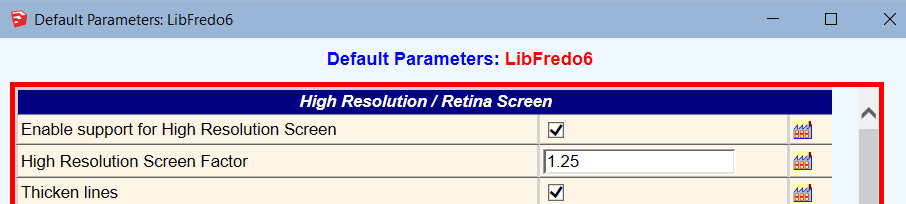
At the top of the dialog box, you should adjust the value of the field "High Resolution Screen Factor". Probably a factor 2.
Note that this adjustment is automatic for SU2017, SU2018 and SU2019.
Fredo
-
HI i'm working on a youtube channel introducing sketchup extensions in korean language.
Hoping if i and my team can make short films (dur : 1 min) from your works.
Of course we're not selling, will leave all links to your page on the description
we ask any opinion of this
thanks.ps. The channel is not open yet and we're not gonna proceed without your permission
-
@caritz said:
HI i'm working on a youtube channel introducing sketchup extensions in korean language.
Hoping if i and my team can make short films (dur : 1 min) from your works.
Of course we're not selling, will leave all links to your page on the description
we ask any opinion of this
thanks.ps. The channel is not open yet and we're not gonna proceed without your permission
You have my permission. And thanks for this initiative (and thanks for asking).
Obviously, It will be difficult to review it in your native language

Fredo
PS: by the way, you may want to have a look at FredoCorner, which is a separate plugin that does the same and a lot more than RoundCorner. The only restriction is that FredoCorner is for SU2016+.
-
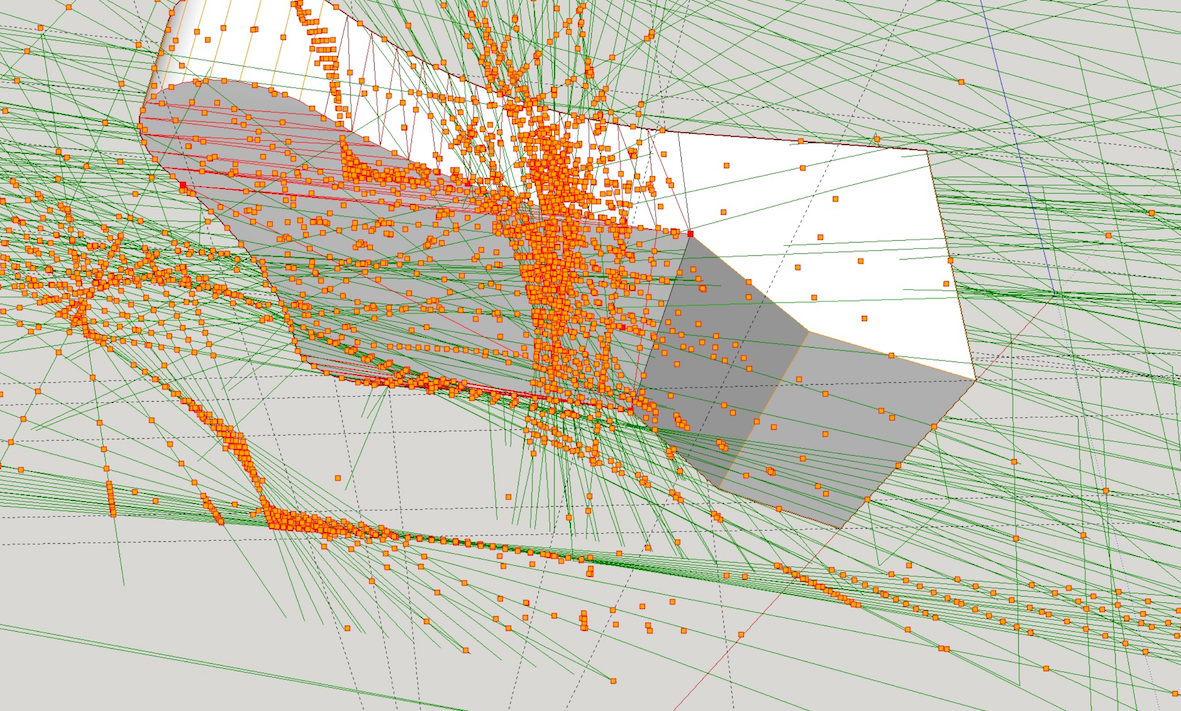
C'est vrai que je ne suis pas un champion de Sketchup, mais j'essaie d'y mettre du mien. Hélas, je vais de déboire en déception.
Dernière tentative en date d’utilisation du plugin roundcorner; tout cela est décidément trop mystérieux pour moi.
-
Looks to me as if you need to greatly reduce the offset amount to something appropriate to the size of the model.
-
@notapoireau said:
...tout cela est décidément trop mystérieux pour moi.
Dave is probably right I think, but before all this becomes too mysterious for you  how about to share your shown model here and briefly describe your intention? so we could look what really happens ...
 -
Hos can I increase the size of the button palette? It is much too small to use.
-
@sunset100 said:
Hos can I increase the size of the button palette? It is much too small to use.
It would be good you attach a picture and indicate the resolution of your hi-screen.
This is similar to this user question.In SU2018 (based on your profile), the adjustment of size is automatic.
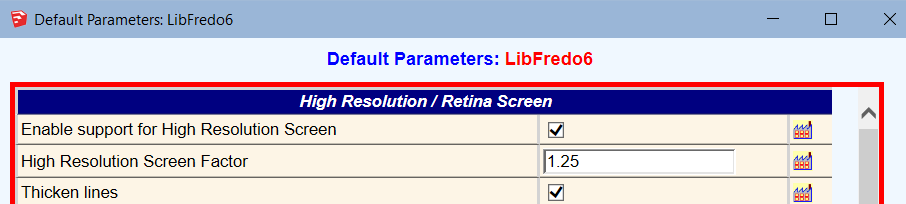
In any case, I would recommend you check the Default Parameters of LibFredo6 to see if the parameter are set correctly.
-
I have some problems when I set up the plugins.
It will pop up a window that shows errors like that:
〔C:/Users/LINDA/AppData/Roaming/SketchUp/SketchUp 2018/SketchUp/Plugins/Fredo6_!LibFredo6.rb:28:in<top (required)>' Load file Fredo6_RoundCorner.rb happen error Error: #<TypeError: can't convert nil into an exact number> C:/Users/LINDA/AppData/Roaming/SketchUp/SketchUp 2018/SketchUp/Plugins/Fredo6_!LibFredo6.rb:79:in-'
C:/Users/LINDA/AppData/Roaming/SketchUp/SketchUp 2018/SketchUp/Plugins/Fredo6_!LibFredo6.rb:79:in<top (required)>' D:/SketchupPro2018/Tools/RubyStdLib/rubygems/core_ext/kernel_require.rb:54:inrequire'
D:/SketchupPro2018/Tools/RubyStdLib/rubygems/core_ext/kernel_require.rb:54:inrequire' C:/Users/LINDA/AppData/Roaming/SketchUp/SketchUp 2018/SketchUp/Plugins/Fredo6_RoundCorner.rb:47:inmodule:Fredo6'
C:/Users/LINDA/AppData/Roaming/SketchUp/SketchUp 2018/SketchUp/Plugins/Fredo6_RoundCorner.rb:26:in `<top (required)>'〕Alough I have setted up LibFredo6 v9.5k and RoundCorner v3.3a
Can you help me please~~~~~
I need your help very much!!!! -
I'm sure Fredo will chime in soon...
Just for clarity, have you restarted SketchUp completely after the two RBZs were installed ?Also have you installed SketchUp correctly ?
You can try a "Repair" which won't affect any of your custom set up...
Here's how...Whilst logged into Windows as your normal user-account, ensure that SketchUp is not running...
Find the SketchUp installer's exe file - usually in your Downloads folder.
Select the installer's exe file's icon, right-click > context-menu > "Run as administrator"
When prompted choose "Repair"...
When it completes restart SketchUp and see what happens...Installing any complex app like SketchUp must be done this way, so never double-click the installer's exe file to 'Run' it etc, even if your normal-user has some admin powers it is NOT equivalent.
Installing incorrectly has unpredictable results, often relating to folder/file permissions... -
There is something wrong in the loading of LibFredo6, definitely
-
hi i'm trying to use Round Corner but when i click on any of the buttons nothing happens, i've reinstalled sketchup, the plugin, everything. I realized that the same thing happens with FredoCorner
-
@walkersama said:
hi i'm trying to use Round Corner but when i click on any of the buttons nothing happens, i've reinstalled sketchup, the plugin, everything. I realized that the same thing happens with FredoCorner
Could you open the Ruby console before launching RoundCorner and report any error. Thanks
-
@fredo6 said:
@walkersama said:
hi i'm trying to use Round Corner but when i click on any of the buttons nothing happens, i've reinstalled sketchup, the plugin, everything. I realized that the same thing happens with FredoCorner
Could you open the Ruby console before launching RoundCorner and report any error. Thanks
I actually managed to solve it by visiting the previous pages and the LibFredo6 page. I was able to solve it by deleting the LibFredo6 folder from AppData. Thanks and incredible work!
-
I thought I'd report what I think is a bit of a bug, although I've been able to solve it by deleting the LibFredo6 subfolder from my Users -> Myname -> AppData
A bit of background:
I'm using Sketchup 2019 Pro.
I downloaded your RoundedCorner extension (which is fantastic, by the way) a few days ago into my Downloads folder. I then installed LibFredo6 tools and RoundedCorner from those two files in my Downloads with Window -> Extension Manager, closed and restarted Sketchup, and the extension worked great.
But then....
I decided to clean up my Downloads folder, so moved those two files into a new subfolder I named DownloadedExtensions in my Sketchup folder.
Well, RoundedCorner didn't like that! Something weird was happening: the icon for "rounded corner" actually invoked the sharp corner routine, and the "sharp corner" icon invoked the rounded corner routine (in other words, they were swapped in the menu). That part I could live with, but the routines themselves became all whacked. For example, to create a sphere when everything's working properly I could create a cube of 10x10x10, set an offset of 5, and then run RoundedCorner and voila! Right? Well, for some reason I was getting a cube with rounded edges of about 4 (I think) with holes on two sides and overlaps on the other two.
Anyway, like I said, I fixed the problem by deleting LibFredo6 from AppData (thanks to a suggestion from a previous poster!).
Has anyone ever said to you "you da man!" ???
-
Difficult to know what has happened. Very weird...
You can put the rbz files wherever you wish or even delete them.
But never move, touch or alter the top rb file and the subfolder. They must stay in the Sketchup plugins directory.
-
I have created a square-frame-object.
as i rounded the inner edges of this frame,the tool generated big square faces, that covered the hole of the frane, that it looked like a solid plate.
i had to remove theese faces to get the rounded frame-shape i wanted.Maybe it was because the special case, that i wanted to merge the inner and outer rounded edges to a half circle profile.
-
That's a common thing in cases where you are rounding the edge of a hole. FredoCorner doesn't seem to do that however.
-
Thanks. Cant wait to use this plugin.







Advertisement