sketchucation logo sketchucation
    • 登入
    Oops, your profile's looking a bit empty! To help us tailor your experience, please fill in key details like your SketchUp version, skill level, operating system, and more. Update and save your info on your profile page today!
    ⚠️ Important | Libfredo 15.6b introduces important bugfixes for Fredo's Extensions Update

    [Plugin] Simple Loft alpha 0.1b -- UPDATED May-15-09

    已排程 已置頂 已鎖定 已移動 Plugins
    251 貼文 88 Posters 154.9k 瀏覽 88 Watching
    正在載入更多貼文
    • 從舊到新
    • 從新到舊
    • 最多點贊
    回覆
    • 在新貼文中回覆
    登入後回覆
    此主題已被刪除。只有擁有主題管理權限的使用者可以查看。
    • A 離線
      anient
      最後由 編輯

      Had to join the forum simply to get a hold of this pluggin thanks sooo much 👍

      1 條回覆 最後回覆 回覆 引用 0
      • G 離線
        guillermorage
        最後由 編輯

        how do i install it

        1 條回覆 最後回覆 回覆 引用 0
        • Rich O BrienR 離線
          Rich O Brien Moderator
          最後由 編輯

          The first post in this thread has the instructions. It's the same for most plugins here. Some are zipped so they need extracting. Others are just .rb files which need to go in your plugins folder. And some are .rb with folders containing files.

          All plugins go in your plugin folder.

          Download the free D'oh Book for SketchUp 📖

          1 條回覆 最後回覆 回覆 引用 0
          • G 離線
            guillermorage
            最後由 編輯

            Sorry, i am new in this forum, im using mac, i downloaded and its a ziped file, so i extracted and it appears a folder wich contains an rb file called:clf_simple_loft_loader.rb and another folder which contains; clf_simple_loft_small.png, clf_simple_loft.png, clf_simple_loft.rb.
            I tried to move them to the plugins and then open sketchup, but nothing.

            1 條回覆 最後回覆 回覆 引用 0
            • Rich O BrienR 離線
              Rich O Brien Moderator
              最後由 編輯

              Hi,

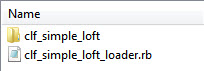
              When you extract you get this...
              Simple Loft.jpg
              Place both the .rb and the folder in your plugins folder. Do not take the files out of the folder as this will prevent it working.

              I'm not familiar with Mac so where your plugin folder is located is a mytery 😲

              Download the free D'oh Book for SketchUp 📖

              1 條回覆 最後回覆 回覆 引用 0
              • TIGT 離線
                TIG Moderator
                最後由 編輯

                If you are unclear about where your ‘Plugins’ folder might be then type [or copy+paste] this line into the
                Window > Ruby Console:

                Sketchup.find_support_file("Plugins")

                • press <enter>

                Typically the PC path that is returned is:

                C:/Program Files/Google/Google SketchUp 7/Plugins

                Whilst typically the Mac path that is returned is:

                Macintosh HD/Library/Application Support/Google Sketchup 7/SketchUp/Plugins

                Test to see where yours is... 🤓

                TIG

                1 條回覆 最後回覆 回覆 引用 0
                • M 離線
                  microracer9
                  最後由 編輯

                  I installed it.... 1st time it worked perfectly....now...dont work.

                  Any idea why?

                  1 條回覆 最後回覆 回覆 引用 0
                  • thomthomT 離線
                    thomthom
                    最後由 編輯

                    @microracer9 said:

                    I installed it.... 1st time it worked perfectly....now...dont work.

                    When reporting software problems please be more specific to what doesn't work. Is it a particular operation that fails? Or does it appear to not be loading at all? (No menus/toolbars) Any error messages (open the Ruby Console as see if any messages appear when you try to use the plugin) ?

                    That's the only way for the developer, or any other, to have an idea of what "doesn't work" and why.

                    Thomas Thomassen — SketchUp Monkey & Coding addict
                    List of my plugins and link to the CookieWare fund

                    1 條回覆 最後回覆 回覆 引用 0
                    • N 離線
                      nektares
                      最後由 編輯

                      This is amazing! you are a very creative coder, thanks for this!

                      1 條回覆 最後回覆 回覆 引用 0
                      • Chris FullmerC 離線
                        Chris Fullmer
                        最後由 編輯

                        Thanks!

                        Lately you've been tan, suspicious for the winter.
                        All my Plugins I've written

                        1 條回覆 最後回覆 回覆 引用 0
                        • G 離線
                          Gromit
                          最後由 編輯

                          Chris, You are A GENIUS!!!

                          1 條回覆 最後回覆 回覆 引用 0
                          • J 離線
                            jeh397
                            最後由 編輯

                            I just downloaded the loft plugin and I'm finding that once I select the loft tool
                            I can't select any of the curves in my model. Any suggestions?

                            1 條回覆 最後回覆 回覆 引用 0
                            • Dave RD 離線
                              Dave R
                              最後由 編輯

                              Jacqueline, could you post either the model or a screen shot so we can see what you're doing?

                              Out of curiosity, is there any chance your curves are inside components or groups that are not open for editing?

                              Etaoin Shrdlu

                              %

                              (THERE'S NO PLACE LIKE)

                              G28 X0.0 Y0.0 Z0.0

                              M30

                              %

                              1 條回覆 最後回覆 回覆 引用 0
                              • A 離線
                                Alezio
                                最後由 編輯

                                Thank you so much for sharing this use full 👍 plugin . im new in sketchup....perhaps everybody would like to help me....thank's again 😄 😄 😄 🎉

                                1 條回覆 最後回覆 回覆 引用 0
                                • Chris FullmerC 離線
                                  Chris Fullmer
                                  最後由 編輯

                                  You're welcome. There are better tools for lofting now. This was the first one, but TIG and FREDO in particular have done lots of amazing work with lofting plugins. I'd recommend looking at theirs.

                                  Lately you've been tan, suspicious for the winter.
                                  All my Plugins I've written

                                  1 條回覆 最後回覆 回覆 引用 0
                                  • F 離線
                                    fran6fontaine
                                    最後由 編輯

                                    Hi,

                                    one simple question, I downloaded the rb script for the loft tool but it doesn't appear in my sketchup. Neither in my plugins menu even if i click and drag it into the plugins folder of my sketchup.

                                    If you could help, i would really like to use it, seems to work like a charm to creat super smooth surfaces.

                                    Thanks

                                    1 條回覆 最後回覆 回覆 引用 0
                                    • Dave RD 離線
                                      Dave R
                                      最後由 編輯

                                      Almost always when a user reports that a plugin doesn't work, the reason turns out to be that it was installed incorrectly. Since I know for a fact that the plugin does work, I'll assume the your problem is the same. It appears you have Win7. In that OS you must have administrator privileges to install files into the Plugins folder. Do you? If not, you'll need to change that so you do.

                                      Second, you say you dragged it into your Plugins folder. Did you extract the contents of the ZIP file? When you open the ZIP file you'll see there is a file whose extension is .rb and a folder. The folder has some icon and other files. Those contents must remain in that folder inside the Plugins folder.

                                      There's a sticky post about installing plugins in this forum. Read it. After you've made sure you have administrative rights to add files to the Plugins folder and you've installed it correctly, check to see if it works. If you still have problems, let us know. Include screen shots that show the plugin installed correctly in the Plugins folder.

                                      Also, this plugin contains a single button toolbar. You'll want to turn that on under View>Toolbars.

                                      Etaoin Shrdlu

                                      %

                                      (THERE'S NO PLACE LIKE)

                                      G28 X0.0 Y0.0 Z0.0

                                      M30

                                      %

                                      1 條回覆 最後回覆 回覆 引用 0
                                      • P 離線
                                        pigfreezer2
                                        最後由 編輯

                                        hollll ll ll

                                        1 條回覆 最後回覆 回覆 引用 0
                                        • 3 離線
                                          32bits
                                          最後由 編輯

                                          Hi Chris,

                                          I have the next problem with the plug-in version 0.3.0 :

                                          [size=85]Error; #<ArgumentError; Cannot convert argument to Sketchup;;Point3d>
                                          C;/Users/AMD6128x2/AppData/Roaming/SketchUp/SketchUp 2014/SketchUp/Plugins/clf_simple_loft/clf_simple_loft_data.rb;163;in `add_cpoint'
                                          C;/Users/AMD6128x2/AppData/Roaming/SketchUp/SketchUp 2014/SketchUp/Plugins/clf_simple_loft/clf_simple_loft_data.rb;163;in `block in end_handles'
                                          C;/Users/AMD6128x2/AppData/Roaming/SketchUp/SketchUp 2014/SketchUp/Plugins/clf_simple_loft/clf_simple_loft_data.rb;160;in `each_index'
                                          C;/Users/AMD6128x2/AppData/Roaming/SketchUp/SketchUp 2014/SketchUp/Plugins/clf_simple_loft/clf_simple_loft_data.rb;160;in `end_handles'
                                          C;/Users/AMD6128x2/AppData/Roaming/SketchUp/SketchUp 2014/SketchUp/Plugins/clf_simple_loft/clf_simple_loft_data.rb;68;in `onReturn'[/size]
                                          

                                          some help? please!

                                          Many Thanks

                                          1 條回覆 最後回覆 回覆 引用 0
                                          • Dave RD 離線
                                            Dave R
                                            最後由 編輯

                                            How did you install it? It works fine for me. I installed it via the Extension Warehouse.

                                            Etaoin Shrdlu

                                            %

                                            (THERE'S NO PLACE LIKE)

                                            G28 X0.0 Y0.0 Z0.0

                                            M30

                                            %

                                            1 條回覆 最後回覆 回覆 引用 0
                                            • 1
                                            • 2
                                            • 9
                                            • 10
                                            • 11
                                            • 12
                                            • 13
                                            • 11 / 13
                                            • 第一個貼文
                                              最後的貼文
                                            Buy SketchPlus
                                            Buy SUbD
                                            Buy WrapR
                                            Buy eBook
                                            Buy Modelur
                                            Buy Vertex Tools
                                            Buy SketchCuisine
                                            Buy FormFonts

                                            Advertisement