sketchucation logo sketchucation
    • 登入
    Oops, your profile's looking a bit empty! To help us tailor your experience, please fill in key details like your SketchUp version, skill level, operating system, and more. Update and save your info on your profile page today!
    ⚠️ Important | Libfredo 15.6b introduces important bugfixes for Fredo's Extensions Update

    [Plugin] Simple Loft alpha 0.1b -- UPDATED May-15-09

    已排程 已置頂 已鎖定 已移動 Plugins
    251 貼文 88 Posters 154.9k 瀏覽 88 Watching
    正在載入更多貼文
    • 從舊到新
    • 從新到舊
    • 最多點贊
    回覆
    • 在新貼文中回覆
    登入後回覆
    此主題已被刪除。只有擁有主題管理權限的使用者可以查看。
    • M 離線
      MrPlanet
      最後由 編輯

      Just to let you know, this plugin creates an empty group in every model, it may seem small, but SketchyPhysics (By Chris Phillips) Simply refuses to work with it.

      I reject your reality and substitute my own.

      1 條回覆 最後回覆 回覆 引用 0
      • Chris FullmerC 離線
        Chris Fullmer
        最後由 編輯

        Oh really? Oops. I'll try to make sure to get that fixed on the next round. I must be forgetting to delete a group somewhere in the mix. Thanks for pointing it out!

        Chris

        Lately you've been tan, suspicious for the winter.
        All my Plugins I've written

        1 條回覆 最後回覆 回覆 引用 0
        • S 離線
          saimen
          最後由 編輯

          wow that's exactly what I need 😉

          1 條回覆 最後回覆 回覆 引用 0
          • Dave RD 離線
            Dave R
            最後由 編輯

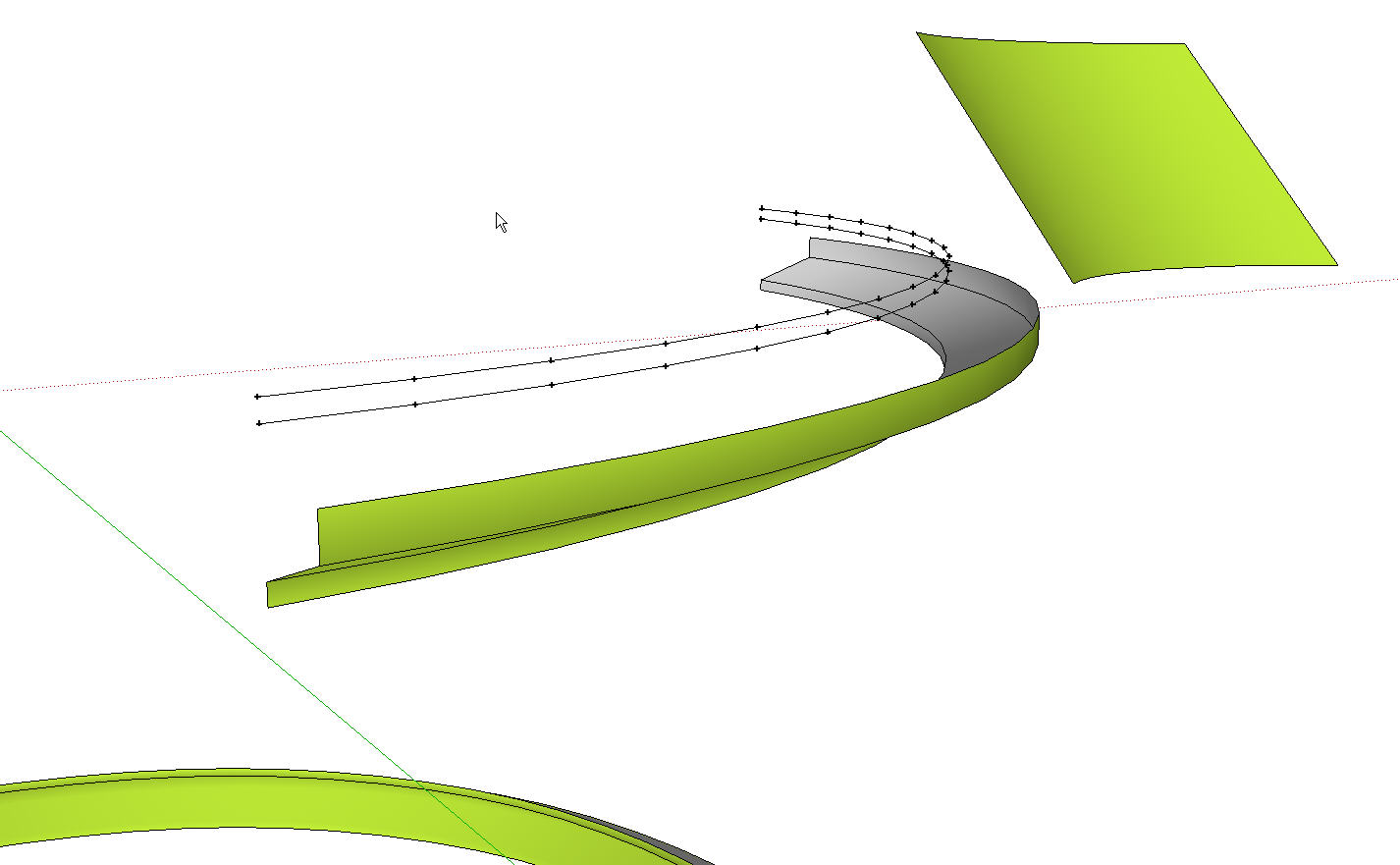
            Chris, I've been playing with your Loft plugin and Driven's screw thread file. When I first opened his file I was able to create his threads by selecting two curves at a time and using 1 for the number of segments. I tried it by selecting all six curves and got a Bug Splat. I reopened the file and cut the curves down to a quarter turn thinking I'd give it fewer faces to create. Here's the results. In the background you can see a test loft with two 12-segment arcs and five loft segments.
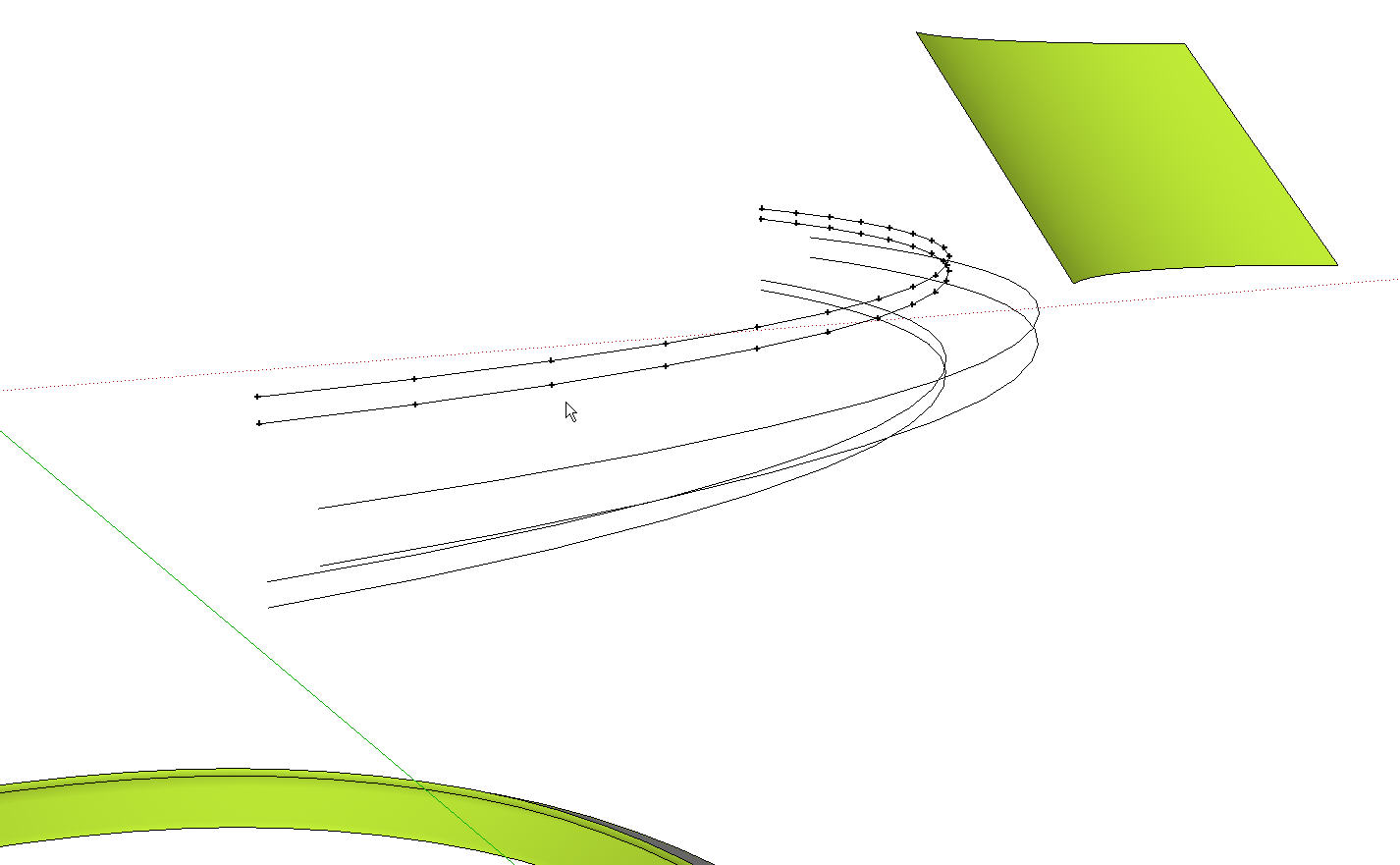
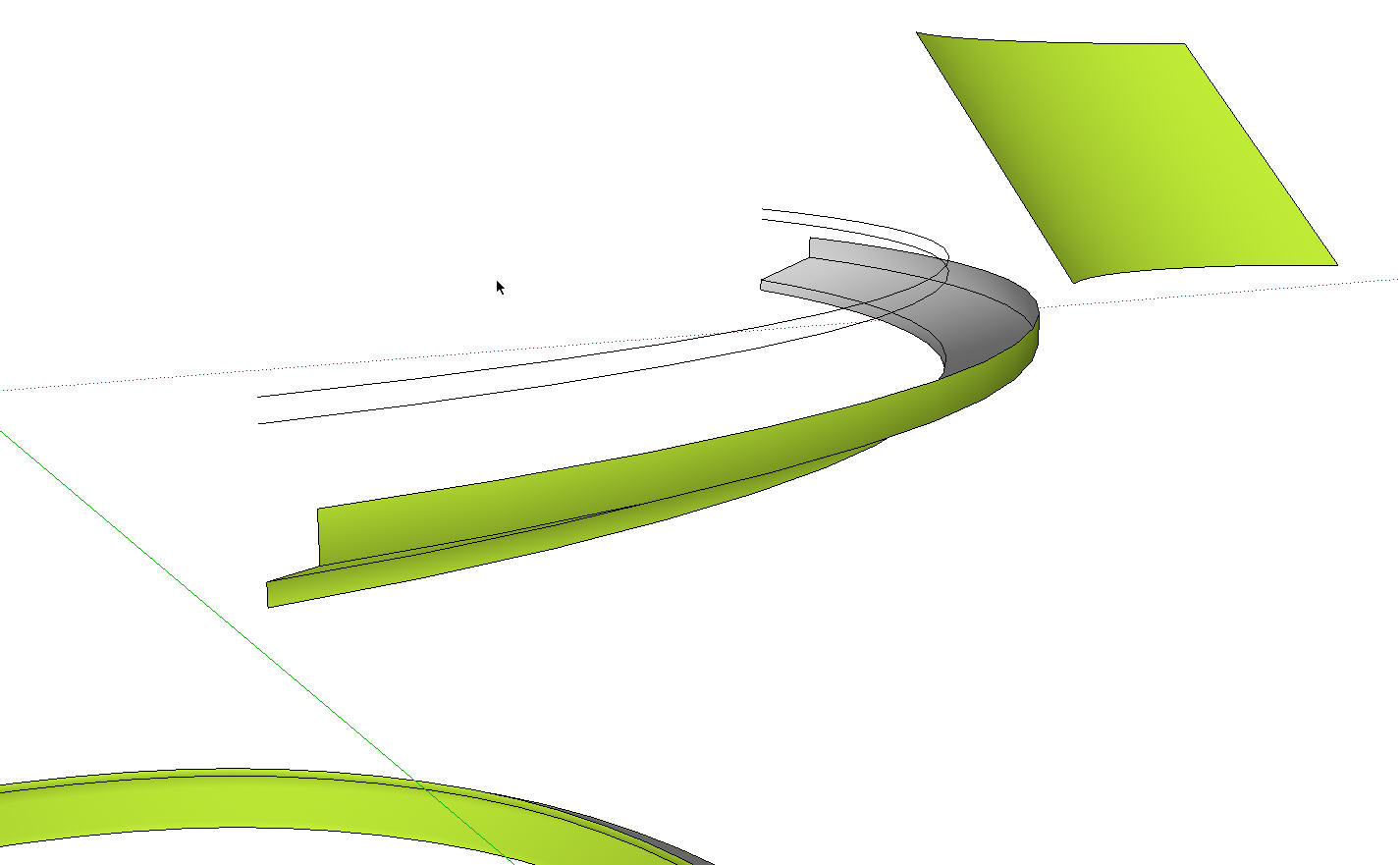
            All six curves selected. One segment chosen in dialog box

            Bottom four curves, one segment.

            Top two curves, one segment

            The guidepoints are interesting but not quite what I expected.

            Etaoin Shrdlu

            %

            (THERE'S NO PLACE LIKE)

            G28 X0.0 Y0.0 Z0.0

            M30

            %

            1 條回覆 最後回覆 回覆 引用 0
            • Chris FullmerC 離線
              Chris Fullmer
              最後由 編輯

              That means it is crashing for some reason. Normally to do with the selection including a non-edge item, or also if the segment counts don't match. I'm not sure which. You can upload the model immediately before that point and show me which lines to click on and I'll figure out what it is.

              Hopefully the next version wll clean some of that up.

              Chris

              Lately you've been tan, suspicious for the winter.
              All my Plugins I've written

              1 條回覆 最後回覆 回覆 引用 0
              • Dave RD 離線
                Dave R
                最後由 編輯

                Here you go Chris. I hope it helps.


                thread_bez_loft[1].skp

                Etaoin Shrdlu

                %

                (THERE'S NO PLACE LIKE)

                G28 X0.0 Y0.0 Z0.0

                M30

                %

                1 條回覆 最後回覆 回覆 引用 0
                • N 離線
                  nomeradona
                  最後由 編輯

                  wow thanks a million...

                  visit my blog: http://www.nomeradona.blogspot.com

                  1 條回覆 最後回覆 回覆 引用 0
                  • EscapeArtistE 離線
                    EscapeArtist
                    最後由 編輯

                    Hey Chris, I just started having some trouble with this plugin. Maybe you can decipher what I'm doing wrong; I know the plugin works so it must be something that I'm doing. Here's the console output:

                    
                    Error; #<NoMethodError; undefined method `all_connected' for nil;NilClass>
                    L;/Modeling/Sketchup Google/Plugins/clf_simple_loft/clf_simple_loft.rb;61;in `onLButtonUp'
                    L;/Modeling/Sketchup Google/Plugins/clf_simple_loft/clf_simple_loft.rb;186
                    Error; #<ArgumentError; Cannot convert argument to Sketchup;;Point3d>
                    L;/Modeling/Sketchup Google/Plugins/clf_simple_loft/clf_simple_loft.rb;189;in `add_cpoint'
                    L;/Modeling/Sketchup Google/Plugins/clf_simple_loft/clf_simple_loft.rb;189;in `end_handles'
                    L;/Modeling/Sketchup Google/Plugins/clf_simple_loft/clf_simple_loft.rb;186;in `each_index'
                    L;/Modeling/Sketchup Google/Plugins/clf_simple_loft/clf_simple_loft.rb;186;in `end_handles'
                    L;/Modeling/Sketchup Google/Plugins/clf_simple_loft/clf_simple_loft.rb;94;in `onReturn'
                    L;/Modeling/Sketchup Google/Plugins/clf_simple_loft/clf_simple_loft.rb;61
                    

                    I'm applying the plugin to 3 bezier curves, the plugin generates construction points and then stops.

                    1 條回覆 最後回覆 回覆 引用 0
                    • TIGT 離線
                      TIG Moderator
                      最後由 編輯

                      EscapeArtist

                      ...onLButtonUp...
                      line=60  best = ph.best_picked
                      line=61  all_best = best.all_connected
                      line=62  @shapes_edges << best.all_connected
                      

                      It's failing to find anything you have selected when you release the mouse-button... Are you picking anything ? It falls over since 'best' = 'nil' and nil can't have connected edges...
                      Chris: before 'all_best = ' you could test for 'best' and re-run the main functions if it's nil, e.g.

                      if not best
                        ### run me again ###
                        return nil
                      end#if
                      

                      ...

                      TIG

                      1 條回覆 最後回覆 回覆 引用 0
                      • EscapeArtistE 離線
                        EscapeArtist
                        最後由 編輯

                        Yep, absolutely picking something. I know the plugin works because I drew two other curves and tested it, the loft worked just fine; so it must be a problem with the curve set I was initially using. Maybe it doesn't work on curves that were part of a face. I had to draw faces to get the curves to lay flat on specific axes and then deleted the faces, leaving the curves behind. I'm probably missing knowledge about a change that happens to edges that were part of a face and how it affects the plugin.

                        edit:

                        Solved:

                        That was the problem, edges/curves that were part of a face will not loft. I worked around the problem by grouping the planes, exiting the group, and then drawing the curves on the faces. The lines went where I wanted and the integrity of the curve was preserved in order for loft to work.

                        1 條回覆 最後回覆 回覆 引用 0
                        • P 離線
                          publied
                          最後由 編輯

                          Chris,
                          a smart substitute of the old curve stitcher! they spare my time. thank you!

                          hire me@ http://www.publied.it !

                          1 條回覆 最後回覆 回覆 引用 0
                          • Chris FullmerC 離線
                            Chris Fullmer
                            最後由 編輯

                            @unknownuser said:

                            No possibility to automate the clicks of curves? 😉
                            the 10 curves are made with the Grow plug by Tig

                            So I've been thinking about this, and what if I made it so that holding down the mouse button (click and drag) would add lines in the order you cross over them. You can let go and then re-click and drag to add more splines to the selection set. I think that would do the trick. Then just hit enter once you've selected all the splines you want to use.

                            Would that be a good solution?

                            Chris

                            Lately you've been tan, suspicious for the winter.
                            All my Plugins I've written

                            1 條回覆 最後回覆 回覆 引用 0
                            • pilouP 離線
                              pilou
                              最後由 編輯

                              Marvelous 👍
                              The only problem for you is the order of the curves 😉
                              image of the original post

                              http://forums.sketchucation.com/download/file.php?id=27140

                              Frenchy Pilou
                              Is beautiful that please without concept!
                              My Little site :)

                              1 條回覆 最後回覆 回覆 引用 0
                              • Chris FullmerC 離線
                                Chris Fullmer
                                最後由 編輯

                                @chris fullmer said:

                                what if I made it so that holding down the mouse button (click and drag) would add lines in the order you cross over them.

                                No, the order of the curves becomes the users problem to figure out. It will all depend on how you click and drag over the splines. 😉

                                Chris

                                Lately you've been tan, suspicious for the winter.
                                All my Plugins I've written

                                1 條回覆 最後回覆 回覆 引用 0
                                • GaieusG 離線
                                  Gaieus
                                  最後由 編輯

                                  So Chris you got to the point to quote yourself. I've only seen this from elderly politicians so far. 😲

                                  Gai...

                                  1 條回覆 最後回覆 回覆 引用 0
                                  • Chris FullmerC 離線
                                    Chris Fullmer
                                    最後由 編輯

                                    I wasn't quoting myself, I was re-explaining myself 😄

                                    Lately you've been tan, suspicious for the winter.
                                    All my Plugins I've written

                                    1 條回覆 最後回覆 回覆 引用 0
                                    • D 離線
                                      Daniel S
                                      最後由 編輯

                                      Each spline must have the same amount of segments and with Fredo´s Bezier plugin it´s easy to create this (has an option for Precision: total number of segments of the generated curve).
                                      I just try this option with Loft alpha and:
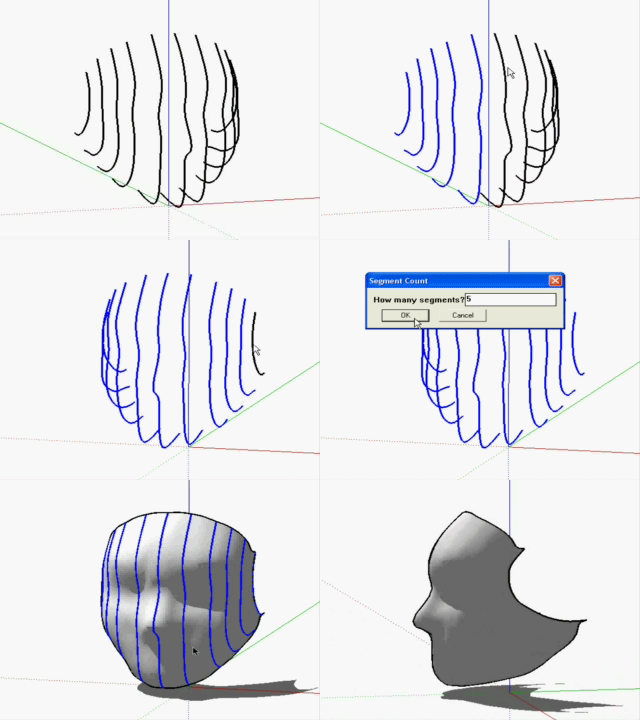
                                      Loft.gif
                                      It´s great combination of plugins.

                                      Daniel S

                                      1 條回覆 最後回覆 回覆 引用 0
                                      • Chris FullmerC 離線
                                        Chris Fullmer
                                        最後由 編輯

                                        Wow, that's pretty impressive! I do have a working version I'm testing that works with splines with different segment counts, but it won't be released for a while I'm sure. So thanks for posting that great work-around!

                                        That's a pretty cool model too!

                                        Chris

                                        Lately you've been tan, suspicious for the winter.
                                        All my Plugins I've written

                                        1 條回覆 最後回覆 回覆 引用 0
                                        • MarianM 離線
                                          Marian
                                          最後由 編輯

                                          😮 😲

                                          http://marian87.deviantart.com/

                                          1 條回覆 最後回覆 回覆 引用 0
                                          • pilouP 離線
                                            pilou
                                            最後由 編輯

                                            It's the same with Grow plug's TIG above as you copy move Size Transfom the same curve before the Loft Chris plug 💚

                                            Frenchy Pilou
                                            Is beautiful that please without concept!
                                            My Little site :)

                                            1 條回覆 最後回覆 回覆 引用 0
                                            • 1
                                            • 2
                                            • 3
                                            • 4
                                            • 5
                                            • 6
                                            • 7
                                            • 12
                                            • 13
                                            • 5 / 13
                                            • 第一個貼文
                                              最後的貼文
                                            Buy SketchPlus
                                            Buy SUbD
                                            Buy WrapR
                                            Buy eBook
                                            Buy Modelur
                                            Buy Vertex Tools
                                            Buy SketchCuisine
                                            Buy FormFonts

                                            Advertisement