sketchucation logo sketchucation
    • 登入
    Oops, your profile's looking a bit empty! To help us tailor your experience, please fill in key details like your SketchUp version, skill level, operating system, and more. Update and save your info on your profile page today!
    🔌 Smart Spline | Fluid way to handle splines for furniture design and complex structures. Download

    [Plugin] UV Toolkit

    已排程 已置頂 已鎖定 已移動 Plugins
    377 貼文 86 Posters 311.3k 瀏覽 86 Watching
    正在載入更多貼文
    • 從舊到新
    • 從新到舊
    • 最多點贊
    回覆
    • 在新貼文中回覆
    登入後回覆
    此主題已被刪除。只有擁有主題管理權限的使用者可以查看。
    • thomthomT 離線
      thomthom
      最後由 編輯

      waves hand
      This is not the plugin you're looking for.

      😉

      Thomas Thomassen — SketchUp Monkey & Coding addict
      List of my plugins and link to the CookieWare fund

      1 條回覆 最後回覆 回覆 引用 0
      • R 離線
        richcat
        最後由 編輯

        Hi ThomThom - Hope you can help. Can't see what I'm doing wrong, or if theres a conflict.

        Just now updated to latest version of UV tools, from previously working version, and at first sketchup locked up, ie wouldn't let me do anything, no bug splat, task manager displayed - Running, but nothing would select or work. Only way to shut down GSU was via TM.
        Removed all plugins installed - IRendernxt and Waybe - not many as only just updated to GSU 8.
        Deleted all traces of UV plugin, or other plugins, as well reinstalled, and booted sketchup again, this time got following error message below.
        Deleted all numerous times making sure latest downloads including TT_Lib2-2.5.0
        PS. When I add back in IRendernxt - I get the same error messages displayed below, but if a add Waybe in - GSU locks up as first described.
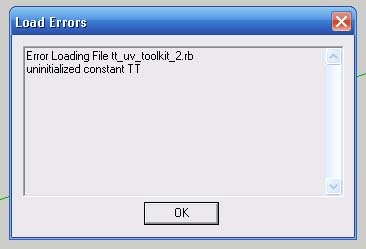
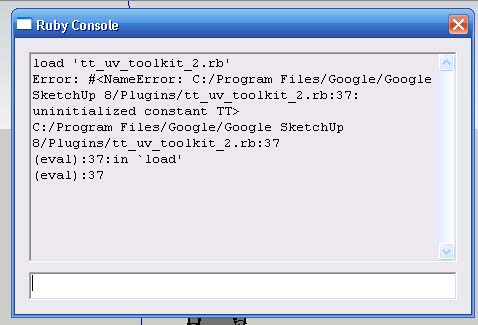
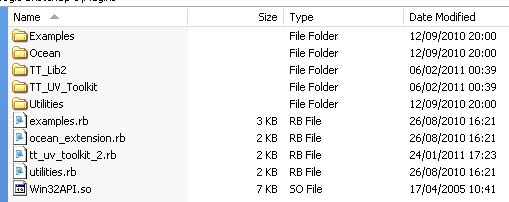
        Load error.jpg


        Ruby console.jpg


        Plugins.jpg

        1 條回覆 最後回覆 回覆 引用 0
        • thomthomT 離線
          thomthom
          最後由 編輯

          Ah, sorry. There's a silly mistake I made there. I'll upload an update shortly.

          Thomas Thomassen — SketchUp Monkey & Coding addict
          List of my plugins and link to the CookieWare fund

          1 條回覆 最後回覆 回覆 引用 0
          • thomthomT 離線
            thomthom
            最後由 編輯

            Version 2.2.1

            • Fixed minor issue where the plugin might throw an error if another plugin hadn't already loaded TT_Lib2.

            Thomas Thomassen — SketchUp Monkey & Coding addict
            List of my plugins and link to the CookieWare fund

            1 條回覆 最後回覆 回覆 引用 0
            • R 離線
              richcat
              最後由 編輯

              Thanks Thom for such a quick fix 😄
              Worked a treat, back to uv mapping again.

              1 條回覆 最後回覆 回覆 引用 0
              • thomthomT 離線
                thomthom
                最後由 編輯

                Version 2.2.2

                • Fixed minor namespace reference issue.

                Thomas Thomassen — SketchUp Monkey & Coding addict
                List of my plugins and link to the CookieWare fund

                1 條回覆 最後回覆 回覆 引用 0
                • M 離線
                  make
                  最後由 編輯

                  I have an error message:

                  Error Loading File /Library/Application Support/Google SketchUp 8/SketchUp/Plugins/TT_UV_Toolkit/loader.rb
                  no such file to load -- TT_Lib2/core.rbError Loading File tt_uv_toolkit_2.rb
                  no such file to load -- TT_Lib2/core.rb

                  Any ideas?
                  Cheers!

                  UPDATE:

                  I didn't have the other plugin loaded.

                  I think it works!

                  1 條回覆 最後回覆 回覆 引用 0
                  • TIGT 離線
                    TIG Moderator
                    最後由 編輯

                    @make said:

                    I have an error message:

                    Error Loading File /Library/Application Support/Google SketchUp 8/SketchUp/Plugins/TT_UV_Toolkit/loader.rb
                    no such file to load -- TT_Lib2/core.rbError Loading File tt_uv_toolkit_2.rb
                    no such file to load -- TT_Lib2/core.rb

                    Any ideas?

                    Cheers!

                    Have you downloaded & installed the latest TT_Lib2 - it's linked at the original tool's download page..........

                    TIG

                    1 條回覆 最後回覆 回覆 引用 0
                    • L 離線
                      lux81
                      最後由 編輯

                      Very nice plugin! I have a small request to make:
                      I noticed that you can select a face, and copy its texture and UV coordinates on other face.
                      I wonder if you can copy only the UV coordinates without the texture.
                      Why ask this?
                      Suppose you have a cube.
                      Each face has a different texture.
                      I would like to turn the texture on all sides by 30 ° with one click.
                      If I could copy only the UV coordinates, I could turn the texture on a face of 30 °, copy the UV coordinates, and then apply them on all other sides without losing the texture already on it!!
                      Am I dreaming or is it something that can be done?

                      1 條回覆 最後回覆 回覆 引用 0
                      • GaieusG 離線
                        Gaieus
                        最後由 編輯

                        I hope you are not dreaming! This is an excellent idea IMO. I know TT has not stopped the development of this plugin and each cool, new feature is welcome (by me at least)
                        🎉

                        Gai...

                        1 條回覆 最後回覆 回覆 引用 0
                        • GaieusG 離線
                          Gaieus
                          最後由 編輯

                          Make sure that while deleting it, SU is not running.

                          Gai...

                          1 條回覆 最後回覆 回覆 引用 0
                          • B 離線
                            butterflyer
                            最後由 編輯

                            I was having trouble with sketchup and wanted to do a clean install but could not get rid of this TT_lib2 no matter what I did I even sent it through a government type deletion and nada why would that happen. everytime sketchup opens it comes up with an error pertaining to that lib2 I followed all instructions when putting it in?
                            ps new to sketchup but do know how to follow instructions
                            as soon as I took out ruby scripts error message went away but still cannot delete that file here is the files full name TT_lib2_-_2.4.0.zip
                            when I opened that zip file it listed all my paint and 3d programs along with my documents why?

                            1 條回覆 最後回覆 回覆 引用 0
                            • thomthomT 離線
                              thomthom
                              最後由 編輯

                              @butterflyer said:

                              I was having trouble with sketchup and wanted to do a clean install but could not get rid of this TT_lib2 no matter what I did I even sent it through a government type deletion and nada why would that happen. everytime sketchup opens it comes up with an error pertaining to that lib2 I followed all instructions when putting it in?
                              ps new to sketchup but do know how to follow instructions
                              as soon as I took out ruby scripts error message went away but still cannot delete that file here is the files full name TT_lib2_-_2.4.0.zip
                              when I opened that zip file it listed all my paint and 3d programs along with my documents why?

                              It's a bit hard to fully understand everything you describe, but did you do what Gaeius suggested, closing SU before removing the files?
                              Can you post a screenshot of your Plugins folder?
                              Also: what is the error messages you got? (These are important to include in questions as they have important information that pin-point where the problem lies.)

                              Thomas Thomassen — SketchUp Monkey & Coding addict
                              List of my plugins and link to the CookieWare fund

                              1 條回覆 最後回覆 回覆 引用 0
                              • H 離線
                                hgagne
                                最後由 編輯

                                Hi thomthom,

                                Firstly, a quick thank you for all of your contributions. 👍

                                I've been experimenting (aka still learning) with SketchUp Standard over the last few weeks and have built several models of buildings (inside & outside) - no materials/textures applied at the moment. I now need to create/fix/clean the UV Map before I can export these models and came accross this thread in my search for the tools to do this.

                                A few questions I have are ...

                                Q - Is there an additional plugin that I need to take all the parts of a model and flatten them out to a 2D-plane in preparation of UV Mapping? I need to create a single diffuse (texture) image which contains all of the model parts so that i may be altered later using a graphics/paint application.

                                Q - Where can I find the sample "UV" image that appears in your YouTube demo at Post 1? I looked in the .\images folder and did not see it. Tried finding a "checkered" or "color grid" pattern and haven't had much success on that front either. I'm guessing these mapping images aren't standard issue. 😉

                                Appreciate any reference links/info.

                                1 條回覆 最後回覆 回覆 引用 0
                                • thomthomT 離線
                                  thomthom
                                  最後由 編輯

                                  @hgagne said:

                                  Q - Is there an additional plugin that I need to take all the parts of a model and flatten them out to a 2D-plane in preparation of UV Mapping? I need to create a single diffuse (texture) image which contains all of the model parts so that i may be altered later using a graphics/paint application.

                                  UV Unwrapping is not something that exists for SketchUp yet. But Whaat has created a plugin that bridges SketchUp with third party mapping utilities. http://forums.sketchucation.com/viewtopic.php?t=23725

                                  @hgagne said:

                                  Q - Where can I find the sample "UV" image that appears in your YouTube demo at Post 1? I looked in the .\images folder and did not see it. Tried finding a "checkered" or "color grid" pattern and haven't had much success on that front either. I'm guessing these mapping images aren't standard issue. 😉

                                  It's a map I created my self. You can find better ones if you google for UV mapping test textures.
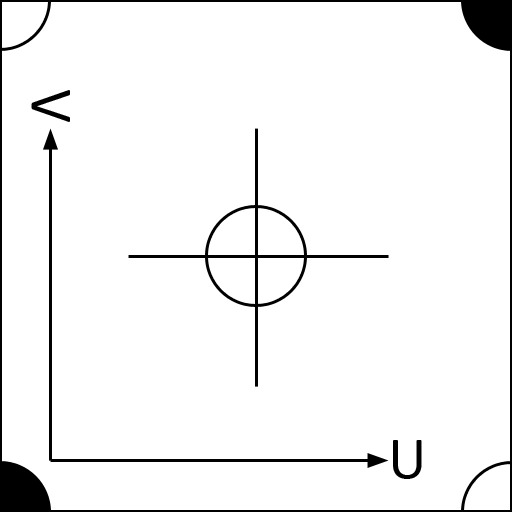

                                  TestTile - UV.png

                                  Thomas Thomassen — SketchUp Monkey & Coding addict
                                  List of my plugins and link to the CookieWare fund

                                  1 條回覆 最後回覆 回覆 引用 0
                                  • H 離線
                                    hgagne
                                    最後由 編輯

                                    @thomthom said:

                                    UV Unwrapping is not something that exists for SketchUp yet. But Whaat has created a plugin that bridges SketchUp with third party mapping utilities. http://forums.sketchucation.com/viewtopic.php?t=23725

                                    It's a map I created my self. You can find better ones if you google for UV mapping test textures.

                                    I've been experimenting with UVTools & UVToolkit since I posted my question and starting to build a comfort level. Appreciate the quick response, UV Map, and link to UVTools.

                                    Best,

                                    1 條回覆 最後回覆 回覆 引用 0
                                    • K 離線
                                      KarinaGM
                                      最後由 編輯

                                      I've just downloaded the plugin and I get this error when I open SU
                                      Also my tools (the icons) are a mess, spread all over the screen :S
                                      and even the tools I don't have in the bar, because I rarely use them, are showing...
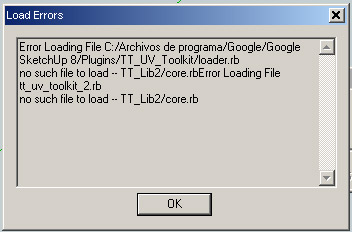
                                      error.jpg

                                      **"Aquel que sacrifica un poco de libertad por seguridad, no se merece ninguna y terminará perdiendo ambas"

                                      -Benjamín Franklin.**

                                      1 條回覆 最後回覆 回覆 引用 0
                                      • Rich O BrienR 離線
                                        Rich O Brien Moderator
                                        最後由 編輯

                                        Have you installed TT_Lib 2? That error seems to indicate it's not able to locate it?

                                        Download the free D'oh Book for SketchUp 📖

                                        1 條回覆 最後回覆 回覆 引用 0
                                        • K 離線
                                          KarinaGM
                                          最後由 編輯

                                          @unknownuser said:

                                          Have you installed TT_Lib 2? That error seems to indicate it's not able to locate it?

                                          😳 Nope, I installed and I don't get the error now
                                          Now I have to learn to use it
                                          Thanks for the fast response

                                          **"Aquel que sacrifica un poco de libertad por seguridad, no se merece ninguna y terminará perdiendo ambas"

                                          -Benjamín Franklin.**

                                          1 條回覆 最後回覆 回覆 引用 0
                                          • Rich O BrienR 離線
                                            Rich O Brien Moderator
                                            最後由 編輯

                                            Quick question...

                                            After mapping to quad faces I decided to 'Save As' on the mapped component. When I looked in my Components folder there were lots of images of each mapped quad. Is this normal?


                                            Download the free D'oh Book for SketchUp 📖

                                            1 條回覆 最後回覆 回覆 引用 0
                                            • 1
                                            • 2
                                            • 3
                                            • 4
                                            • 5
                                            • 18
                                            • 19
                                            • 1 / 19
                                            • 第一個貼文
                                              最後的貼文
                                            Buy SketchPlus
                                            Buy SUbD
                                            Buy WrapR
                                            Buy eBook
                                            Buy Modelur
                                            Buy Vertex Tools
                                            Buy SketchCuisine
                                            Buy FormFonts

                                            Advertisement
