sketchucation logo sketchucation
    • 登入
    Oops, your profile's looking a bit empty! To help us tailor your experience, please fill in key details like your SketchUp version, skill level, operating system, and more. Update and save your info on your profile page today!
    🔌 Smart Spline | Fluid way to handle splines for furniture design and complex structures. Download

    [Plugin] Exploded Arc Centerpoint Finder UPDATE May 23, 2013

    已排程 已置頂 已鎖定 已移動 Plugins
    59 貼文 31 Posters 67.4k 瀏覽 31 Watching
    正在載入更多貼文
    • 從舊到新
    • 從新到舊
    • 最多點贊
    回覆
    • 在新貼文中回覆
    登入後回覆
    此主題已被刪除。只有擁有主題管理權限的使用者可以查看。
    • Chris FullmerC 離線
      Chris Fullmer
      最後由 編輯

      ok, now updated so that when it is used in group/component edit mode, it will add the construction point inside the group that is being edited. Thanks for pointing that out Thom.

      So re-download it from the first post in the thread.

      Chris

      Lately you've been tan, suspicious for the winter.
      All my Plugins I've written

      1 條回覆 最後回覆 回覆 引用 0
      • thomthomT 離線
        thomthom
        最後由 編輯

        👍

        Thomas Thomassen — SketchUp Monkey & Coding addict
        List of my plugins and link to the CookieWare fund

        1 條回覆 最後回覆 回覆 引用 0
        • A 離線
          August
          最後由 編輯

          Thanks Chris,

          I found this to be a very readable script for learning a little more Ruby. It's pretty clear from context what it's doing as far as finding a perpendicular direction, creating a temporary "z" from the original two edges, etc. I assume the ".cross" function is the Cross-product from vector algebra, which I vaguely remember, but I'll have to look up what that actually is and why it's called "cross".

          Thanks again,
          August

          “An idea, like a ghost, must be spoken to a little before it will explain itself.”
          [floatr:v1mcbde2]-- Charles Dickens[/floatr:v1mcbde2]

          1 條回覆 最後回覆 回覆 引用 0
          • K 離線
            kostas_designer
            最後由 編輯

            i know it may seem stupid, but why can't i see the context "point at center" menu when i right-click on an arc? 😳

            1 條回覆 最後回覆 回覆 引用 0
            • Chris FullmerC 離線
              Chris Fullmer
              最後由 編輯

              You have to first enable the sketchup ruby script examples from Window > Preferences > Extensions > Ruyb Script Examples (or might be the one called Utilities tools). Enable them both, then you should get the point at center option.

              Chris

              Lately you've been tan, suspicious for the winter.
              All my Plugins I've written

              1 條回覆 最後回覆 回覆 引用 0
              • jeff hammondJ 離線
                jeff hammond
                最後由 編輯

                @chris fullmer said:

                You have to first enable the sketchup ruby script examples from Window > Preferences > Extensions > Ruyb Script Examples (or might be the one called Utilities tools). Enable them both, then you should get the point at center option.

                Chris

                ha!
                i never knew this function came with SU.. i've been using jim f's arc_centerpoint.rb for a couple of years now.
                ☀

                dotdotdot

                1 條回覆 最後回覆 回覆 引用 0
                • J 離線
                  Jim
                  最後由 編輯

                  Hehe, and I wrote that before I realized Point at Center came with SketchUp!

                  Hi

                  1 條回覆 最後回覆 回覆 引用 0
                  • K 離線
                    kostas_designer
                    最後由 編輯

                    @unknownuser said:

                    @chris fullmer said:

                    You have to first enable the sketchup ruby script examples from Window > Preferences > Extensions > Ruyb Script Examples (or might be the one called Utilities tools). Enable them both, then you should get the point at center option.

                    Chris

                    ha!
                    i never knew this function came with SU.. i've been using jim f's arc_centerpoint.rb for a couple of years now.
                    ☀

                    Me too, seems that the ways of SU are infinite! 😄

                    Thanks for the tip, Chris.

                    1 條回覆 最後回覆 回覆 引用 0
                    • boofredlayB 離線
                      boofredlay
                      最後由 編輯

                      I just wanted to thank you again for this Chris. It is a very useful tool. 👍

                      http://www.coroflot.com/boofredlay

                      1 條回覆 最後回覆 回覆 引用 0
                      • Chris FullmerC 離線
                        Chris Fullmer
                        最後由 編輯

                        Oh good, glad its helpful!

                        Chris

                        Lately you've been tan, suspicious for the winter.
                        All my Plugins I've written

                        1 條回覆 最後回覆 回覆 引用 0
                        • bazB 離線
                          baz
                          最後由 編輯

                          Great tool, thanks Chris.
                          baz

                          1 條回覆 最後回覆 回覆 引用 0
                          • W 離線
                            watkins
                            最後由 編輯

                            Dear Chris,

                            I made a request a little time ago for an icon to go with this script. I use your centrepoint finder so often that an icon would be very useful (and yes, TIG, I know I could assign a shortcut...)

                            Many thanks,

                            Bob

                            1 條回覆 最後回覆 回覆 引用 0
                            • jamalitoJ 離線
                              jamalito
                              最後由 編輯

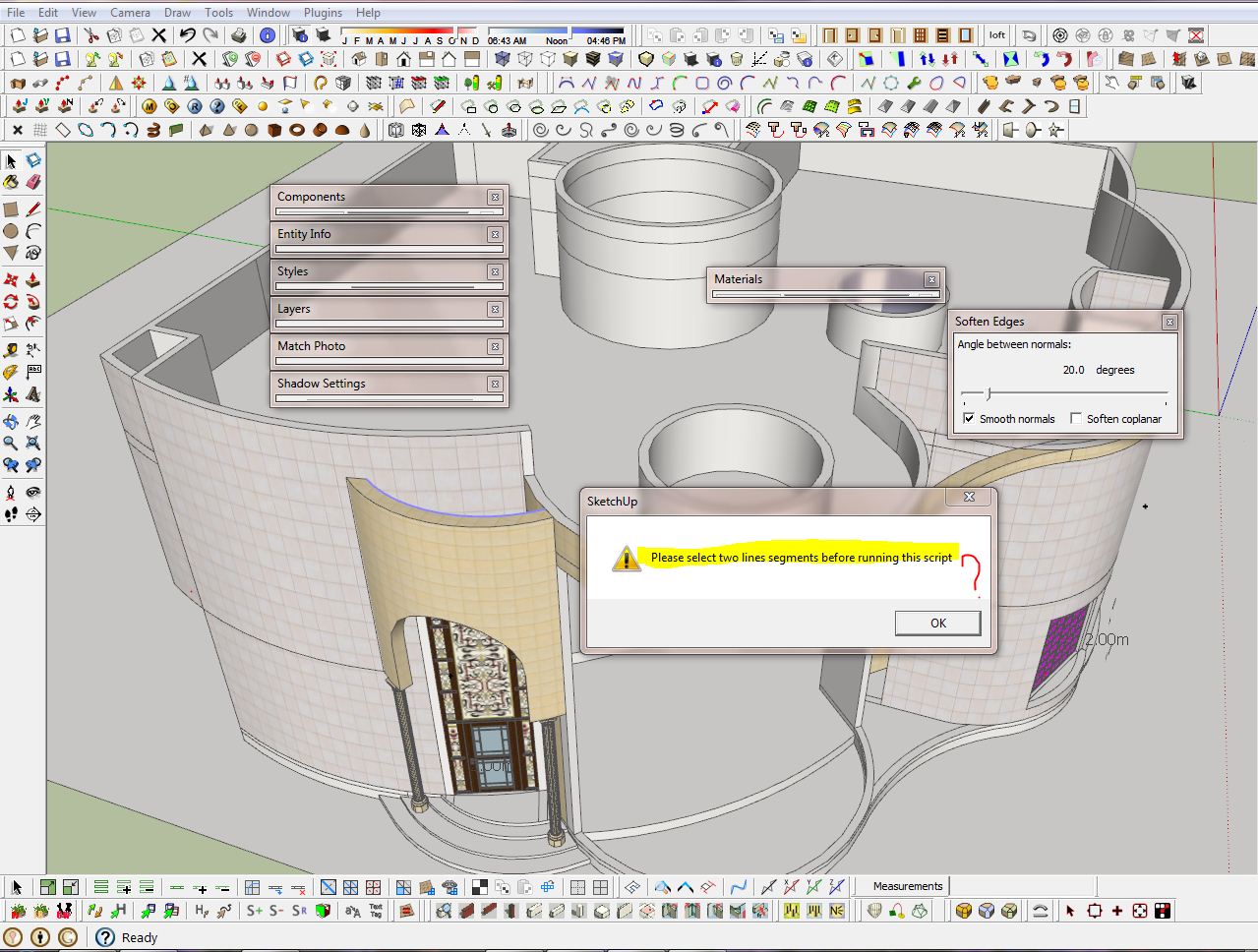
                              hello Chris thank for this Plugin but after I updated my SU8 to SU8m2 it was not work when I run in form plugin menu show to me this window I don't know what is meaning ?
                              note I removed it and instal it again but same problem 😢

                              Capture.JPG

                              Albert Einstein:
                              ((I am enough of an artist to draw freely upon my imagination. Imagination is more important than knowledge. Knowledge is limited. Imagination encircles the world.))

                              1 條回覆 最後回覆 回覆 引用 0
                              • mitcorbM 離線
                                mitcorb
                                最後由 編輯

                                Hi, jamalito:
                                It appears you have preselected a non exploded arc. Chris's plugin is for calculating a centerpoint of 2 or more unconnected or nonwelded segments. Use Sketchup's native Point at Center or Jim's Autocenterpoint.

                                I take the slow, deliberate approach in my aimless wandering.

                                1 條回覆 最後回覆 回覆 引用 0
                                • G 離線
                                  GM2013
                                  最後由 編輯

                                  Had this very handy plugin installed previouslyu but I had to reintall Sketchup today.
                                  I tried installing via the Sketchucation plugin store but it didn't work so I manually placed it in the plugin folder and but doesn't appear in the plugins menu.

                                  Am I doing something wrong?

                                  1 條回覆 最後回覆 回覆 引用 0
                                  • Dave RD 離線
                                    Dave R
                                    最後由 編輯

                                    @gm2013 said:

                                    Had this very handy plugin installed previouslyu but I had to reintall Sketchup today.
                                    I tried installing via the Sketchucation plugin store but it didn't work so I manually placed it in the plugin folder and but doesn't appear in the plugins menu.

                                    Am I doing something wrong?

                                    Yes.

                                    You didn't actually install the plugin. files with the .rbz extension are intended to be installed via Install Extensions under Preferences>Extensions. Put the file back into your Downloads folder, or wherever it was downloaded to. Open Preferences and go to Extensions. Click on the Install Extension button, navigate to the file, choose it and open it. Most plugins will work after this install but it won't hurt to close SketchUp and reopen it.

                                    BTW, could you please complete your profile? Which version of SketchUp are you using?

                                    Etaoin Shrdlu

                                    %

                                    (THERE'S NO PLACE LIKE)

                                    G28 X0.0 Y0.0 Z0.0

                                    M30

                                    %

                                    1 條回覆 最後回覆 回覆 引用 0
                                    • TIGT 離線
                                      TIG Moderator
                                      最後由 編輯

                                      @gm2013 said:

                                      Had this very handy plugin installed previouslyu but I had to reintall Sketchup today.
                                      I tried installing via the Sketchucation plugin store but it didn't work so I manually placed it in the plugin folder and but doesn't appear in the plugins menu.

                                      Am I doing something wrong?
                                      Dave just beat me to it...
                                      BUT since I had typed this here's my equivalent text...

                                      You must be doing something wrong 😒
                                      Installs fine for me ???
                                      I assume you are on v8 or v2013 your User-Profile is incomplete...
                                      If it's v8 you need the latest version to be able to AutoInstall RBZ archives.
                                      If you have manually put the tool's RB file into the Plugins folder and restarted SketchUp then the tool should appear in the submenu Plugins > Chris Fullmers Tools...

                                      If it's not in there you haven't actually installed it right... 😕
                                      If it is, then it has loaded.

                                      Some common reasons:

                                      • You left it inside the RBZ - SketchUp only auto-loads RB/RBS files it finds within the Plugins folder as it starts...
                                      • You don't have Properties > Security permissions set to FULL, which allows you to add files to the Plugins folder.
                                        If so it might look like you added it but a 'Compatibility Files...' link/button in the top-bars of the Windows Explorer window for Plugins is a give-away that its actually in a VirtualStore - from where it won't load when SketchUp starts !
                                        Fix your permissions.
                                        Also set SketchUp.exe to always run as administrator in Properties > Compatibility...

                                      TIG

                                      1 條回覆 最後回覆 回覆 引用 0
                                      • N 離線
                                        ncas
                                        最後由 編輯

                                        Is there a version for SU 8?
                                        Thanks

                                        1 條回覆 最後回覆 回覆 引用 0
                                        • TIGT 離線
                                          TIG Moderator
                                          最後由 編輯

                                          What makes you think it's not v8 compatible ?
                                          The previous post explained how to install it in v8 - but you do need the latest v8 version with the Preferences > Extensions > Install... button.
                                          If you don't have that, then get the latest v8 installer from here:
                                          http://help.sketchup.com/en/article/60107
                                          Note how version 8 will no longer be supported after 20 May 2015, so keep a copy of the downloaded installer !


                                          TIG

                                          1 條回覆 最後回覆 回覆 引用 0
                                          • 1
                                          • 2
                                          • 3
                                          • 3 / 3
                                          • 第一個貼文
                                            最後的貼文
                                          Buy SketchPlus
                                          Buy SUbD
                                          Buy WrapR
                                          Buy eBook
                                          Buy Modelur
                                          Buy Vertex Tools
                                          Buy SketchCuisine
                                          Buy FormFonts

                                          Advertisement