sketchucation logo sketchucation
    • Login
    Oops, your profile's looking a bit empty! To help us tailor your experience, please fill in key details like your SketchUp version, skill level, operating system, and more. Update and save your info on your profile page today!
    Mac User? | Join the Rayscaper Beta for Mac Learn More

    [Plugin] HoverSelect - v1.5a - 07 Oct 17

    Scheduled Pinned Locked Moved Plugins
    81 Posts 34 Posters 149.1k Views 34 Watching
    Loading More Posts
    • Oldest to Newest
    • Newest to Oldest
    • Most Votes
    Reply
    • Reply as topic
    Log in to reply
    This topic has been deleted. Only users with topic management privileges can see it.
    • H
      hebeijianke
      last edited by

      Thanks
      I see πŸ˜„

      1 Reply Last reply
      Reply Quote 0
      • dereiD
        derei
        last edited by

        Script doesn't work for me, I mean it doesn't select anything. I have the menu, i can "use" the selection tool, but it doesn't select any edge. Compatibility issue with SU8 maybe?

        DESIGNER AND ARTIST DEREI.UK

        1 Reply Last reply
        Reply Quote 0
        • OxerO
          Oxer
          last edited by

          Hi Fredo and thanks for the plugin!
          I have translated the plugin to Spanish language this is the file:

          HoverSelect Spanish Language

          "The result is the end what is important is the process" by Oxer
          http://www.oxervision.blogspot.com/

          1 Reply Last reply
          Reply Quote 0
          • A
            amuyobo
            last edited by

            Just started using Sketchup - this plugin is an absolute must! Thank You!

            1 Reply Last reply
            Reply Quote 0
            • CarrozzaC
              Carrozza
              last edited by

              I have pretty much the same problems as Dereeei (see above): when I activate the plugin and click-hover on edges nothing get selected.
              What's worst, in rare occasions it works, it seems mostly after having performed a rectangle select action.
              What works flawlessly is the click-on-face selection, but that's the less useful feature because for what I understand it pretty much replicate the native double-click Sketchup funcionality.
              Could someone please help me make this great plugin work?
              Cheers!

              1 Reply Last reply
              Reply Quote 0
              • fredo6F
                fredo6
                last edited by

                @carrozza said:

                I have pretty much the same problems as Dereeei (see above): when I activate the plugin and click-hover on edges nothing get selected.

                Just in case, did you check the edge property filter? By default, HoverSelect does not select Smooth edges (even if they appear as plain edges). But you can change the filter.

                Fredo

                1 Reply Last reply
                Reply Quote 0
                • CarrozzaC
                  Carrozza
                  last edited by

                  I thing filters are correct (all four button pressed); I can say it because when I disable some type of edges there's a forbid sign near the cursor while overing excluded edge types.
                  I made tests in a few different situations and models, but no luck so far.

                  In case it matters here are all the plugins installed:
                  Chris's Shape Bender.
                  Didier's Projections.
                  Diggory's Recurve.
                  Fredo's Bezier Spline, Curviloft, Hover Select, Scale, Joint PushPull, Round Corner, Tools on surface.
                  ThomThom's Cleanup.

                  I have Sketchup 8 running on Windows 7 64 bit, graphics card is Nvidia GeForce GT 525M (mobile).

                  Thanks for your great plugins and your help.

                  1 Reply Last reply
                  Reply Quote 0
                  • CarrozzaC
                    Carrozza
                    last edited by

                    Fredo, is there hope you'll look into this issue?
                    Unfortunately selecting only edges without faces is a real pain in Sketchup...

                    1 Reply Last reply
                    Reply Quote 0
                    • fredo6F
                      fredo6
                      last edited by

                      @carrozza said:

                      Fredo, is there hope you'll look into this issue?
                      Unfortunately selecting only edges without faces is a real pain in Sketchup...

                      I'll see what I can do quickly and come back

                      Fredo

                      1 Reply Last reply
                      Reply Quote 0
                      • irwanwrI
                        irwanwr
                        last edited by

                        i'll try to learn and use this one too. IA.
                        thank you Fredo

                        1 Reply Last reply
                        Reply Quote 0
                        • SwissmountainS
                          Swissmountain
                          last edited by

                          @carrozza said:

                          I have pretty much the same problems as Dereeei (see above): when I activate the plugin and click-hover on edges nothing get selected.

                          Hey Fredo, same problem over here on Mac OSX Snowleopard, Sketchup 8.0.11751 & LibFredo6 - v4.4m - 14 Apr 12

                          I see the menu but can't select anything, there is no selection rectangle either.

                          Thank you for everything you do

                          Ciao

                          Cogito ergo dum-di-dum

                          1 Reply Last reply
                          Reply Quote 0
                          • fredo6F
                            fredo6
                            last edited by

                            Does this problem happen only with HoverSelect or all my plugins?

                            If so, this may come from a conflict with some other plugins (like some versions of Podium and Matchbox)

                            Fredo

                            1 Reply Last reply
                            Reply Quote 0
                            • SwissmountainS
                              Swissmountain
                              last edited by

                              @unknownuser said:

                              Does this problem happen only with HoverSelect or all my plugins?

                              All your other plugins work like a charm on my machine Fredo, thank you for the update to the round corner and curviloft scripts earlier this year!

                              The hoverselect sounds like an amazing tool for speeding up more organic modeling approaches which require selection and scaling of splines, I would love to make it a part of my toolbox.

                              Cogito ergo dum-di-dum

                              1 Reply Last reply
                              Reply Quote 0
                              • fredo6F
                                fredo6
                                last edited by

                                NEW RELEASE: HoverSelect v1.2a - 27 Nov 13

                                HoverSelect 1.2a is a release for future Sketchup compatibility. It is advised to upgrade even if there are no functional changes.

                                See main post of this thread for Download.

                                Fredo

                                1 Reply Last reply
                                Reply Quote 0
                                • fredo6F
                                  fredo6
                                  last edited by

                                  NEW RELEASE: HoverSelect v1.3a - 20 Oct 14

                                  HoverSelect 1.3a is required for the support of usernames with non-ascii characters in Sketchup 2014.

                                  See main post of this thread for Download.

                                  Fredo

                                  1 Reply Last reply
                                  Reply Quote 0
                                  • G
                                    greatoe
                                    last edited by

                                    @swissmountain said:

                                    @carrozza said:

                                    I have pretty much the same problems as Dereeei (see above): when I activate the plugin and click-hover on edges nothing get selected.

                                    Hey Fredo, same problem over here on Mac OSX Snowleopard, Sketchup 8.0.11751 & LibFredo6 - v4.4m - 14 Apr 12

                                    I see the menu but can't select anything, there is no selection rectangle either.

                                    Thank you for everything you do

                                    Ciao

                                    This issue still remains. Mac OSX El Capitan 10.11, Sketchup 2015.

                                    1 Reply Last reply
                                    Reply Quote 0
                                    • fredo6F
                                      fredo6
                                      last edited by

                                      Could you open the Ruby Console to chcek if there is an error message displayed.

                                      Thanks

                                      Fredo

                                      1 Reply Last reply
                                      Reply Quote 0
                                      • G
                                        greatoe
                                        last edited by

                                        @fredo6 said:

                                        Could you open the Ruby Console to chcek if there is an error message displayed.

                                        Thanks

                                        Fredo

                                        Nothing show up in the console.

                                        1 Reply Last reply
                                        Reply Quote 0
                                        • R
                                          rilian
                                          last edited by

                                          Recently discovered this plugin. It installs and the menu items are there but I am not seeing the toolbar. It's turned on in the settings for the tool. I'm on SU 2017.

                                          [edit] Clarification Note: It's not showing in the toolbars list nor displaying anything on the screen.

                                          1 Reply Last reply
                                          Reply Quote 0
                                          • Dave RD
                                            Dave R
                                            last edited by

                                            @rilian said:

                                            Recently discovered this plugin. It installs and the menu items are there but I am not seeing the toolbar. It's turned on in the settings for the tool. I'm on SU 2017.

                                            [edit] Clarification Note: It's not showing in the toolbars list nor displaying anything on the screen.

                                            Did you look for the icon in the Fredo6 Tools toolbar as indicated in the first post of this thread?

                                            Screenshot - 4_3_2017 , 6_02_24 PM.png

                                            It shows up and works just fine for me in SU2017.
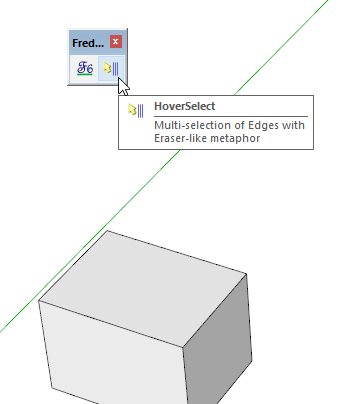
                                            Screenshot - 4_3_2017 , 6_01_03 PM.png

                                            Etaoin Shrdlu

                                            %

                                            (THERE'S NO PLACE LIKE)

                                            G28 X0.0 Y0.0 Z0.0

                                            M30

                                            %

                                            1 Reply Last reply
                                            Reply Quote 0

                                            Hello! It looks like you're interested in this conversation, but you don't have an account yet.

                                            Getting fed up of having to scroll through the same posts each visit? When you register for an account, you'll always come back to exactly where you were before, and choose to be notified of new replies (either via email, or push notification). You'll also be able to save bookmarks and upvote posts to show your appreciation to other community members.

                                            With your input, this post could be even better πŸ’—

                                            Register Login
                                            • 1
                                            • 2
                                            • 3
                                            • 4
                                            • 5
                                            • 3 / 5
                                            • First post
                                              Last post
                                            Buy SketchPlus
                                            Buy SUbD
                                            Buy WrapR
                                            Buy eBook
                                            Buy Modelur
                                            Buy Vertex Tools
                                            Buy SketchCuisine
                                            Buy FormFonts

                                            Advertisement