[Plugin] HoverSelect - v1.5a - 07 Oct 17
-
@daniel s said:
This is the next generation of UI in SketchUp!!!
A lot better, quick, easy and more efficient than the webdialogs (and I assume that is also more compatible for macs).I made a try, but if this works and does not create too much interference, I'll try to extend to other scripts.
@daniel s said:
I make alternative icons and cursors for this plugin:
Thanks very much. I will integrate.
For the button palette, unfortunately the buttons are not image files, but drawing with primitives. I have not found any method to draw png in the viewport.@daniel s said:
PS. The new Edge selection via rectangle dosen´t work inside groups (I mean double click on group to edit and then select the hoverselect).
This is intentional. You can only select at the first level of the active model, as in Sketchup native. Anyway, you would have some problem with the selection, if you selected within a component or group.
Fredo
-
@unknownuser said:
This is intentional. You can only select at the first level of the active model, as in Sketchup native. Anyway, you would have some problem with the selection, if you selected within a component or group.
It is difficult to me to explain this in english so i make this gif:
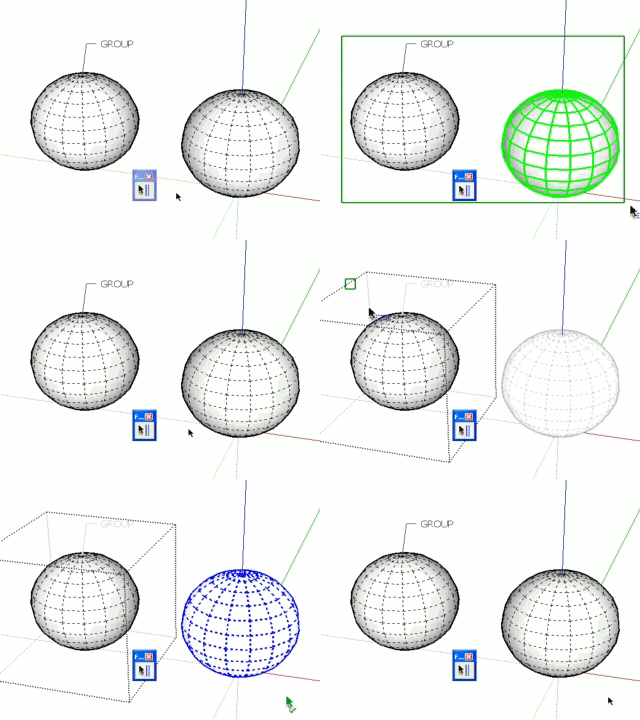
The first time the selection is good because selects all at the first level (visible-only / Ray Cast Selection).
The second time I´m editing a group, but dosen´t selects what is inside the group but yes what it is outside. This is intentional? In SketchUp if you are editing a group you can select all what is inside the group and nothing outside. In this case it´s not selecting inside the group and yes outside this group.Daniel S
-
I have been looking forward to a plugin like this for so long! thankyou so much!
-
@daniel s said:
The first time the selection is good because selects all at the first level (visible-only / Ray Cast Selection).
The second time I´m editing a group, but dosen´t selects what is inside the group but yes what it is outside. This is intentional? In SketchUp if you are editing a group you can select all what is inside the group and nothing outside. In this case it´s not selecting inside the group and yes outside this group.Daniel S
Daniel,
Thanks for signaling. This is simply a big bug which I fixed in 1.1c (actually a lack of attention).
Fredo
-
New version **HoverSelect 1.1c**available. It fixes a big bug related to selection from within groups and components.
see main post at http://www.sketchucation.com/forums/scf/viewtopic.php?f=180&t=18916#p155058
-
Fredddooooo!! Mais comment fais-tu !!?? Impressionnant, je suis que je suis complètement fan de tes plugins !! Bravo...
For those who didn't adopt this incredible new plugin:
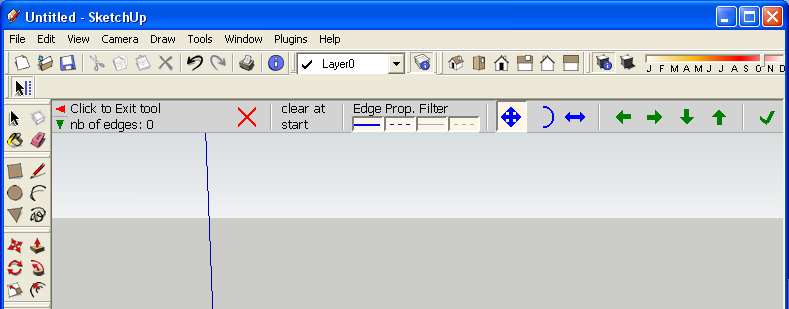
-
New version **HoverSelect 1.1d (23 May 09)**available. It fixes a bug in the 'All Connected' selection mode.
see main post at http://www.sketchucation.com/forums/scf/viewtopic.php?f=180&t=18916#p155058
-
@matt666 said:
Fredddooooo!! Mais comment fais-tu !!?? Impressionnant, je suis que je suis complètement fan de tes plugins !! Bravo...
For those who didn't adopt this incredible new plugin:
[attachment=0:3frmu70t]<!-- ia0 -->Sans titre 2.jpg<!-- ia0 -->[/attachment:3frmu70t]Is that the UI? How on earth is that done??
-
@unknownuser said:
Is that the UI? How on earth is that done??
Yes
Awesome... -
How is it one?
I'm really curious. -
Have you downloaded it and used it Thom? Its an awesome UI!
I think that it is is done with the view.draw type methods. All the draw, draw2d, draw_points, draw_polyline, draw_text. That is my guess.
Chris
-
@chris fullmer said:
Have you downloaded it and used it Thom? Its an awesome UI!
I think that it is is done with the view.draw type methods. All the draw, draw2d, draw_points, draw_polyline, draw_text. That is my guess.
Chris
Yes, this is actually pure drawing routines in the view. Which is somehow also an issue to capture events when you cascade tools.
So far, this is experimental, but I'll work on it to retrofit in other plugins.Fredo
-
I thought you could only draw lines and text. Not filled shapes. I need to look at the API again.
-
Hi Fredo, i've not tried this plugin yet and maybe it works for my request. But it's possible to add a filter "by distance" to the selection via rectangle? I try to explain: actually when you select by a rectangle you select all edges and faces in the window even if they are very far and that is quite annoying. I have in mind an option with an input for maximum distance selection like, for example, "select all edges and faces in the window as far as 100 cm". Something like "Max Wall Thickness" in Windowizer 4 plugin.
Thank you and sorry if that is a nonsense...
Massimo. -
Massimo,
This make perfect sense.
And after all, the tool is there to comply with requests from users.I'll do something in a next version.
Thanks for the idea.
Fredo
-
Fredo:
This would be the variable falloff "brush" available in some other modelers.
Sure would be nice to have this capability. -
Working on the spanish translation (very busy these days...)
-
I've grown to use this plugin as much or more than any other. I've actually added it as the shortcut Shift + Spacebar and I'll use in place of the standard selection tool.
It is perfect except for one or two things.
Fredo,
In the next version can you change the way that hitting shift will toggle the "select all connected lines" on? Can it be set that when you let go of shift, the command goes back to standard selection mode? I often have to move and pan around the scene while selecting lines and anytime I pan using shift, it turns on the select all connected lines and I have to turn it back off to keep hover selecting the additional lines. A minor headache, but one nonetheless.
Also the select all connected lines is very inconsistent for me. A lot of times it will register that there are connected lines and the arrow will change color and the plus sign will appear, but it will not select anything at all. Then I go to a parallel set of lines that form the same structure and it has no problem. It is an issue with intersecting hidden or softened lines touch the line I want to select continuously?
Thanks again Fredo for all your great time saving tools!!!!
-
How do you actually draw filled shapes to the viewport?
-
@earthmover said:
In the next version can you change the way that hitting shift will toggle the "select all connected lines" on? Can it be set that when you let go of shift, the command goes back to standard selection mode? I often have to move and pan around the scene while selecting lines and anytime I pan using shift, it turns on the select all connected lines and I have to turn it back off to keep hover selecting the additional lines. A minor headache, but one nonetheless.
Actually Shift and Ctrl work in 2 modes:
- Toggle: quick press and release
- Keep down while selecting. Normally, when you release the key, it goes back to normal mode. Maybe this does not work very well?
So far I have not found other ways for the modifiers (function keys do not work well on Mac and most other keys are taken by short cuts). This is why I added the button palette.
@earthmover said:
Also the select all connected lines is very inconsistent for me. A lot of times it will register that there are connected lines and the arrow will change color and the plus sign will appear, but it will not select anything at all. Then I go to a parallel set of lines that form the same structure and it has no problem. It is an issue with intersecting hidden or softened lines touch the line I want to select continuously?
There are bugs in this version and it may well be related to the soft / hideen lines, depending on how you configured the filter. I encapsulated a different implementation in LibFredo6 which I will retrofit in HoverSelect for a new release. You can see it for instance in RoundCorner 2.1.
Fredo








Advertisement