[Plugin] HoverSelect - v1.5a - 07 Oct 17
-
Fredo,
This selection script of yours sounds brilliant although I've not tried it yet.
........
An idea If you do implement selection by rectangle........An idea might be to devise the tool so that if users draw the selection rectangle from the North West corner to the South East corner of the screen (ie top left to lower right) then all geometry COMPLETELY inside this rectangle is selected.
If users draw the selection rectangle from the South East corner to the North West corner of the screen (ie lower right to top left) then all geometry INSIDE AND CROSSING this rectangle is selected.
Hope this makes sense.
Thanks very much for all your hard work and effort in devising this tool so far.
.................Regards
Howard L' -
Fredo,
I get a Bug Splat each time I try to open the PDF documentation. Sketchup quits, and give the Bug Splat, however the documentation does open.
However, thanks for this script. For me, I will find a great deal of use cleaning up models after Intersect with Model.
Again thanks
Ken
-
Fredo... you RULE!


-
Nice Plugin Fredo
Thxs a lot
more control over selection is one thing SU was laking until now.Would it be posible to make a ruby that selects multiple endpoints ?
-
@unknownuser said:
Fredo,
I get a Bug Splat each time I try to open the PDF documentation. Sketchup quits, and give the Bug Splat, however the documentation does open.
KenIf you use my other scripts, can you try with their documentation to see if you get a bugsplat too. I do nothing special (standard UI.openURL) and this may be an issue with your Sketchup configuration or PC environment.
-
@jmmad said:
Would it be posible to make a ruby that selects multiple endpoints ?
Do you mean vertices?
-
Fredo6
Yes, I do get a Bug Splat when I open up your other documentations. I have other problems also, haven't been able to trace those down to any particular scrip or set of scrip’s. Therefore, I will just go about my way, remembering what not to do, and saving or archiving frequently.
Again thanks for all your effort in these plugins.
Ken
-
@unknownuser said:
@jmmad said:
Would it be posible to make a ruby that selects multiple endpoints ?
Do you mean vertices?
Yes Fredo it would be nice to select multiple vertices instead of lines, so the we can modify them (rotate, scale, move, etc..) all at the same time.
But i have never seen a ruby that does that. Is it possible? -
@unknownuser said:
... if users draw the selection rectangle from the North West corner to the South East corner of the screen (ie top left to lower right) then all geometry COMPLETELY inside this rectangle is selected.
If users draw the selection rectangle from the South East corner to the North West corner of the screen (ie lower right to top left) then all geometry INSIDE AND CROSSING this rectangle is selected. ...
Just to clarify my possibly mistaken understanding of the conversation so far --
This tool is about ONLY selecting the VISIBLE geometry, right? The above describes what SU already does, selecting ALL geometry inside in the first case, and ALL geometry even partially inside in the second case, including ALL geometry, including parts on the backside of the front object and parts that may be at a great distance.
Howard Leslie is too modest when he says "An idea might be ..." Using the direction the selection rectangle is drawn as the way to toggle what is included should, of course, echo what SU already does. Anything else would be too confusing.
August
-
New version **HoverSelect 1.1a**available, with some additional features, mainly:
- Edge selection (and un-selection) via rectangle, by mouse dragging, for visible-only edges (but also for all edges, as in native Sketchup)
- Configuration of the precision for picking edges
- Options (modifiers and filter) accessible via a button palette (experimental). There are indeed also accessible via the contextual menu and shortcuts.
see main post at http://www.sketchucation.com/forums/scf/viewtopic.php?f=180&t=18916#p155058
-
Nice UI update Fredo
I like that "button palette" that pops up with the command
Thxs -
This is the next generation of UI in SketchUp!!!
A lot better, quick, easy and more efficient than the webdialogs (and I assume that is also more compatible for macs).I make alternative icons and cursors for this plugin:
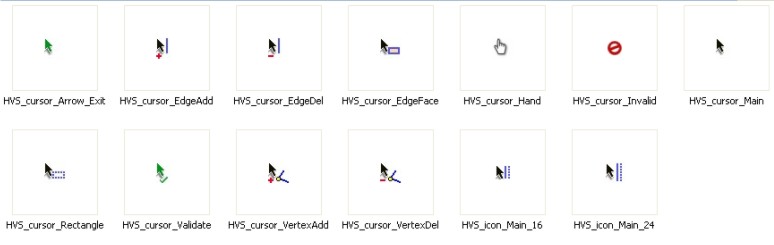
Here you can download them:
To drop into HOVERSELECT_Dir_11 folder
Extract into Plugins\HOVERSELECT_Dir_11 and set this ones in "Tools>Fredo6 Collection>HoverSelect>Default Parameters...
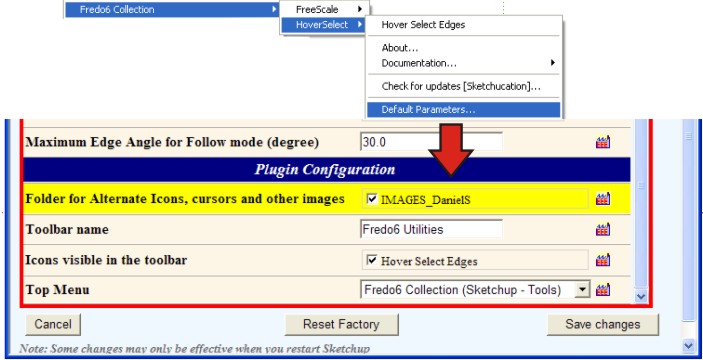
Thank you again Fredo!!
Daniel S
PS. The new Edge selection via rectangle dosen´t work inside groups (I mean double click on group to edit and then select the hoverselect).
-
@daniel s said:
This is the next generation of UI in SketchUp!!!
A lot better, quick, easy and more efficient than the webdialogs (and I assume that is also more compatible for macs).I made a try, but if this works and does not create too much interference, I'll try to extend to other scripts.
@daniel s said:
I make alternative icons and cursors for this plugin:
Thanks very much. I will integrate.
For the button palette, unfortunately the buttons are not image files, but drawing with primitives. I have not found any method to draw png in the viewport.@daniel s said:
PS. The new Edge selection via rectangle dosen´t work inside groups (I mean double click on group to edit and then select the hoverselect).
This is intentional. You can only select at the first level of the active model, as in Sketchup native. Anyway, you would have some problem with the selection, if you selected within a component or group.
Fredo
-
@unknownuser said:
This is intentional. You can only select at the first level of the active model, as in Sketchup native. Anyway, you would have some problem with the selection, if you selected within a component or group.
It is difficult to me to explain this in english so i make this gif:
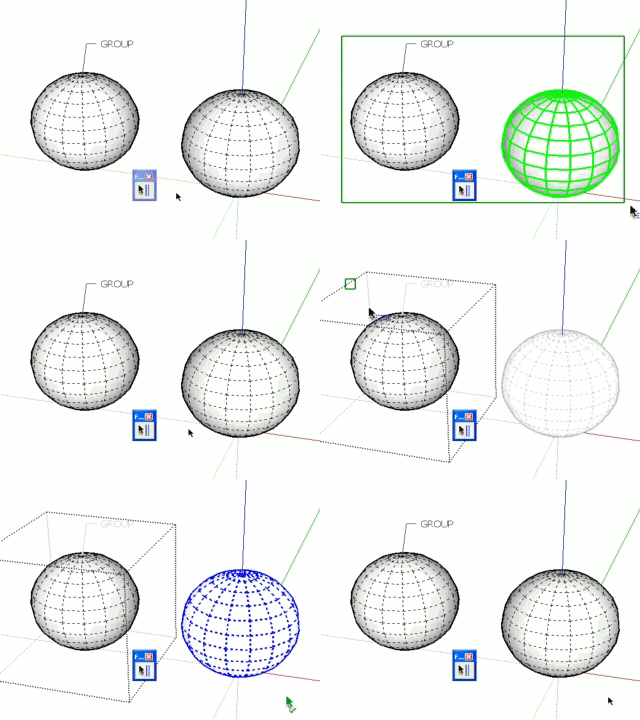
The first time the selection is good because selects all at the first level (visible-only / Ray Cast Selection).
The second time I´m editing a group, but dosen´t selects what is inside the group but yes what it is outside. This is intentional? In SketchUp if you are editing a group you can select all what is inside the group and nothing outside. In this case it´s not selecting inside the group and yes outside this group.Daniel S
-
I have been looking forward to a plugin like this for so long! thankyou so much!
-
@daniel s said:
The first time the selection is good because selects all at the first level (visible-only / Ray Cast Selection).
The second time I´m editing a group, but dosen´t selects what is inside the group but yes what it is outside. This is intentional? In SketchUp if you are editing a group you can select all what is inside the group and nothing outside. In this case it´s not selecting inside the group and yes outside this group.Daniel S
Daniel,
Thanks for signaling. This is simply a big bug which I fixed in 1.1c (actually a lack of attention).
Fredo
-
New version **HoverSelect 1.1c**available. It fixes a big bug related to selection from within groups and components.
see main post at http://www.sketchucation.com/forums/scf/viewtopic.php?f=180&t=18916#p155058
-
Fredddooooo!! Mais comment fais-tu !!?? Impressionnant, je suis que je suis complètement fan de tes plugins !! Bravo...
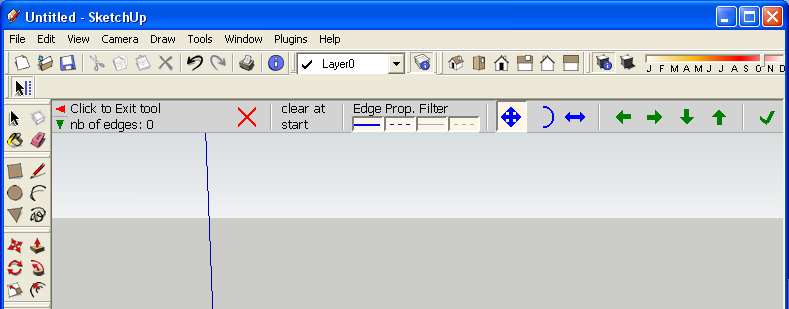
For those who didn't adopt this incredible new plugin:
-
New version **HoverSelect 1.1d (23 May 09)**available. It fixes a bug in the 'All Connected' selection mode.
see main post at http://www.sketchucation.com/forums/scf/viewtopic.php?f=180&t=18916#p155058
-
@matt666 said:
Fredddooooo!! Mais comment fais-tu !!?? Impressionnant, je suis que je suis complètement fan de tes plugins !! Bravo...
For those who didn't adopt this incredible new plugin:
[attachment=0:3frmu70t]<!-- ia0 -->Sans titre 2.jpg<!-- ia0 -->[/attachment:3frmu70t]Is that the UI? How on earth is that done??





Advertisement