sketchucation logo sketchucation
    • 登入
    Oops, your profile's looking a bit empty! To help us tailor your experience, please fill in key details like your SketchUp version, skill level, operating system, and more. Update and save your info on your profile page today!
    🔌 Smart Spline | Fluid way to handle splines for furniture design and complex structures. Download

    [Plugin] HoverSelect - v1.5a - 07 Oct 17

    已排程 已置頂 已鎖定 已移動 Plugins
    81 貼文 34 Posters 126.1k 瀏覽 34 Watching
    正在載入更多貼文
    • 從舊到新
    • 從新到舊
    • 最多點贊
    回覆
    • 在新貼文中回覆
    登入後回覆
    此主題已被刪除。只有擁有主題管理權限的使用者可以查看。
    • irwanwrI 離線
      irwanwr
      最後由 編輯

      i'll try to learn and use this one too. IA.
      thank you Fredo

      1 條回覆 最後回覆 回覆 引用 0
      • SwissmountainS 離線
        Swissmountain
        最後由 編輯

        @carrozza said:

        I have pretty much the same problems as Dereeei (see above): when I activate the plugin and click-hover on edges nothing get selected.

        Hey Fredo, same problem over here on Mac OSX Snowleopard, Sketchup 8.0.11751 & LibFredo6 - v4.4m - 14 Apr 12

        I see the menu but can't select anything, there is no selection rectangle either.

        Thank you for everything you do

        Ciao

        Cogito ergo dum-di-dum

        1 條回覆 最後回覆 回覆 引用 0
        • fredo6F 離線
          fredo6
          最後由 編輯

          Does this problem happen only with HoverSelect or all my plugins?

          If so, this may come from a conflict with some other plugins (like some versions of Podium and Matchbox)

          Fredo

          1 條回覆 最後回覆 回覆 引用 0
          • SwissmountainS 離線
            Swissmountain
            最後由 編輯

            @unknownuser said:

            Does this problem happen only with HoverSelect or all my plugins?

            All your other plugins work like a charm on my machine Fredo, thank you for the update to the round corner and curviloft scripts earlier this year!

            The hoverselect sounds like an amazing tool for speeding up more organic modeling approaches which require selection and scaling of splines, I would love to make it a part of my toolbox.

            Cogito ergo dum-di-dum

            1 條回覆 最後回覆 回覆 引用 0
            • fredo6F 離線
              fredo6
              最後由 編輯

              NEW RELEASE: HoverSelect v1.2a - 27 Nov 13

              HoverSelect 1.2a is a release for future Sketchup compatibility. It is advised to upgrade even if there are no functional changes.

              See main post of this thread for Download.

              Fredo

              1 條回覆 最後回覆 回覆 引用 0
              • fredo6F 離線
                fredo6
                最後由 編輯

                NEW RELEASE: HoverSelect v1.3a - 20 Oct 14

                HoverSelect 1.3a is required for the support of usernames with non-ascii characters in Sketchup 2014.

                See main post of this thread for Download.

                Fredo

                1 條回覆 最後回覆 回覆 引用 0
                • G 離線
                  greatoe
                  最後由 編輯

                  @swissmountain said:

                  @carrozza said:

                  I have pretty much the same problems as Dereeei (see above): when I activate the plugin and click-hover on edges nothing get selected.

                  Hey Fredo, same problem over here on Mac OSX Snowleopard, Sketchup 8.0.11751 & LibFredo6 - v4.4m - 14 Apr 12

                  I see the menu but can't select anything, there is no selection rectangle either.

                  Thank you for everything you do

                  Ciao

                  This issue still remains. Mac OSX El Capitan 10.11, Sketchup 2015.

                  1 條回覆 最後回覆 回覆 引用 0
                  • fredo6F 離線
                    fredo6
                    最後由 編輯

                    Could you open the Ruby Console to chcek if there is an error message displayed.

                    Thanks

                    Fredo

                    1 條回覆 最後回覆 回覆 引用 0
                    • G 離線
                      greatoe
                      最後由 編輯

                      @fredo6 said:

                      Could you open the Ruby Console to chcek if there is an error message displayed.

                      Thanks

                      Fredo

                      Nothing show up in the console.

                      1 條回覆 最後回覆 回覆 引用 0
                      • R 離線
                        rilian
                        最後由 編輯

                        Recently discovered this plugin. It installs and the menu items are there but I am not seeing the toolbar. It's turned on in the settings for the tool. I'm on SU 2017.

                        [edit] Clarification Note: It's not showing in the toolbars list nor displaying anything on the screen.

                        1 條回覆 最後回覆 回覆 引用 0
                        • Dave RD 離線
                          Dave R
                          最後由 編輯

                          @rilian said:

                          Recently discovered this plugin. It installs and the menu items are there but I am not seeing the toolbar. It's turned on in the settings for the tool. I'm on SU 2017.

                          [edit] Clarification Note: It's not showing in the toolbars list nor displaying anything on the screen.

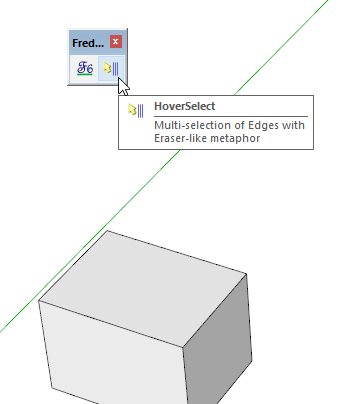
                          Did you look for the icon in the Fredo6 Tools toolbar as indicated in the first post of this thread?

                          Screenshot - 4_3_2017 , 6_02_24 PM.png

                          It shows up and works just fine for me in SU2017.
                          Screenshot - 4_3_2017 , 6_01_03 PM.png

                          Etaoin Shrdlu

                          %

                          (THERE'S NO PLACE LIKE)

                          G28 X0.0 Y0.0 Z0.0

                          M30

                          %

                          1 條回覆 最後回覆 回覆 引用 0
                          • G 離線
                            giuliosaoncella
                            最後由 編輯

                            Hi Fredo! I have just now the opportunity to use and appreciate this fantastic plugin... Is it possible to add a Face-HoverSelect mode? Let me try to explain: I often import model from other CAD formats converted in 3ds, so I have a faceted model, no any circle/rect/curve/etc. In order to create sub-groups and/or adding material/color specs to them, I need to select ANY single face one click by another: terrible. Using the selection rectangle, unwanted results occour... If I can hover-select faces, instead, I can group and color them quickly. Do You think You can add this function or maybe create a dedicated plugin?
                            Thank You very much and many, many, many compliments for your great works!!!
                            Giulio

                            1 條回覆 最後回覆 回覆 引用 0
                            • fredo6F 離線
                              fredo6
                              最後由 編輯

                              @giuliosaoncella said:

                              Is it possible to add a Face-HoverSelect mode?

                              Not totally sure, but I think there exists some plugin doing that, possibly Thomthom's Selection Toys.

                              Maybe some other forum contributors know the options.

                              Fredo

                              1 條回覆 最後回覆 回覆 引用 0
                              • D 離線
                                db11
                                最後由 編輯

                                @greatoe said:

                                This issue still remains. Mac OSX El Capitan 10.11, Sketchup 2015.

                                Same here: also Mac OSX El Capitan 10.11, SU Pro 2015. This is a plugin I would use a lot if it worked properly on Mac OS.

                                1 條回覆 最後回覆 回覆 引用 0
                                • G 離線
                                  giuliosaoncella
                                  最後由 編輯

                                  @fredo6 said:

                                  @giuliosaoncella said:

                                  Is it possible to add a Face-HoverSelect mode?

                                  Not totally sure, but I think there exists some plugin doing that, possibly Thomthom's Selection Toys.

                                  Maybe some other forum contributors know the options.

                                  Fredo

                                  ...no... I have tested many plugins (including thomthom selection toys): all performs either a "filter" or a "search", but no one acts like the eraser tool, which effectively is what I need... thanks anyway to You and to all the plugins developers: You made Sketchup special!!!

                                  Giulio

                                  1 條回覆 最後回覆 回覆 引用 0
                                  • fredo6F 離線
                                    fredo6
                                    最後由 編輯

                                    NEW RELEASE: HoverSelect v1.5a - 07 Oct 17

                                    HoverSelect 1.5a is a maintenance release:

                                    • required for the support of usernames with non-ascii characters.
                                    • Support of OSX High Sierra
                                    • Certified for SU2017

                                    See main post of this thread for Download.

                                    Fredo

                                    1 條回覆 最後回覆 回覆 引用 0
                                    • A 離線
                                      Ahmed0007
                                      最後由 編輯

                                      Follow mode not working
                                      any solution?

                                      1 條回覆 最後回覆 回覆 引用 0
                                      • fredo6F 離線
                                        fredo6
                                        最後由 編輯

                                        @ahmed0007 said:

                                        Follow mode not working
                                        any solution?

                                        Can you clarify and explain what is the problem. Follow option works fine for me.

                                        Fredo

                                        1 條回覆 最後回覆 回覆 引用 0
                                        • A 離線
                                          Ahmed0007
                                          最後由 編輯

                                          1233.gif
                                          @fredo6 said:

                                          @ahmed0007 said:

                                          Follow mode not working
                                          any solution?

                                          Can you clarify and explain what is the problem. Follow option works fine for me.

                                          Fredo

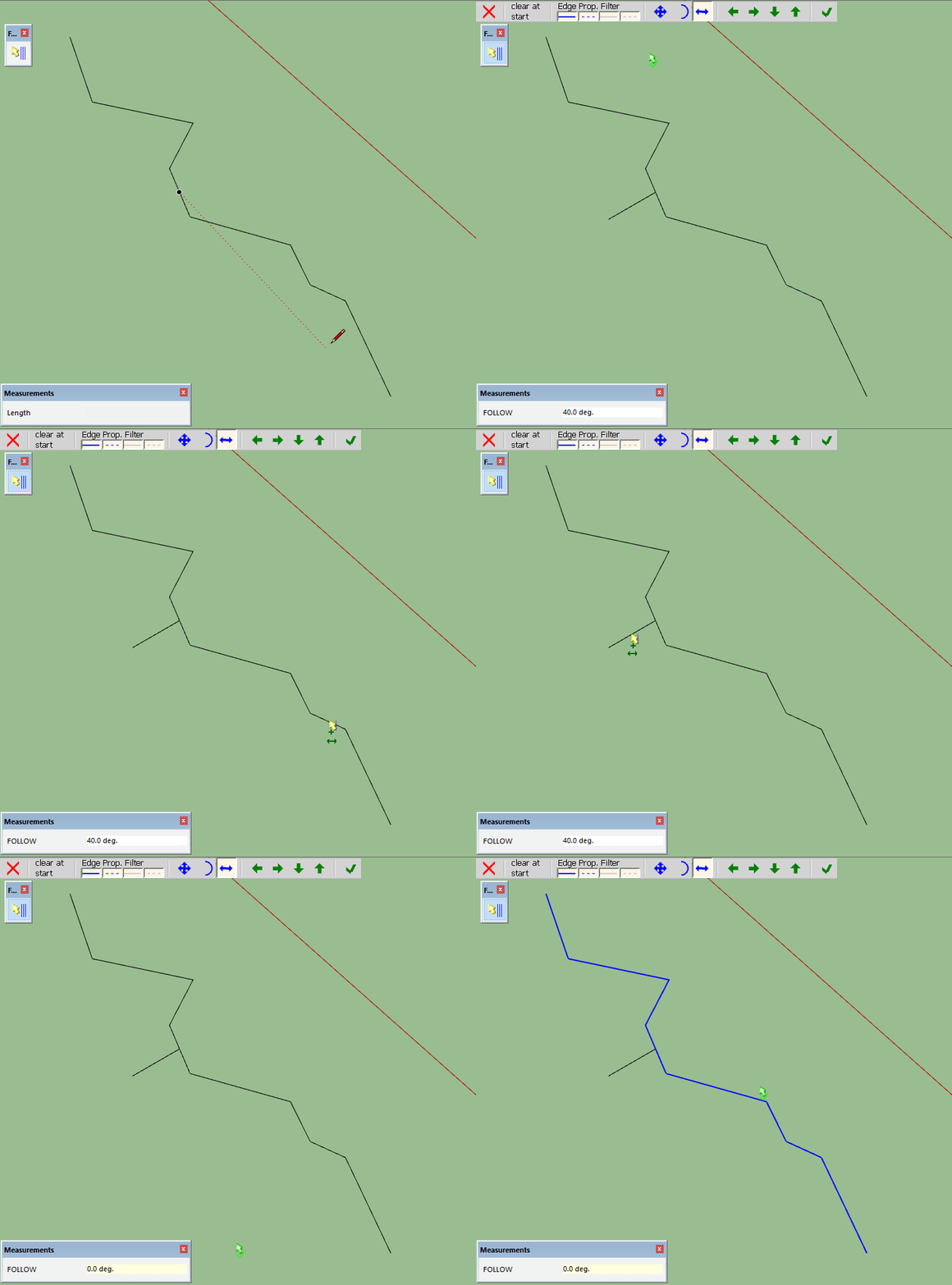
                                          it's select whole. even i set the limit
                                          please see .gif
                                          and please add "Stop at Edge Crossing"( ❤ ) feature in hoverselect like in Curvizard.
                                          Thanks

                                          1 條回覆 最後回覆 回覆 引用 0
                                          • A 離線
                                            Ahmed0007
                                            最後由 編輯

                                            try in sketchup 2015,17,18
                                            here is one another Behavior that i don't understand

                                            12333.gif

                                            1 條回覆 最後回覆 回覆 引用 0
                                            • 1
                                            • 2
                                            • 3
                                            • 4
                                            • 5
                                            • 4 / 5
                                            • 第一個貼文
                                              最後的貼文
                                            Buy SketchPlus
                                            Buy SUbD
                                            Buy WrapR
                                            Buy eBook
                                            Buy Modelur
                                            Buy Vertex Tools
                                            Buy SketchCuisine
                                            Buy FormFonts

                                            Advertisement