sketchucation logo sketchucation
    • 登入
    Oops, your profile's looking a bit empty! To help us tailor your experience, please fill in key details like your SketchUp version, skill level, operating system, and more. Update and save your info on your profile page today!
    🔌 Smart Spline | Fluid way to handle splines for furniture design and complex structures. Download

    [Plugin] Shape Bender Beta

    已排程 已置頂 已鎖定 已移動 Plugins
    1.3k 貼文 331 Posters 1.8m 瀏覽 329 Watching
    正在載入更多貼文
    • 從舊到新
    • 從新到舊
    • 最多點贊
    回覆
    • 在新貼文中回覆
    登入後回覆
    此主題已被刪除。只有擁有主題管理權限的使用者可以查看。
    • TIGT 離線
      TIG Moderator
      最後由 編輯

      Have you installed progressbar.rb on both PCs ?

      TIG

      1 條回覆 最後回覆 回覆 引用 0
      • A 離線
        avraz
        最後由 編輯

        @tig said:

        Have you installed progressbar.rb on both PCs ?

        yes i did
        on the same computer i got v7 that works but got very few plugs in its library and v8 with alot of plugs that doesnt work correctly

        1 條回覆 最後回覆 回覆 引用 0
        • A 離線
          araz
          最後由 編輯

          @tobobo said:

          Do you have to mist uptodate Compent Spray plugin?, as i believe there is a clash with bender and the previous plugin.

          i removed the component spray and it worked
          thanks alot for the advice-problem solved

          1 條回覆 最後回覆 回覆 引用 0
          • ToboboT 離線
            Tobobo
            最後由 編輯

            Do you have the most up to date Compent Spray plugin? as i believe there is a clash with bender and the previous version of the plugin.

            Toby

            Philippians 4:13

            I can do everything through him who gives me strength.

            1 條回覆 最後回覆 回覆 引用 0
            • ToboboT 離線
              Tobobo
              最後由 編輯

              the new version of component spray works with the bender plugin
              @araz said:

              i removed the component spray and it worked
              thanks alot for the advice-problem solved

              Apologise for the poor typing, i've corrected the post 😳

              Toby

              Philippians 4:13

              I can do everything through him who gives me strength.

              1 條回覆 最後回覆 回覆 引用 0
              • O 離線
                onezero
                最後由 編輯

                @tig said:

                You have unzipped the files into folder named after the zip and moved that folder into Plugins.
                The only shape bender related stuff you should have in Plugins is the loader rb file and the subfolder, like this [attachment=0:2fm4zizk]<!-- ia0 -->Capture1.PNG<!-- ia0 -->[/attachment:2fm4zizk] and that subfolder should contain these files [attachment=1:2fm4zizk]<!-- ia1 -->Capture.PNG<!-- ia1 -->[/attachment:2fm4zizk] I.E. you move the file and subfolder that were in the zip into Plugins AND NOT the unzipped folder [clf_shape_bender_v005] itself...

                Howdy everyone,
                I'm sort of a newbie to SU. Well, I'm a newbie when it comes to using a MAC and SU. I've played with SU for years on a PC and recently I've made the move to Macintosh ( macbook pro) and the above help from TIG has by far been the most valuable advice and visual guide for getting this plugin to work.
                I was repeatedly moving the whole zip file folder to the plugins and was absolutely confounded as to why it did not work. I installed and reinstalled again and again with the same result. I never had this frustrating difficulty on a PC.
                Anyway, THANK YOU TIG and everyone else!! I am now on my way to enjoying (hopefully) the SU experience on my Apple.

                I wish there was an energetic young person with a lot of time on their hands that could put all the MAC problems into a thread or topic so it would be easier to pinpoint some problems but I know that would be a huge task - just some wishful thinking on my part.

                Keep up the good work everyone! This is a great website with an absolutely encouraging and positive atmosphere--renews my hope for mankind, in a way. 😄

                1 條回覆 最後回覆 回覆 引用 0
                • S 離線
                  saj33
                  最後由 編輯

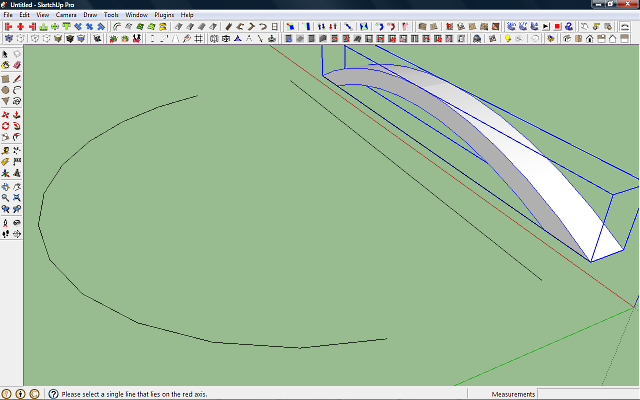
                  Can somebody help? I've been trying to let my staircase follow a curved path. I selected the component, used the plugin then, when it comes to selecting a line on the red axis, my mouse can't select it. Nothing happens. Note, it does select when I'm not using the plugin. What do you think's the problem?

                  1 條回覆 最後回覆 回覆 引用 0
                  • TIGT 離線
                    TIG Moderator
                    最後由 編輯

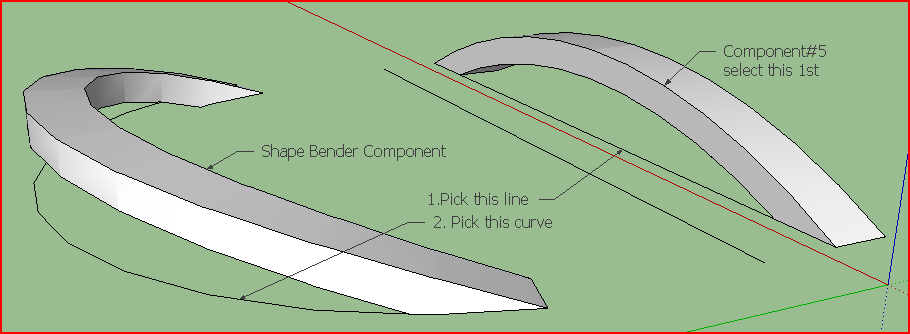
                    This line you must pick that is parallel to the red axis must be completely 'unattached' - i.e. it cannot join onto another line, or edge a face etc.
                    It also has to be a piece of separate geometry in the active-entities context [i.e. with the group/component that you want to bend].
                    The same points apply to the 'curve' you will need to pick next...

                    TIG

                    1 條回覆 最後回覆 回覆 引用 0
                    • B 離線
                      breeze
                      最後由 編輯

                      thank you very much

                      1 條回覆 最後回覆 回覆 引用 0
                      • D 離線
                        disturbed13
                        最後由 編輯

                        i have an issue
                        this plug-in doesnt work right
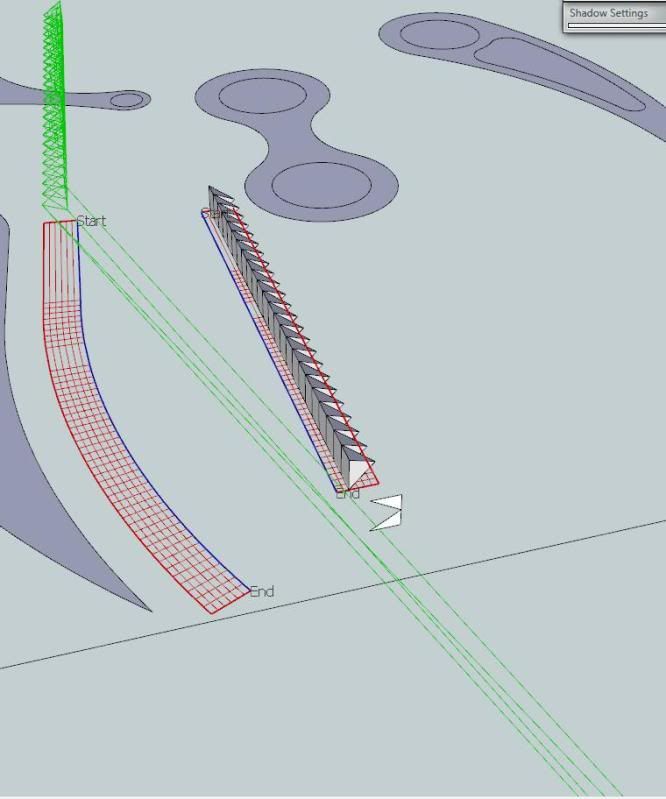
                        http://i107.photobucket.com/albums/m294/hedoe/myissue.jpg

                        am i doing something wrong here or what?

                        1 條回覆 最後回覆 回覆 引用 0
                        • Dave RD 離線
                          Dave R
                          最後由 編輯

                          Could you post the SKP so we can take a look?

                          Etaoin Shrdlu

                          %

                          (THERE'S NO PLACE LIKE)

                          G28 X0.0 Y0.0 Z0.0

                          M30

                          %

                          1 條回覆 最後回覆 回覆 引用 0
                          • D 離線
                            disturbed13
                            最後由 編輯

                            @dave r said:

                            Could you post the SKP so we can take a look?

                            sure some background first so you understand what i am trying to accomplish
                            im in the process of designing a tree climbing spider robot
                            and im working on one of the legs, ive decided to have a 'thumb-like' appendage to grasp onto branches in the canopy
                            now my mind is turning and it would be a good idea to add a saw-tooth like pattern to the inside of each
                            for better grasping ability
                            however i cant get the blasted mini pyramids to follow the curve of the main leg
                            i havent tried the grasping limb yet


                            the leg

                            1 條回覆 最後回覆 回覆 引用 0
                            • TIGT 離線
                              TIG Moderator
                              最後由 編輯

                              The 'line' you are asked to pick initially needs to be parallel to the Red axis and it cannot touch anything else.
                              Your supplied SKP only has two lines parallel to the Red axis; BUT both of these touch a line drawn on the Green axis, so they won't work!
                              Erase the connected line and then the Lines parallel to the Red axis will be available and the tool should work.
                              Note that the length of the 'line' and the 'arc', and the location of them relative to the object that's to be bent will affect the 'bending' - experiment with some different settings... 🤓

                              TIG

                              1 條回覆 最後回覆 回覆 引用 0
                              • Jean-FrancoJ 離線
                                Jean-Franco
                                最後由 編輯

                                Hi,
                                for me it works as it is in your SU file.
                                But after you select the curved line and as shown in your picture, you have to play a bit with the Up and down arrows of your keyboard.
                                Try.
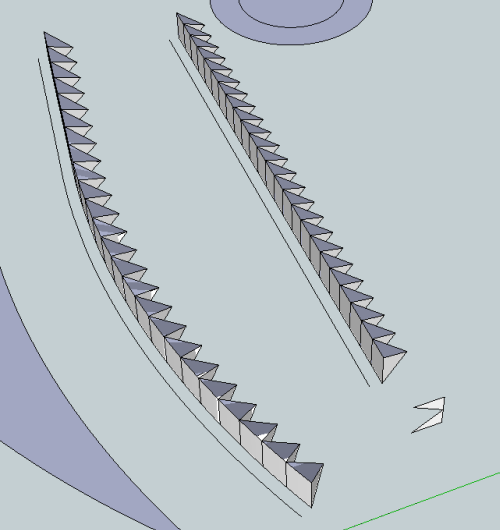
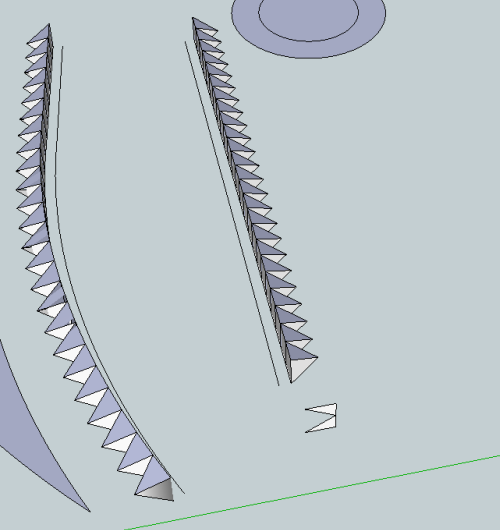
                                Shapebender example.png

                                Shapebender example_1.png

                                Jean-Franco

                                1 條回覆 最後回覆 回覆 引用 0
                                • G 離線
                                  gr8fzy1
                                  最後由 編輯

                                  @tig said:

                                  The 'line' you are asked to pick initially needs to be parallel to the Red axis and it cannot touch anything else.
                                  Your supplied SKP only has two lines parallel to the Red axis; BUT both of these touch a line drawn on the Green axis, so they won't work!
                                  Erase the connected line and then the Lines parallel to the Red axis will be available and the tool should work.
                                  Note that the length of the 'line' and the 'arc', and the location of them relative to the object that's to be bent will affect the 'bending' - experiment with some different settings... 🤓

                                  Can you explain this a little bit more clearly, because I'm having the same problem as saj33.

                                  I have the component all set, so I draw a line on the red axis. I then select the component and it asks me to select the line. But no matter how many times I click on it, it won't let me select the line.
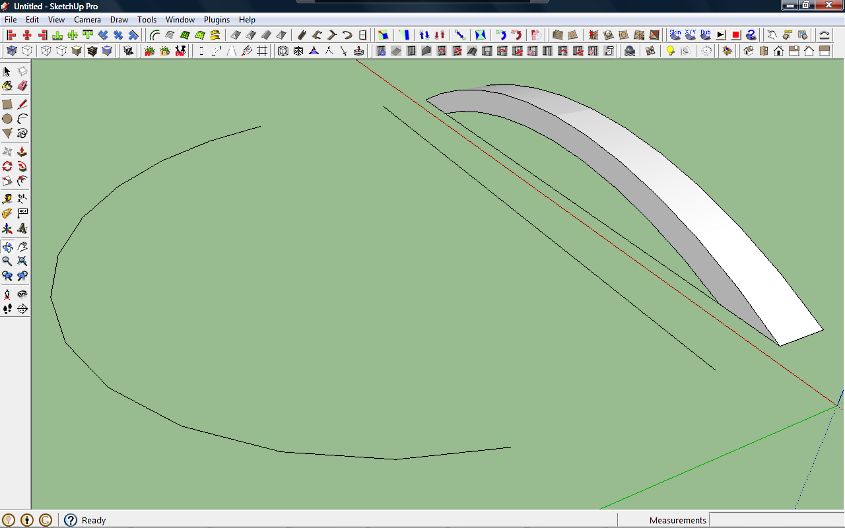
                                  This is a screen shot of the arch I want to bend, the curve I want it to follow, and a dummy line drawn between them to represent the line drawn on the component. None of the lines/components are touching the red or green axis. And you can clearly see the line drawn on the component that I want to use.
                                  But then when I select the component and activate Shape bender, it WILL NOT let me select the drawn line. And I am doing everything as shown in the maker's own video. (The youtube one, 3rd video in his first post)

                                  This is the test file I made to test the plug in.

                                  1 條回覆 最後回覆 回覆 引用 0
                                  • TIGT 離線
                                    TIG Moderator
                                    最後由 編輯

                                    The 'line' you are asked to pick initially needs to be parallel to the Red axis and it should not touch anything else. BUT YOU HAVE IT TOUCHING THE VERY OBJECT THAT YOU WANT TO BEND! It might 'work'... but it will/might give unpredictable results, with no preview before bending!
                                    Your supplied SKP has two lines parallel to the Red axis; ONE of these touches nothing, so it will work! USE THAT.
                                    The length of the 'line' and the 'arc', and the location of them relative to the object that's to be bent will affect the 'bending' - experiment with some different settings...
                                    IT WORKS FOR ME.Capture.PNG
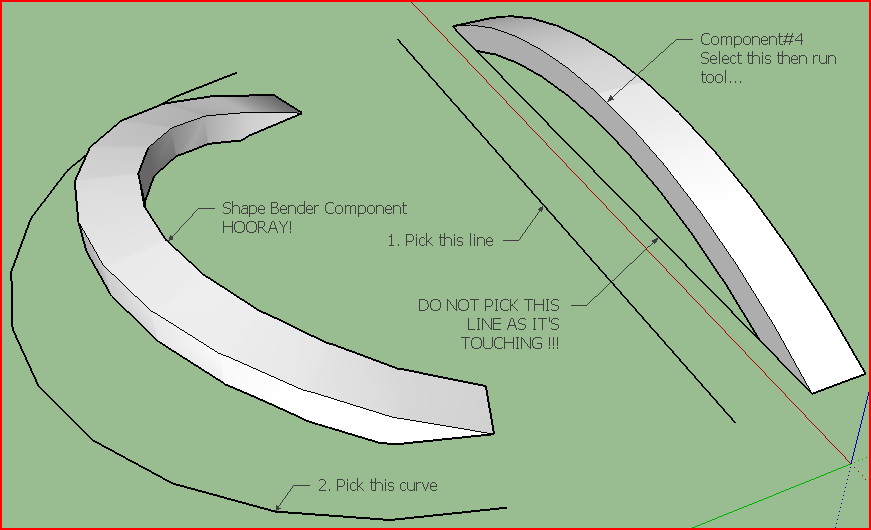
                                    TIG

                                    1 條回覆 最後回覆 回覆 引用 0
                                    • gullfoG 離線
                                      gullfo
                                      最後由 編輯

                                      i've found that the line on the red axis can touch the group or component as it's a separate object. but i've found that the start of the lines need to be both on the same side otherwise the results are not good... having the object away from the red axis line seems to create an offset in the final result which means the final dimensions can be off.

                                      Glenn

                                      http://www.runnel.com

                                      1 條回覆 最後回覆 回覆 引用 0
                                      • TIGT 離線
                                        TIG Moderator
                                        最後由 編輯

                                        Capture.PNGThis is the result from picking the line that touches the object that's to be bent. It can touch the object because it's a group or instance and therefore there's no 'raw' geometry involved... and it might give what you want... BUT you will get no 'preview' of the new curved-form to see if you are happy with the result before committing to it.
                                        Picking a line spaced away from the object gives more predictable results with a preview to allow you to toggle start/end etc...
                                        Note: the examples show how the offset between the object and the line, is replicated in the offset between the bent-clone and the curve... If there is an offset 'gap' [even small] you'll get better control...
                                        Tip: it's always best to have the three parts [object, line and curve] within the same ;quadrant of the Red-Green/X-Y axes - i.e. all three located on the same side of the Red and Green axes.

                                        TIG

                                        1 條回覆 最後回覆 回覆 引用 0
                                        • TIGT 離線
                                          TIG Moderator
                                          最後由 編輯

                                          gr8fzy1
                                          Incidentally, please 'purge' SKPs before attaching them.
                                          Model Info > Statistics > Purge Unused... OR my Purge-Tool
                                          The original in 2.55Mb but purged it's only 28kb !
                                          You must have had some complex components and materials unused?
                                          Here's what was not needed in the posted SKP:

                                          C:/Users/TIG/Desktop/Shape Bender test-PurgeLog.txt

                                          Purged Unused...

                                          Components: 8
                                          Component#3
                                          Component#2
                                          light-point-2
                                          ivyleaf_3
                                          ivyleaf_2
                                          ivyleaf_1
                                          Component#1
                                          Susan

                                          Layers: 0

                                          Materials: 12
                                          black
                                          <Beige>1
                                          Color_B24
                                          <LightGray>
                                          0135_DarkGray
                                          96,96,96
                                          jean blue
                                          <Charcoal>
                                          efeu1
                                          Color_F12#1
                                          Ivy2d#1
                                          Ivy_stem

                                          Styles: 0

                                          #EOF

                                          TIG

                                          1 條回覆 最後回覆 回覆 引用 0
                                          • G 離線
                                            gr8fzy1
                                            最後由 編輯

                                            @tig said:

                                            The 'line' you are asked to pick initially needs to be parallel to the Red axis and it should not touch anything else. BUT YOU HAVE IT TOUCHING THE VERY OBJECT THAT YOU WANT TO BEND! It might 'work'... but it will/might give unpredictable results, with no preview before bending!
                                            Your supplied SKP has two lines parallel to the Red axis; ONE of these touches nothing, so it will work! USE THAT.
                                            The length of the 'line' and the 'arc', and the location of them relative to the object that's to be bent will affect the 'bending' - experiment with some different settings...
                                            IT WORKS FOR ME.[attachment=1:gywgvp4p]<!-- ia1 -->Capture.PNG<!-- ia1 -->[/attachment:gywgvp4p]

                                            See, THAT'S what I don't get. In I did it just like he did in the video. I drew the line right from one end of the component to the other: Just like he did on his demonstration ramp. But here you are telling me to use the dummy line I created?

                                            I've tried doing it like you suggested. I select the component, click the shape bender Icon, and it asks me to "Please select a single line that lies on the Red Axis". But then it won't let me click on the separate line. And then when I try to select them like he did in the video (Select the line, Select the component, click Shape bender) I get this error message:

                                            [attachment=0:gywgvp4p]<!-- ia0 -->Shape Bender 3.png<!-- ia0 -->[/attachment:gywgvp4p]

                                            Perhaps it is clashing with another plug in...should I provide a screen shot with my plugins list?

                                            @tig said:

                                            gr8fzy1
                                            Incidentally, please 'purge' SKPs before attaching them.
                                            Model Info > Statistics > Purge Unused... OR my Purge-Tool
                                            The original in 2.55Mb but purged it's only 28kb !
                                            You must have had some complex components and materials unused?
                                            Here's what was not needed in the posted SKP:

                                            C:/Users/TIG/Desktop/Shape Bender test-PurgeLog.txt

                                            Purged Unused...

                                            Components: 8
                                            Component#3
                                            Component#2
                                            light-point-2
                                            ivyleaf_3
                                            ivyleaf_2
                                            ivyleaf_1
                                            Component#1
                                            Susan

                                            Layers: 0

                                            Materials: 12
                                            black
                                            <Beige>1
                                            Color_B24
                                            <LightGray>
                                            0135_DarkGray
                                            96,96,96
                                            jean blue
                                            <Charcoal>
                                            efeu1
                                            Color_F12#1
                                            Ivy2d#1
                                            Ivy_stem

                                            Styles: 0

                                            #EOF

                                            And as for purging my SKP, I have no idea where those textures and such came from! I didn't import any components or even USE the bucket tool. Just rectangle, pencil, arch and push/pull! SKP is now purged.

                                            How do you get that purge log?
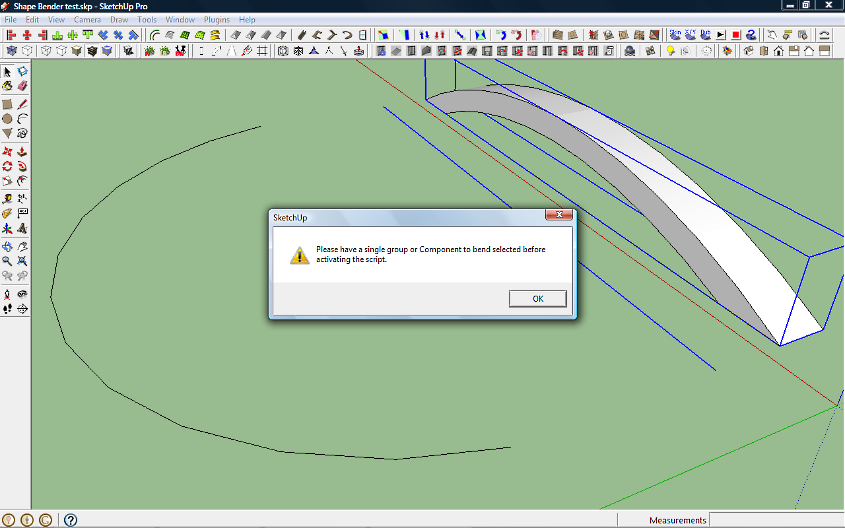

                                            Error Message.

                                            1 條回覆 最後回覆 回覆 引用 0
                                            • 1
                                            • 2
                                            • 10
                                            • 11
                                            • 12
                                            • 13
                                            • 14
                                            • 63
                                            • 64
                                            • 12 / 64
                                            • 第一個貼文
                                              最後的貼文
                                            Buy SketchPlus
                                            Buy SUbD
                                            Buy WrapR
                                            Buy eBook
                                            Buy Modelur
                                            Buy Vertex Tools
                                            Buy SketchCuisine
                                            Buy FormFonts

                                            Advertisement