sketchucation logo sketchucation
    • Login
    Oops, your profile's looking a bit empty! To help us tailor your experience, please fill in key details like your SketchUp version, skill level, operating system, and more. Update and save your info on your profile page today!
    Mac User? | Join the Rayscaper Beta for Mac Learn More

    [Plugin][$] FredoScale - v3.7c - 19 Aug 26


    Scheduled Pinned Locked Moved Plugins
    1.2k Posts 347 Posters 3.4m Views 345 Watching
    Loading More Posts
    • Oldest to Newest
    • Newest to Oldest
    • Most Votes
    Reply
    • Reply as topic
    Log in to reply
    This topic has been deleted. Only users with topic management privileges can see it.
    • thomthomT
      thomthom
      last edited by

      @fletch said:

      Fredo, is there a way I can change your shortcuts F4 and F5 to something else? I have used these for years for other things in SU (toggling parallel/perspective cam= F4 and toggling xray mode is F5)

      so the twist tool only turns my group around... not actually twisting anything.

      You can configure these yourself. Tools->Fredo Collection->FreeScale->Default Parameters.

      Thomas Thomassen — SketchUp Monkey & Coding addict
      List of my plugins and link to the CookieWare fund

      1 Reply Last reply
      Reply Quote 0
      • G
        gata
        last edited by

        To expand upon Chris Fullmer's insight, one of the things Google did was release a 'free' version of SU. That free stuff brought in a lot of talented plugin coders from all over the world who applied their coding magic to add extra functionality to this program.

        SU developers can and should concentrate their energy on making this the best rendering engine which people can customize to best fit their needs.

        Fredo, your coding efforts shouldn't be free. Google can give out a free version as it helps draw in people to make SKP a popular and dominating extension, and for more people to use their other products and services. Like @last and many other software developers, many plugin developers deserve to earn money for their effort too.

        1 Reply Last reply
        Reply Quote 0
        • Dave RD
          Dave R
          last edited by

          Tusen takk, ThomThom

          Etaoin Shrdlu

          %

          (THERE'S NO PLACE LIKE)

          G28 X0.0 Y0.0 Z0.0

          M30

          %

          1 Reply Last reply
          Reply Quote 0
          • J
            Jörg
            last edited by

            Fredo, I´m speechless.
            Your my hero.
            You are not from this world.
            Thank you very, very much.
            This plugin ist absolutely terrifik.

            THANK YOU!!!!
            Jörg

            1 Reply Last reply
            Reply Quote 0
            • S
              steelers05
              last edited by

              amazing. Great work man. This will truely change a lot of model approaceds.

              1 Reply Last reply
              Reply Quote 0
              • soloS
                solo
                last edited by

                LOL

                I was looking at some of the 'gotoschool' and 'youtube' tutorials, they seem so primitive now that we have these cool new plugins to get the job done faster and easier.

                looks like they are back to basics, creating new tutorials, see? your plugins keep everyone busy.

                http://www.solos-art.com

                If you see a toilet in your dreams do not use it.

                1 Reply Last reply
                Reply Quote 0
                • J
                  johan1982
                  last edited by

                  Unbelievable, this plugin will save me days of work 😄

                  You rock !!!!

                  1 Reply Last reply
                  Reply Quote 0
                  • P
                    PKast
                    last edited by

                    An amazing contribution to Sketchup, thanks, I am speechless.

                    Best,
                    PKast

                    1 Reply Last reply
                    Reply Quote 0
                    • P
                      PHUONG_HEHE
                      last edited by

                      please help.... i don't have this pluggin,help meee.. link down.thanks alot

                      1 Reply Last reply
                      Reply Quote 0
                      • MALAISEM
                        MALAISE
                        last edited by

                        Look at the head of this thread, you get all infos to download it.

                        MALAISE 😄

                        La Connaissance n'a de valeur que partagée

                        1 Reply Last reply
                        Reply Quote 0
                        • Chris FullmerC
                          Chris Fullmer
                          last edited by

                          @phuong_hehe said:

                          please help.... i don't have this pluggin,help meee.. link down.thanks alot

                          Look at the bottom of the first post. There is a file there. There is also a link in that first post to another thread that has a file you must download. D/L and install them both as described in various places in the thread, and you should be set to go.

                          Chris

                          Lately you've been tan, suspicious for the winter.
                          All my Plugins I've written

                          1 Reply Last reply
                          Reply Quote 0
                          • free agentF
                            free agent
                            last edited by

                            fredo, would it be possible to allow users to enter a distance in the VCB once the bend tool has been anchored ie: i select a group, activate the bend tool, now while im dragging the purple line to indicate the extent of the bended area, it would be nice if this line snapped to axis and i could enter a distance for this line as to match the geometry to an existing curve, given that i know the length of the curve i am matching the geometry to

                            http://i167.photobucket.com/albums/u143/FreeAgent84/bug.gif

                            1 Reply Last reply
                            Reply Quote 0
                            • P
                              princedragoncok
                              last edited by

                              Had some fun with twist. Thanks fredo 👍

                              [flash=640,480:3ipay77h]http://vimeo.com/moogaloop.swf?clip_id=4013278&server=vimeo.com&show_title=1&show_byline=1&show_portrait=0&color=&fullscreen=1[/flash:3ipay77h]

                              1 Reply Last reply
                              Reply Quote 0
                              • fredo6F
                                fredo6
                                last edited by

                                I guess someone will now propose some furnitures!

                                1 Reply Last reply
                                Reply Quote 0
                                • erikBE
                                  erikB
                                  last edited by

                                  great pluging Fredo !!
                                  Much appriciated !
                                  erikB

                                  1 Reply Last reply
                                  Reply Quote 0
                                  • jeff hammondJ
                                    jeff hammond
                                    last edited by

                                    i've already used bend and twist for a real project.. (and i mean bend and twist were the main tools used.. other than that, i only used rectangle and push/pull to create the basic slabs)

                                    it's a proposal for a skateboard-able sculpture and i'm hoping to build a few of these types of things in NYC.

                                    http://homepage.mac.com/jeffhammond/.Public/scf/bendtwist1.jpg

                                    http://homepage.mac.com/jeffhammond/.Public/scf/bendtwist2.jpg

                                    this new set of tools makes exploring shapes such as these very fast and intuitive and i can modify/develop the idea without the computer getting in the way.. thanks again fredo!

                                    dotdotdot

                                    1 Reply Last reply
                                    Reply Quote 0
                                    • K
                                      kwistenbiebel
                                      last edited by

                                      @princedragoncok said:

                                      Had some fun with twist. ...

                                      I love that vid, Prince ! 👍

                                      1 Reply Last reply
                                      Reply Quote 0
                                      • D
                                        Daniel S
                                        last edited by

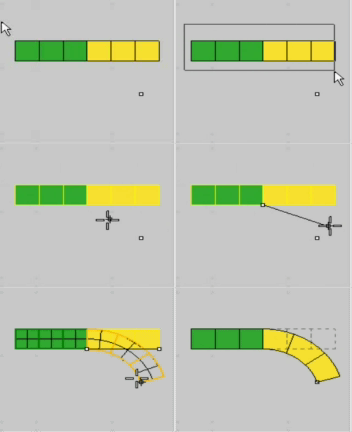
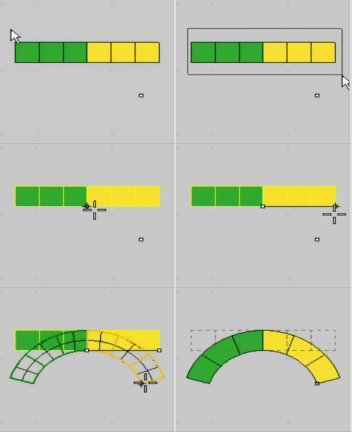
                                        I dont know if its difficult to add more features to this plugin. But a good option for the bend will be to press CTRL and the plugin bend symmetrically around the center.

                                        Now is possible this:

                                        Bend.gif

                                        and this is the idea:

                                        Symmetric Bend.gif

                                        Daniel S

                                        1 Reply Last reply
                                        Reply Quote 0
                                        • fredo6F
                                          fredo6
                                          last edited by

                                          @unknownuser said:

                                          fredo, would it be possible to allow users to enter a distance in the VCB once the bend tool has been anchored ie: i select a group, activate the bend tool, now while im dragging the purple line to indicate the extent of the bended area, it would be nice if this line snapped to axis and i could enter a distance for this line as to match the geometry to an existing curve, given that i know the length of the curve i am matching the geometry to

                                          Interesting idea. I think this is feasible, and I'll try to include it in a next version.

                                          Fredo

                                          1 Reply Last reply
                                          Reply Quote 0
                                          • fredo6F
                                            fredo6
                                            last edited by

                                            @daniel s said:

                                            I dont know if its difficult to add more features to this plugin. But a good option for the bend will be to press CTRL and the plugin bend symmetrically around the center.
                                            Daniel S

                                            Daniel,

                                            The difficulty is always to make sure I do not break anything.
                                            Another good idea, but requires a little bit of work and testing. I'll see what I can do.

                                            Fredo

                                            1 Reply Last reply
                                            Reply Quote 0

                                            Hello! It looks like you're interested in this conversation, but you don't have an account yet.

                                            Getting fed up of having to scroll through the same posts each visit? When you register for an account, you'll always come back to exactly where you were before, and choose to be notified of new replies (either via email, or push notification). You'll also be able to save bookmarks and upvote posts to show your appreciation to other community members.

                                            With your input, this post could be even better 💗

                                            Register Login
                                            • 1
                                            • 2
                                            • 38
                                            • 39
                                            • 40
                                            • 41
                                            • 42
                                            • 58
                                            • 59
                                            • 40 / 59
                                            • First post
                                              Last post
                                            Buy SketchPlus
                                            Buy SUbD
                                            Buy WrapR
                                            Buy eBook
                                            Buy Modelur
                                            Buy Vertex Tools
                                            Buy SketchCuisine
                                            Buy FormFonts

                                            Advertisement