[Plugin][$] FredoScale - v3.6a - 01 Apr 24




-
Merci pour la réponse rapide.
Après avoir supprimé manuellement le dossier et le fichier du dossier Plugins, je l'ai réinstallé une première fois à l'aide de l'outil SketchUcation (ma méthode habituelle), le lanceur n'a pas fonctionné.
J'ai ensuite supprimé/réinstallé, mais cette fois manuellement depuis le gestionnaire d'extension, sans succès.J'ai supprimé/réinstallé LibFredo6 en appliquant successivement les 2 méthodes ci-dessus, toufours sans succès.
J'ai téléchargé à nouveau FredoScale et LibFredo6 puis comparé les Hachages SHA-256 sans trouvé de différence avec les versions installées.
Y a-t-il quelque chose d'autre que je puisse faire?
-
@bharralure said:
Y a-t-il quelque chose d'autre que je puisse faire?
N'y aurait-il pas de vieux fichiers de mes plugins qui traînent dans le repertoire Plugin?
-
Je ne vois pas, ou sinon Windows les à bien caché ...
Je viens de lancer l'outil "purger les fichiers obsolètes" depuis Fenêtre > LibFredo6, il n'a rien trouvé.Bon il ne faut arrêter de ce prendre la tête pour un problème qui n'est pas majeur. Je vais afficher la barre d'outil complète. Elle va prendre plus de place que le lanceur seul, mais c'est le seul inconvénient.
Merci pour l'aide.
-
Bonsoir Fredo,
Je viens d'installer LibFredo6 v10.4.a et là Miracle! le lanceur Fredo Scale fonctionne à nouveau.
Du bon travail comme d'habitude.
Merci -
Si vous permettez I'd continue in English

Would it be possible to implement 'preserve texture' mode?
In this mode, all texture's transforms (scale,proportions,orientation) would stay untouched.
I'd like it to be as default even in standard scale tool, but Trimble and adding new features don't compose well in these latter days
Thanks -
@rv1974 said:
Would it be possible to implement 'preserve texture' mode?
Actually, FredoScale does not more or less than what the Sketchup native tool (Scale, Move or deform) would do. Even if it's possible to alter the behavior, I think it would make things complicated because it would have to be an option and would potentially slow down the live deformations (to re-apply texture).
The best in my opinion is that deformation is done before texturing and then use the dedicated tools for texturing or re-texturing. -
I'll be more precise:
It'd be way more logical if at least Boxing Scaling would preserve textures exactly like your Box stretching (already existing tool! )@unknownuser said:
The best in my opinion is that deformation is done before texturing and then use the dedicated tools for texturing or re-texturing.
I doubt. Rescale a simple box group without material and then apply some bitmap material. The texture sizing will be wrong.
-
This program isn't without issue. I used the Box Scale to "flatten" a bunch of things so I can bring them into AutoCAD (for our consultants). It creates objects that appear to be there, but then when you go to open them up, they disappear.
-
@lostarkitekt said:
This program isn't without issue. I used the Box Scale to "flatten" a bunch of things so I can bring them into AutoCAD (for our consultants). It creates objects that appear to be there, but then when you go to open them up, they disappear.
I would need more information on this issue
After applying FredoScale flattening, do you see the objects correctly in Sketchup?
If so, if the problem is in the Export, it might be because they have a thickness of zero.
-
Hello,
I got two questions.
First one is:
Is there any way/shortcut to force scaling box align to group's/ world axes?Second one is a request:
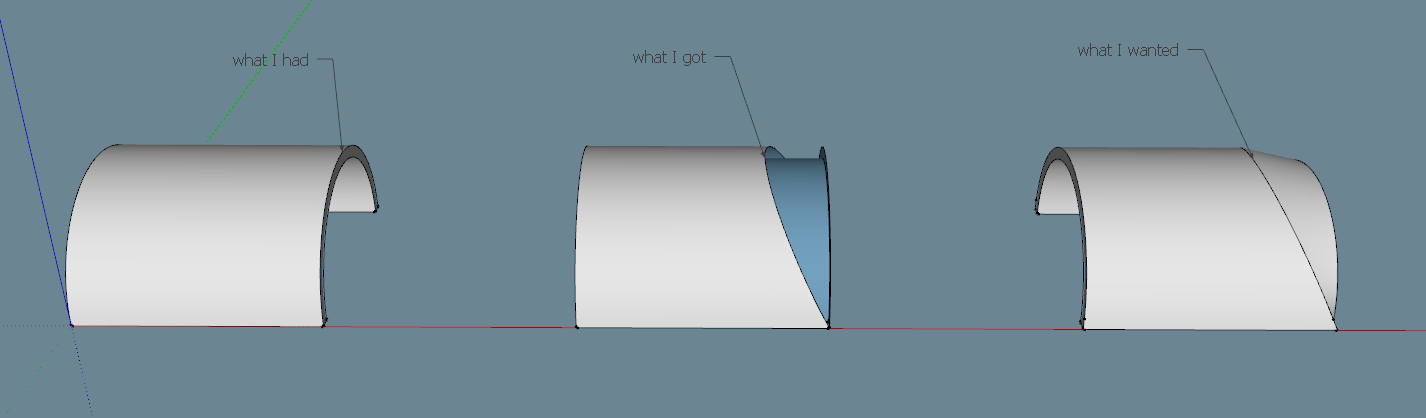
When we use shear tool for specific edges/faces, not for entire groups, it kind of "pulls" any edges/faces attached to transformed part of mesh. This is very nice behaviour because we can not only shear groups/ components but also fragments of meshes and they will keep continuity - they will stay "glued together" as they were originally. On the other hand, taper tool doesn't behave that nicely. Do you think you could change the plugin a little (if you have time) so that taper behaviour would be similar to shear tool?
Here's a screenshot:
-
@einstein said:
Is there any way/shortcut to force scaling box align to group's/ world axes?
Normally, typing an arrow should force axis alignment
@einstein said:
Second one is a request:
When we use shear tool for specific edges/faces, not for entire groups, it kind of "pulls" any edges/faces attached to transformed part of mesh. This is very nice behaviour because we can not only shear groups/ components but also fragments of meshes and they will keep continuity - they will stay "glued together" as they were originally. On the other hand, taper tool doesn't behave that nicely. Do you think you could change the plugin a little (if you have time) so that taper behaviour would be similar to shear tool?
Here's a screenshot:That would be something more complex. Shear is a conform transformation (like Scale or Move). So I let Sketchup manage the deformation and folding of adjacent faces and edges.
For Taper, I have to recompute the geometry and does not do this, because this is not trivial and not always wanted. It's possible however. -
If this could be done in the future as an option/ toggle/ alternative, cuz really not everybody may want this, it would be super, super cool!
-
Thank you for a lovely plugin. In the box stretching tool I can set a plane that defines what geometry that is to be moved.
What if this plane could be a box? So I could stretch everything inside that selection box?
enormous use case for this I think. say you have 2 groups beside each other. All that is inside the stretch box would move in both groups.
Say you have a wooden wall group that ends, and the rest of the wall is inside another group, because its different (brick)
A stretch "selection box" could move all of those end faces from multiple groups all at the same time, effectively change where one wall ends and another begins, all in one stretch operation.
This could be a tool I used all the time, more than the basic move tool in skechup. (Because so much geometry is grouped, and a wall is maybe three groups thick)
Then its a lot of work to go into every group to lengthen all parts of one wall, and then shorten all parts of the other wall
I know I can do this with your tool now, in two operations, stretching one wall at the time.
-
Another question. Isn't possible to adjust the number of segments in a radial bend? I thought there was, but I'd like to get more segments in the bend, for a smoother curve.
-
@pbacot said:
Isn't possible to adjust the number of segments in a radial bend?
Select Radial Bend and hit Tab.
-
Thanks Dave! Yes, these plugins have all the bells and whistles if you know where to look.
-
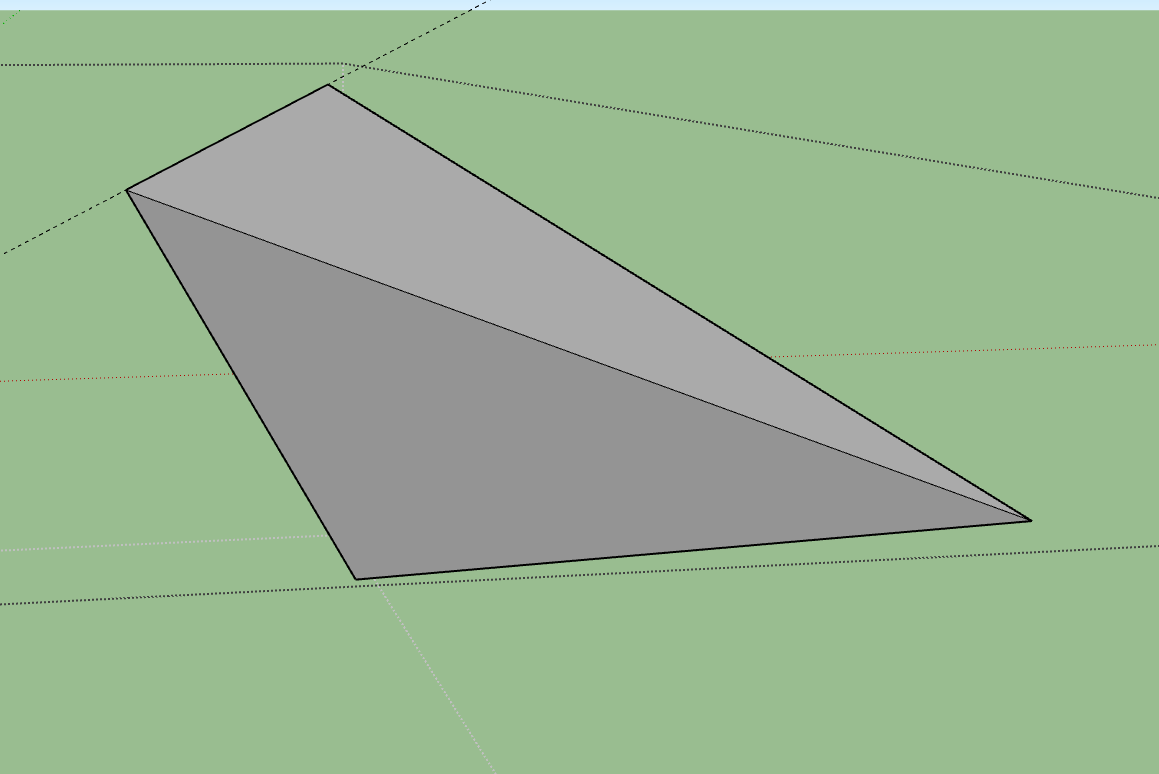
I'm trying to twist a plane with box twisting. All I've got so far is this (image). From the videos, I can't really figure out how to twist one end down and have an even twist along the length of the plane. This is a simple rectangular shape drawn on the incline.
Edit-- actually what I wanted to do is twist a rectangle with the axis along one side. I wondered if this could be done with the Fredoscale Twist tool. At least the first edge which is the center of rotation needs to stay straight. The face needs to be warped. The other edges could warp or not.
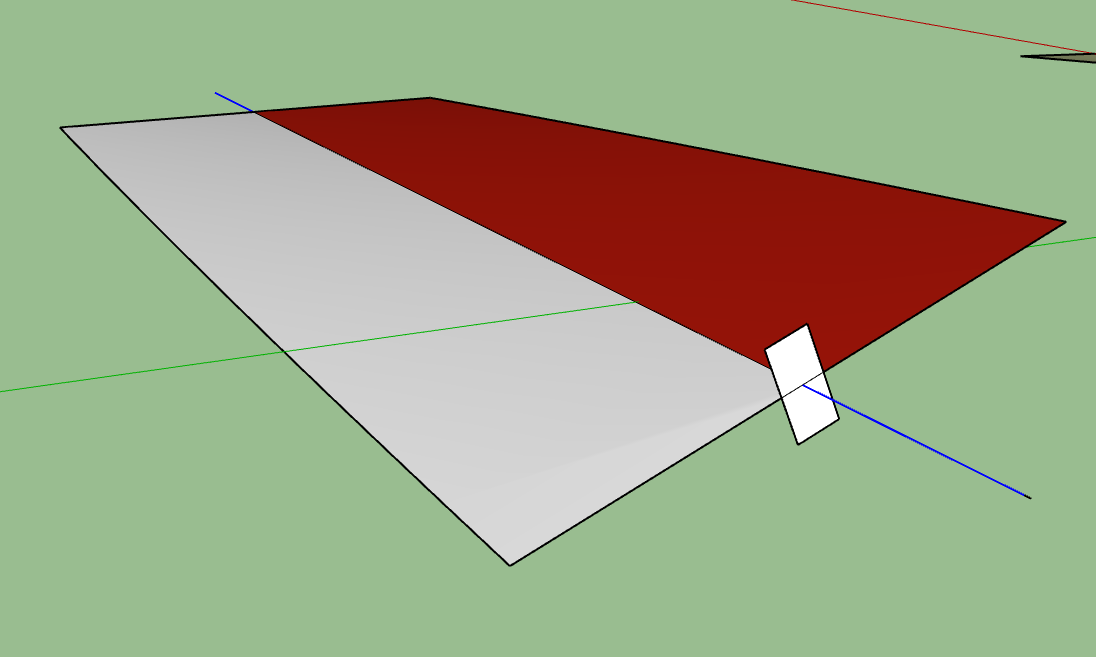
Edit 2-- I found one way to do it with the Twist tool. in the second picture: the group must be 3d so I added a rectangle centered on the side for the rotation axis. I added a copy of the long rectangle so the axis is the center of the group. In the image I want the red surface only. Blue lines added to show the axis (which remains straight and unmoved).
-
Hi, I have a question regarding the plugin, I can't find an answer anywhere.
I use the FredoScale plugin a lot for woodworking, and there is a feature that is bugging me. Every time the tool is used on a cabinet it automatically makes all components unique. This is good for most part but I would love to be able to toggle this on and off. What I am looking for is for the plugin to not make my cabinet sides components unique if I am only making a cabinet from 600 mm to 900mm in length, only to make them unique if I modify the depth or height but also recognize that is the same component and keep them linked together, creating only a new component definition for both sides.If this is already possible pls help me understand how to do that and if not could it be done ?
-
FredoScale says it will run on Sketchup 6 or latter, but the current LibFredo6 only runs on SU2017

Is there a link to a version of LibFredo6 < 10 that I can use with FredoScale to be able to run on Sketchup 7 ?
(No, I'm unable to update to a later version of Sketchup.)
Thanks.
-
There are legacy versions of Fredo's Lib and several of his extensions still available in the PluginStore.
Labelled 'Prior'.
https://sketchucation.com/pluginstore?listtype=1&author=0&category=0&search=prior&submit=%3F
Not sure about FredoScale ?
But the legacy Lib on it's own with an older FS might work...






Advertisement