[Plugin][$] FredoScale - v3.6a - 01 Apr 24




-
@unknownuser said:
I have two major problems with the plugin: I can't see the new scaling icon on toolbar and I could not find it on settings webdialog.
Second problem is shown in the images below. It seems that stretching is made accordingly with global axis, not component's orientation.
I have the last plugin and LibFredo3.7-
There is no new scaling icon
-
you need first to orientate the scaling box. Just click on the long edge of your component.
Fredo
-
-
@unknownuser said:
Hi Fredo,
I notice that this latest release isn't found via the 'Check for Update' feature within SU?
Rich,
You are right. Thanks.
I just published the notice for the version 2.2a.Fred
-
@unknownuser said:
- There is no new scaling icon
This post mislead me http://forums.sketchucation.com/viewtopic.php?f=323&t=17948&p=344976#p343978 In the image are two scaling icons on toolbar
@unknownuser said:
- you need first to orientate the scaling box. Just click on the long edge of your component.
Fredo
Strange, I haven't done that before... is it a new feature? Also it is possible that I never was into position to stretch rotated components

Thanks for the tip. What about components that don't have edges collinear with axis orientation, how do we orientate the scaling box then? -
@dereeei
You can have extra icons that are 'scale to target' enabled. Check the documentation to see what they care.
@Fredo
Your first post still has the January version as the current download version under the download icon. The file is correct but the text suggests an older version.
-
@unknownuser said:
- There is no new scaling icon
Just go to Fredo6 Collection > FredoScale > Default Parameters.... Scroll down the dialog box and you'll find check boxes to enable additional icons. Note that whether icons are visible or not, the menu entry for all commands is always available. The icons you talk about are Scale to Target and Stretch to Target
@unknownuser said:
- What about components that don't have edges collinear with axis orientation, how do we orientate the scaling box then?
First you can orientate the box by clicking on any line or face in the model. The line or face does not have to be in the component.
Second, you can also orientate the box along the local axes of the component. Just use the Arrows.
All details are explained in the documentation which is available from within Sketchup (Fredo6 Collection > FredoScale > Documentation...)Fredo
-
Hi, this is a lovely pugin, however there appears to be an issue concerning the context menu in other tools becoming greyed-out when it is enabled... http://sketchuptips.blogspot.com/2010/05/sketchup-context-menu-greyed-out.html
I don't fully understand the explanation at this above post link, but following the advice to disable FredoScale seems to fix the greyed out context menu...
Is there a fix in the pipeline ?
Anyway, it's a minor thing once one knows, & thanks for the good work. -
Hi Patrick,
That (my) blog post is over a year old, and I thought FredoScale had been updated to address the problem. I can not find a reference to it being fixed. Fredo will need to clarify.
-
Hmm, thanks & meantime I found this : http://forums.sketchucation.com/viewtopic.php?t=29032
which seems to sort the problem for me... so heh makes me happy as I have tons of things loaded that I use...
Hope one day Google gets 'round to making a loader/unloader for plugins that's easy to use...Anyhow, thanks to all you clever people who know how to ruby script !
-
A big thank you. This plugin will be saving me hours and hours of work!
-
Dear Fredo,
FYI, I updated to 2.2a today and found that the radial bending tool seems to break the ability to use ThomThom's UV Toolkit remember/restore feature. It works fine with 2.1a and I've gone back to that version for now. Just thought I'd make you aware of it.
Here's the link to my post in the UV Toolkit thread that explains the problem better. The combination of Fredoscale and the UV Toolkit to do things like curved brick arches is terrific!!
LINK: http://forums.sketchucation.com/viewtopic.php?p=346983#p346983
BTW, thanks for all of your hard work over the years! I've never had to chance to thank you. (I haven't posted here in a couple of years!)
-
Hey Adrian,
You are a sketchup hall of fame'er. I have always admired your worked. Good to see you posting on the board.
No doubt you've kept busy in chi'town and abroad with all that talent. -
Dear Pixel Artist,
The only difference between 2.2a and 2.1a is that FredoScale activates the Automatic Slicer by default in 2.2a (the slicer is toggled by key F4 and is shown with small orange ticks along the line of curvature).
If you bend a shape which is already sliced with enough granularity, you don't need the automatic slicer, and thus you would probably not alter the UV settings.This may be the explanation. Thanks to advise if this is the case.
Fredo
PS: I did the activation of Slicer by default in 2.2a because many users had problem to bend solid shapes like a simple cylinder and did not read the documentation to find out about the Slicer.
-
Awesome, Sorry I've been away. But excellent work
Should increase workflow no end -
Could you modify the Update-Check window? For now it just highlights with red the outdated plugins. It would be useful to link to plugin's forum page.
Thank you. -
@unknownuser said:
Could you modify the Update-Check window? For now it just highlights with red the outdated plugins. It would be useful to link to plugin's forum page.
Thank you.Not sure I understand.
In the check for update dialog box, the middle column ("info") is precisely the link to the Forum page.Do you get it?
Best is maybe to post a picture of the dialog box.
Thanks
Fredo
-
@unknownuser said:
Not sure I understand.
In the check for update dialog box, the middle column ("info") is precisely the link to the Forum page.Do you get it?
Best is maybe to post a picture of the dialog box.
Thanks
Fredo
Thanks for pointing it to me. I only hovered on left column. I guess my I expected the entire line to be a link
 So, when I saw that nothing happens, I never thought to try the underlined Info text.
 -
Is it a bug, or I do something wrong?
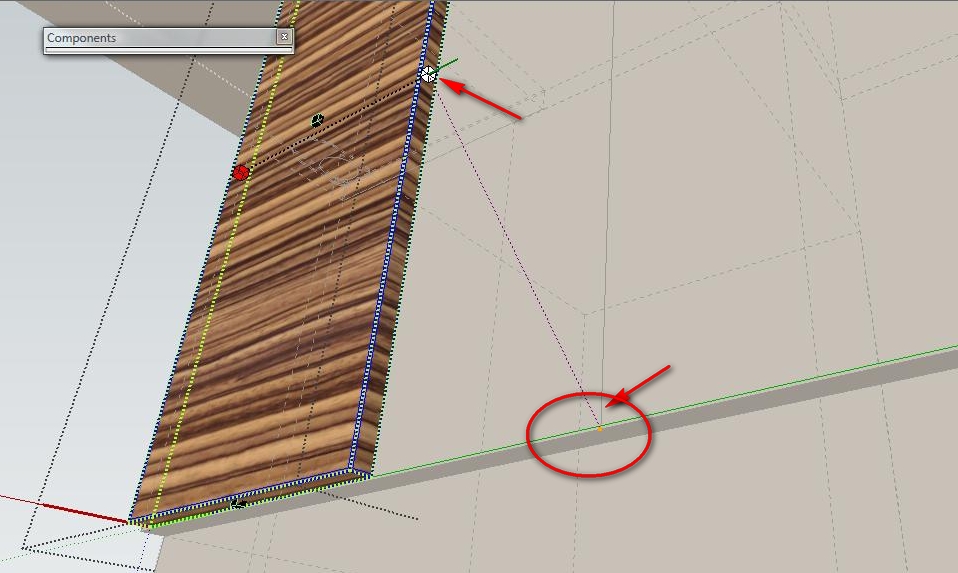
The inference for scaling don't work in certain situations. Please see the image. Is not the first time when it happens.
I tried to scale the door, to meet a line which was drawn in a group outside door component. The door scaled arbitrary.Thank you very much.
-
@unknownuser said:
Is it a bug, or I do something wrong?
The inference for scaling don't work in certain situations. Please see the image. Is not the first time when it happens.
I tried to scale the door, to meet a line which was drawn in a group outside door component. The door scaled arbitrary.Thank you very much.
This may be normal. I did not invest enough time in this, so it is not bullet proof. It may be even work in some views and not in another one.
Fredo
-
@unknownuser said:
This may be normal. I did not invest enough time in this, so it is not bullet proof. It may be even work in some views and not in another one.
FredoSome time ago I played with projections and seems to not be too hard (like inference lock), is this somehow different? Is it any hope that this feature will be improved? It would be really nice.
Thanks -
Hi,
I have download the fredoscale plugin and the libfredo library.This is a wonderful tool and seems to be ok except the fact that when i click the default parameter option (Tools/Fredo6 collection/Fredoscale/Default parameters...), nothing happen.
I just receive a message in the status bar "Load all ruby files for plugin FredoScale --> 40 ms"
Other hunction seems to run well.
I have tried to uninstall Sketchup and made a new installation of the program and the plugin but nothing happened.
Can you help me please ?
I'm running Sketchup 8 (free version 0 in Windows 7 environment.
Richard G.





Advertisement