sketchucation logo sketchucation
    • 登入
    Oops, your profile's looking a bit empty! To help us tailor your experience, please fill in key details like your SketchUp version, skill level, operating system, and more. Update and save your info on your profile page today!
    🔌 Smart Spline | Fluid way to handle splines for furniture design and complex structures. Download

    [Plugin][$] FredoScale - v3.6a - 01 Apr 24


    已排程 已置頂 已鎖定 已移動 Plugins
    1.1k 貼文 345 Posters 2.4m 瀏覽 342 Watching
    正在載入更多貼文
    • 從舊到新
    • 從新到舊
    • 最多點贊
    回覆
    • 在新貼文中回覆
    登入後回覆
    此主題已被刪除。只有擁有主題管理權限的使用者可以查看。
    • D 離線
      Daniel S
      最後由 編輯

      The latest Lib6Protractor.rb works very well like the native SU tool.

      Thank you Again!!!

      Daniel S

      1 條回覆 最後回覆 回覆 引用 0
      • Jean-FrancoJ 離線
        Jean-Franco
        最後由 編輯

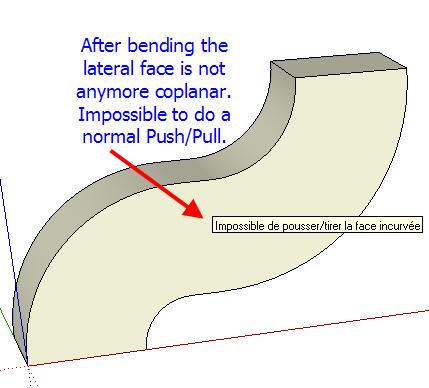
        Hi, Fredo I've a recurent problem after bending. See my picture.
        Any idea of what happens ?
        FreeScale_20_problem.jpg

        Jean-Franco

        1 條回覆 最後回覆 回覆 引用 0
        • thomthomT 離線
          thomthom
          最後由 編輯

          @jean-franco said:

          Hi, Fredo I've a recurent problem after bending. See my picture.
          Any idea of what happens ?

          They are still co-planar. But there is hidden lines created there. Turn on Hidden Geometry and erase the lines on that surface and you can do a regular push/pull.

          Thomas Thomassen — SketchUp Monkey & Coding addict
          List of my plugins and link to the CookieWare fund

          1 條回覆 最後回覆 回覆 引用 0
          • fredo6F 離線
            fredo6
            最後由 編輯

            Very simple;
            If you show hidden geometry you'll see all the subface.
            In your case, you can easily clean up all those coplanar edges, and then have a surface you can push pull with the native Sketchup tool.

            Fredo

            Actually, I could have the script do the clean up of coplanar edges automatically as an option. Maybe I'll do that.

            1 條回覆 最後回覆 回覆 引用 0
            • Chris FullmerC 離線
              Chris Fullmer
              最後由 編輯

              @unknownuser said:

              Actually, I could have the script do the clean up of coplanar edges automatically as an option. Maybe I'll do that.

              +1 for that idea.

              Great Plugin!

              Chris

              Lately you've been tan, suspicious for the winter.
              All my Plugins I've written

              1 條回覆 最後回覆 回覆 引用 0
              • Jean-FrancoJ 離線
                Jean-Franco
                最後由 編輯

                Thank you all, effectively I missed the point !

                Jean-Franco

                1 條回覆 最後回覆 回覆 引用 0
                • D 離線
                  Daniel S
                  最後由 編輯

                  I make alternative icons and cursors for this plugin:

                  FreeScale Icons.jpg

                  Here you can download:

                  IMAGES_Alternative1.zip

                  Extract into FREESCALE_Dir_20 and set this ones in "Tools>Fredo6 Collection>Free Scale>Default Parameters"

                  Daniel S

                  1 條回覆 最後回覆 回覆 引用 0
                  • Dave RD 離線
                    Dave R
                    最後由 編輯

                    Daniel, thank you for those alternative icons. They look nice. For some reason I seem to be missing the tools in the 2nd, 4th, 6th and 9th positions on your toolbar. They did copied into the directory, though. It looks like I'm missing the ones with the target.

                    Etaoin Shrdlu

                    %

                    (THERE'S NO PLACE LIKE)

                    G28 X0.0 Y0.0 Z0.0

                    M30

                    %

                    1 條回覆 最後回覆 回覆 引用 0
                    • fredo6F 離線
                      fredo6
                      最後由 編輯

                      Dave,

                      It might simply be that the icons were not 'enabled'. So, whether with Daniel's or the standard icons, they won't show up.
                      Just go to FreeScale default parameters to select the ones you want to appear in the toolbar.

                      Fredo

                      1 條回覆 最後回覆 回覆 引用 0
                      • Dave RD 離線
                        Dave R
                        最後由 編輯

                        Thanks Fredo. Dumb question then. In which menu do I find "FreeScale default parameters"? I've looked but don't seem to see it.

                        I found LibFredo6 Settings>Default Parameters

                        Etaoin Shrdlu

                        %

                        (THERE'S NO PLACE LIKE)

                        G28 X0.0 Y0.0 Z0.0

                        M30

                        %

                        1 條回覆 最後回覆 回覆 引用 0
                        • thomthomT 離線
                          thomthom
                          最後由 編輯

                          @dave r said:

                          Thanks Fredo. Dumb question then. In which menu do I find "FreeScale default parameters"? I've looked but don't seem to see it.

                          Tools->Fredo Collection

                          Thomas Thomassen — SketchUp Monkey & Coding addict
                          List of my plugins and link to the CookieWare fund

                          1 條回覆 最後回覆 回覆 引用 0
                          • J 離線
                            jmmad
                            最後由 編輯

                            Nice Icons

                            Thxs Daniel S

                            Get Upa !

                            1 條回覆 最後回覆 回覆 引用 0
                            • mitcorbM 離線
                              mitcorb
                              最後由 編輯

                              Hi, Fredo:
                              Thank you for an excellent group of tools.
                              I am attaching a skp.I was testing the FS plugin on my machine and in the process I created what looks like a proxy after a stretch operation on the grey portion,and then a bend. I pulled the "proxy" away from the parent. I don't understand why these things became groups.
                              By the way, do I need to download the updated rubies you provided in later posts?


                              freescale20 test skp

                              I take the slow, deliberate approach in my aimless wandering.

                              1 條回覆 最後回覆 回覆 引用 0
                              • fredo6F 離線
                                fredo6
                                最後由 編輯

                                @mitcorb said:

                                Hi, Fredo:
                                Thank you for an excellent group of tools.
                                I am attaching a skp.I was testing the FS plugin on my machine and in the process I created what looks like a proxy after a stretch operation on the grey portion,and then a bend. I pulled the "proxy" away from the parent. I don't understand why these things became groups.

                                That's a bug, already signaled by Daniel S. I may have fixed it.
                                For Stretch, you have to know that I have to enclose the natural geometry in a group in order to keep it in the selection. It is exploded at the end. The drawback is that if you do an undo outside the tool or if something goes wrong, you may end up with the group still there. In general, it is better to enclose natural geometry at model level within a group or component.

                                @mitcorb said:

                                By the way, do I need to download the updated rubies you provided in later posts?

                                I'll publish a new version soon. So you must not bother with the individual rubies posted here and there in this thread.

                                1 條回覆 最後回覆 回覆 引用 0
                                • jeff hammondJ 離線
                                  jeff hammond
                                  最後由 編輯

                                  @dave

                                  http://homepage.mac.com/jeffhammond/.Public/scf/screen4.jpg

                                  [edit] oops..nevermind.. i'll leave the image though as another mac vs. pc thing 😄
                                  [edit2] switched it to a link.. too late for me to delete this post..sorry for the clutter.

                                  dotdotdot

                                  1 條回覆 最後回覆 回覆 引用 0
                                  • mitcorbM 離線
                                    mitcorb
                                    最後由 編輯

                                    Thanks, again. Amazing tools.

                                    I take the slow, deliberate approach in my aimless wandering.

                                    1 條回覆 最後回覆 回覆 引用 0
                                    • P 離線
                                      pichuneke
                                      最後由 編輯

                                      I have started the translation to spanish. Don't worry Fredo6 😉

                                      Forgive my spanglish...

                                      1 條回覆 最後回覆 回覆 引用 0
                                      • P 離線
                                        putnik
                                        最後由 編輯

                                        Incredible set of tools! Thank you Fredo6! Thank you Daniel S for the alt icons too

                                        http://keshas.info

                                        1 條回覆 最後回覆 回覆 引用 0
                                        • majidM 離線
                                          majid
                                          最後由 編輯

                                          hi all!
                                          if I was mr. GOOGLE...then i'd ...Fredo6...
                                          what is best fit in blank area? please say your opinion 😄
                                          thanx again Fredo6

                                          My inspiring A, B, Sketches book: https://sketchucation.com/shop/books/intermediate/2612-alphabet-inspired-sketches--inspiring-drills-for-architects--3d-artists-and-designers-

                                          1 條回覆 最後回覆 回覆 引用 0
                                          • E 離線
                                            Ecuadorian
                                            最後由 編輯

                                            I'll propose another phrase:
                                            Fredo should be Google's VP of product development.

                                            -Miguel Lescano
                                            Subscribe to my house plans YouTube channel! (30K+ subs)

                                            1 條回覆 最後回覆 回覆 引用 0
                                            • 1
                                            • 2
                                            • 51
                                            • 52
                                            • 53
                                            • 54
                                            • 55
                                            • 56
                                            • 57
                                            • 53 / 57
                                            • 第一個貼文
                                              最後的貼文
                                            Buy SketchPlus
                                            Buy SUbD
                                            Buy WrapR
                                            Buy eBook
                                            Buy Modelur
                                            Buy Vertex Tools
                                            Buy SketchCuisine
                                            Buy FormFonts

                                            Advertisement








