sketchucation logo sketchucation
    • Conectarse
    Oops, your profile's looking a bit empty! To help us tailor your experience, please fill in key details like your SketchUp version, skill level, operating system, and more. Update and save your info on your profile page today!
    🔌 Smart Spline | Fluid way to handle splines for furniture design and complex structures. Download

    [Plugin][$] FredoScale - v3.6a - 01 Apr 24


    Programado Fijo Cerrado Movido Plugins
    1.1k Mensajes 345 Posters 2.4m Visitas 342 Watching
    Cargando más mensajes
    • Más antiguo a más nuevo
    • Más nuevo a más antiguo
    • Mayor número de Votos
    Responder
    • Responder como tema
    Accede para responder
    Este tema ha sido borrado. Solo los usuarios que tengan privilegios de administración de temas pueden verlo.
    • B Desconectado
      bricofranck59
      Última edición por

      Hello
      Merci beaucoup, ce plugin est vraiment formidable
      Francis

      1 Respuesta Última respuesta Responder Citar 0
      • G Desconectado
        griffeur
        Última edición por

        Hi!

        Do you know how can I do something like the "scaling by reference" in autocad? The scaling target mode doesn't seem to work in the same way. Thanks!

        1 Respuesta Última respuesta Responder Citar 0
        • fredo6F Desconectado
          fredo6
          Última edición por

          @griffeur said:

          Hi!

          Do you know how can I do something like the "scaling by reference" in autocad? The scaling target mode doesn't seem to work in the same way. Thanks!

          This is an interesting function which is not supported by FredoScale exactly in the same way. The Scale to Target requires that you scale in the same direction than the target points (even if they can be taken from anywhere in the model).
          The idea behind is to perform the scaling (or other) transformation which brings the origin to the target.

          Maybe I'll add the feature in a next release.

          Fredo

          1 Respuesta Última respuesta Responder Citar 0
          • G Desconectado
            griffeur
            Última edición por

            Thanks! This kind of Scaling is realy important for me in architecture modeling(plan scaling, etc...)

            1 Respuesta Última respuesta Responder Citar 0
            • pbacotP Desconectado
              pbacot
              Última edición por

              Giffeur,

              Meanwhile you might want to make use of the tape measure tool for this sort of scaling. In this case you would work inside a group. It would require (in the example of the door) first measuring the opening, then rescale the door using the tape measure tool (from inside door group) to define the opening width. You then have to move the door back into position. Much longer than autocad version but works, and might be quite fast for some uses, once you are used to it. It will scale in all directions though. There are videos showing how to use the tape measure tool this way.

              It is a good way to rescale a whole 2d plan using a known dimension.

              Peter

              MacOSX MojaveSketchUp Pro v19 Twilight v2 Thea v3 PowerCADD

              1 Respuesta Última respuesta Responder Citar 0
              • B Desconectado
                ByKAz
                Última edición por

                Hi Fredo, I have been using the FredoScale on my Imac OS 10.5 (Leopard) without any problem.
                I change it for a new Imac OS 10.7 (Lion) and FredoScale crashes a lot, I'm not sure whats happening...
                Could you help me with this issue!??!?!

                Anyway, the FredoScale is the best plugin ever...

                1 Respuesta Última respuesta Responder Citar 0
                • R Desconectado
                  racer13
                  Última edición por

                  For some reason the plugin stopped working for me. I don't know what happened. There isn't any error message that comes up or anything, it just doesn't work properly. For example, when I try to use the radial bend tool on say a long rectangular box, my complete process is

                  1. draw a rectangle that is long on the red axis and very skinny on the green axis.

                  2. push/pull that rectangle to a height that makes the vertical green axis, the skinny one, almost a square, so you have a long bar, not a tall plane.

                  3. select the radial bend tool from the toolbar.

                  4. select the box just made on the red axis face.

                  5. drag the line to bend from away from the center axis, or away from the person.

                  6. tell it to bend up.

                  7. confirm.

                  Result is a diagonal box with the face along the green axis line vertical and normal and the opposite face at some weird angle up in the air. No curve or bend at all. But the weirder thing is that really weird that confuses me is that if I try it on person then it works fine. I added other plugins and already tried disabling those, but it still didn't work. And it used to work before. Can someone explain to me what to do or even whats wrong? Thanks, because I love this plugin!

                  1 Respuesta Última respuesta Responder Citar 0
                  • fredo6F Desconectado
                    fredo6
                    Última edición por

                    @racer13 said:

                    Result is a diagonal box with the face along the green axis line vertical and normal and the opposite face at some weird angle up in the air. No curve or bend at all. But the weirder thing is that really weird that confuses me is that if I try it on person then it works fine. I added other plugins and already tried disabling those, but it still didn't work. And it used to work before. Can someone explain to me what to do or even whats wrong? Thanks, because I love this plugin!

                    You need to activate the slicer (Key F4) to slice automatically the shape. Otherwise, since there is no intermediate slice, it would not bend, but just shear.

                    Fredo

                    1 Respuesta Última respuesta Responder Citar 0
                    • fredo6F Desconectado
                      fredo6
                      Última edición por

                      @bykaz said:

                      Hi Fredo, I have been using the FredoScale on my Imac OS 10.5 (Leopard) without any problem.
                      I change it for a new Imac OS 10.7 (Lion) and FredoScale crashes a lot, I'm not sure whats happening...
                      Could you help me with this issue!??!?!

                      Anyway, the FredoScale is the best plugin ever...

                      I don't know too much, except that there have been many problem reported with OS X Lion. I think they are somehow solved with SU8 M2.

                      Anyway, it would be good to give some details on the circumstances of the crashes you have.

                      Fredo

                      1 Respuesta Última respuesta Responder Citar 0
                      • R Desconectado
                        racer13
                        Última edición por

                        Thanks, that fixed everything! Lesson: Don't play with settings you don't understand! Now I can use this fantastic plugin again! Thanks for creating such a wonderful and simple plugin that's free! I love it! It makes everything so much easier!

                        1 Respuesta Última respuesta Responder Citar 0
                        • B Desconectado
                          ByKAz
                          Última edición por

                          @unknownuser said:

                          @bykaz said:

                          Hi Fredo, I have been using the FredoScale on my Imac OS 10.5 (Leopard) without any problem.
                          I change it for a new Imac OS 10.7 (Lion) and FredoScale crashes a lot, I'm not sure whats happening...
                          Could you help me with this issue!??!?!

                          Anyway, the FredoScale is the best plugin ever...

                          I don't know too much, except that there have been many problem reported with OS X Lion. I think they are somehow solved with SU8 M2.

                          Anyway, it would be good to give some details on the circumstances of the crashes you have.

                          Fredo

                          I'll keep you posted, thanks for your time and consideration

                          1 Respuesta Última respuesta Responder Citar 0
                          • pep75P Desconectado
                            pep75
                            Última edición por

                            Hi SU-pers!

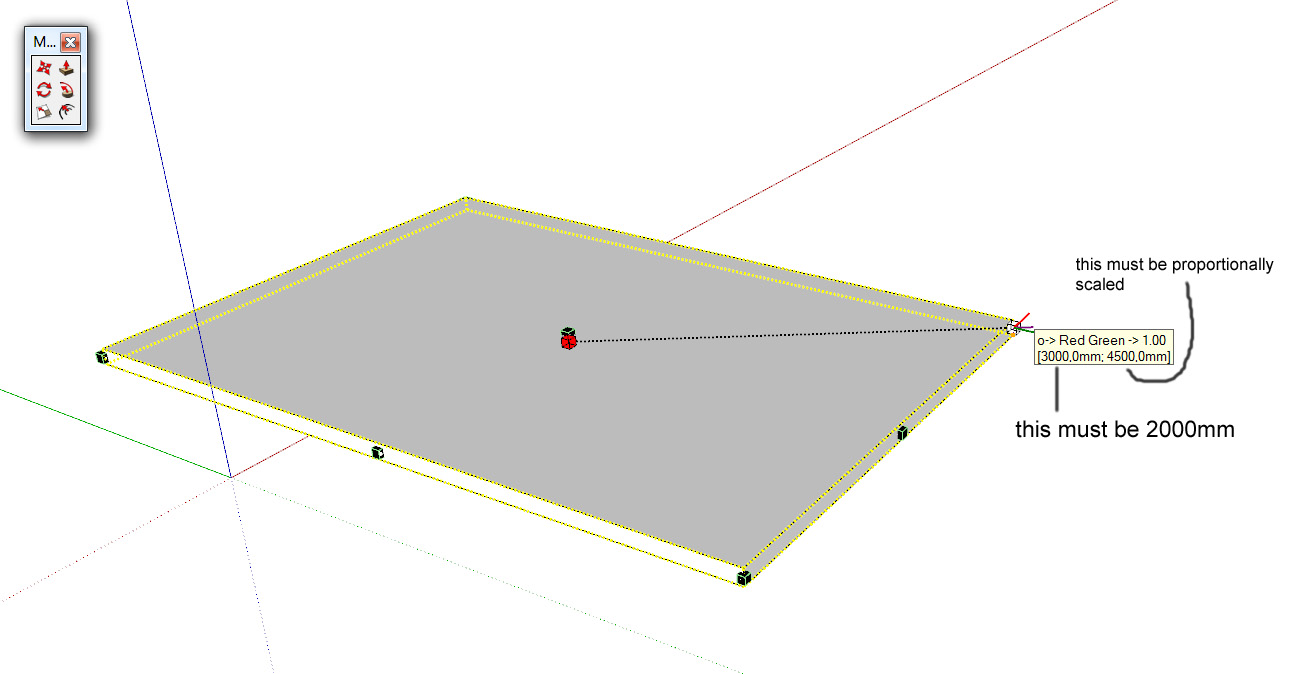
                            I've a little question and it's probably asked before. But I can't find it in this forum nor an answer in the manual. I want to scale a box(for instance) with the FredoScale-tool, and I want to scale that from the Centre (with the ctrl-key) and then input(TAB) ONLY the width(along the red axis). But this seems to be not possible without a length-input...It's hard to explain....But I only want to have one dimension fixed while scaling the object proportionally around its centre.
                            How can this been done, does anyone know that?
                            Thanks in advance!
                            Pep

                            scale issue.jpg

                            1 Respuesta Última respuesta Responder Citar 0
                            • J Desconectado
                              jcastro.arch
                              Última edición por

                              I am having a bit of an issue. I am running Mac OS Lion and I just tried to install your Fredo Scale 2.2 a and LibFredo6 and placed the folders in the approiate plugins... but I dont see any of the tools when I start up SketchUP. I was hoping someone had come accross this issue and found a fix, or knows something about this occurance. Any help would be greatly appreaciated. Thanks!

                              1 Respuesta Última respuesta Responder Citar 0
                              • pbacotP Desconectado
                                pbacot
                                Última edición por

                                Jonathan please post the file path. Click on the FredoScale_Dir22 folder and get info (command "i") and look at "where". The total path should read /Library/Application Support/Google SketchUp 8/SketchUp/plugins

                                MacOSX MojaveSketchUp Pro v19 Twilight v2 Thea v3 PowerCADD

                                1 Respuesta Última respuesta Responder Citar 0
                                • TIGT Conectado
                                  TIG Moderator
                                  Última edición por

                                  @jcastro.arch said:

                                  I am having a bit of an issue. I am running Mac OS Lion and I just tried to install your Fredo Scale 2.2 a and LibFredo6 and placed the folders in the approiate plugins... but I dont see any of the tools when I start up SketchUP. I was hoping someone had come accross this issue and found a fix, or knows something about this occurance. Any help would be greatly appreaciated. Thanks!
                                  At the risk of repeating ourselves yet again...
                                  Are you extracting files from the zip correctly ?
                                  Are you also getting and installing the required Lib' folder of supporting tools as advised on the download page ?
                                  What 'Plugins folder' are you putting things into on your MAC ?
                                  The root[HD]...Library...Plugins is good, user...Library...Plugins is bad.
                                  There are several helpful posts about how to extract and install plugins...
                                  Once everything is in the right folder[s] a restart will make the tool available.
                                  Activate it from Preferences > Extensions.
                                  Active it toolbar from View > Toolbars [slightly different name on a MAC ?].
                                  Customize what appears on the tool's toolbar using the special menu items as explained in the tools help docs/pages...

                                  TIG

                                  1 Respuesta Última respuesta Responder Citar 0
                                  • Dave RD Desconectado
                                    Dave R
                                    Última edición por

                                    Just a note, on Mac, Preferences are found under the SketchUp menu to the left of File.

                                    Etaoin Shrdlu

                                    %

                                    (THERE'S NO PLACE LIKE)

                                    G28 X0.0 Y0.0 Z0.0

                                    M30

                                    %

                                    1 Respuesta Última respuesta Responder Citar 0
                                    • jeff hammondJ Desconectado
                                      jeff hammond
                                      Última edición por

                                      holy crap!

                                      that's perfect!

                                      👍 👍

                                      dotdotdot

                                      1 Respuesta Última respuesta Responder Citar 0
                                      • utilerU Desconectado
                                        utiler
                                        Última edición por

                                        @unknownuser said:

                                        holy crap!

                                        that's perfect!

                                        👍 👍

                                        That is perfect, Fredo!!!!

                                        @Jeff - thanks for the challenge, I wasted hours on that bloody thing!!!! 😉

                                        Just Curious...

                                        1 Respuesta Última respuesta Responder Citar 0
                                        • Dave RD Desconectado
                                          Dave R
                                          Última edición por

                                          Thank you Fredo.

                                          And yes, Jeff, thanks for the challenge. I won't ever do it the hard way again.

                                          Etaoin Shrdlu

                                          %

                                          (THERE'S NO PLACE LIKE)

                                          G28 X0.0 Y0.0 Z0.0

                                          M30

                                          %

                                          1 Respuesta Última respuesta Responder Citar 0
                                          • pilouP Desconectado
                                            pilou
                                            Última edición por

                                            Vital Addition! 👍

                                            I must try it for see if that gives the same result than a nurbs modeler! 😉

                                            So YES this time seems very good! 😎

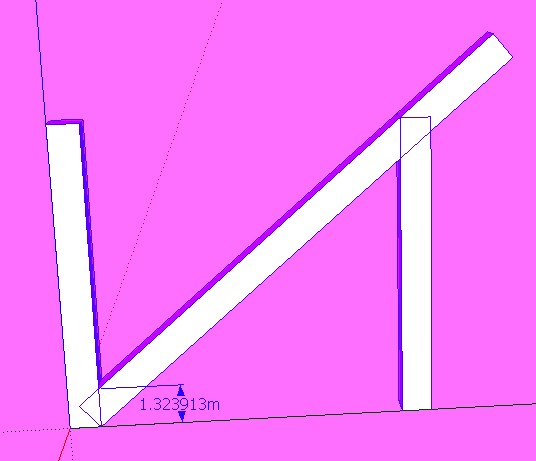
                                            1.3239127 Nurbs (height of brace cut vertically) Pilars are 1 * 1 * 10 , brace 1 * 1 * x : unity meter
                                            1.323913m SU

                                            yes.jpg

                                            Frenchy Pilou
                                            Is beautiful that please without concept!
                                            My Little site :)

                                            1 Respuesta Última respuesta Responder Citar 0
                                            • 1
                                            • 2
                                            • 32
                                            • 33
                                            • 34
                                            • 35
                                            • 36
                                            • 56
                                            • 57
                                            • 34 / 57
                                            • First post
                                              Last post
                                            Buy SketchPlus
                                            Buy SUbD
                                            Buy WrapR
                                            Buy eBook
                                            Buy Modelur
                                            Buy Vertex Tools
                                            Buy SketchCuisine
                                            Buy FormFonts

                                            Advertisement





