sketchucation logo sketchucation
    • Login
    Oops, your profile's looking a bit empty! To help us tailor your experience, please fill in key details like your SketchUp version, skill level, operating system, and more. Update and save your info on your profile page today!
    Mac User? | Join the Rayscaper Beta for Mac Learn More

    [Plugin Library] LibFredo6 - v16.3b - 21 Oct 26


    Scheduled Pinned Locked Moved Plugins
    2.3k Posts 593 Posters 13.7m Views 595 Watching
    Loading More Posts
    • Oldest to Newest
    • Newest to Oldest
    • Most Votes
    Reply
    • Reply as topic
    Log in to reply
    This topic has been deleted. Only users with topic management privileges can see it.
    • G
      goyatea Newcomers
      last edited by

      The installation did not work for me. I received an error message when I tried to use the add command. Any ideas?

      Rich O BrienR 1 Reply Last reply
      Reply Quote 0
      • Rich O BrienR
        Rich O Brien Moderator @goyatea
        last edited by

        @goyatea said:

        I received an error message

        Please share the error message, your SketchUp version and Operating System

        Download the free D'oh Book for SketchUp đź“–

        1 Reply Last reply
        Reply Quote 0
        • G
          goyatea Newcomers
          last edited by

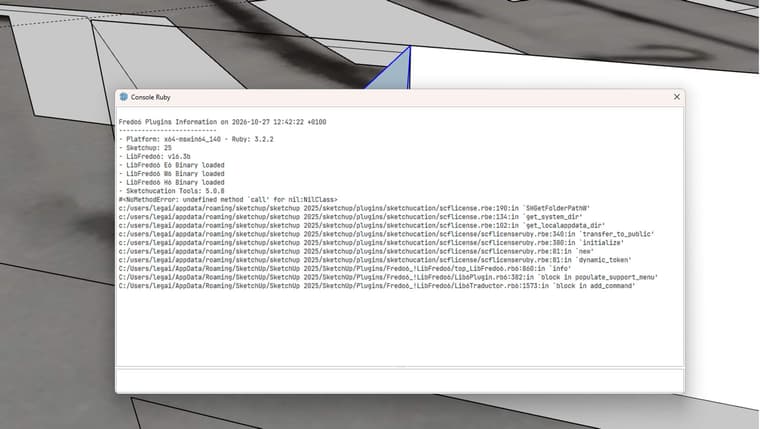
          Ruby error message :

          Fredo6 Plugins Information on 2026-10-27 12:42:22 +0100

          • Platform: x64-mswin64_140 - Ruby: 3.2.2
          • Sketchup: 25.0.571
          • LibFredo6: v16.3b
          • LibFredo6 E6 Binary loaded
          • LibFredo6 W6 Binary loaded
          • LibFredo6 H6 Binary loaded
          • Sketchucation Tools: 5.0.8
            #<NoMethodError: undefined method call' for nil:NilClass> c:/users/legai/appdata/roaming/sketchup/sketchup 2025/sketchup/plugins/sketchucation/scflicense.rbe:190:in SHGetFolderPathW'
            c:/users/legai/appdata/roaming/sketchup/sketchup 2025/sketchup/plugins/sketchucation/scflicense.rbe:134:in get_system_dir' c:/users/legai/appdata/roaming/sketchup/sketchup 2025/sketchup/plugins/sketchucation/scflicense.rbe:102:in get_localappdata_dir'
            c:/users/legai/appdata/roaming/sketchup/sketchup 2025/sketchup/plugins/sketchucation/scflicense/scflicenseruby.rbe:340:in transfer_to_public' c:/users/legai/appdata/roaming/sketchup/sketchup 2025/sketchup/plugins/sketchucation/scflicense/scflicenseruby.rbe:380:in initialize'
            c:/users/legai/appdata/roaming/sketchup/sketchup 2025/sketchup/plugins/sketchucation/scflicense/scflicenseruby.rbe:81:in new' c:/users/legai/appdata/roaming/sketchup/sketchup 2025/sketchup/plugins/sketchucation/scflicense/scflicenseruby.rbe:81:in dynamic_token'
            C:/Users/legai/AppData/Roaming/SketchUp/SketchUp 2025/SketchUp/Plugins/Fredo6_!LibFredo6/top_LibFredo6.rb6:860:in info' C:/Users/legai/AppData/Roaming/SketchUp/SketchUp 2025/SketchUp/Plugins/Fredo6_!LibFredo6/Lib6Plugin.rb6:382:in block in populate_support_menu'
            C:/Users/legai/AppData/Roaming/SketchUp/SketchUp 2025/SketchUp/Plugins/Fredo6_!LibFredo6/Lib6Traductor.rb6:1573:in `block in add_command'
          1 Reply Last reply
          Reply Quote 0
          • G
            goyatea Newcomers
            last edited by

            error curviloft.jpg

            1 Reply Last reply
            Reply Quote 0
            • fredo6F
              fredo6
              last edited by

              Somethings is wrong is the installation of Sketchucation Tools.
              Could you

              1. go to the Plugin directory: c:/users/legai/appdata/roaming/sketchup/sketchup 2025/sketchup/plugins
              2. Delete the folder Sketchucation
              3. Reinstall Sketchucation tools from the Sketchucation site

              Please advise if this does not work.

              1 Reply Last reply
              Reply Quote 0
              • G
                goyatea Newcomers
                last edited by

                Thanks, it's working now.

                First, I deleted it, then I modified the signature authorisation in the warehouse extension. It was a signature issue.

                In SketchUp:
                Extensions → Extension Manager
                Click the ⚙️ Extension Manager Settings icon.
                You'll find “Extension Loading Policy” / “Extension Loading Preferences.”
                Select:
                “Approve Unidentified Extensions”
                Restart SketchUp.

                1 Reply Last reply
                Reply Quote 0
                • I
                  ID3D
                  last edited by

                  Bonjour
                  Avec la version 16.3b la fenĂŞtre traduction n'apparait plus sur tout les plugins frtedo6

                  fredo6F 1 Reply Last reply
                  Reply Quote 0
                  • fredo6F
                    fredo6 @ID3D
                    last edited by

                    @ID3D
                    which plugins for instance?

                    1 Reply Last reply
                    Reply Quote 0
                    • B
                      Bublifuk21 @fredo6
                      last edited by

                      @fredo6 please find attached.
                      Fredo6 Plugins Information on 2026-11-06 09:14:12 +0100

                      • Platform: x64-mingw32 - Ruby: 2.2.4
                      • Sketchup: 17.2.2555
                      • LibFredo6: v16.1g
                      • LibFredo6 G6 Binary loaded
                      • LibFredo6 E6 Binary NOT loaded
                      • Sketchucation Tools: 5.0.8
                      • SCFLicense: v7.5a - 80
                      • Fredo6 Plugins

                        Curviloft v2.0a - licensed FULL: 262837 - HE1772082497.0K
                        FredoScale v3.7c
                        JointPushPull v4.9a - licensed FULL: 263124 - HE1772082497.0K
                        RoundCorner v3.4a - licensed FULL: 263401 - HE1772082497.0K

                      • SCFLicense directory present

                        Signature File: 2026-02-26 06:08:17 +0100
                        Curviloft: 2026-02-26 06:08:26 +0100
                        JointPushPull: 2026-02-26 10:15:01 +0100
                        RoundCorner: 2026-03-02 12:08:45 +0100

                      1 Reply Last reply
                      Reply Quote 0
                      • S
                        studioae
                        last edited by

                        Hi, all. I'm running SU2027. I have LibFredo6 installed. I had several Fredo extensions installed, but have backed it off just to Curviloft as I troubleshoot.

                        The toolbars are present, buttons are there, but when pressed they do nothing. I have uninstalled, reinstalled, rebooted, etc., and none of that has changed anything.

                        Any ideas? Thanks.

                        fredo6F 1 Reply Last reply
                        Reply Quote 0
                        • fredo6F
                          fredo6 @studioae
                          last edited by

                          @studioae

                          Could you open the Ruby console before launching a plugin. If there are error showing up, copy and paste the text here.

                          1 Reply Last reply
                          Reply Quote 0

                          Hello! It looks like you're interested in this conversation, but you don't have an account yet.

                          Getting fed up of having to scroll through the same posts each visit? When you register for an account, you'll always come back to exactly where you were before, and choose to be notified of new replies (either via email, or push notification). You'll also be able to save bookmarks and upvote posts to show your appreciation to other community members.

                          With your input, this post could be even better đź’—

                          Register Login
                          • 1
                          • 2
                          • 3
                          • 4
                          • 5
                          • 6
                          • 7
                          • 115
                          • 116
                          • 5 / 116
                          • First post
                            Last post
                          Buy SketchPlus
                          Buy SUbD
                          Buy WrapR
                          Buy eBook
                          Buy Modelur
                          Buy Vertex Tools
                          Buy SketchCuisine
                          Buy FormFonts

                          Advertisement