sketchucation logo sketchucation
    • Login
    Oops, your profile's looking a bit empty! To help us tailor your experience, please fill in key details like your SketchUp version, skill level, operating system, and more. Update and save your info on your profile page today!
    Mac User? | Join the Rayscaper Beta for Mac Learn More

    [Plugin Library] LibFredo6 - v16.3b - 21 Oct 26


    Scheduled Pinned Locked Moved Plugins
    2.3k Posts 589 Posters 12.2m Views 591 Watching
    Loading More Posts
    • Oldest to Newest
    • Newest to Oldest
    • Most Votes
    Reply
    • Reply as topic
    Log in to reply
    This topic has been deleted. Only users with topic management privileges can see it.
    • Dave RD
      Dave R @fredo6
      last edited by

      @fredo6 should it be

      UI.openURL LibFredo6.sudir

      without the final period?

      Etaoin Shrdlu

      %

      (THERE'S NO PLACE LIKE)

      G28 X0.0 Y0.0 Z0.0

      M30

      %

      fredo6F 1 Reply Last reply
      Reply Quote 0
      • fredo6F
        fredo6 @Dave R
        last edited by

        @Dave-R said:

        UI.openURL LibFredo6.sudir

        without the final period?

        Yes, definitely. Good you point it out,

        1 Reply Last reply
        Reply Quote 0
        • M
          maria0p03 Newcomers
          last edited by

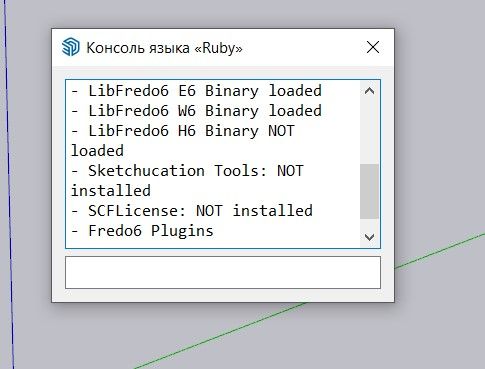
          After deleting the folder Fredo6_!LibFredo6 and reinstalling the plugin, the folder reappears, and the issue remains unresolved. In the "Fredo6 Plugins Information for SketchUcation Support" section, the console output looks like this:
          2.jpg

          TIGT fredo6F 2 Replies Last reply
          Reply Quote 0
          • TIGT
            TIG Moderator @maria0p03
            last edited by TIG

            @maria0p03

            The SketchUcation tools is not installed get its RBZ from the PluginStore, then install it using the Extension Manager...
            It installs the SCFLicensing stuff with it...

            TIG

            1 Reply Last reply
            Reply Quote 0
            • fredo6F
              fredo6 @maria0p03
              last edited by

              @maria0p03

              Could you please seelct the text IN the Ruby console and copy / paste it here. This will help to have a global view on your installation.

              B 1 Reply Last reply
              Reply Quote 0
              • B
                Bublifuk21
                last edited by TIG

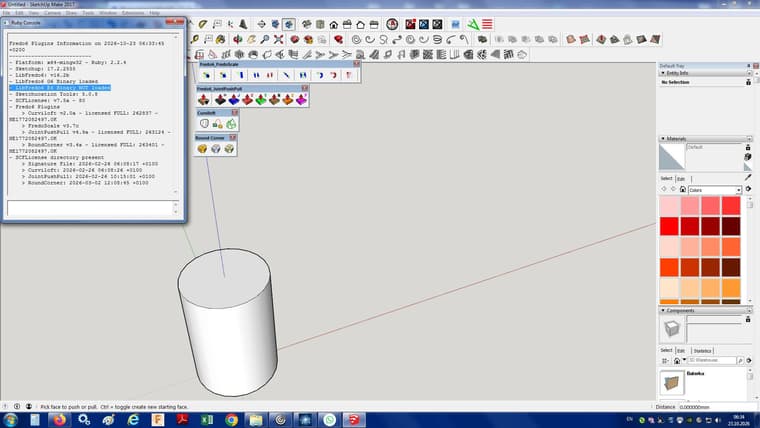
                I tried three different versions of LibFredo6. The version 15.8 b. On this version works all other plugins, except FredoScale, which I really need. On version 16.1 g, I can see Icons of FredoScale, but no one plugins is working. I can click on icon, but they are inactive. When I install version 16.2 or higher the icons of all plugins disappears and ruby console is empty. Aaaaarch. I delete LibFredo6 from root directory, but nothing help.

                1 Reply Last reply
                Reply Quote 0
                • B
                  Bublifuk21 @fredo6
                  last edited by

                  @fredo6 image.jpeg
                  Here is what is in ruby console. I dont know why is this not loaded. May be this is the problem. But how can I fix it? - LibFredo6 E6 Binary NOT loaded

                  fredo6F 1 Reply Last reply
                  Reply Quote 0
                  • fredo6F
                    fredo6 @Bublifuk21
                    last edited by

                    @Bublifuk21

                    Can you pleae select the text in the Ruby console and paste it here as text, no as screen capture.

                    I cannot help with partial information.

                    Thanks.

                    1 Reply Last reply
                    Reply Quote 0
                    • D
                      dingom
                      last edited by

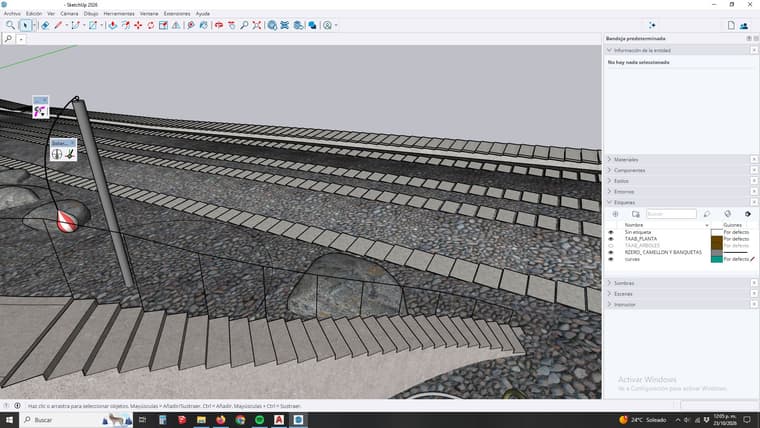
                      Hi! I can't install the plugin, it allways stays like this (see image), can somebody help me? thank you! !problem.jpg

                      Dave RD 1 Reply Last reply
                      Reply Quote 0
                      • Dave RD
                        Dave R @dingom
                        last edited by

                        @dingom said:

                        I can't install the plugin, it allways stays like this (see image)

                        What plugin are you trying to install? I can't see anything related to a problem with an extension in your screenshot. I do see you are using tags incorrectly but that doesn't have anything to do with installing extensions.

                        Etaoin Shrdlu

                        %

                        (THERE'S NO PLACE LIKE)

                        G28 X0.0 Y0.0 Z0.0

                        M30

                        %

                        1 Reply Last reply
                        Reply Quote 0
                        • TIGT
                          TIG Moderator
                          last edited by

                          As Dave says, your posts in the LibFredo6 thread says nothing about that ?
                          It does nothing on its own, but supports most of Fredo6's extensions.
                          If you are having problems with one of his extensions please post in its thread, and explain what the problem is with at least some clues so we can try and help you.
                          Also - as Dave points out - you have your active Tag [previously called 'layers'] set up wrongly - named 'Etiquetas' in your language. All geometry -i.e. edges and faces - should be made/associated with 'Untagged' - i.e. 'Sin etiqueta' - you can then assign different Tags to selected groups and component-instances, using the Entity Info panel ['Información de la entidad'] - later it can be used to control their visibility whilst modelling and editing...


                          TIG

                          1 Reply Last reply
                          Reply Quote 0

                          Hello! It looks like you're interested in this conversation, but you don't have an account yet.

                          Getting fed up of having to scroll through the same posts each visit? When you register for an account, you'll always come back to exactly where you were before, and choose to be notified of new replies (either via email, or push notification). You'll also be able to save bookmarks and upvote posts to show your appreciation to other community members.

                          With your input, this post could be even better šŸ’—

                          Register Login
                          • 1
                          • 2
                          • 103
                          • 104
                          • 105
                          • 106
                          • 107
                          • 114
                          • 115
                          • 105 / 115
                          • First post
                            Last post
                          Buy SketchPlus
                          Buy SUbD
                          Buy WrapR
                          Buy eBook
                          Buy Modelur
                          Buy Vertex Tools
                          Buy SketchCuisine
                          Buy FormFonts

                          Advertisement