sketchucation logo sketchucation
    • Login
    Oops, your profile's looking a bit empty! To help us tailor your experience, please fill in key details like your SketchUp version, skill level, operating system, and more. Update and save your info on your profile page today!
    ⚠️ Update | Sketchucation Tools 5.0.8 released with licensing improvements and bugfixes Download

    [Plugin Library] LibFredo6 - v16.2b - 22 Sep 26


    Scheduled Pinned Locked Moved Plugins
    2.2k Posts 583 Posters 9.1m Views 585 Watching
    Loading More Posts
    • Oldest to Newest
    • Newest to Oldest
    • Most Votes
    Reply
    • Reply as topic
    Log in to reply
    This topic has been deleted. Only users with topic management privileges can see it.
    • fredo6F
      fredo6
      last edited by

      NEW RELEASE: LibFredo6 v6.8c - 16 Jul 15

      LibFredo6 6.8c is a minor release fixing a blocking bug in FredoTools::Convexify

      See main post of this thread for Download of LibFredo6.

      Fredo

      1 Reply Last reply
      Reply Quote 0
      • romboutR
        rombout
        last edited by

        Hi there,

        Since 2-3 weeks i have a macbook pro with retina screen. Though the screen is very nice it does not work like you want with all applications.

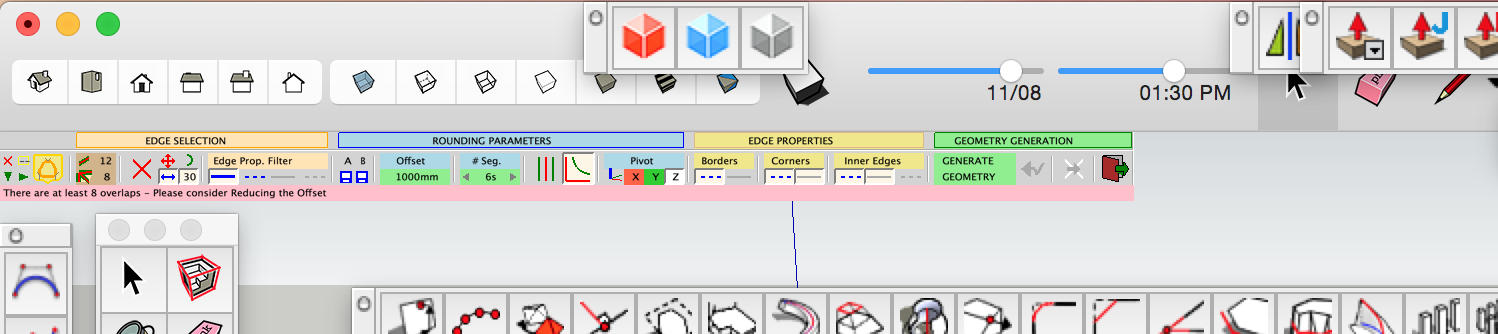
        In SU a lot of interfaces of plugins which rest in a corner for user interface are very small. In this screen shot its blown out cause retina doubling pixels, on real dimensions its very small.

        Is there a method i can scale this up?

        Screen Shot 2015-07-23 at 2.30.10 PM.png

        1 Reply Last reply
        Reply Quote 0
        • romboutR
          rombout
          last edited by

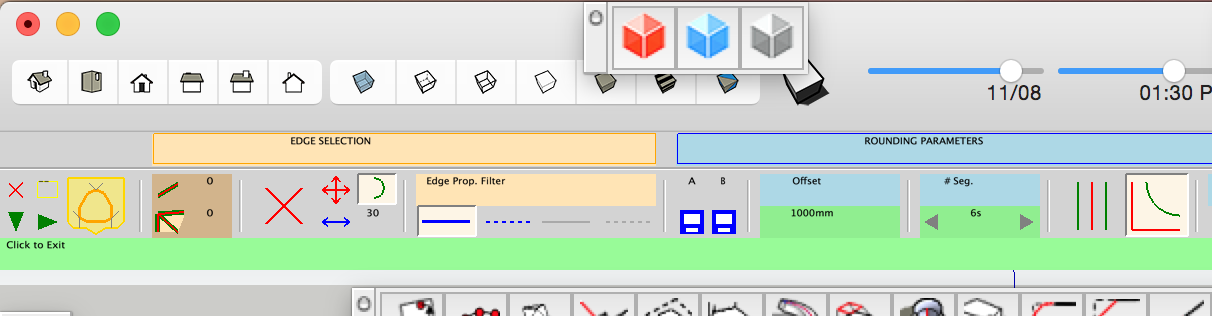
          Sorry hadnt tried a search first ...πŸ˜„ I noticed there's this Retina option, i checked and the menu is bigger. But font in menu is still very small. Can i enlarge this some how?

          Screen Shot 2015-07-23 at 2.45.57 PM.png

          1 Reply Last reply
          Reply Quote 0
          • fredo6F
            fredo6
            last edited by

            @rombout said:

            Sorry hadnt tried a search first ...πŸ˜„ I noticed there's this Retina option, i checked and the menu is bigger. But font in menu is still very small. Can i enlarge this some how?

            Unfortunately, the Ruby Sketchup API does not gve any control on the size of texts.

            But in some OSX Retina set up, it is possible to enlarge the character size by a system parametrization. So the Retina option of LibFredo6 is simply there to double the size of the graphical drawing, not more.

            There is a discussion at http://sketchucation.com/forums/viewtopic.php?f=15%26amp;t=56028%26amp;hilit=retina.
            you can also search for Retina keyword in the forum.

            Fredo

            1 Reply Last reply
            Reply Quote 0
            • G
              gonchai
              last edited by

              thanks

              1 Reply Last reply
              Reply Quote 0
              • V
                valerostudio
                last edited by

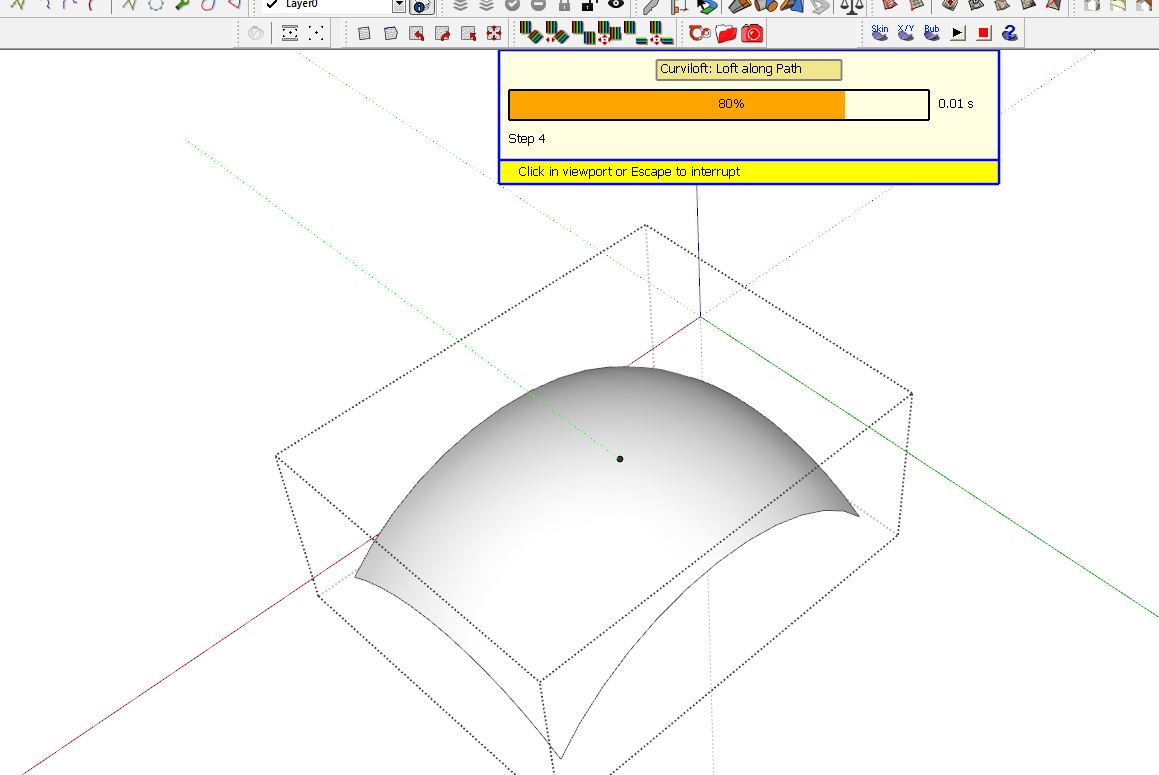
                Having an issue with Curviloft and this update. Toolbar doesn't open and I get this box. When I exit out of Curviloft and open ToolsOnSurface, the same Curviloft box now opens. Same issue happens with RoundCorner as well.
                Tools on.JPG

                1 Reply Last reply
                Reply Quote 0
                • Dave RD
                  Dave R
                  last edited by

                  Someone else contacted me about this and it turned out they had a lingering file from an older version of LibFredo6 still in their Plugins folder. Is it possible that the situation for you?

                  Etaoin Shrdlu

                  %

                  (THERE'S NO PLACE LIKE)

                  G28 X0.0 Y0.0 Z0.0

                  M30

                  %

                  1 Reply Last reply
                  Reply Quote 0
                  • fredo6F
                    fredo6
                    last edited by

                    @valerostudio said:

                    Having an issue with Curviloft and this update. Toolbar doesn't open and I get this box. When I exit out of Curviloft and open ToolsOnSurface, the same Curviloft box now opens. Same issue happens with RoundCorner as well.
                    [attachment=0:1ncmm8gs]<!-- ia0 -->Tools on.JPG<!-- ia0 -->[/attachment:1ncmm8gs]

                    Could you open the Ruby console and check if there are errors displayed.

                    Thanks

                    Fredo

                    1 Reply Last reply
                    Reply Quote 0
                    • G
                      gurnani
                      last edited by

                      how do i download this? i can't see a download link

                      1 Reply Last reply
                      Reply Quote 0
                      • Dave RD
                        Dave R
                        last edited by

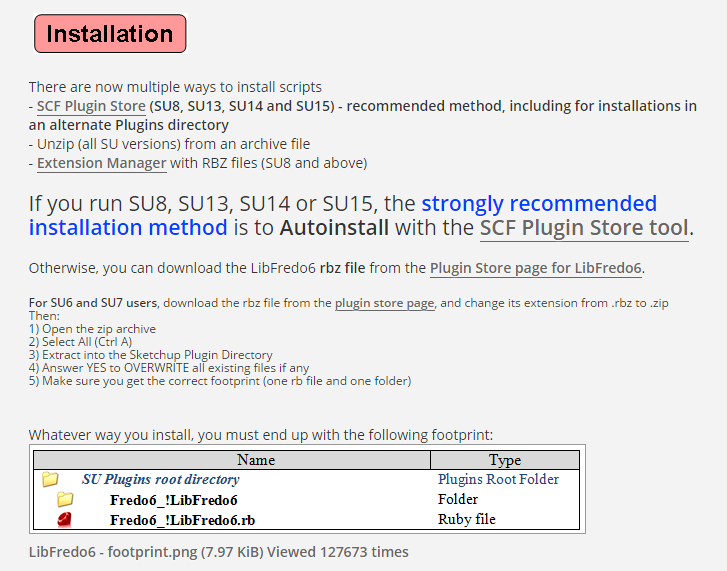
                        From the first post of this thread it's pretty clear.
                        Capture.PNG

                        Etaoin Shrdlu

                        %

                        (THERE'S NO PLACE LIKE)

                        G28 X0.0 Y0.0 Z0.0

                        M30

                        %

                        1 Reply Last reply
                        Reply Quote 0
                        • TIGT
                          TIG Moderator
                          last edited by

                          @gurnani said:

                          how do i download this? i can't see a download link
                          As Dave R just explained... There is a link in the very first post in this thread.
                          This linking is common in most such Plugin related threads...


                          However, there is an even easier way...
                          Use the SketchUcation "PluginStore" link above / or in the menu [you might have to (re)log in]
                          In the page's Search box type Fredo and Lib...
                          You then have a link to that Plugin's entry.
                          Click on the 'red' Download button and get the RBZ file.
                          Then use the Preferences > Extensions > Install Extension... button to auto-install it for you.
                          Restart SketchUp for it to become fully integrated with Fredo's other Plugins...


                          An alterbative would also be to download the SketchUcation PluginStore Toolset's RBZ, and install that.
                          Thereafter you can access and browse the vast contents of the PluginStore, then Auto-Install selected ones, without even having to do download the RBZ yourself... Having that toolset installed also gives you lots of other tools like Managers for all Extensions and all Plugins, Plugin UnInstaller, and Update reminders and 'Bundles' to span across SketchUp versions and computers etc etc...

                          TIG

                          1 Reply Last reply
                          Reply Quote 0
                          • T
                            tmtuan3
                            last edited by

                            Thanks for download

                            1 Reply Last reply
                            Reply Quote 0
                            • O
                              oliveiraac1
                              last edited by

                              😞 i cant find de link to Download the version: LibFredo6 is 6.8
                              please can you help me?

                              1 Reply Last reply
                              Reply Quote 0
                              • Dave RD
                                Dave R
                                last edited by

                                @oliveiraac1 said:

                                😞 i cant find de link to Download the version: LibFredo6 is 6.8
                                please can you help me?

                                Look three posts up from yours and then at the first post of this thread.

                                Etaoin Shrdlu

                                %

                                (THERE'S NO PLACE LIKE)

                                G28 X0.0 Y0.0 Z0.0

                                M30

                                %

                                1 Reply Last reply
                                Reply Quote 0
                                • A
                                  alisonkr
                                  last edited by

                                  @dave r said:

                                  From the first post of this thread it's pretty clear.

                                  I installed the tools from inside my copy of SketchUp 8 using Autoinstall with the SCF Plugin Store tool. I had no previous installations of these plugins and I am getting the following errors when I open up SketchUp now:
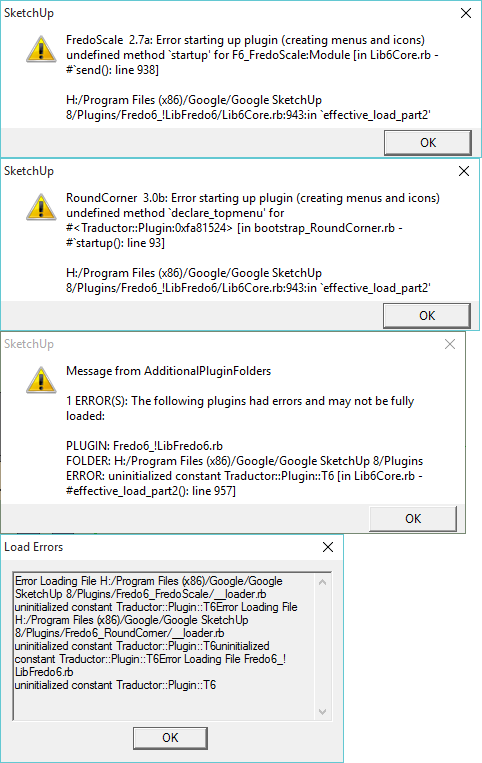
                                  SketchUpPluginErrors.png


                                  It does load the BezierSpline tool without issue. I installed it the same way I did the other tools from the Plugin Store inside SketchUp.

                                  Any thoughts as to what I should try next? At the very least I would like to get the Round Corners tool working.

                                  Thanks

                                  1 Reply Last reply
                                  Reply Quote 0
                                  • TIGT
                                    TIG Moderator
                                    last edited by

                                    This type of issue is almost always because old and superseded files have somehow got into the Plugins folder - typically because they were copied over from an earlier version, rather than installing the newest copy available...

                                    I suspect that you have the unwanted/old LibTraductor.rb in the Plugns folder, this is loading and messing with the newer installation - since its equivalent [Lib6Traductor.rb] is now provided inside the Fredo6_!LibFredo6 folder...
                                    See here http://sketchucation.com/forums/viewtopic.php?p=573620#p573620
                                    So remove the rogue RB file.
                                    Also ensure that the very latest Lib and Plugin's RBZ have been installed.
                                    Restart SketchUp and test.
                                    See if that helps avoid the issue...

                                    TIG

                                    1 Reply Last reply
                                    Reply Quote 0
                                    • A
                                      alisonkr
                                      last edited by

                                      Okay I dumped everything out of my plugins folder to start clean again. I loaded the SketchUcationTools.rbz file in SketchUp 8 and opened up the window for it in the program. I selected Autoinstall for the LibFredo6 and restarted SketchUp with no errors. I then opened up the SketchUcation window again and Autoinstalled the RoundCorners v3.0b and restarted this time getting the following errors, I added a picture of my plugin's folder as well:
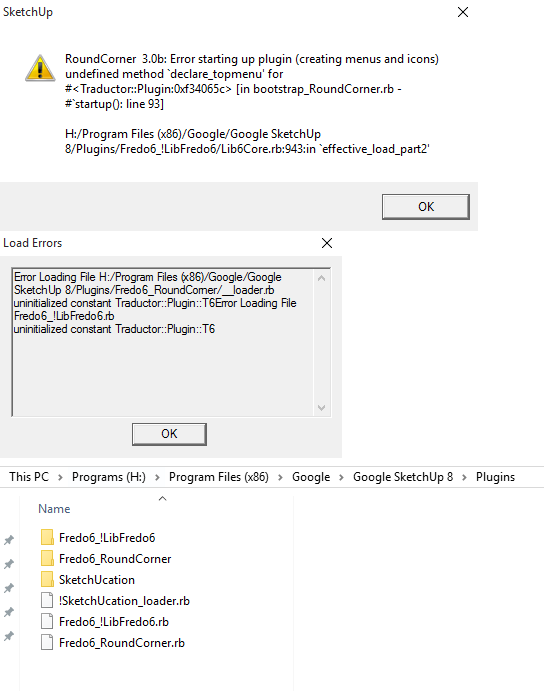
                                      SketchUpPluginErrors2.png

                                      What am I missing?

                                      1 Reply Last reply
                                      Reply Quote 0
                                      • TIGT
                                        TIG Moderator
                                        last edited by

                                        This is a weird error...
                                        Works for me - I can see no problems/errors...

                                        Can you also do the following, copy+paste this into the Ruby Console and report the path returned...
                                        Sketchup.find_support_file('Plugins')
                                        Is this the same as the installed location of the subfolders/rb files etc ?

                                        Also try this and post the result...
                                        ENV["APPDATA"]

                                        Does your Windows User-Name include any unusual [accented] characters ?

                                        TIG

                                        1 Reply Last reply
                                        Reply Quote 0
                                        • fredo6F
                                          fredo6
                                          last edited by

                                          @alisonkr
                                          At least do you have LibFredo6 loading, i.e. do you see a menu "LibFredo6 settings..." in the Windows menu of Sketchup?

                                          Fredo

                                          1 Reply Last reply
                                          Reply Quote 0
                                          • X
                                            xianglin
                                            last edited by

                                            Hi Fredo you have MSN number.
                                            Tell me this number, I want to talk to you about SketchUp's plugin.
                                            Thank you

                                            1 Reply Last reply
                                            Reply Quote 0

                                            Hello! It looks like you're interested in this conversation, but you don't have an account yet.

                                            Getting fed up of having to scroll through the same posts each visit? When you register for an account, you'll always come back to exactly where you were before, and choose to be notified of new replies (either via email, or push notification). You'll also be able to save bookmarks and upvote posts to show your appreciation to other community members.

                                            With your input, this post could be even better πŸ’—

                                            Register Login
                                            • 1
                                            • 2
                                            • 3
                                            • 4
                                            • 5
                                            • 112
                                            • 113
                                            • 3 / 113
                                            • First post
                                              Last post
                                            Buy SketchPlus
                                            Buy SUbD
                                            Buy WrapR
                                            Buy eBook
                                            Buy Modelur
                                            Buy Vertex Tools
                                            Buy SketchCuisine
                                            Buy FormFonts

                                            Advertisement


