sketchucation logo sketchucation
    • Login
    Oops, your profile's looking a bit empty! To help us tailor your experience, please fill in key details like your SketchUp version, skill level, operating system, and more. Update and save your info on your profile page today!
    โš ๏ธ Update | Sketchucation Tools 5.0.8 released with licensing improvements and bugfixes Download

    [Plugin Library] LibFredo6 - v16.2b - 22 Sep 26


    Scheduled Pinned Locked Moved Plugins
    2.2k Posts 583 Posters 9.1m Views 585 Watching
    Loading More Posts
    • Oldest to Newest
    • Newest to Oldest
    • Most Votes
    Reply
    • Reply as topic
    Log in to reply
    This topic has been deleted. Only users with topic management privileges can see it.
    • Didier BurD
      Didier Bur
      last edited by

      @unknownuser said:

      Extract to the destination folder (i.e. not 'drag and drop')

      Sorry Fredo, my mistake ๐Ÿ˜ณ

      DB

      1 Reply Last reply
      Reply Quote 0
      • fredo6F
        fredo6
        last edited by

        NEW RELEASE: LibFredo6 v4.4m - 14 Apr 12

        LibFredo6 4.4 is a new release which essentially support the publishing of ThruPaint and ReverseOrientFaces as part of FredoTools

        This small update fixes some issues in ThruPaint and integrate the translation to Spanish (Defisto, Oxer) and Chinese (guanjin)

        See main post of this thread for Download.

        Fredo

        1 Reply Last reply
        Reply Quote 0
        • N
          nphong63
          last edited by

          thank you!

          1 Reply Last reply
          Reply Quote 0
          • K
            kespencer1
            last edited by

            Hey y'all. I need some help. For whatever reason, LibFredo6 plugin is starting to crash Sketchup. (Yes I know it's this one because I systematically went through and tested sketchup with each plugin I have.)Anyone know a fix for it?

            Now that I think about it, it MAY be something that it activates. All I really know is that if I delete it, Sketchup doesn't crash. But then I can't use curveloft and whatnot. ANY help is appreciated.

            1 Reply Last reply
            Reply Quote 0
            • 3
              3deeidee
              last edited by

              Hi,

              the round corner tool seems like something i would use a lot. Unfortunatly i cannot get it to work properly. I have downloaded the LibFredo6 and placed it in the plugin folder (that is the .rb and the folder) and i also downloaded the round corner tool and also placed it in the plugin folder (the .rb and the folder). As i understand correctly it should then work. But nothing happens when i open SU. I'm working on a mac with SU7 pro.

              Thanks
              Ruud

              1 Reply Last reply
              Reply Quote 0
              • TIGT
                TIG Moderator
                last edited by

                Assuming the file/folders were extracted 'intact' and then put into the correct Plugins folder [Macintosh HD/...Lib/.../plugins] and not a spurious 'User' one... then a restart of Sketchup should auto-load the tool for you.
                However, like many such tools this is an Extension and so it needs a one off activation, which is done through Preferences > Extensions.
                Once it is activated its menu items and toolbar becomes available to you - if it hasn't auto-activated then the toolbar can be activated from the appropriate menu item too...

                TIG

                1 Reply Last reply
                Reply Quote 0
                • TIGT
                  TIG Moderator
                  last edited by

                  @kespencer1 said:

                  Hey y'all. I need some help. For whatever reason, LibFredo6 plugin is starting to crash Sketchup. (Yes I know it's this one because I systematically went through and tested sketchup with each plugin I have.)Anyone know a fix for it?

                  Now that I think about it, it MAY be something that it activates. All I really know is that if I delete it, Sketchup doesn't crash. But then I can't use curveloft and whatnot. ANY help is appreciated.
                  Are you sure it's installed properly - file and folder ?
                  Do you have the latest version ?

                  TIG

                  1 Reply Last reply
                  Reply Quote 0
                  • fredo6F
                    fredo6
                    last edited by

                    NEW RELEASE: LibFredo6 v4.5a - 08 May 12

                    LibFredo6 4.5 is a update dedicated to

                    • Some evolutions in ThruPaint 1.2 (paint container and text, as well as bug fixing)
                    • New features for the Free Rotate tool of FredoScale (rotation with offset and inference on line)

                    See main post of this thread for Download.

                    Fredo

                    1 Reply Last reply
                    Reply Quote 0
                    • J
                      jooooe
                      last edited by

                      sorry! this is not suit for Mac?

                      1 Reply Last reply
                      Reply Quote 0
                      • Dave RD
                        Dave R
                        last edited by

                        @jooooe said:

                        sorry! this is not suit for Mac?

                        What makes you think that? It works fine on my Mac as well as many others.

                        Etaoin Shrdlu

                        %

                        (THERE'S NO PLACE LIKE)

                        G28 X0.0 Y0.0 Z0.0

                        M30

                        %

                        1 Reply Last reply
                        Reply Quote 0
                        • I
                          ihanna
                          last edited by

                          @unknownuser said:

                          NEW VERSION 3.1c 11 Apr 09 NOW RELEASED
                          Needed for for FreeScale 2.0c
                          see http://www.sketchucation.com/forums/scf/viewtopic.php?f=180&t=17947&p=144178#p144178

                          Note: For those who have downloaded the release (c) of 9 Avril, which was available for a few minutes, please download again the version of 11 Apr.

                          hello,

                          I just want to ask some help, I've already download those files twice but still not working, can you give me some advice? Thanks in advance.


                          You must be the change you wish to see in the world. โ€”Gandhi

                          1 Reply Last reply
                          Reply Quote 0
                          • Dave RD
                            Dave R
                            last edited by

                            @ihanna said:

                            hello,

                            I just want to ask some help, I've already download those files twice but still not working, can you give me some advice? Thanks in advance.

                            You have to meet us half way. Give us something to help you out. We can't see your computer from here and you've given us no clue as to what you've done short of downloading the files. ๐Ÿ˜’ Did you extract the zip file into Program Files/ Google/Google SketchUp 8/Plugins? Did you extract them correctly? Do you have admin rights to install files into the Plugins folder?

                            Post a screen shot of your Plugins folder showing the files installed correctly and we'll go from there.

                            Etaoin Shrdlu

                            %

                            (THERE'S NO PLACE LIKE)

                            G28 X0.0 Y0.0 Z0.0

                            M30

                            %

                            1 Reply Last reply
                            Reply Quote 0
                            • TIGT
                              TIG Moderator
                              last edited by

                              These files don't do much on there own. ๐Ÿ˜•
                              They are 'helpers' for many of Fredo's other tools, which don't work without the file and subfolder of files etc that form the 'Lib'... ๐Ÿ˜ฎ

                              TIG

                              1 Reply Last reply
                              Reply Quote 0
                              • G
                                GooUser
                                last edited by

                                Thanks you very lot ! It's Great.

                                1 Reply Last reply
                                Reply Quote 0
                                • L
                                  Luaner
                                  last edited by

                                  Thanks again~โค

                                  1 Reply Last reply
                                  Reply Quote 0
                                  • T
                                    the.pjt
                                    last edited by

                                    hi dear ferdo , I have a little question ...

                                    .. maybe it's a bad question and I know that it takes much time for you to write these features fur us ... thanks a lot for time you spend and offering your incredible codes freely to us ... thanks ferdo ..
                                    my question is
                                    how to disable time tracer and updater part due to have a faster startup and a lighter SU ?
                                    I'm a ruby newbie .. but you codes are too complex for me to trace .. ๐Ÿ˜„ .. I just wanna to know the .rb files that does these extra works ...

                                    I'm sorry for asking these .. I believe that these parts ( specially Updater module )are very useful for all users .. and thanks for codding these parts ferdo .. ๐Ÿ˜›

                                    thanks

                                    1 Reply Last reply
                                    Reply Quote 0
                                    • fredo6F
                                      fredo6
                                      last edited by

                                      @the.pjt said:

                                      my question is
                                      how to disable time tracer and updater part due to have a faster startup and a lighter SU ?
                                      I'm a ruby newbie .. but you codes are too complex for me to trace .. ๐Ÿ˜„ .. I just wanna to know the .rb files that does these extra works ...

                                      You don't need to edit the ruby files.
                                      Normally, go to the CheckForUpdate dialog box and enter 999 (days) in the 'next check' field.

                                      Fredo

                                      PS: 'Check for update' does not go to the Internet when SU Starts. It just checks the date to see if it should display the reminder, so it is very fast. The fact is that that the reminder is based on a WebDialog and the first web dialogs are used, it takes a little bit long (SU may load extra stuff or perform some operations in the background).

                                      1 Reply Last reply
                                      Reply Quote 0
                                      • T
                                        the.pjt
                                        last edited by

                                        thanks feredo ... I hade done that ( 999 ) several days ago .. but I alwase see the ruby image (update check ) at start up .. how about time tracer tool ?

                                        thanks for answer and support ferdo ๐Ÿ˜

                                        1 Reply Last reply
                                        Reply Quote 0
                                        • D
                                          disco_UK
                                          last edited by

                                          hi Fredo, Thanks for this work you've done ๐Ÿ‘

                                          I have unzipped it to my plugins folder on C:/Program Files(x86)/google/Google Sketchup 8/plugins but for some reasons I just cant find it in the menus! I have also put LibFredo6.rb in the plugins. am I missing something?

                                          kindest regards

                                          Disco

                                          1 Reply Last reply
                                          Reply Quote 0
                                          • D
                                            disco_UK
                                            last edited by

                                            ๐Ÿ˜ณ

                                            Can't seem to get the toolbar up. I've followed some of the posts and checked its in the right directory, and also ticked the box in Sketchup.

                                            Any help would be appreciated

                                            A.Noob lol
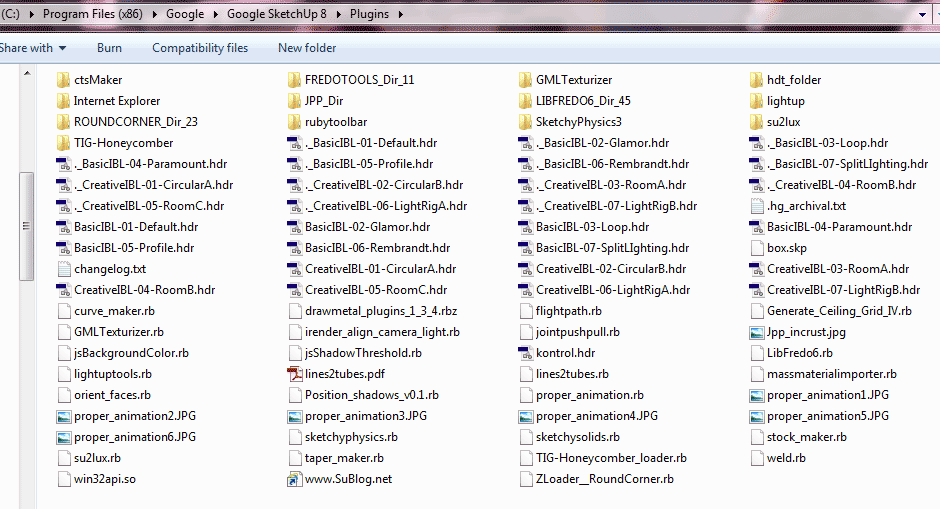

                                            screen grab

                                            1 Reply Last reply
                                            Reply Quote 0

                                            Hello! It looks like you're interested in this conversation, but you don't have an account yet.

                                            Getting fed up of having to scroll through the same posts each visit? When you register for an account, you'll always come back to exactly where you were before, and choose to be notified of new replies (either via email, or push notification). You'll also be able to save bookmarks and upvote posts to show your appreciation to other community members.

                                            With your input, this post could be even better ๐Ÿ’—

                                            Register Login
                                            • 1
                                            • 2
                                            • 105
                                            • 106
                                            • 107
                                            • 108
                                            • 109
                                            • 112
                                            • 113
                                            • 107 / 113
                                            • First post
                                              Last post
                                            Buy SketchPlus
                                            Buy SUbD
                                            Buy WrapR
                                            Buy eBook
                                            Buy Modelur
                                            Buy Vertex Tools
                                            Buy SketchCuisine
                                            Buy FormFonts

                                            Advertisement



