sketchucation logo sketchucation
    • Login
    Oops, your profile's looking a bit empty! To help us tailor your experience, please fill in key details like your SketchUp version, skill level, operating system, and more. Update and save your info on your profile page today!
    ⚠️ Update | Sketchucation Tools 5.0.8 released with licensing improvements and bugfixes Download

    [Plugin Library] LibFredo6 - v16.2b - 22 Sep 26


    Scheduled Pinned Locked Moved Plugins
    2.2k Posts 583 Posters 9.1m Views 585 Watching
    Loading More Posts
    • Oldest to Newest
    • Newest to Oldest
    • Most Votes
    Reply
    • Reply as topic
    Log in to reply
    This topic has been deleted. Only users with topic management privileges can see it.
    • R
      rv1974
      last edited by

      For some reason I can't install libfredo 9.5.e on SU2020 (win10 64 bit)

      1 Reply Last reply
      Reply Quote 0
      • TIGT
        TIG Moderator
        last edited by

        The Lib installs fine for me [same OS etc] and it is fully signed etc...

        TIG

        1 Reply Last reply
        Reply Quote 0
        • R
          rv1974
          last edited by

          Manual extract to plugins folder solved the issue.

          1 Reply Last reply
          Reply Quote 0
          • fredo6F
            fredo6
            last edited by

            NEW RELEASE: LibFredo6 v9.5g - 09 Feb 20

            LibFredo6 9.5g is a minor release necessary for Animator and FredoTools::MoveAlong. It corrects a problem when moving objects.


            See plugin home page of LibFredo6 for Download of LibFredo6.

            Main Post of the LibFredo6 thread

            Fredo

            1 Reply Last reply
            Reply Quote 0
            • fredo6F
              fredo6
              last edited by

              NEW RELEASE: LibFredo6 v9.5f - 08 Feb 20

              LibFredo6 9.5f is a minor release necessary for VisuHole to capture stencil from container where axes are not oriented with Z being the normal to the thin plate.


              See plugin home page of LibFredo6 for Download of LibFredo6.

              Main Post of the LibFredo6 thread

              Fredo

              1 Reply Last reply
              Reply Quote 0
              • B
                Beaver99
                last edited by

                Thank you so much for creating these tools, extremely valuable to my work flow.

                You are
                Awesome & Amazing !

                1 Reply Last reply
                Reply Quote 0
                • J
                  Jeff Mack Designs
                  last edited by

                  can you use this plug in with sketch up for web? like the free version?
                  when I go to Window the options outlined are not there.

                  ty.

                  1 Reply Last reply
                  Reply Quote 0
                  • Dave RD
                    Dave R
                    last edited by

                    @jeff mack designs said:

                    can you use this plug in with sketch up for web? like the free version?
                    when I go to Window the options outlined are not there.

                    ty.

                    No. As I told you elsewhere yesterday, the web versions of SketchUp have no implementation for using extensions.

                    Etaoin Shrdlu

                    %

                    (THERE'S NO PLACE LIKE)

                    G28 X0.0 Y0.0 Z0.0

                    M30

                    %

                    1 Reply Last reply
                    Reply Quote 0
                    • fredo6F
                      fredo6
                      last edited by

                      NEW RELEASE: LibFredo6 v9.5j - 25 Feb 20

                      LibFredo6 9.5j is a minor release for fixing a bug in some rare situations where the model has no attribute at all.


                      See plugin home page of LibFredo6 for Download of LibFredo6.

                      Main Post of the LibFredo6 thread

                      Fredo

                      1 Reply Last reply
                      Reply Quote 0
                      • fredo6F
                        fredo6
                        last edited by

                        NEW RELEASE: LibFredo6 v9.5h - 13 Feb 20

                        LibFredo6 9.5h is a minor release necessary for Animator. It corrects a problem when Easing functions.


                        See plugin home page of LibFredo6 for Download of LibFredo6.

                        Main Post of the LibFredo6 thread

                        Fredo

                        1 Reply Last reply
                        Reply Quote 0
                        • S
                          Sunxl
                          last edited by

                          Hi Fredo,

                          Do you know how to fix the problem shown as below,

                          [img]file:///C:/Users/SUN/Desktop/%E9%98%BF%E9%87%8C%E6%97%BA%E6%97%BA%E5%9B%BE%E7%89%8720200303012702.jpg[/img]

                          I tried the su2019 and 2020, But the SU still failed to load the Fredo6

                          Please help

                          Thank you

                          1 Reply Last reply
                          Reply Quote 0
                          • TIGT
                            TIG Moderator
                            last edited by

                            The image is missing you cannot link to a file that is on your own PC !
                            Try copy/paste ?

                            TIG

                            1 Reply Last reply
                            Reply Quote 0
                            • S
                              Sunxl
                              last edited by

                              @tig said:

                              The image is missing you cannot link to a file that is on your own PC !
                              Try copy/paste ?

                              Sorry,this is my first time to use this.

                              the problem shown as below

                              载入文件 C:/Users/SUN/AppData/Roaming/SketchUp/SketchUp 2019/SketchUp/Plugins/Fredo6_!LibFredo6/top_LibFredo6.rbe 时出错
                              Failed to read RBE/RBS file.
                              载入文件 Fredo6_!LibFredo6.rb 时出错
                              Error: #<NameError: uninitialized constant LibFredo6_Loader::LibFredo6>
                              C:/Users/SUN/AppData/Roaming/SketchUp/SketchUp 2019/SketchUp/Plugins/Fredo6_!LibFredo6.rb:63:in process' C:/Users/SUN/AppData/Roaming/SketchUp/SketchUp 2019/SketchUp/Plugins/Fredo6_!LibFredo6.rb:70:in module:LibFredo6_Loader'
                              C:/Users/SUN/AppData/Roaming/SketchUp/SketchUp 2019/SketchUp/Plugins/Fredo6_!LibFredo6.rb:28:in `<top (required)>'

                              thank you

                              1 Reply Last reply
                              Reply Quote 0
                              • fredo6F
                                fredo6
                                last edited by

                                This 'failed to load RBS/RBE' seems to be a problem related to the installation of Sketchup.

                                Could you reinstall it, with 'run as administrator'.

                                1 Reply Last reply
                                Reply Quote 0
                                • S
                                  Sunxl
                                  last edited by

                                  @fredo6 said:

                                  This 'failed to load RBS/RBE' seems to be a problem related to the installation of Sketchup.

                                  Could you reinstall it, with 'run as administrator'.

                                  Yes, I did. But the error still exist.

                                  I didn’t find any available solutions to deal with it.

                                  1 Reply Last reply
                                  Reply Quote 0
                                  • J
                                    JDW Interiors
                                    last edited by

                                    Hi all,

                                    I've downloaded Fredoscale for my MacBook Pro 2018 but I can't seem to open it. I am running sketchup 2020.

                                    I firstly downloaded it from sketchUcation and then I went to 'Window>Extension manager>Install extension'

                                    In the extension manager it says the app is signed but I can't see how I can open the window and use the fredoscale tools.

                                    Can anyone help?

                                    Thanks in advance!

                                    Jack

                                    1 Reply Last reply
                                    Reply Quote 0
                                    • Dave RD
                                      Dave R
                                      last edited by

                                      Have you quit out of SketchUp and reopened it to make sure both extensions load completely? After you do that you should be able to see the FredoScale tool palette in View>Tool palettes.

                                      Etaoin Shrdlu

                                      %

                                      (THERE'S NO PLACE LIKE)

                                      G28 X0.0 Y0.0 Z0.0

                                      M30

                                      %

                                      1 Reply Last reply
                                      Reply Quote 0
                                      • fredo6F
                                        fredo6
                                        last edited by

                                        NEW RELEASE: LibFredo6 v9.5k - 14 Mar 20

                                        LibFredo6 9.5k is a major release

                                        1. Fixes a bug preventing all my plugins to work with some configurations of MacOS Catalina

                                        2. Introduces a 'toolbar visibility' button in all the QuickLauncher dialogs of my plugins. This makes it easier to manage the visibility of icons in the toolbar, which was already available in the Default Parameters. You need to restart Sketchup for the changes to be effective.

                                        As an example, here is the new layout of the FredoScale QuickLauncher, with the visibility toggle buttons on the right (small eye).
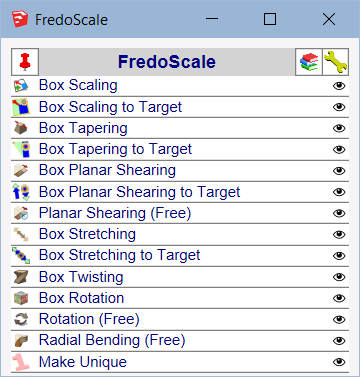
                                        FredoScale Quick Launcher.png


                                        See plugin home page of LibFredo6 for Download of LibFredo6.

                                        Main Post of the LibFredo6 thread

                                        Fredo

                                        1 Reply Last reply
                                        Reply Quote 0
                                        • E
                                          Elrodrules
                                          last edited by

                                          Hi -

                                          I had installed LibFredo6 9.5j and that was working fine. Today I tried to update to LibFredo6 9.5k and now I'm getting the following error(s). I'm using SketchUp Make 17.3.116 on a MacBook Air running macOS Catalina. I have quit and reopened SketchUp several times and the result is the same. Any suggestions?

                                          The first error window says:

                                          Curviloft 1.8a: Error starting up plugin (creating menus and icons)
                                          undefined method declare_topmenu' for #<Traductor::Plugin:0x007faf20183c70> [in bootstrap_curviloft.rbe: - #startup(): line 87]

                                          /users/ll/library/application support/sketchup 2017/sketchup/plugins/fredo6_!libfredo6/lib6core.rbe:1058:in `rescue in block in effective_load_part2'

                                          I click 'OK' and a second error window opens with these strings:

                                          Error: #<NameError: uninitialized constant Traductor::Plugin::T6>
                                          /users/ll/library/application support/sketchup 2017/sketchup/plugins/fredo6_!libfredo6/lib6core.rbe:1072:in effective_load_part2' /users/ll/library/application support/sketchup 2017/sketchup/plugins/fredo6_!libfredo6/lib6core.rbe:1003:in effective_load'
                                          /users/ll/library/application support/sketchup 2017/sketchup/plugins/fredo6_curviloft/__loader__curviloft.rbe:1:in <main>' /Applications/SketchUp 2017/SketchUp.app/Contents/Resources/Content/Tools/extensions.rb:197:in eval'
                                          /Applications/SketchUp 2017/SketchUp.app/Contents/Resources/Content/Tools/extensions.rb:197:in require' /Applications/SketchUp 2017/SketchUp.app/Contents/Resources/Content/Tools/extensions.rb:197:in load'
                                          /Users/ll/Library/Application Support/SketchUp 2017/SketchUp/Plugins/Fredo6_Curviloft.rb:57:in register_extension' /Users/ll/Library/Application Support/SketchUp 2017/SketchUp/Plugins/Fredo6_Curviloft.rb:57:in module:Fredo6'
                                          /Users/ll/Library/Application Support/SketchUp 2017/SketchUp/Plugins/Fredo6_Curviloft.rb:26:in `<top (required)>'

                                          1 Reply Last reply
                                          Reply Quote 0
                                          • M
                                            maotine
                                            last edited by

                                            Thank

                                            1 Reply Last reply
                                            Reply Quote 0

                                            Hello! It looks like you're interested in this conversation, but you don't have an account yet.

                                            Getting fed up of having to scroll through the same posts each visit? When you register for an account, you'll always come back to exactly where you were before, and choose to be notified of new replies (either via email, or push notification). You'll also be able to save bookmarks and upvote posts to show your appreciation to other community members.

                                            With your input, this post could be even better 💗

                                            Register Login
                                            • 1
                                            • 2
                                            • 34
                                            • 35
                                            • 36
                                            • 37
                                            • 38
                                            • 112
                                            • 113
                                            • 36 / 113
                                            • First post
                                              Last post
                                            Buy SketchPlus
                                            Buy SUbD
                                            Buy WrapR
                                            Buy eBook
                                            Buy Modelur
                                            Buy Vertex Tools
                                            Buy SketchCuisine
                                            Buy FormFonts

                                            Advertisement



