[Plugin Library] LibFredo6 - v15.9a - 25 Mar 26



-
NEW RELEASE: LibFredo6 v9.2a - 16 Oct 19
LibFredo6 9.2a is a major release for FredoTools v3.6:
- FredoTools::ColorByAltitude tool, which create a color mapping for a terrain mesh based on the altitude of its faces.
- FredoTools::ColorPaint tool, which is a configurable Color Selector.
- A new view 'Outliner' in FredoTools::ReportLabelArea tool, with a hierarchical, expandable tree of groups and components with their individual areas.
It also includes various bug fixing and cosmetic adjustments.
See plugin home page of LibFredo6 for Download of LibFredo6.
Main Post of the LibFredo6 thread
Fredo
-
I've tried several times to use the plugin you've developed, But everytime I download this'Libfredo6' extension and open sketchup pro, there's a 'Load Error' window saying
'Error Loading File Fredo6_!LibFredo6.rb
Error: #<ArgumentError: invalid byte sequence in UTF-8>
c:/users/오하경/appdata/roaming/sketchup/sketchup 2019/sketchup/plugins/fredo6_!libfredo6/top_libfredo6.rbe:52:ingsub' c:/users/오하경/appdata/roaming/sketchup/sketchup 2019/sketchup/plugins/fredo6_!libfredo6/top_libfredo6.rbe:52:inget_dir_from_ENV'
c:/users/오하경/appdata/roaming/sketchup/sketchup 2019/sketchup/plugins/fredo6_!libfredo6/top_libfredo6.rbe:415:in `dir_appdata'
c:/users/오하경/appdata/roaming/sketchup/sketchup 2019/sketchup/plugins/fredo6_!
... and the plugins didn't workHow can I fix it?
-
It is your Korean Windows user-name.
Ruby used to fail with any text that was not pure ASCII [UTF-8], newer versions have some ways of forcing strings from different alphabets into usable UTF-8 formats.
Clearly things are failing in your case...
Can you try the following in your Ruby Console, and report back what it prints - it might help Fredo refine his code...Copy/paste this code + <enter>
plugins = Sketchup.find_support_file('Plugins') puts plugins puts plugins.encodingIt should print the full path to your plugins folder, and also its encoding...
-
NEW RELEASE: LibFredo6 v9.3a - 02 Nov 19
LibFredo6 9.3a is a major release for FredoTools v3.7:
- FredoTools::ColorByAltitude --> cosmetic adjustments and bug fixing.
- FredoTools::ColorPaint --> support of transparency, cosmetic adjustments, bug fixing.
- FredoTools::ReportLabelArea --> cosmetic adjustments and bug fixing.
It also includes various bug fixing and cosmetic adjustments useful for my other plugins
See plugin home page of LibFredo6 for Download of LibFredo6.
Main Post of the LibFredo6 thread
Fredo
-
NEW RELEASE: LibFredo6 v9.4a - 18 Nov 19
LibFredo6 9.4a is a major release for FredoPortrait v2.0 and FredoTools v3.8:
- FredoPortrait::Screenshot --> New plugin to generate images at specified dimensions.
- FredoTools::ColorFlatMode --> New plugin to switch to minimum color shading
It also includes various bug fixing and cosmetic adjustments useful for my other plugins
See plugin home page of LibFredo6 for Download of LibFredo6.
Main Post of the LibFredo6 thread
Fredo
-
NEW RELEASE: LibFredo6 v9.4b - 25 Nov 19
LibFredo6 9.4b is a minor release for FredoPortrait v2.0:
- for FredoPortrait v2.0b
- add a new color palette ('SVG') for FredoTools::ColorPaint
It also includes various bug fixing and cosmetic adjustments useful for my other plugins
See plugin home page of LibFredo6 for Download of LibFredo6.
Main Post of the LibFredo6 thread
Fredo
-
NEW RELEASE: LibFredo6 v9.5a - 23 Dec 19
LibFredo6 9.5a is a major release for FredoGuides v1.1.
It also includes various bug fixing and cosmetic adjustments useful for my other plugins
See plugin home page of LibFredo6 for Download of LibFredo6.
Main Post of the LibFredo6 thread
Fredo
-
After installing LibFredo6_v9.4b, an error appears.
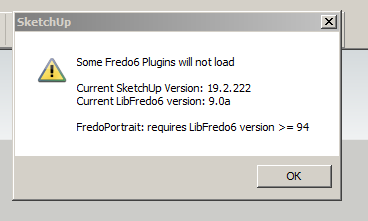
-
Did you try restarting SketchUp?
-
Yes. After selecting a template, the Bugsplat window crashes. The button "View report data" is not active. After removing the "Fredo6_! LibFredo6 folders" and "Fredo6_! LibFredo6.rb folders" from the plugin directory, SketchUp18 opens. When upgrading to SketchUp19, the same thing happens.
-
When you installed SketchUp from the downloaded installer, did you right click on it and choose Run as administrator from the Context menu?
-
Yes.
-
sh: /Users/Jonathan/Documents/Animator Videos/ffmpeg-4.2.2.cpgz: Permission denied
mac high sierra 10.13.6 I've followed countless tutorials to get ffmpeg installed properly, starting with libfredo6 for animator in sketchup. After downloading the zip and or package file from ffmpeg.org, I don't get the same results from the step by step tutorials. Even in terminal I'm getting unsuccessful responses to line commands at a certain point. I found animator very user friendly and edited a great technical video very efficiently. I'm stuck not being able to generate an mp4 video file to share on my website. Please help -
Did you see my answer in the Animator subforum?
I give a link to the latest version of FFmpeg for Mac.
- This points to a zip file.
- Extract the file 'ffmpeg' located in the zip archive under 'bin'
- put this file somewhere on your Mac where it's convenient to you
- In the Animator video, Click on the button 'locate FFMpeg' and point to this local file.
Fredo
-
NEW RELEASE: LibFredo6 v9.5b - 08 Jan 20
LibFredo6 9.5b is a minor release for bug fixing and adjustments.
See plugin home page of LibFredo6 for Download of LibFredo6.
Main Post of the LibFredo6 thread
Fredo
-
On SU 2018 the new update (with LibFredo v9.5b) is not preserving the guides.
(Correction) posted in wrong forum, this comment was meant for Fredo Guides. -
@penumbra said:
On SU 2018 the new update (with LibFredo v9.5b) is not preserving the guides.
(Correction) posted in wrong forum, this comment was meant for Fredo Guides.Could you open the Ruby Console when you protect guides and then when you delete them, in order to see if there are error messages. Thanks.
-
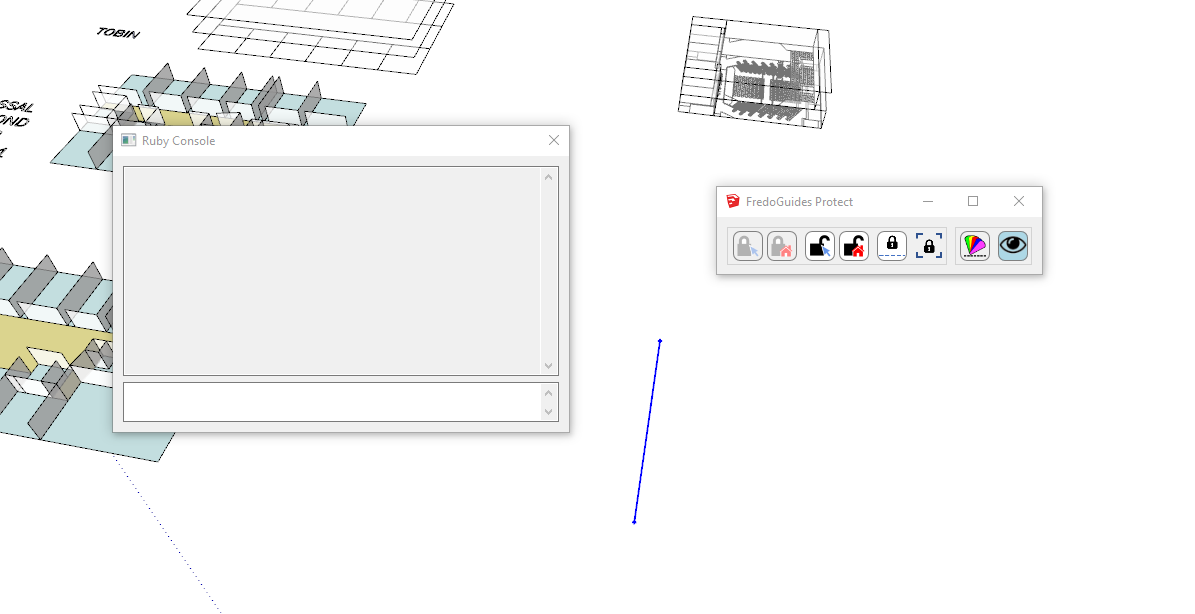 ruby console is blank, doesn't show any activity.
 -
@penumbra said:
[attachment=0:v3qajxdy]<!-- ia0 -->Annotation 2020-01-09 132839.png<!-- ia0 -->[/attachment:v3qajxdy]ruby console is blank, doesn't show any activity.
Does the problem happens with any model?
-
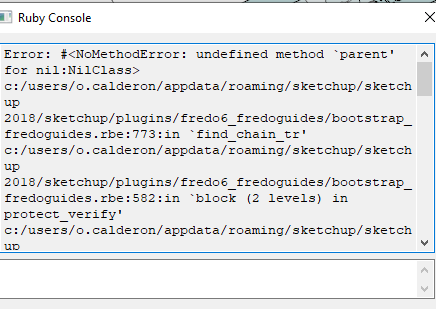 interestingly, no it does not. starting a fresh model the plugin works fine.
but here is something that pops up on the ruby consol when i start the sketchup file where it doesn't work.



Hello! It looks like you're interested in this conversation, but you don't have an account yet.
Getting fed up of having to scroll through the same posts each visit? When you register for an account, you'll always come back to exactly where you were before, and choose to be notified of new replies (either via email, or push notification). You'll also be able to save bookmarks and upvote posts to show your appreciation to other community members.
With your input, this post could be even better 💗
등록 로그인


Advertisement