[Plugin Library] LibFredo6 - v15.8e - 15 Feb 26



-
New Spanish Language (Spain) file to LibFredo6 - v5.8c - 17 Apr 14
-
Hi Fredo,
I love all your plugins but I'm having some problems with sketchup 2014, I tried installing LibFredo6 5.8c and keep getting this error
Error Loading File Fredo6_!LibFredo6.rb
Error: #<LoadError: cannot load such file -- LibTraductor.rb>
C:/Users/Architect34/AppData/Roaming/SketchUp/SketchUp 2014/SketchUp/Plugins/Fredo6_!LibFredo6.rb:28:inrequire' C:/Users/Architect34/AppData/Roaming/SketchUp/SketchUp 2014/SketchUp/Plugins/Fredo6_!LibFredo6.rb:28:in<top (required)>'I also tried deleting everything and clean install from .rbz, also copy and paste but keep getting same error. I also tried installing from sketchucation autoinstall and same problem.
I also copied to Sketchup 2014> Tools folder, and Plugins folder but same problem.
I hope you can help me.
Thanks
-
Hopefully you have installed fresh newest versions and not copied old versions across from an earlier SketchUp's Plugins folder !
How have you installed the latest RBZ's ?
Preferences > Extensions > Install... button ? or perhaps AutoInstall with the PluginStore dialog ?
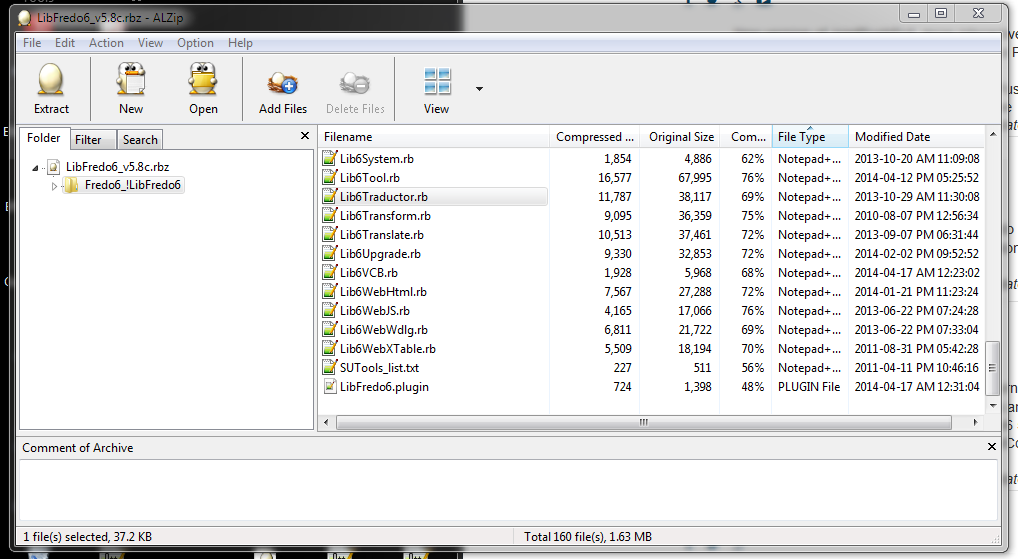
Either way you should end up with a Lib subfolder with many files in it, including something like the one that is reported missing 'Lib6Traductor.rb' [see screenshot] - although your error says 'LibTraductor.rb' with NO '6'! See next...
The lines inFredo6_!LibFredo6.rbto which it refers say:
require 'LibTraductor.rb' if Sketchup.find_support_file('LibTraductor.rb', "Plugins") #Compatibility require 'TOS_Dir_13/LibTraductor_20.rb' if Sketchup.find_support_file('TOS_Dir_13/LibTraductor_20.rb', "Plugins") #Compatibility
So the 'require' should only be called if the 'LibTraductor.rb' file is in the main Plugins folder [or alternatively the old TOS directory].
It should not run with a clean install because the newest versions of Fredo's tools use the alternative translator file in the Lib folder.There should be no such files to cause the 'if' test to be positive ?
Using this in the Ruby Console should returnnil:
Sketchup.find_support_file('LibTraductor.rb', "Plugins")
If not, then find that rogue file and delete it and retry/restart...I have v2014 and it loads the Lib and all Fredo's tools just fine.
There are neither of these older 'LibTraductor' rb files in the Plugins or an obsolete TOS subfolder.
The 'Lib6Traductor.rb' in the Lib folder does what's needed...
-
NEW RELEASE: LibFredo6 v5.9a - 15 May 14
LibFredo6 5.9a is a release for:
- DrawAlong 1.0,
- MoveAlong 1.1,
which are just published as part of FredTools 1.9a.
See main post of this thread for Download of LibFredo6.
Fredo
-
New Spanish Language File for LibFredo6 - v5.9a - 15 May 14
P.S: If you have like preference Spanish Language (Spain) simply change the ES in filename to --> SP
-
NEW RELEASE: LibFredo6 v5.9b - 17 May 14
LibFredo6 5.9b is a release for:
- DrawAlong 1.0b,
- MoveAlong 1.1b,
which are published as part of FredTools 1.9b.
This small updates
- fixes a problem for VCB input with architectural units (like 5'2 1/4) for DrawAlong, MoveAlong and JointPushPull
- includes an updated translation in Spanish-Spain (ES) by Oxer
See main post of this thread for Download of LibFredo6.
Fredo
-
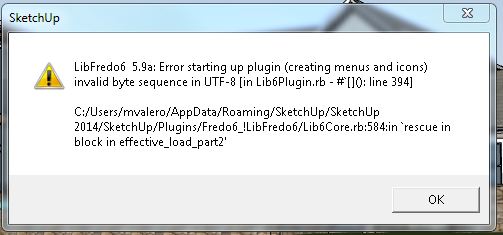
If I open a new clean copy of SketchUp, everything loads fine. If I open a file directly from Windows Explorer, I get this error, which in turn prevents all Fredo plugins from opening.
-
I am having such trouble trying to install this (or any) plugins on my Mac. I have placed the downloaded extensions in the plugins folder (MacHD/Library/Application Support/Google Sketchup 8/Sketchup/Plugins) and have made my security "read and write" but I cannot get anything to work. I am not able to get the Sketchucation Tools to function either. I have to work through an administrator so I am trying to get a very clear idea of what to do before I contact them again (third time!). I'd appreciate any help.
-
If you are simply putting the files you download into the Plugins folder you are not installing them correctly. Much has been written about how to install them correctly but here it is again.
If you are downloading files with the .rbz extension, DO NOT put them in the Plugins folder. Save them to some other location you can find. Go to Preferences under the SketchUp menu, left of File. Choose Extensions and click on the button labeled Install Extension. Navigate to where you saved the .rbz file, select it, click Open and follow the prompts.
I think it was already suggested to you to install the Sketchucation Plugin Store tool. You can then locate the various plugins you're interested in and install them automatically. Do that.
-
If your MAC's plugins folder did not initially have FULL read/write permissions, but you had managed to manually add some files to it already, then you must do the extra step of setting its permissions to FULL, AND also choose to trickle down the changes to its contents...
To double check where your SketchUp v8 thinks its main plugins folder is... use this snippet in the Ruby Console:
Sketchup.find_support_file('Plugins')Also type this into the Ruby Console to see which Plugins folder[s] are listed@
$:BUT.... since you have v8 why not use the
Preferences > Extensions > Install...button to install the RBZ archives for all available Plugins...
These will be automatically extracted, keeping files in the correct subfolders and in the correct Plugins folder too ! -
Thanks so much Dave and TIG. I really am trying here, I just keep hitting a dead end. I have followed these directions precisely, but when I get to the finish (Preferences/Choose Extensions/Install Extension/Open) I receive an error message: "Unable to install the Extension you have chosen for some unknown reason. Consult your Extension's documentation for additional help." The Sketchucation Plugin Store tool would be a dream come true, but I am also unable to install that for the same reason. It all ends in this error message.
-
It sounds to me as if the permissions for your log in still haven't been set to Read & Write. That's the only reason I've ever seen that specific message pop up. Perhaps a screen shot of that would help?
-
Yes, make sure you have the correct Plugins folder - as revealed by my code snippet.
Then change its permissions to FULL Read/Write... AND choose to apply the changes to the contents of that folder too...
It should work both Dave and I have MACs that do this without issues... -
@bobpineo said:
Hello Fredo,
Love your Plugins, thank you!
I keep getting this message..."libfredo6 will be updated at next startup of sketchup.I have tried reloading, deleting obsolete files etc etc.
Can you help me figure out what is going on?
Thanks
Best BPplus the following:(after I get the initial libfredo update warning.
C:/Program Files (x86)/SketchUp/SketchUp 2014/Tools/DBUR_UcsManager.rb:12:in
<top (required)>' Error: c:/program files (x86)/sketchup/sketchup 2014/tools/dm_artisan/artisan.rbs:273: invalid multibyte char (UTF-8) c:/program files (x86)/sketchup/sketchup 2014/tools/dm_artisan/artisan.rbs:273: invalid multibyte char (UTF-8) c:/program files (x86)/sketchup/sketchup 2014/tools/dm_artisan/artisan.rbs:273: syntax error, unexpected end-of-input, expecting keyword_end data="90¡M5lªÙ[:}¶ä^-Ú¢ßÓjt@+¡©tp}x±" #just garbage ^ C:/Program Files (x86)/SketchUp/SketchUp 2014/Tools/DM_artisan/artisan_load.rb:10:ineval'
C:/Program Files (x86)/SketchUp/SketchUp 2014/Tools/DM_artisan/artisan_load.rb:10:inload' C:/Program Files (x86)/SketchUp/SketchUp 2014/Tools/DM_artisan/artisan_load.rb:10:inmodule:Artisan'
C:/Program Files (x86)/SketchUp/SketchUp 2014/Tools/DM_artisan/artisan_load.rb:3:in<module:DM>' C:/Program Files (x86)/SketchUp/SketchUp 2014/Tools/DM_artisan/artisan_load.rb:1:in<top (required)>'
C:/Program Files (x86)/SketchUp/SketchUp 2014/Tools/extensions.rb:197:inrequire' C:/Program Files (x86)/SketchUp/SketchUp 2014/Tools/extensions.rb:197:inload'
C:/Program Files (x86)/SketchUp/SketchUp 2014/Tools/DM_artisan.rb:18:inregister_extension' C:/Program Files (x86)/SketchUp/SketchUp 2014/Tools/DM_artisan.rb:18:inmodule:Artisan'
C:/Program Files (x86)/SketchUp/SketchUp 2014/Tools/DM_artisan.rb:5:in<module:DM>' C:/Program Files (x86)/SketchUp/SketchUp 2014/Tools/DM_artisan.rb:4:in<top (required)>'I faced a similar issue while copying my plugins. Download the latest rbz from artisan’s official website. Install this extension, and these errors will be fixed.

-
@Bob Pineo
Somewhat belatedly I read your post...
Your error messages relate to .rb files loading from theToolsfolder.
Some of these, like Didier Bur's current UCSmanager, and the older version of Artisan are not compatible with v2014.
BUT you should have NO plugins files loading from theToolsfolder in v2014 except the three which ship with SketchUp itself:
sketchup.rb extensions.rb langhandler.rb
and a subfolder named 'RubyStdLib', which contains dozens of Ruby2 files...
[and there might also be a lone file named something like!_fix_ruby_startup2-1-2.rb- but that is only IF you have manually downloaded and installed it yourself - it allows you to open SKPs on remote drives and thereby launch SketchUp without breaking SketchUp.exe - a known bug in v2014M0 that will be fixed within the imminent v2014M1]
If you have incorrectly manually copied these additional plugins files into the Tools folder you must remove them [and their subfolders].
They all belong in your user's Plugins folder !
To find where that is, useSketchup.find_support_file('Plugins')in the Ruby Console, BUT remember that the Preferences > Extensions > Install... button and/or the SketchUcation AutoInstall tool will extract RBZ's files and add them into the correct Plugins folder for you = without any need to manually tinker with things and break SketchUp...Please do NOT copy plugins from earlier SketchUps unless there is no possible alternative.
Newer v2014-compatible versions for most common Plugins are available in the SCF PluginStore, Trimble's EWarehouse, Smustard.com, other Plugin's-Website etc.
Get those. -
NEW RELEASE: LibFredo6 v6.0a - 18 Jun 14
LibFredo6 6.0a is a release for:
- DrawAlong 1.1a,
- MoveAlong 1.2a,
which are published as part of FredTools 2.0a.
This updates provides fixes and evolutions for
- DrawAlong: inferences when drawing on a plane
- MoveAlong: Move with alignment
See main post of this thread for Download of LibFredo6.
Fredo
-
Disregard! All sorted
-
thax a lot
-
New Spanish Language File.
-
Still not working on Sketchup 2014. Here is the error, what am I doing wrong?
Error Loading File Fredo6_!LibFredo6.rb
Error: #<LoadError: cannot load such file -- LibTraductor.rb>
C:/Program Files (x86)/SketchUp/SketchUp 2014/Tools/RubyStdLib/rubygems/core_ext/kernel_require.rb:45:inrequire' C:/Program Files (x86)/SketchUp/SketchUp 2014/Tools/RubyStdLib/rubygems/core_ext/kernel_require.rb:45:inrequire'
C:/Users/Username/AppData/Roaming/SketchUp/SketchUp 2014/SketchUp/Plugins/Fredo6_!LibFredo6.rb:29:in `<top (required)>'Hm... Renamed Lib6Traductor to LibTraductor and it worked somehow o.O







Advertisement