sketchucation logo sketchucation
    • Login
    Oops, your profile's looking a bit empty! To help us tailor your experience, please fill in key details like your SketchUp version, skill level, operating system, and more. Update and save your info on your profile page today!
    πŸ”Œ Smart Spline | Fluid way to handle splines for furniture design and complex structures. Download

    [Plugin Library] LibFredo6 - v15.8e - 15 Feb 26


    Scheduled Pinned Locked Moved Plugins
    2.2k Posts 572 Posters 4.2m Views 574 Watching
    Loading More Posts
    • Oldest to Newest
    • Newest to Oldest
    • Most Votes
    Reply
    • Reply as topic
    Log in to reply
    This topic has been deleted. Only users with topic management privileges can see it.
    • S Offline
      SunnyGee2017
      last edited by

      Sketchup 2024 (24.0.553 64-Bit) crashes constantly when I use Rounded Corner or Joint Push/Pull. I have already installed the latest lib (15.8d) and updated all drivers (Radeon RX550).

      TIGT fredo6F 2 Replies Last reply Reply Quote 0
      • TIGT Offline
        TIG Moderator @SunnyGee2017
        last edited by

        @SunnyGee2017
        I think @fredo6 will need more details before he can fully look into the cause...
        e.g.
        Are there any error messages in the Ruby Console or message-boxes ?
        What kind of 'crash' is it ?
        If it's a BugSplat then what are its details, and have you send these reports into SketchUp ?

        TIG

        S 1 Reply Last reply Reply Quote 0
        • S Offline
          SunnyGee2017 @TIG
          last edited by

          @TIG It just freezes. I can still move the mouse, but nothing else works. I have to kill the app with the task manager and restart it. It only happens with Fredo plugins. All others work well.

          TIGT 1 Reply Last reply Reply Quote 0
          • TIGT Offline
            TIG Moderator @SunnyGee2017
            last edited by

            @SunnyGee2017
            Thanks, that might be helpful...
            Now up to @fredo6

            TIG

            1 Reply Last reply Reply Quote 0
            • fredo6F Offline
              fredo6 @SunnyGee2017
              last edited by

              @SunnyGee2017
              Can also invoke menu Window > LibFredo6 Settings.... > Fredo6 Plugin Information... and copy/paste here the content of the Ruby Console.
              This will tell me which version of plugins you have.

              S 1 Reply Last reply Reply Quote 0
              • S Offline
                SunnyGee2017
                last edited by

                Fredo6 Plugins Information on 2026-02-08 18:19:24 +0800

                • Platform: x64-mswin64_140 - Ruby: 3.2.2
                • Sketchup: 24.0.553
                • LibFredo6: v15.8d
                • LibFredo6 Binary loaded
                • Sketchucation ExtensionStore: NOT installed
                • SCFLicense: NOT installed
                • Fredo6 Plugins

                  Curviloft v2.0a
                  FredoTools v4.5c
                  JointPushPull v4.9a
                  RoundCorner v3.4a

                1 Reply Last reply Reply Quote 0
                • S Offline
                  SunnyGee2017 @fredo6
                  last edited by

                  @fredo6
                  Fredo6 Plugins Information on 2026-02-08 18:19:24 +0800

                  • Platform: x64-mswin64_140 - Ruby: 3.2.2
                  • Sketchup: 24.0.553
                  • LibFredo6: v15.8d
                  • LibFredo6 Binary loaded
                  • Sketchucation ExtensionStore: NOT installed
                  • SCFLicense: NOT installed
                  • Fredo6 Plugins

                    Curviloft v2.0a
                    FredoTools v4.5c
                    JointPushPull v4.9a
                    RoundCorner v3.4a

                  1 Reply Last reply Reply Quote 0
                  • TIGT Offline
                    TIG Moderator
                    last edited by

                    I'm sure @fredo6 will have more to say...
                    but the report your posted shows that although you have the latest versions of the 4 extensions installed,
                    you don't have the SketchUcation toolset installed - for the ExtensionStore and the required SCFLicensing files.
                    Without those all licensed extensions will not work.
                    Download the RBZ for the SketchUcation tools and use the Extension Manager dialog's Install... button.
                    Restart SketchUp to sync everything.
                    Now you will have the licensing set up.
                    You need to validate appropriate licenses for the 4 fredo extensions.
                    If you already have those use them, or get them from the appropriate page on this forum.
                    If you haven't already got a license then buy it.
                    Restart SketchUp after all of this to sync everything...

                    TIG

                    1 Reply Last reply Reply Quote 0
                    • G Offline
                      GavinG
                      last edited by

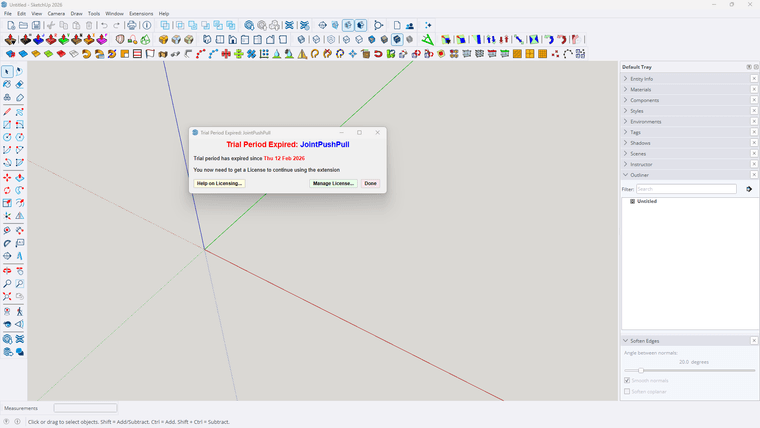
                      I have recently upgraded to sketchup 2026 and my laptop to windows 11. Up till today my Fredo^ plugins have been working fine, until today. I have the prepetual licences for all the plugins, and when I want to use them I get a window saying - TRIAL PERIOD EXPIRED etc etc. I have removed all the files from my PC, and reinstalled Fredo^ and all the plugins from my licence profile on Sketchucation. I have restarted sketchup and still receive the same notification. What must i do next please. Can admin assist?
                      Screenshot 2026-02-15 155403.png

                      Dave RD 1 Reply Last reply Reply Quote 0
                      • Dave RD Offline
                        Dave R @GavinG
                        last edited by

                        @GavinG do you have the latest version of the Sketchucation Extension Store installed?

                        Etaoin Shrdlu

                        %

                        (THERE'S NO PLACE LIKE)

                        G28 X0.0 Y0.0 Z0.0

                        M30

                        %

                        1 Reply Last reply Reply Quote 0
                        • G Offline
                          GavinG
                          last edited by

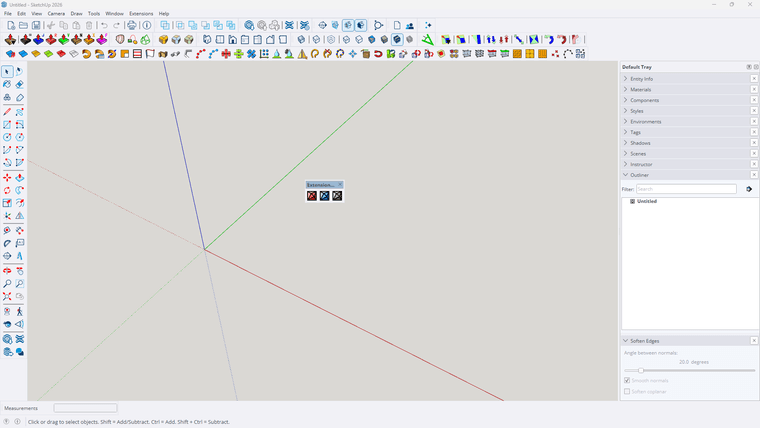
                          I think so, I have 3 new icons on my ribbon ( see attached). This is where I get directed when looking for Sketchucation Extension Store

                          1 Reply Last reply Reply Quote 0
                          • G Offline
                            GavinG
                            last edited by

                            Screenshot 2026-02-15 172330.png

                            1 Reply Last reply Reply Quote 0
                            • fredo6F Offline
                              fredo6
                              last edited by

                              First, when you have a problem of license, do not try to reinstall. Just check you have the latest versions.

                              Also, if you get the message of expiration, try first to revalidate the license. It won't count for a new seat.

                              Does it work in your case?

                              1 Reply Last reply Reply Quote 0
                              • fredo6F Offline
                                fredo6
                                last edited by fredo6

                                NEW RELEASE: LibFredo6 v15.8e - 15 Feb 26

                                LibFredo6 15.8e is a maintenance release. It includes changes related to:

                                • Bug Fixing
                                • Future compatibility

                                Requirements: SU2017 and above

                                See plugin home page of LibFredo6 for Download of LibFredo6.

                                Main Post of the LibFredo6 thread

                                1 Reply Last reply Reply Quote 0
                                • 1
                                • 2
                                • 101
                                • 102
                                • 103
                                • 104
                                • 105
                                • 109
                                • 110
                                • 103 / 110
                                • First post
                                  Last post
                                Buy SketchPlus
                                Buy SUbD
                                Buy WrapR
                                Buy eBook
                                Buy Modelur
                                Buy Vertex Tools
                                Buy SketchCuisine
                                Buy FormFonts

                                Advertisement