[Plugin Library] LibFredo6 - v15.8e - 15 Feb 26



-
See this topic which covers license management vis SketchUcation.com
If the defunct device had an old licensing setup then you might not be able to do it this way...
In which case PM Fredo or Rich with a list of the licenses to be released and will probably be able to help you...
However, it'll be quicker to do it yourself, if you can... -
Hi there!
SketchUp Pro 2023.
I tried yo install libfredo (the latest version),and RoundCorner (the latest versionm) but something went wrong. it is shown that it is installed in the Extension Manager but nothing is displayed. I found that I have to install ExtensionStore, I did it, but nothing changed. the message that I need to install the latest version of libfredo always appears, but it has been already installed. I've read that many people has the same issue but i haven't found the answer how to repair it. Please help me!
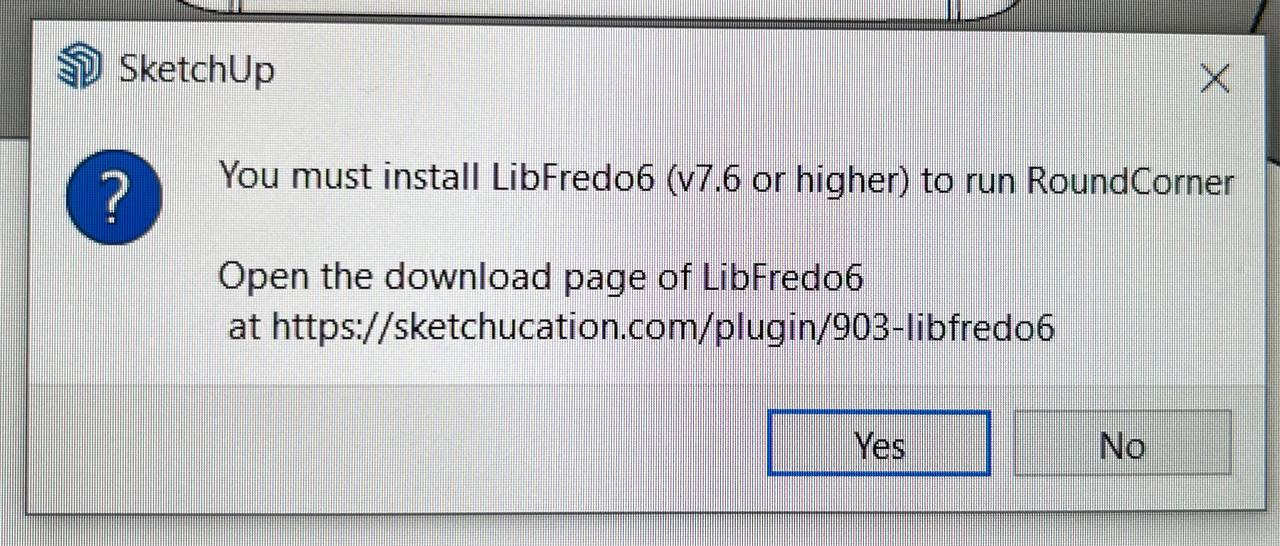
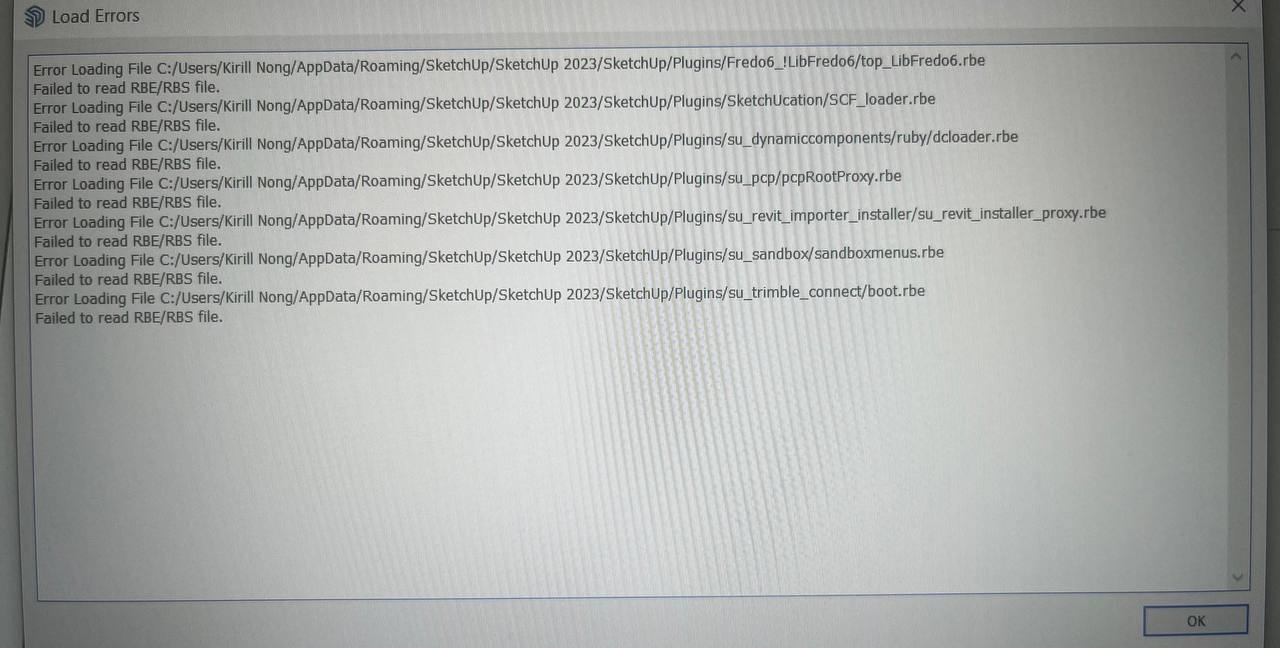
-
While we wait for Fredo to reply...
Being unable to read installed files is often a clue to an incorrect installation of SketchUp.
You don't need to reinstall it, but do the following... which will not impact on any customization thus far...Close SketchUp.
Find its installer exe file [usually in your Downloads folder]
Select its icon, right-click > context-menu > 'Run as administrator'
When prompted by the dialog that will open choose 'Repair'.
When if is completed, retry SketchUp and see if the problems are gone.
Installing a complex app by double-click its installer's exe file to 'Run' it, is not the same as doing it as I describe; even if you have admin powers the results will vary unpredictably - often messing up permissions.Also make sure you have the latest versions of Fredo's exensions, his LibFredo, and the SketchUcation Tools [for licensing] installed and SketchUp restarted to sync everything...
-
@tig said:
While we wait for Fredo to reply...
Being unable to read installed files is often a clue to an incorrect installation of SketchUp.
You don't need to reinstall it, but do the following... which will not impact on any customization thus far...Close SketchUp.
Find its installer exe file [usually in your Downloads folder]
Select its icon, right-click > context-menu > 'Run as administrator'
When prompted by the dialog that will open choose 'Repair'.
When if is completed, retry SketchUp and see if the problems are gone.
Installing a complex app by double-click its installer's exe file to 'Run' it, is not the same as doing it as I describe; even if you have admin powers the results will vary unpredictably - often messing up permissions.Also make sure you have the latest versions of Fredo's exensions, his LibFredo, and the SketchUcation Tools [for licensing] installed and SketchUp restarted to sync everything...
Thank you for trying to help me, appreciate it. But it doesn't work for me, the problem is repeated - these files can't be opened. I did what you said and also tried to uninstall everything and reinstall - but nothing helps. It seems that the only way is to reinstall my Windows))))))
-
This seems to be a Sketchup problem, already reported by users and independent from LibFredo6.
Usually, it is related to permissions.
A clean installation of Sketchup with admin rights is what is recommended.
-
NEW RELEASE: LibFredo6 v14.3a - 30 Mar 24
LibFredo6 14.3a includes changes related to:
- Future compatibility
- Various bug fixes and adjustments
Requirements: SU2017 and above
See plugin home page of LibFredo6 for Download of LibFredo6.
-
NEW RELEASE: LibFredo6 v14.3b - 31 Mar 24
LibFredo6 14.3b includes changes related to:
- Correction for Check Plugins for Update (due to the migration of the Sketchucation forum)
- Future compatibility
- Various bug fixes and adjustments
Requirements: SU2017 and above
See plugin home page of LibFredo6 for Download of LibFredo6.
-
Buenas, de manera repentina me han dejado de funcionar los complementos de Fredo.
He podido averiguar que no se cargan las Libfredo, las he instalado de nuevo varias veces
pero no consigo que funcione. Me sale este mensaje en la consola de ruby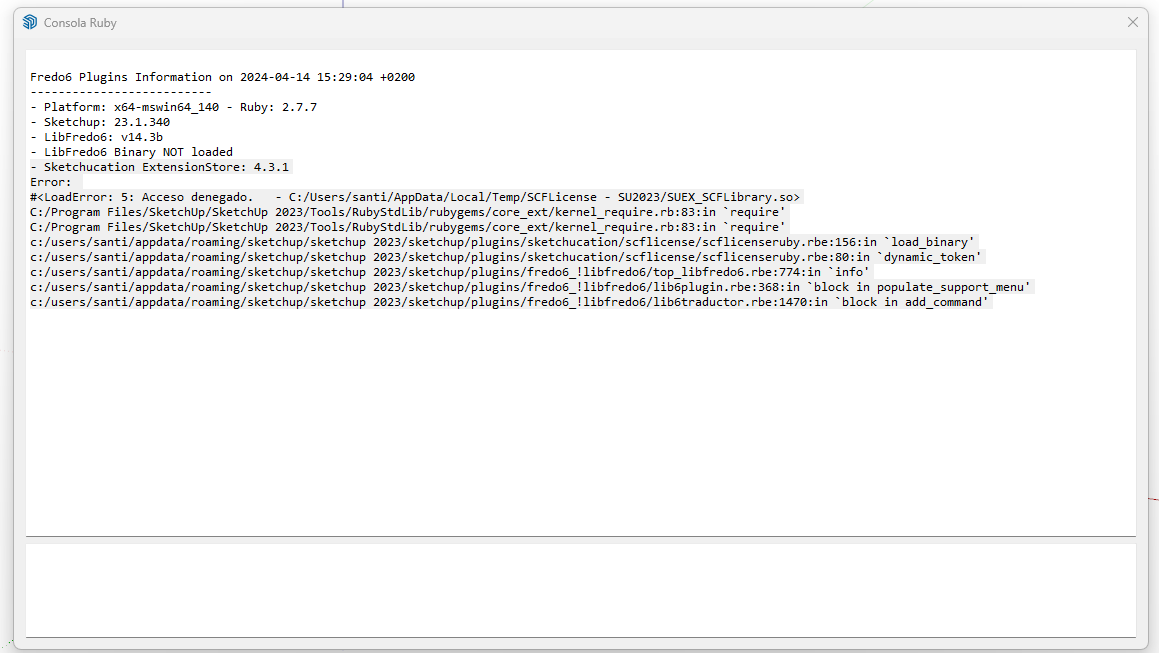
Que instalado varias veces le LibFedro y el Sketchup. Pero sigo igual.
Algunas idea de como solucionarlo.
-
You seem to have problems with the loading of binaries.
I suggest that you go to the Plugin directory and delete the Fredo6_!LibFredo6 folder. Then, resinstall LibFredo6 v14.3b.
For Sketchucation ExtensionStore, I also suggest that you upgrade to version 4.4.0, even if you run SU2023.
-
NEW RELEASE: LibFredo6 v14.3d - 21 Apr 24
LibFredo6 14.3d includes changes related to:
- Correction for bugs for LordOfTheToolbars
- Various bug fixes and adjustments
Requirements: SU2017 and above
See plugin home page of LibFredo6 for Download of LibFredo6.
-
Buenas Fredo.
El problemo lo tenia en dos equipos. en uno de ellos lo he solucionado dando todos los perminos a la carpeta y archico donde me daba el error de acceso denegado
Pero en otro equipo de un compañero. Le sigue saliendo el Libfredo6 binary not loaded. Aunque si que le carga el resto de extensiones de Fredo. Pero no puede
ejecutarlas.Que puede ser que no carge las libfredo6 Binary? donde esta ese archivo?
Saludos
-
@santiagoyagogil
If the previously posted massage, it says 'Access denied' - so then the file is there, but access to 'run' it is stopped by your permissions for that folder.
I suggest you open the C:/Users/santi/AppData/Local/Temp folder and right-click > context-menu > Properties > Security > Edit and ensure that all entries listed have 'Full control' permissions set.
These should trickle down to all enclosed files and subfolders.
Apply to all and close.
It might take a few minutes.
Try SketchUp again...Si el mensaje publicado anteriormente dice "Acceso denegado", entonces el archivo está ahí, pero el acceso para "ejecutarlo" está detenido por sus permisos para esa carpeta.
Le sugiero que abra la carpeta C:/Users/santi/AppData/Local/Temp y haga clic derecho > menú contextual > Propiedades > Seguridad > Editar y asegúrese de que todas las entradas enumeradas tengan configurados los permisos de "Control total".
Estos deberían llegar a todos los archivos y subcarpetas adjuntos.
Aplicar a todos y cerrar.
Puede que tarde unos minutos.
Prueba SketchUp de nuevo... -
@santiagoyagogil
it might also be a problem of Sketchup installation.
Did you install with 'Run as Administrator'? -
Gracias . Solucionado.
Era un tema de permisos. al final al poner todas las entradas de permisos en "on" de la carperta Temp se ha solucionado el problema.
Saludos
[Thank you . Solved.
It was a permissions issue. In the end, setting all the permissions entries to "on" in the Temp folder solved the problem.]
-
Hi. I'm having a similar problem and getting this message:
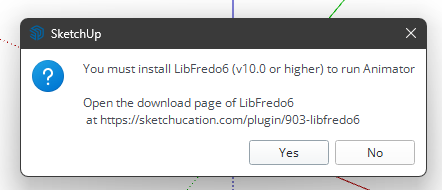
Also, all of the Fredo6 plugin icons have disappeared!
Thanks for your help!
-
Did you install LibFredo6 (latest version)?
-
@fredo6 I believe so, I installed v14.3d
-
UPDATE: I have no idea why but when I checked the settings in Sketchucation it was set to not load LibFredo and a couple of other plugins that I've been having issues with as well... It's strange because this is a recently installed Sketchup 2024 and I haven't touched those settings. Oh well, now I can use your plugins again!
@fredo6 Thanks for making my life easier for the many years I've been using Sketchup!
-
NEW RELEASE: LibFredo6 v14.4a - 10 May 24
LibFredo6 14.4a includes changes related to:
- Bug fixing for Curviloft Along Path (see this post)
- New extension Fredo Layport
Requirements: SU2017 and above
See plugin home page of LibFredo6 for Download of LibFredo6.
-
NEW RELEASE: LibFredo6 v14.4c - 18 May 24
LibFredo6 14.4c includes changes related to:
- Bug fixing for FredoCorner (see this post)
Requirements: SU2017 and above
See plugin home page of LibFredo6 for Download of LibFredo6.




Advertisement