sketchucation logo sketchucation
    • 登入
    Oops, your profile's looking a bit empty! To help us tailor your experience, please fill in key details like your SketchUp version, skill level, operating system, and more. Update and save your info on your profile page today!
    🔌 Smart Spline | Fluid way to handle splines for furniture design and complex structures. Download

    [Plugin Library] LibFredo6 - v15.8e - 15 Feb 26


    已排程 已置頂 已鎖定 已移動 Plugins
    2.2k 貼文 573 Posters 4.2m 瀏覽 575 Watching
    正在載入更多貼文
    • 從舊到新
    • 從新到舊
    • 最多點贊
    回覆
    • 在新貼文中回覆
    登入後回覆
    此主題已被刪除。只有擁有主題管理權限的使用者可以查看。
    • TIGT 離線
      TIG Moderator
      最後由 編輯

      You download RBZs from the PluginStore and install them using the Extension Manager dialog's install button...
      Restart SketchUp to sync everything...
      LibFredo6 offers support to Fredo's other extensions [which you also need to install].
      You also need the SketchUcation toolset installing,because that does the licensing stuff used by many of Fredo's paid-for extensions.
      Using the SketchUcation ExtensionStore dialog to auto-install other plugins sidesteps the need to down their RBZs... so perhaps install that first, then use it to auto-install the others...

      TIG

      1 條回覆 最後回覆 回覆 引用 0
      • S 離線
        Scamper4ever Newcomers
        最後由 編輯

        How do I download into sketchup 2023. Did I get scammed? its so stupid. Explain to me NOW!

        1 條回覆 最後回覆 回覆 引用 0
        • P 離線
          prinjke Newcomers
          最後由 編輯

          I have issues loading FredoScale. Message keeps popping up saying it requires LibFredo6 version >= 129 but I have the most recent version.

          1 條回覆 最後回覆 回覆 引用 0
          • S 離線
            stkfig Newcomers
            最後由 編輯

            Hey Fredo6

            I have the 3 seat JointPushPull plugin, but my old work laptop graphics card died and it will not let me open SketchUp to release the seat on the old machine and IT has taken the laptop away from me.

            Is there a way to remotely release that seat from the old laptop?

            Thanks

            Tim

            1 條回覆 最後回覆 回覆 引用 0
            • TIGT 離線
              TIG Moderator
              最後由 編輯

              See this topic which covers license management vis SketchUcation.com
              If the defunct device had an old licensing setup then you might not be able to do it this way...
              In which case PM Fredo or Rich with a list of the licenses to be released and will probably be able to help you...
              However, it'll be quicker to do it yourself, if you can...

              TIG

              1 條回覆 最後回覆 回覆 引用 0
              • L 離線
                leranong Newcomers
                最後由 編輯

                Hi there!

                SketchUp Pro 2023.

                I tried yo install libfredo (the latest version),and RoundCorner (the latest versionm) but something went wrong. it is shown that it is installed in the Extension Manager but nothing is displayed. I found that I have to install ExtensionStore, I did it, but nothing changed. the message that I need to install the latest version of libfredo always appears, but it has been already installed. I've read that many people has the same issue but i haven't found the answer how to repair it. Please help me!
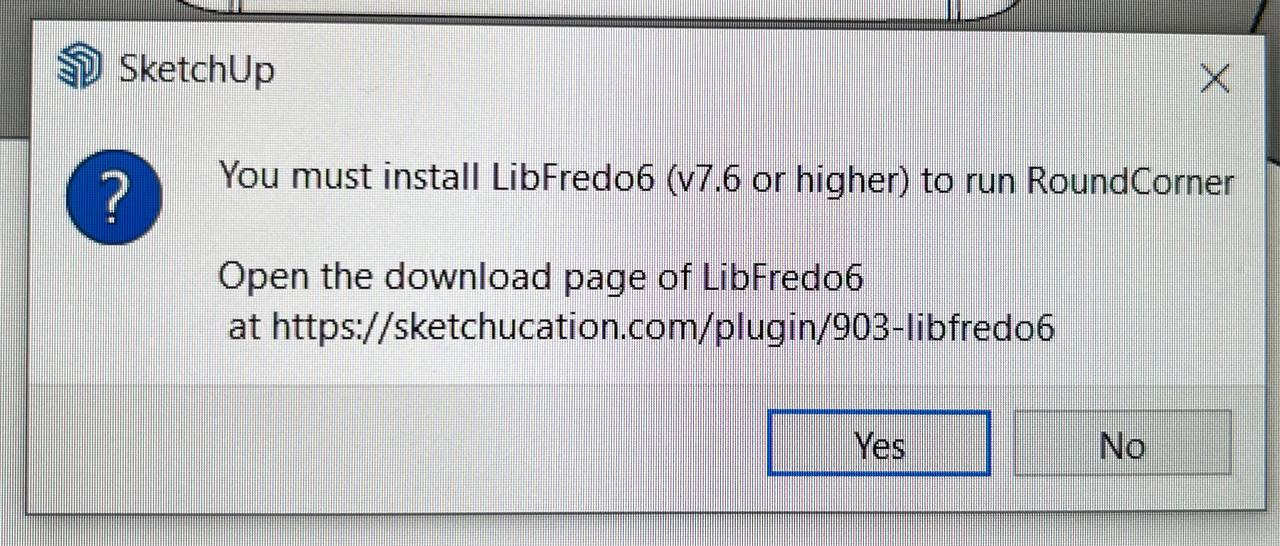
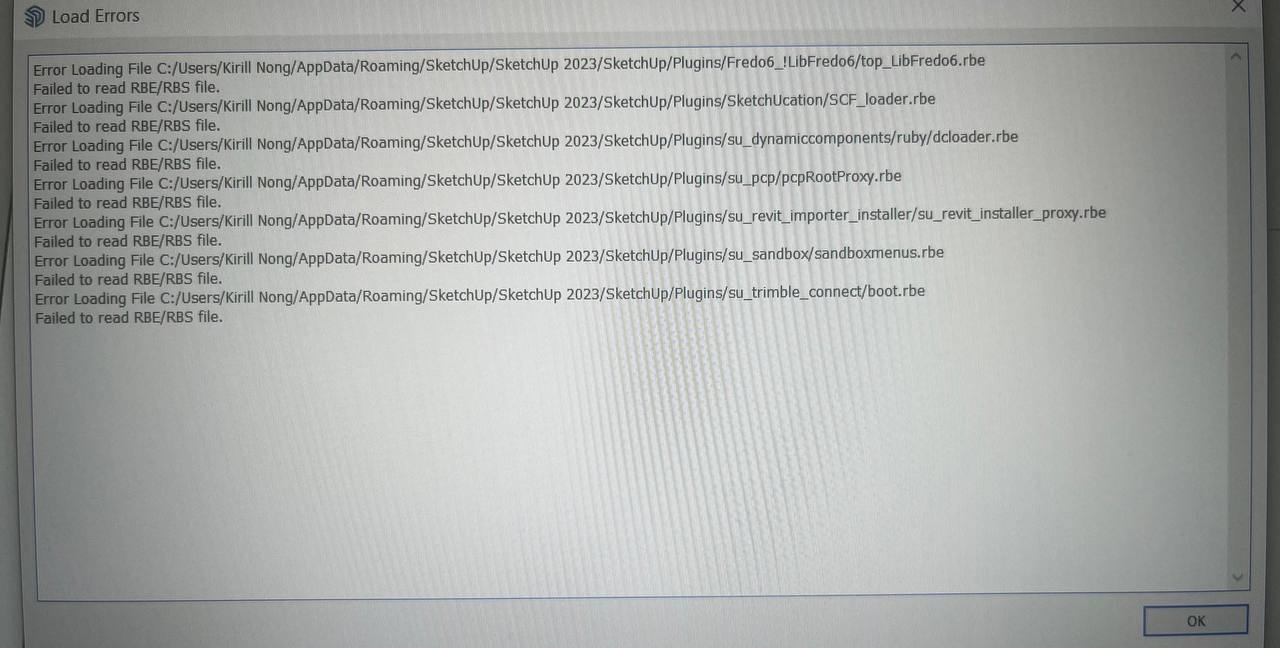
                photo_2024-02-18_15-55-25.jpg


                photo_2024-02-18_15-55-29.jpg

                1 條回覆 最後回覆 回覆 引用 0
                • TIGT 離線
                  TIG Moderator
                  最後由 編輯

                  @leranong

                  While we wait for Fredo to reply...

                  Being unable to read installed files is often a clue to an incorrect installation of SketchUp.
                  You don't need to reinstall it, but do the following... which will not impact on any customization thus far...

                  Close SketchUp.
                  Find its installer exe file [usually in your Downloads folder]
                  Select its icon, right-click > context-menu > 'Run as administrator'
                  When prompted by the dialog that will open choose 'Repair'.
                  When if is completed, retry SketchUp and see if the problems are gone.
                  Installing a complex app by double-click its installer's exe file to 'Run' it, is not the same as doing it as I describe; even if you have admin powers the results will vary unpredictably - often messing up permissions.

                  Also make sure you have the latest versions of Fredo's exensions, his LibFredo, and the SketchUcation Tools [for licensing] installed and SketchUp restarted to sync everything...

                  TIG

                  1 條回覆 最後回覆 回覆 引用 0
                  • L 離線
                    leranong Newcomers
                    最後由 編輯

                    @tig said:

                    @leranong

                    While we wait for Fredo to reply...

                    Being unable to read installed files is often a clue to an incorrect installation of SketchUp.
                    You don't need to reinstall it, but do the following... which will not impact on any customization thus far...

                    Close SketchUp.
                    Find its installer exe file [usually in your Downloads folder]
                    Select its icon, right-click > context-menu > 'Run as administrator'
                    When prompted by the dialog that will open choose 'Repair'.
                    When if is completed, retry SketchUp and see if the problems are gone.
                    Installing a complex app by double-click its installer's exe file to 'Run' it, is not the same as doing it as I describe; even if you have admin powers the results will vary unpredictably - often messing up permissions.

                    Also make sure you have the latest versions of Fredo's exensions, his LibFredo, and the SketchUcation Tools [for licensing] installed and SketchUp restarted to sync everything...

                    Thank you for trying to help me, appreciate it. But it doesn't work for me, the problem is repeated - these files can't be opened. I did what you said and also tried to uninstall everything and reinstall - but nothing helps. It seems that the only way is to reinstall my Windows))))))

                    1 條回覆 最後回覆 回覆 引用 0
                    • fredo6F 離線
                      fredo6
                      最後由 編輯

                      This seems to be a Sketchup problem, already reported by users and independent from LibFredo6.

                      Usually, it is related to permissions.

                      A clean installation of Sketchup with admin rights is what is recommended.

                      1 條回覆 最後回覆 回覆 引用 0
                      • fredo6F 離線
                        fredo6
                        最後由 fredo6 編輯

                        NEW RELEASE: LibFredo6 v14.3a - 30 Mar 24

                        LibFredo6 14.3a includes changes related to:

                        • Future compatibility
                        • Various bug fixes and adjustments

                        Requirements: SU2017 and above

                        See plugin home page of LibFredo6 for Download of LibFredo6.

                        Main Post of the LibFredo6 thread

                        1 條回覆 最後回覆 回覆 引用 0
                        • fredo6F 離線
                          fredo6
                          最後由 編輯

                          NEW RELEASE: LibFredo6 v14.3b - 31 Mar 24

                          LibFredo6 14.3b includes changes related to:

                          • Correction for Check Plugins for Update (due to the migration of the Sketchucation forum)
                          • Future compatibility
                          • Various bug fixes and adjustments

                          Requirements: SU2017 and above

                          See plugin home page of LibFredo6 for Download of LibFredo6.

                          Main Post of the LibFredo6 thread

                          S 1 條回覆 最後回覆 回覆 引用 0
                          • S 離線
                            santiagoyagogil @fredo6
                            最後由 編輯

                            Buenas, de manera repentina me han dejado de funcionar los complementos de Fredo.
                            He podido averiguar que no se cargan las Libfredo, las he instalado de nuevo varias veces
                            pero no consigo que funcione. Me sale este mensaje en la consola de ruby
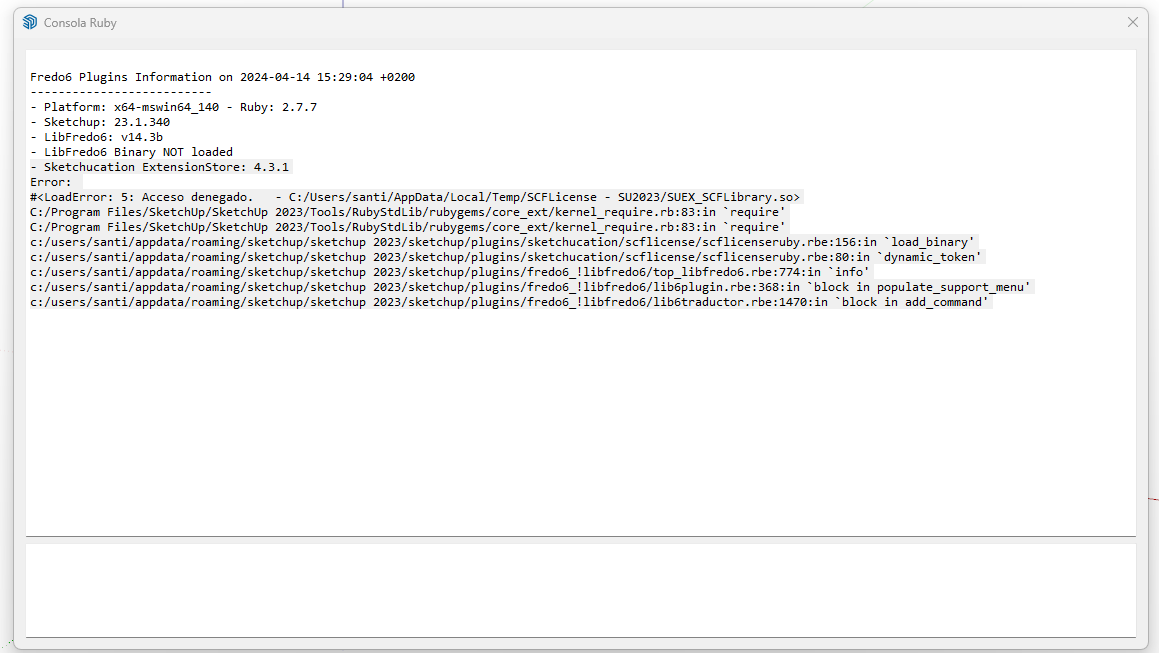
                            Consola de Ruby.png

                            Que instalado varias veces le LibFedro y el Sketchup. Pero sigo igual.

                            Algunas idea de como solucionarlo.

                            fredo6F 1 條回覆 最後回覆 回覆 引用 0
                            • fredo6F 離線
                              fredo6 @santiagoyagogil
                              最後由 編輯

                              @santiagoyagogil

                              You seem to have problems with the loading of binaries.

                              I suggest that you go to the Plugin directory and delete the Fredo6_!LibFredo6 folder. Then, resinstall LibFredo6 v14.3b.

                              For Sketchucation ExtensionStore, I also suggest that you upgrade to version 4.4.0, even if you run SU2023.

                              S 1 條回覆 最後回覆 回覆 引用 0
                              • fredo6F 離線
                                fredo6
                                最後由 編輯

                                NEW RELEASE: LibFredo6 v14.3d - 21 Apr 24

                                LibFredo6 14.3d includes changes related to:

                                • Correction for bugs for LordOfTheToolbars
                                • Various bug fixes and adjustments

                                Requirements: SU2017 and above

                                See plugin home page of LibFredo6 for Download of LibFredo6.

                                Main Post of the LibFredo6 thread

                                1 條回覆 最後回覆 回覆 引用 0
                                • S 離線
                                  santiagoyagogil @fredo6
                                  最後由 編輯

                                  Buenas Fredo.

                                  El problemo lo tenia en dos equipos. en uno de ellos lo he solucionado dando todos los perminos a la carpeta y archico donde me daba el error de acceso denegado
                                  Pero en otro equipo de un compañero. Le sigue saliendo el Libfredo6 binary not loaded. Aunque si que le carga el resto de extensiones de Fredo. Pero no puede
                                  ejecutarlas.

                                  Que puede ser que no carge las libfredo6 Binary? donde esta ese archivo?

                                  Saludos

                                  TIGT 1 條回覆 最後回覆 回覆 引用 0
                                  • TIGT 離線
                                    TIG Moderator @santiagoyagogil
                                    最後由 編輯

                                    @santiagoyagogil
                                    If the previously posted massage, it says 'Access denied' - so then the file is there, but access to 'run' it is stopped by your permissions for that folder.
                                    I suggest you open the C:/Users/santi/AppData/Local/Temp folder and right-click > context-menu > Properties > Security > Edit and ensure that all entries listed have 'Full control' permissions set.
                                    These should trickle down to all enclosed files and subfolders.
                                    Apply to all and close.
                                    It might take a few minutes.
                                    Try SketchUp again...

                                    Si el mensaje publicado anteriormente dice "Acceso denegado", entonces el archivo está ahí, pero el acceso para "ejecutarlo" está detenido por sus permisos para esa carpeta.
                                    Le sugiero que abra la carpeta C:/Users/santi/AppData/Local/Temp y haga clic derecho > menú contextual > Propiedades > Seguridad > Editar y asegúrese de que todas las entradas enumeradas tengan configurados los permisos de "Control total".
                                    Estos deberían llegar a todos los archivos y subcarpetas adjuntos.
                                    Aplicar a todos y cerrar.
                                    Puede que tarde unos minutos.
                                    Prueba SketchUp de nuevo...

                                    TIG

                                    fredo6F 1 條回覆 最後回覆 回覆 引用 0
                                    • fredo6F 離線
                                      fredo6 @TIG
                                      最後由 編輯

                                      @santiagoyagogil
                                      it might also be a problem of Sketchup installation.
                                      Did you install with 'Run as Administrator'?

                                      S 1 條回覆 最後回覆 回覆 引用 1
                                      • S 離線
                                        santiagoyagogil @fredo6
                                        最後由 TIG 編輯

                                        Gracias . Solucionado.

                                        Era un tema de permisos. al final al poner todas las entradas de permisos en "on" de la carperta Temp se ha solucionado el problema.

                                        Saludos

                                        [Thank you . Solved.

                                        It was a permissions issue. In the end, setting all the permissions entries to "on" in the Temp folder solved the problem.]

                                        1 條回覆 最後回覆 回覆 引用 0
                                        • N 離線
                                          nekobus76
                                          最後由 編輯

                                          Hi. I'm having a similar problem and getting this message:
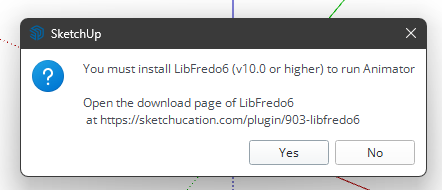
                                          a284748e-7b12-4809-a4e0-d0b04132e93e-image.png

                                          Also, all of the Fredo6 plugin icons have disappeared!

                                          Thanks for your help!

                                          1 條回覆 最後回覆 回覆 引用 0
                                          • fredo6F 離線
                                            fredo6
                                            最後由 編輯

                                            Did you install LibFredo6 (latest version)?

                                            N 1 條回覆 最後回覆 回覆 引用 0
                                            • 1
                                            • 2
                                            • 3
                                            • 4
                                            • 5
                                            • 6
                                            • 7
                                            • 8
                                            • 109
                                            • 110
                                            • 6 / 110
                                            • 第一個貼文
                                              最後的貼文
                                            Buy SketchPlus
                                            Buy SUbD
                                            Buy WrapR
                                            Buy eBook
                                            Buy Modelur
                                            Buy Vertex Tools
                                            Buy SketchCuisine
                                            Buy FormFonts

                                            Advertisement

