[Plugin Library] LibFredo6 - v15.8e - 15 Feb 26



-
Hi Fredo6,
I updated Libfredo6 yesterday because of your new FredoSketch extension. First tried with window-Libfredo settings-check for fredo6 plugin updates and was surprised that it said that everything was up to date. Libfredo6 version was 13.6..
When checking with the sketchucation tool it said there was an update for Libfredo6.
Just wanted to give you a heads up..
Thanks for all your work and fantastic extensions!
Herman. -
@hairman said:
Hi Fredo6,
I updated Libfredo6 yesterday because of your new FredoSketch extension. First tried with window-Libfredo settings-check for fredo6 plugin updates and was surprised that it said that everything was up to date. Libfredo6 version was 13.6..
The mechanism for the CheckForUpdate is slightly different current. It relies on me setting the information on the server. So, there may a slight delay.
-
NEW RELEASE: LibFredo6 v13.7b - 20 Jan 23
LibFredo6 13.7b includes:
- Fix for FredoScale Radial Bend (wrong base direction of protractor)
It is strongly advised to upgrade to this version
Requirements: SU2017 and above
See plugin home page of LibFredo6 for Download of LibFredo6.
Main Post of the LibFredo6 thread
Fredo
-
I am not able to install the file on sketchup... Is there a problem with the file? Sketchup keeps showing the message ''load errors''... and I really need to use one of the fredo exptension today
-
What load errors exactly?
-
Hi. This is what I get on sketchup every time I install the new version.
Erreur de chargement du fichier C:/Users/Amy/AppData/Roaming/SketchUp/SketchUp 2021/SketchUp/Plugins/su_advancedcameratools/actloader.rbe
Failed to read RBE/RBS file.
Erreur de chargement du fichier C:/Users/Amy/AppData/Roaming/SketchUp/SketchUp 2021/SketchUp/Plugins/su_dynamiccomponents/ruby/dcloader.rbe
Failed to read RBE/RBS file.
Erreur de chargement du fichier C:/Users/Amy/AppData/Roaming/SketchUp/SketchUp 2021/SketchUp/Plugins/su_sandbox/sandboxmenus.rbe
Failed to read RBE/RBS file.
Erreur de chargement du fichier C:/Users/Amy/AppData/Roaming/SketchUp/SketchUp 2021/SketchUp/Plugins/su_trimble_connect/boot.rbe
Failed to read RBE/RBS file. -
These load errors are not directly relating to Fredo's extensions,they relate to the 'shipped' tools which come with the SketchUp installation, however, the root cause of these errors can affect many extensions to through load errors.
It usually points to an incorrect installation of SketchUp on your Windows PC.
It can be 'repaired' without adversely affecting your installed extensions...
Follow these steps...
Ensure SketchUp is closed.
Find the SketchUp installer's exe file - usually in your Downloads folder.
Select its icon, right-click > context-menu > "Run as administrator"
In the dialog that opens choose 'Repair'.
When it's completed try starting SketchUp again...
Any better ?
Double-clicking any installer's exe file to 'Run' it is not the same thing, even if you user-account has admin powers. Permissions can become skewed in unpredictable ways.
It is possible that some 'temp' data files [usually Fredo's] which stored outside of the usual SketchUp paths might still be set up wrongly, and so they can throw up errors, if this occurs let us know and we can tell you which folder to delete, as it will get remade when SketchUp restarts, but this time with good permissions... -
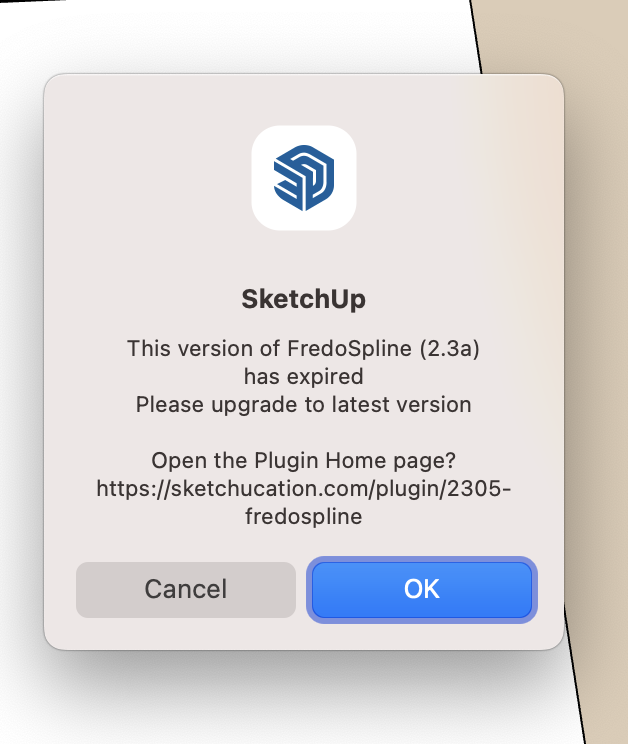 I've downloaded the 13.7b file and I think I've installed it, but the application refuses to acknowledge it and I keep getting an error. I've uninstalled the old version, installed the new version, quit SketchUp and rebooted the whole mac more than once and still the error message. Any help, please?!?!?
 -
@uxcentricdarren said:
I've downloaded the 13.7b file and I think I've installed it, but the application refuses to acknowledge it and I keep getting an error.
The latest version of FredoSPline, which is indicated as out of date in your case, is 2.4a. Based on the version number you mention, it sounds like you updated LibFredo6. How about updating FredoSpline to the current version and then see if the message goes away?
While you're updating, make sure you have the latest version of the Sketchucation tool installed, too.
-
Thank you!!
-
I have installed the plug in through the extention manager, but why Id don't see any tool bar? I have only the settings under the window menu... can anyone help?
-
@yles858026 said:
I have installed the plug in through the extention manager, but why Id don't see any tool bar? I have only the settings under the window menu... can anyone help?
LibFredo6 is just a code library shared by my plugins.
You now need to install each plugin. -
Hi Fredo,
I have upgraded LibFredo6 to v13.7b and simultaneously upgraded Joint Push Pull Interactive to v4.6a. And now after re-starting the Sketchup, the Joint Push Pull toolbar appears but no response when clicking any buttons, and on the window menu > LibFreddo6 Settings...also nothing happens when clicking most of the menus - both are nothing works.
Thank you
-
@erwinz said:
Hi Fredo,
I have upgraded LibFredo6 to v13.7b and simultaneously upgraded Joint Push Pull Interactive to v4.6a.
Your profile indicates you are using SketchUp 2015. For that version you need to be using the older legacy versions of the the extension and LibFredo6 files.
Edit: Thank you for updating your profile.
Did you also update to the latest version of the Sketchucation tool?
-
@erwinz said:
I have upgraded LibFredo6 to v13.7b and simultaneously upgraded Joint Push Pull Interactive to v4.6a. And now after re-starting the Sketchup, the Joint Push Pull toolbar appears but no response when clicking any buttons, and on the window menu > LibFreddo6 Settings...also nothing happens when clicking most of the menus - both are nothing works.
Could you open the Ruby console for possible error messages before you click on the command icon.
-
NEW RELEASE: LibFredo6 v13.8a - 04 Feb 23
LibFredo6 13.8a includes:
- Bug fixing related to licensing of ThruPaint
- Support for future compatibility
It is strongly advised to upgrade to this version if you use ThruPaint
Requirements: SU2017 and above
See plugin home page of LibFredo6 for Download of LibFredo6.
Main Post of the LibFredo6 thread
Fredo
-
Thank!
-
Dear developers or sketchUcation management,
We do not have paypal access from Turkey. I would like you to inform us about how to buy fredo plugins.
-
dear developers or sketchUcation management,
We do not have paypal access from Turkey. I would like you to inform us about how to buy fredo plugins.
-
NEW RELEASE: LibFredo6 v13.9a - 20 Feb 23
LibFredo6 13.9a includes:
- Bug fixing related to SU2023 in some circumstances
It is strongly advised to upgrade to this version if you use ThruPaint
Requirements: SU2017 and above
See plugin home page of LibFredo6 for Download of LibFredo6.
Main Post of the LibFredo6 thread
Fredo





Advertisement