sketchucation logo sketchucation
    • 登入
    Oops, your profile's looking a bit empty! To help us tailor your experience, please fill in key details like your SketchUp version, skill level, operating system, and more. Update and save your info on your profile page today!
    🔌 Smart Spline | Fluid way to handle splines for furniture design and complex structures. Download

    [Plugin Library] LibFredo6 - v15.8e - 15 Feb 26


    已排程 已置頂 已鎖定 已移動 Plugins
    2.2k 貼文 573 Posters 4.2m 瀏覽 575 Watching
    正在載入更多貼文
    • 從舊到新
    • 從新到舊
    • 最多點贊
    回覆
    • 在新貼文中回覆
    登入後回覆
    此主題已被刪除。只有擁有主題管理權限的使用者可以查看。
    • TIGT 離線
      TIG Moderator
      最後由 編輯

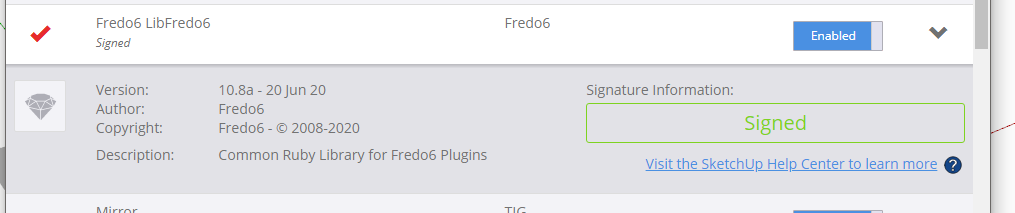
      LibFredo is signed.
      Capture.PNG
      You haven't clearly explained how you installed it or the other two Fredo extensions.
      Let's start again from the beginning.
      You will have downloaded three RBZ files for these extensions.
      Use the red-button on the bottom-left of the Extension Manager dialog - visible in your screenshot -
      to 'Install Extension'.
      Navigate to, and select an RBZ and it'll be auto-installed.
      Repeat for the remaining RBZ files.
      Restart SketchUp and sync everything.
      What does the Extension Manager dialog say now ?
      Expand the LibFredo item to see its details... is it the same version as my screenshot ?
      It you have incorrectly manually placed files into a location other than your Users/.../Plugins folder it might be causing issues and these should be removed too...

      TIG

      1 條回覆 最後回覆 回覆 引用 0
      • fredo6F 離線
        fredo6
        最後由 編輯

        NEW RELEASE: LibFredo6 v10.9a - 02 Jul 20

        LibFredo6 10.9a fixes a problem with the animation rendering of VRay 4.2 and Animator


        Requirements: SU2017 and above

        See plugin home page of LibFredo6 for Download of LibFredo6.

        Main Post of the LibFredo6 thread

        Fredo

        1 條回覆 最後回覆 回覆 引用 0
        • fredo6F 離線
          fredo6
          最後由 編輯

          NEW RELEASE: LibFredo6 v10.8a - 20 Jun 20

          LibFredo6 10.8a is a maintenance release, with bug fixing and adjustments mostly for Mac (dialogs)


          Requirements: SU2017 and above

          See plugin home page of LibFredo6 for Download of LibFredo6.

          Main Post of the LibFredo6 thread

          Fredo

          1 條回覆 最後回覆 回覆 引用 0
          • R 離線
            Ralf Jansen
            最後由 編輯

            Hi,
            today I regognised that all Fredo6-Plugins are in english (dont know since when). 😮
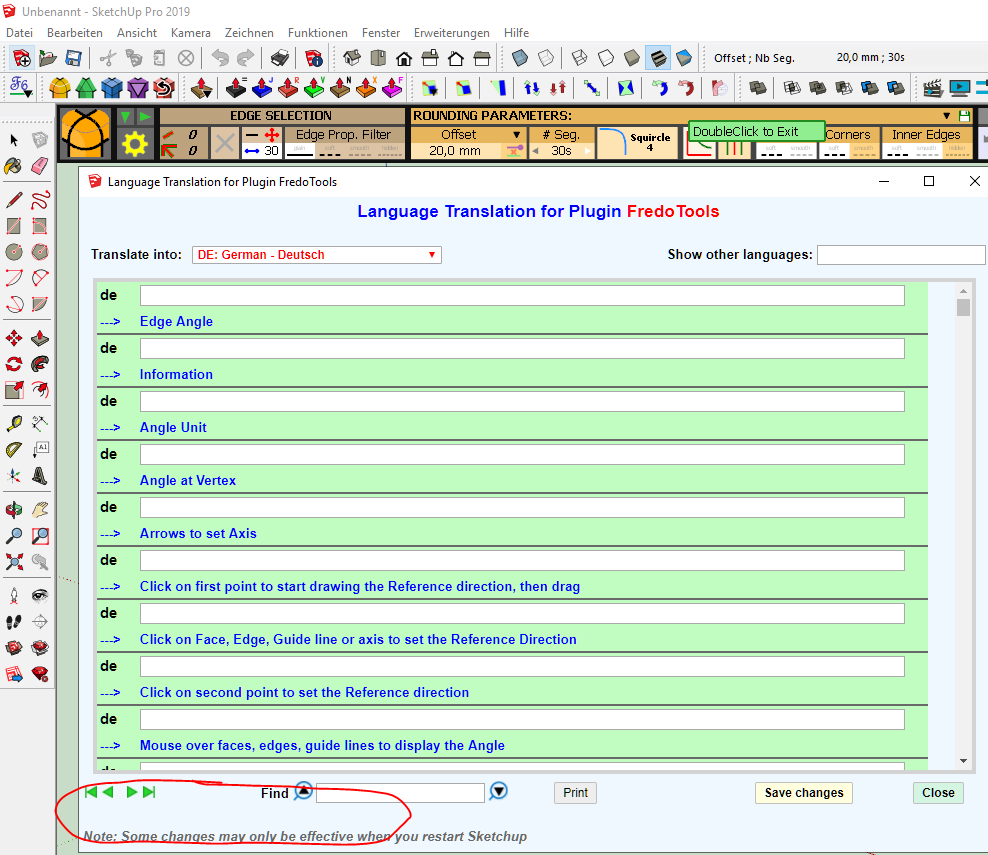
            When open the language it is set to German and all translation Fields are empty.
            After changing to another language (e.g. English), and switching back to German, most of the Fields are with german translation (Left to translate: 201 / 605).
            But unfortunately all Plugins still in english, even after restarting Sketchup. 😞

            I'm using Sketchup2019 Pro.
            All Fredo-Plugins are up to date.

            1 條回覆 最後回覆 回覆 引用 0
            • Dave RD 離線
              Dave R
              最後由 編輯

              @ralf jansen said:

              I'm using Sketchup2019 Pro.

              Perhaps you could update your profile?

              I'm just guessing that you haven't made the correct setting in LibFredo6 yet.
              Screenshot - 7_8_2020 , 11_23_27 AM.png

              Etaoin Shrdlu

              %

              (THERE'S NO PLACE LIKE)

              G28 X0.0 Y0.0 Z0.0

              M30

              %

              1 條回覆 最後回覆 回覆 引用 0
              • R 離線
                Ralf Jansen
                最後由 編輯

                @dave r said:

                @ralf jansen said:

                I'm using Sketchup2019 Pro.

                Perhaps you could update your profile?

                -> Done

                @dave r said:

                I'm just guessing that you haven't made the correct setting in LibFredo6 yet.

                The config setting of LibFredo6 is "German". But there are no translations... 😞
                -> see also bottom line counter
                1.PNG

                When I switch to english it looks like:
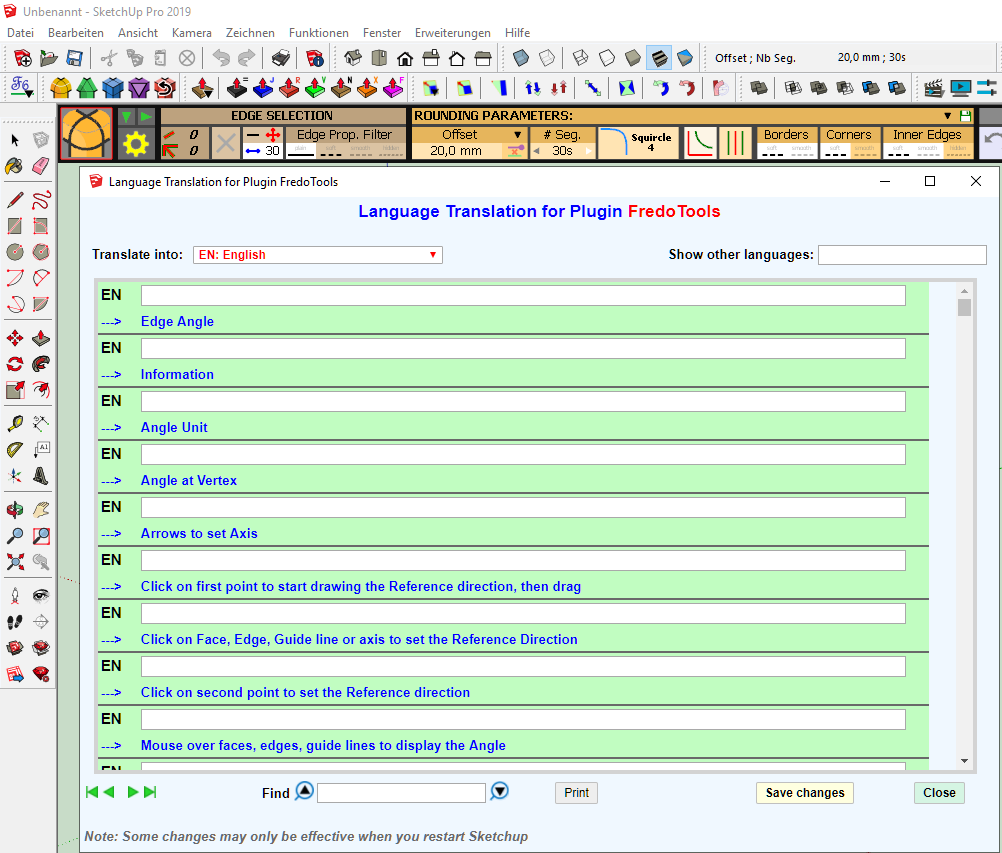
                2.PNG

                After switching back to german it looks like:
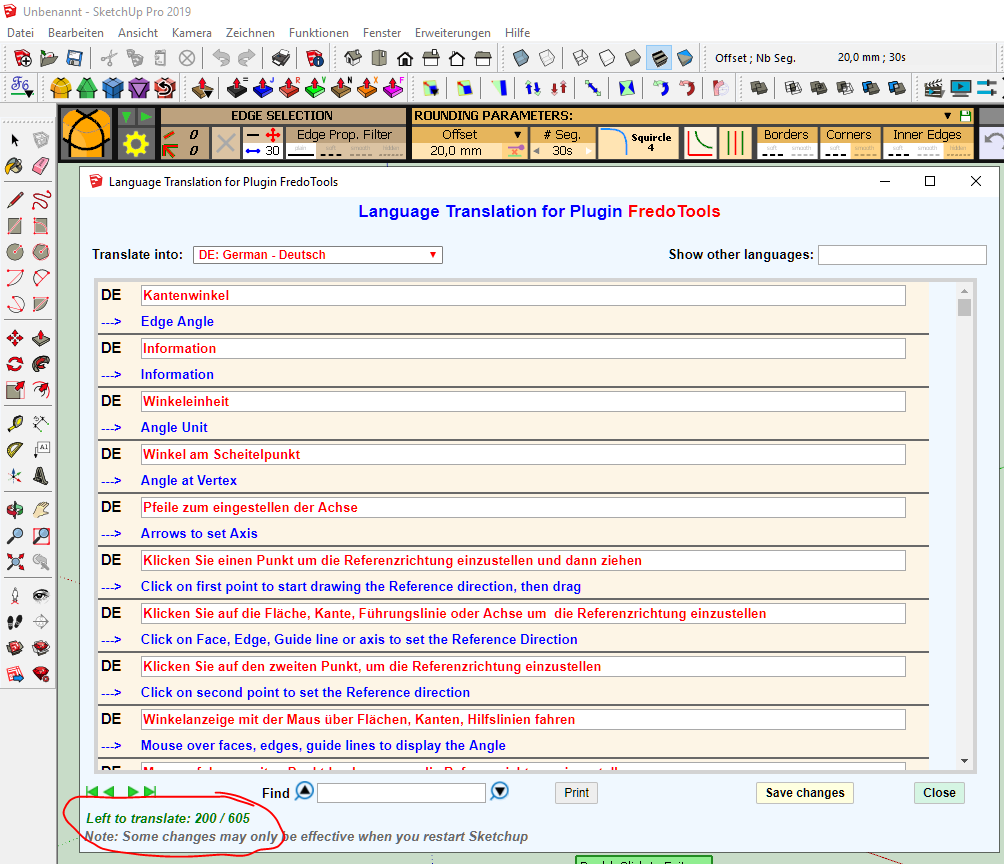
                3.PNG

                After pressing "Save changes" and restart of Sketchup there are still no translations
                -> looks like first attachment

                1 條回覆 最後回覆 回覆 引用 0
                • fredo6F 離線
                  fredo6
                  最後由 編輯

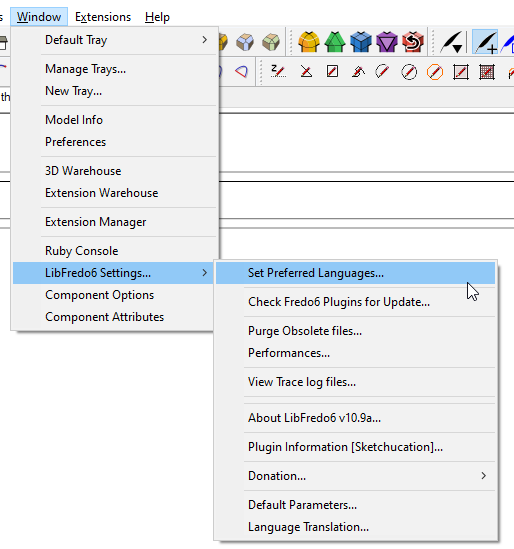
                  Did you set the language with the menu Window > LibFredo6 Settings... > Set Preferred Language
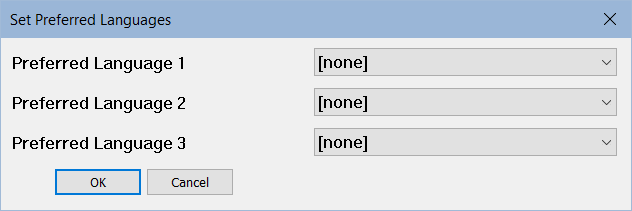
                  LibFredo6 Set Language.png

                  The Translation dialog boxes for LibFredo6 and my other plugins are to be used only by translators.

                  1 條回覆 最後回覆 回覆 引用 0
                  • R 離線
                    Ralf Jansen
                    最後由 編輯

                    @fredo6 said:

                    Did you set the language with the menu Window > LibFredo6 Settings... > Set Preferred Language

                    [attachment=0:3amq512s]<!-- ia0 -->LibFredo6 Set Language.png<!-- ia0 -->[/attachment:3amq512s]

                    The Translation dialog boxes for LibFredo6 and my other plugins are to be used only by translators.

                    Thanks Fredo6! That's fixing my problem 😄
                    Looks like that I was working with your tools in english since switching to the "pro" Version of Sketchup. 😮
                    By the way: You are doing a great job. Thanks a lot. 👍

                    1 條回覆 最後回覆 回覆 引用 0
                    • G 離線
                      grigorescustelian
                      最後由 編輯

                      Why don't you just keep it to one version? Why do you keep updating forever? It's the same tool.

                      1 條回覆 最後回覆 回覆 引用 0
                      • Dave RD 離線
                        Dave R
                        最後由 編輯

                        @grigorescustelian said:

                        Why don't you just keep it to one version? Why do you keep updating forever? It's the same tool.

                        There are periodic changes to Ruby, additional extensions that require additional or modified support files, and bug fixes. Fredo6 is pretty good about explaining why he updates when he does. You aren't forced to install these updates, however. You can ignore them.

                        Etaoin Shrdlu

                        %

                        (THERE'S NO PLACE LIKE)

                        G28 X0.0 Y0.0 Z0.0

                        M30

                        %

                        1 條回覆 最後回覆 回覆 引用 0
                        • V 離線
                          victoriagaylard
                          最後由 編輯

                          Hi Tig,
                          Sorry it's taken me a while to look at this and come back to you.
                          I removed everything and started again (and re-watched your install tutorial).
                          But I'm still having the same problem.
                          I download the .rbz files onto my desktop, use the Extension Manager to install the files. This part seems to work fine.
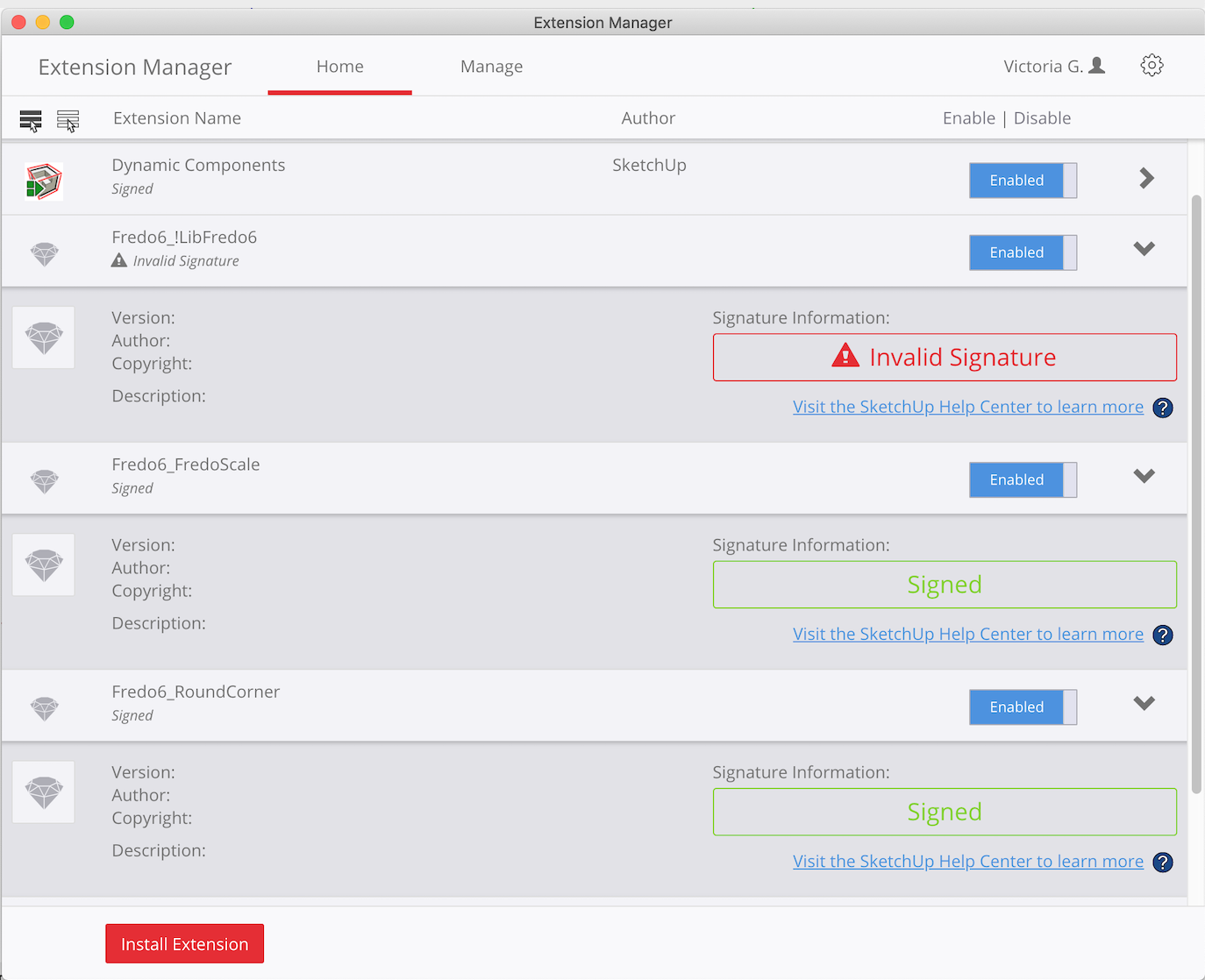
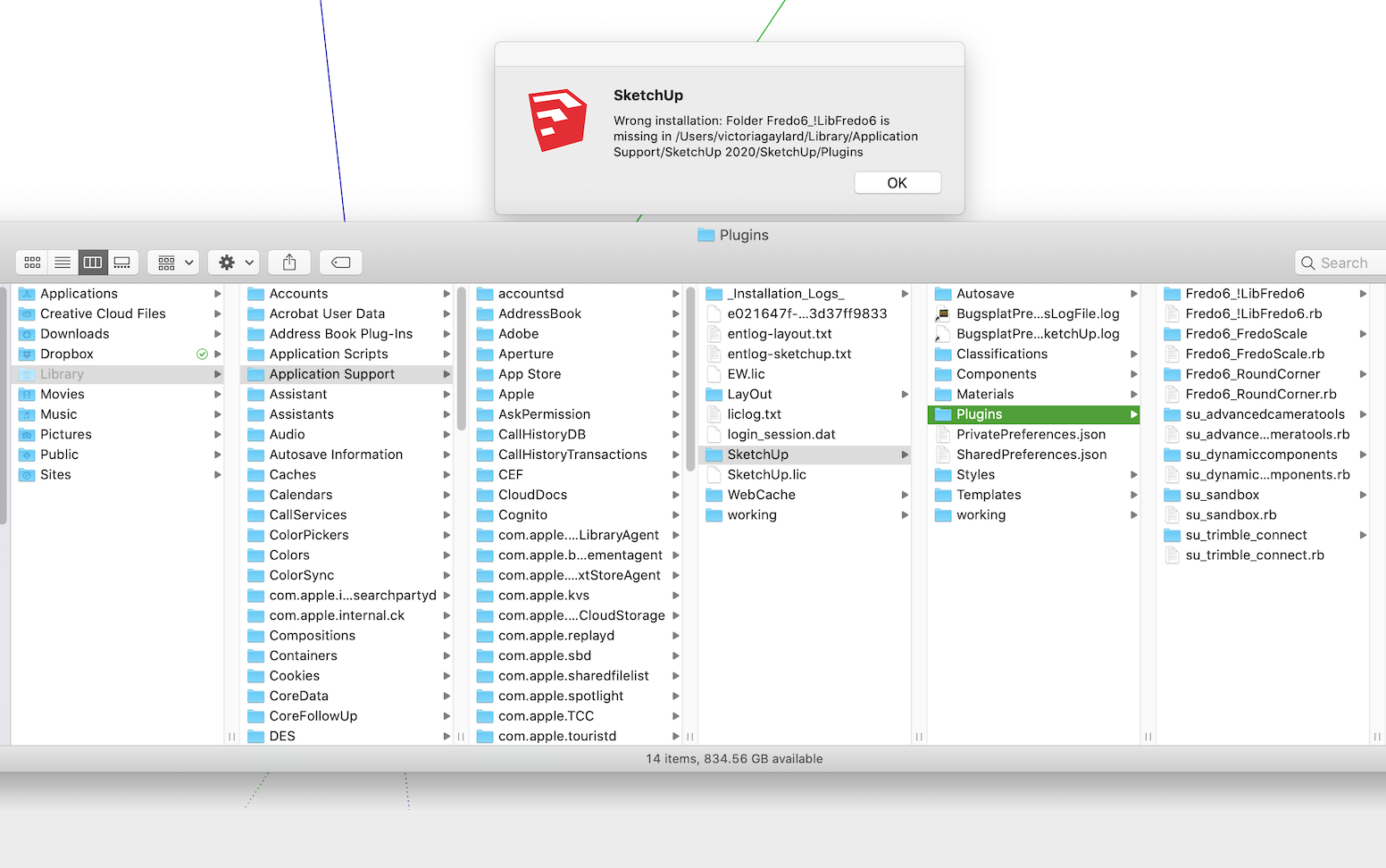
                          I checked my Plug-Ins folder and the Fredo folders appear to be there (see screenshot).
                          I quit out of SketchUp and when I reopen it, I get this message that the LibFredo6 folder is not in the Plug-Ins folder (see second screenshot).
                          In the Extension Manager, it's saying your signature is invalid and I notice there are no details for the extensions (version etc).
                          I'm on a Mac so not sure if that makes a difference?
                          I am sure I'm following your instructions, but am not sure what to do now?
                          Thanks in advance for your help.
                          Victoria

                          Untitled 5.png


                          Untitled 4.png

                          1 條回覆 最後回覆 回覆 引用 0
                          • TIGT 離線
                            TIG Moderator
                            最後由 編輯

                            This is weird.

                            Perhaps a MAC expert can comment / help.
                            Clearly the expected file/subfolder seems to be in your Plugins folder.
                            Perhaps it's a permissions issue preventing SketchUp seeing/reading them ?
                            Perhaps a MAC-guy can explain how to check the Plugins folder's permissions and ensure the reset trickles down to all its contents too...

                            Fredo's RBZs are all signed and current, so it should report properly and show its version etc...

                            For the avoidance of doubt please get the current RBZ and reinstall in.
                            Restart SketchUp and see what happens...
                            https://sketchucation.com/pluginstore?pln=LibFredo6

                            TIG

                            1 條回覆 最後回覆 回覆 引用 0
                            • Steve_SS 離線
                              Steve_S
                              最後由 編輯

                              I installed the latest version of - LibFredo6 - v10.9a - 02 jul 20.

                              SketchUp's extension manager shows it as UNSIGNED.
                              All of my other plug-ins are all marked SIGNED.

                              Is it normal for LibFredo6 - v10.9a - 02 jul 20 to be marked as UNSIGNED?
                              If not, what is the process required to change its state from UNSIGNED to SIGNED?

                              In advance, thank you for your response.

                              LibFredo6.png

                              1 條回覆 最後回覆 回覆 引用 0
                              • Dave RD 離線
                                Dave R
                                最後由 編輯

                                Look at LibFredo6 not top_Libfredo.

                                It doesn't matter if top_LibFredo isn't signed as long as you leave the loading permissions set to allow it to load.

                                It should look like this in Extension Manager.
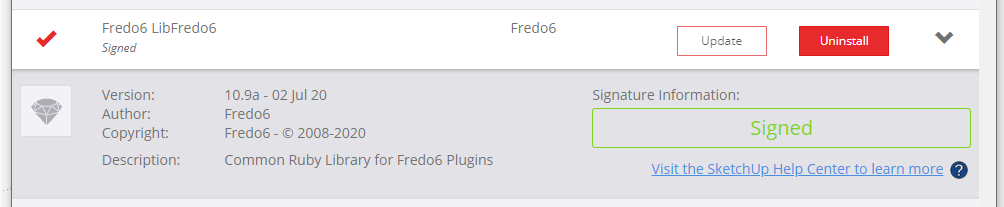
                                Screenshot - 7_24_2020 , 2_36_37 PM.png

                                Etaoin Shrdlu

                                %

                                (THERE'S NO PLACE LIKE)

                                G28 X0.0 Y0.0 Z0.0

                                M30

                                %

                                1 條回覆 最後回覆 回覆 引用 0
                                • Steve_SS 離線
                                  Steve_S
                                  最後由 編輯

                                  @dave r said:

                                  Look at LibFredo6 not top_Libfredo.

                                  It doesn't matter if top_LibFredo isn't signed as long as you leave the loading permissions set to allow it to load.

                                  It should look like this in Extension Manager.
                                  [attachment=0:1y5ttorh]<!-- ia0 -->Screenshot - 7_24_2020 , 2_36_37 PM.png<!-- ia0 -->[/attachment:1y5ttorh]

                                  ———————————————————————————————————————————————————————————————————————————————————————————

                                  Thank you for your prompt response, Dave. Greatly appreciated.

                                  1 條回覆 最後回覆 回覆 引用 0
                                  • V 離線
                                    victoriagaylard
                                    最後由 編輯

                                    @tig said:

                                    This is weird.

                                    Perhaps a MAC expert can comment / help.
                                    Clearly the expected file/subfolder seems to be in your Plugins folder.
                                    Perhaps it's a permissions issue preventing SketchUp seeing/reading them ?
                                    Perhaps a MAC-guy can explain how to check the Plugins folder's permissions and ensure the reset trickles down to all its contents too...

                                    Fredo's RBZs are all signed and current, so it should report properly and show its version etc...

                                    For the avoidance of doubt please get the current RBZ and reinstall in.
                                    Restart SketchUp and see what happens...
                                    https://sketchucation.com/pluginstore?pln=LibFredo6

                                    Well, this is weird. I've just retried all the steps (I swear I did the same things as last time) and it worked!
                                    Thanks - these will be very helpful tools for my interior design work. 😄

                                    1 條回覆 最後回覆 回覆 引用 0
                                    • fredo6F 離線
                                      fredo6
                                      最後由 編輯

                                      NEW RELEASE: LibFredo6 v11.0a - 19 Aug 20

                                      LibFredo6 11.0a provide bug fixing, cosmetic adjustments and technical evolution to a number of my plugins, in particular:

                                      • FredoSpline
                                      • FredoGuides
                                      • FredoGhost
                                      • FredoCorner
                                      • FredoPortrait

                                      Requirements: SU2017 and above

                                      See plugin home page of LibFredo6 for Download of LibFredo6.

                                      Main Post of the LibFredo6 thread

                                      Fredo

                                      1 條回覆 最後回覆 回覆 引用 0
                                      • zooenZ 離線
                                        zooen
                                        最後由 編輯

                                        Hi,

                                        After updating Fredolib (today, latest version) the file mentioned above is systematically blocked by my antivirus and no plugin is loaded.

                                        The start of the error report

                                        Erreur de chargement du fichier Fredo6_!LibFredo6.rb
                                        Error: #<LoadError: 5: Acc\xE8s refus\xE9. - C:/Users/fosse/AppData/Local/Temp/Fredo6_LibFredo6_TemporaryFiles/Binaries/SU20/bin_LibFredo6.so>
                                        C:/Program Files/SketchUp/SketchUp 2020/Tools/RubyStdLib/rubygems/core_ext/kernel_require.rb:59:in require' C:/Program Files/SketchUp/SketchUp 2020/Tools/RubyStdLib/rubygems/core_ext/kernel_require.rb:59:in require'
                                        c:/users/xxxx/appdata/roaming/sketchup/sketchup 2020/sketchup/plugins/fredo6_!libfredo6/top_libfredo6.rbe:622:in load_binary' c:/users/xxxx/appdata/roaming/sketchup/sketchup 2020/sketchup/plugins/fredo6_!libfredo6/top_libfredo6.rbe:257:in startup'
                                        C:/Users/xxxx/AppData/Roaming/SketchUp/SketchUp 2020/SketchUp/Plugins/Fredo6_!LibFredo6.rb:61:in process' C:/Users/xxxxx/AppData/Roaming/SketchUp/SketchUp 2020/SketchUp/Plugins/Fredo6_!LibFredo6.rb:68:in module:LibFredo6_Loader'
                                        C:/Users/xxxx/AppData/Roaming/SketchUp/SketchUp 2020/SketchUp/Plugins/Fredo6_!

                                        Si possible échangeons sur le forum fr, merci

                                        Zooen

                                        1 條回覆 最後回覆 回覆 引用 0
                                        • zooenZ 離線
                                          zooen
                                          最後由 編輯

                                          RE,

                                          Bon en redémarrant l'ordi tout fonctionne. Donc pas d'explication pour moi. Souvent le fait de redémarrer l'ordi corrige les dysfonctionnements lors de mises à jour de logiciels, mais je n'y avais pas pensé.

                                          Bonne fin de journée, Zooen

                                          1 條回覆 最後回覆 回覆 引用 0
                                          • A 離線
                                            azgcz
                                            最後由 編輯

                                            After upgrading LibFredo6 v11.0a,I can not use "ctrl"key to ctrl "toggle JointPushPull create starting face "in"Joint Push Pull Interactive v4.4e"

                                            If it is a bug,hope to fix it.

                                            1 條回覆 最後回覆 回覆 引用 0
                                            • 1
                                            • 2
                                            • 99
                                            • 100
                                            • 101
                                            • 102
                                            • 103
                                            • 109
                                            • 110
                                            • 101 / 110
                                            • 第一個貼文
                                              最後的貼文
                                            Buy SketchPlus
                                            Buy SUbD
                                            Buy WrapR
                                            Buy eBook
                                            Buy Modelur
                                            Buy Vertex Tools
                                            Buy SketchCuisine
                                            Buy FormFonts

                                            Advertisement