[Plugin Library] LibFredo6 - v15.8e - 15 Feb 26



-
Your Windows user-name in Chinese [劉 祐 成] "Liú yòu chéng" seems to be causing the issue.
Ruby is having difficulty encoding it into UTF-8 format...
Having non-ASCII characters in user-names used to be a recipe for an error in Ruby; however, more recent versions are much better in forcing UTF-8 from such strings.Typically using this in the Ruby Console:
ENV['USERNAME'].encoding
or
ENV['HOME'].encoding
Returns this:
Windows-1252Which is then converted to the required encoding of UTF-8 in the Ruby processing.
What do you get returned for those ENV tests ?
Perhaps Fredo can strengthen his code to force that encoding ??
-
Error Loading File Fredo6_!LibFredo6.rb
Error: #<ArgumentError: invalid byte sequence in UTF-8>
c:/users/dan/appdata/roaming/sketchup/sketchup 2018/sketchup/plugins/fredo6_!libfredo6/lib6core.rbe:806:inmatch' c:/users/dan/appdata/roaming/sketchup/sketchup 2018/sketchup/plugins/fredo6_!libfredo6/lib6core.rbe:806:inblock (2 levels) in load_from_config'
c:/users/dan/appdata/roaming/sketchup/sketchup 2018/sketchup/plugins/fredo6_!libfredo6/lib6core.rbe:805:ineach' c:/users/dan/appdata/roaming/sketchup/sketchup 2018/sketchup/plugins/fredo6_!libfredo6/lib6core.rbe:805:inblock in load_from_config'
c:/users/dan/appdata/roaming/sketchup/sketchup 2018/sketchup/plugins/fredo6_!libfredo6/lib6core.rbe:803:inforeach' c:/users/dan/appdata/roaming/sketchup/sketchup 2018/sketchup/plugins/fredo6_!libfredo6/lib6core.rbe:803:inload_from_config'
c:/users/dan/appdata/roaming/sketchup/sketchup 2018/sketchup/plugins/fredo6_!libfredo6/lib6core.rbe:1218:inblock in load_all_plugins' c:/users/dan/appdata/roaming/sketchup/sketchup 2018/sketchup/plugins/fredo6_!libfredo6/lib6core.rbe:1218:ineach'
c:/users/dan/appdata/roaming/sketchup/sketchup 2018/sketchup/plugins/fredo6_!libfredo6/lib6core.rbe:1218:inload_all_plugins' c:/users/dan/appdata/roaming/sketchup/sketchup 2018/sketchup/plugins/fredo6_!libfredo6/top_libfredo6.rbe:252:instartup'
C:/Users/dan/AppData/Roaming/SketchUp/SketchUp 2018/SketchUp/Plugins/Fredo6_!LibFredo6.rb:63:inprocess' C:/Users/dan/AppData/Roaming/SketchUp/SketchUp 2018/SketchUp/Plugins/Fredo6_!LibFredo6.rb:70:inmodule:LibFredo6_Loader'
C:/Users/dan/AppData/Roaming/SketchUp/SketchUp 2018/SketchUp/Plugins/Fredo6_!LibFredo6.rb:28:in<top (required)>' Error Loading File Fredo6_FredoScale.rb Error: #<TypeError: can't convert nil into an exact number> C:/Users/dan/AppData/Roaming/SketchUp/SketchUp 2018/SketchUp/Plugins/Fredo6_!LibFredo6.rb:79:in-'
C:/Users/dan/AppData/Roaming/SketchUp/SketchUp 2018/SketchUp/Plugins/Fredo6_!LibFredo6.rb:79:in<top (required)>' C:/Program Files/SketchUp/SketchUp 2018/Tools/RubyStdLib/rubygems/core_ext/kernel_require.rb:54:inrequire'
C:/Program Files/SketchUp/SketchUp 2018/Tools/RubyStdLib/rubygems/core_ext/kernel_require.rb:54:inrequire' C:/Users/dan/AppData/Roaming/SketchUp/SketchUp 2018/SketchUp/Plugins/Fredo6_FredoScale.rb:47:inmodule:Fredo6'
C:/Users/dan/AppData/Roaming/SketchUp/SketchUp 2018/SketchUp/Plugins/Fredo6_FredoScale.rb:26:in<top (required)>' Error Loading File Fredo6_FredoTools.rb Error: #<TypeError: can't convert nil into an exact number> C:/Users/dan/AppData/Roaming/SketchUp/SketchUp 2018/SketchUp/Plugins/Fredo6_!LibFredo6.rb:79:in-'
C:/Users/dan/AppData/Roaming/SketchUp/SketchUp 2018/SketchUp/Plugins/Fredo6_!LibFredo6.rb:79:in<top (required)>' C:/Program Files/SketchUp/SketchUp 2018/Tools/RubyStdLib/rubygems/core_ext/kernel_require.rb:54:inrequire'
C:/Program Files/SketchUp/SketchUp 2018/Tools/RubyStdLib/rubygems/core_ext/kernel_require.rb:54:inrequire' C:/Users/dan/AppData/Roaming/SketchUp/SketchUp 2018/SketchUp/Plugins/Fredo6_FredoTools.rb:47:inmodule:Fredo6'
C:/Users/dan/AppData/Roaming/SketchUp/SketchUp 2018/SketchUp/Plugins/Fredo6_FredoTools.rb:26:in<top (required)>' Error Loading File Fredo6_JointPushPull.rb Error: #<TypeError: can't convert nil into an exact number> C:/Users/dan/AppData/Roaming/SketchUp/SketchUp 2018/SketchUp/Plugins/Fredo6_!LibFredo6.rb:79:in-'
C:/Users/dan/AppData/Roaming/SketchUp/SketchUp 2018/SketchUp/Plugins/Fredo6_!LibFredo6.rb:79:in<top (required)>' C:/Program Files/SketchUp/SketchUp 2018/Tools/RubyStdLib/rubygems/core_ext/kernel_require.rb:54:inrequire'
C:/Program Files/SketchUp/SketchUp 2018/Tools/RubyStdLib/rubygems/core_ext/kernel_require.rb:54:inrequire' C:/Users/dan/AppData/Roaming/SketchUp/SketchUp 2018/SketchUp/Plugins/Fredo6_JointPushPull.rb:47:inmodule:Fredo6'
C:/Users/dan/AppData/Roaming/SketchUp/SketchUp 2018/SketchUp/Plugins/Fredo6_JointPushPull.rb:26:in `<top (required)>'Can anyone help me understand what this error means?
-
Usually, this problem comes when you installed Sketchup without Administrator rights.
So I am afraid you need to uninstall SU2018 and reinstall.
Fredo
-
I tried to download FredoTools and Toposhaper yesterday. My current LibFredo6 version is 8.5. I got a message saying that I need LibFredo6 version 86 for FredoTools and LibFredo6 version 87 for Toposhaper. The extension manager doesn't give me the option of updating my 8.5 version. Do I need to uninstall version 8.5 and then install version 8.7? Or do I leave 8.5 in the manager and just install 8.7?
-
No need to uninstall the earlier version[s].
The new installation will overwrite any equivalent files/version etc as needed.
But you should restart SketchUp after finishing the installation[s] to ensure everything gets synced... -
cannot be set in sketchup2015, all Chinese is empty.
-
@guanjin said:
cannot be set in sketchup2015, all Chinese is empty.
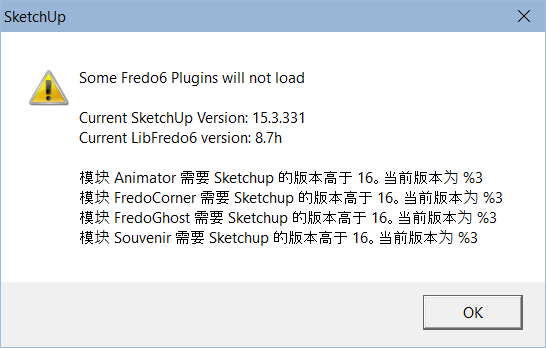
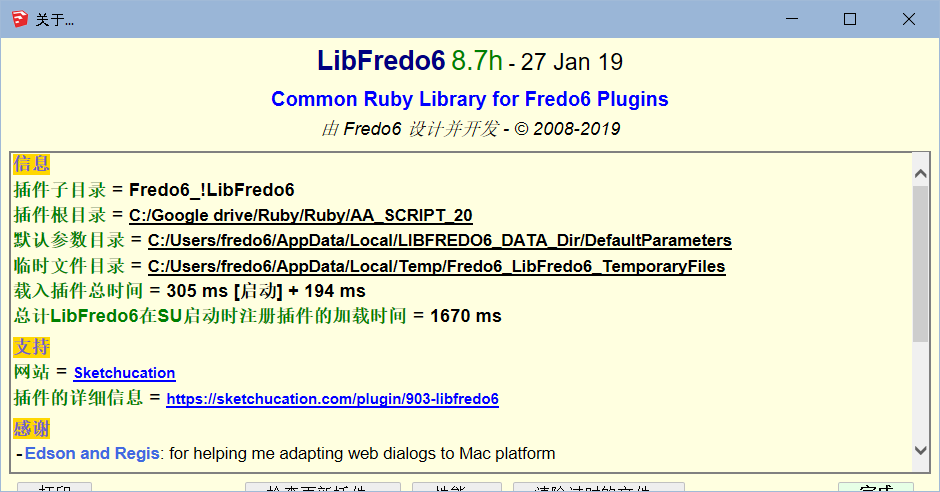
Can you be more explicit for the problem.
I do have the Chinese in SU2015
-
@fredo6 said:
@guanjin said:
cannot be set in sketchup2015, all Chinese is empty.
Can you be more explicit for the problem.
I do have the Chinese in SU2015
[attachment=1:18r21dr6]<!-- ia1 -->LibFredo6 - plugins load chinese.png<!-- ia1 -->[/attachment:18r21dr6]
[attachment=0:18r21dr6]<!-- ia0 -->LibFredo6 - About Chinese.png<!-- ia0 -->[/attachment:18r21dr6]
Found that your version is 8.7h, I installed 8.7f
-
v8.7f is the latest release. v8.7h is an internal release on my own laptop.
-
v8.7f is the latest release. v8.7h is an internal release on my own laptop.
-
NEW RELEASE: LibFredo6 v8.7k - 14 Feb 19
LibFredo6 8.7k fixes various bugs and the accuracy of the hand cursor over button palettes
See plugin home page of LibFredo6 for Download of LibFredo6.
Main Post of the LibFredo6 thread
Fredo
-
Hi Fredo one question, I installed SU 2019 and the first thing that I freshly install is LibFredo6-v8.7K but when I go to Windows/LibFredo6Settings/Check for updates it gives info that 8.7j is actually installed and needs an update to 8.7k... I tried everything to fix this, fresh install and everything and after several attempts to install 8.7k, it gives a result as if I have installed 8.7j and needs an update. Any help?
-
You must restart SketchUp to ensure the latest installed version is loaded.
But if the issue continues after that, then come back... -
Did restart SketchUp, and my pc to be entirely sure that everything is set correctly, but no luck, 8.7j is installed instead of 8.7k. Checked the download folder if I accidentally have the wrong version downloaded, but no, everything is ok, 8.7 K is what I have downloaded and installed, and yet, SketchUp even upon restart of the program and pc says that I need to actually update to 8.7 k

-
@puco said:
Hi Fredo one question, I installed SU 2019 and the first thing that I freshly install is LibFredo6-v8.7K but when I go to Windows/LibFredo6Settings/Check for updates it gives info that 8.7j is actually installed and needs an update to 8.7k...
This is my own error in the parameterization of the release. You definitely have the good version. So don't worry.
Fredo
-
Thank you for the quick response to this concern. As long as you are saying that it is just some minor issue regardless the version number only, I won't be supper paranoic to cry for the same issue
 all over again, except this time it gives like I have version 8.7 L installed and need to update to 8.7 M ... I will avoid that notification that I don't have the latest version, as long as you said already that is just a parametrization, not the actual extension/plugin problem! Thank you once again!
 -
NEW RELEASE: LibFredo6 v8.7m - 15 Feb 19
LibFredo6 8.7m fixes various bugs and aligns the release reference (misaligned with previous v8.7k)
See plugin home page of LibFredo6 for Download of LibFredo6.
Main Post of the LibFredo6 thread
Fredo
-
NEW RELEASE: LibFredo6 v8.8a - 24 Feb 19
LibFredo6 8.8a fixes various bugs and is required for Curvizard v2.4a (Circle, Arc, Polygon)
See plugin home page of LibFredo6 for Download of LibFredo6.
Main Post of the LibFredo6 thread
Fredo
-
Sketchucation Folk,
Sorry to be dense. I'd like to update LibFredo6 but after reading the documentation, watching a video on installation, and doing a search in Sketchucation, I keep coming up with intall instructions. https://sketchucation.com/plugin/903-libfredo6definitely definitely says "It must be installed ONCE and updated as needed..." I think this makes sense as I believe I read somewhere that having old LibFredo folders/files around can cause problems.
Of course I know to check FOR updates - that's how I know I need one. But the only clickable link in the resulting window is "Info" and it takes me to the installation page noted above that says to ONLY install once, then use an update process from then on. Please inform me of this update process. Again, apologies if I'm missing something obvious.
Thanks,
Gordy_Z
-
Go to...
https://sketchucation.com/pluginstore
Search for Lib_Fredo6...
Download its RBZ and install it in SketchUp like any other archive...




Advertisement