[Plugin Library] LibFredo6 - v15.8e - 15 Feb 26



-
T
-
Hello, I am having the same problem as coasterinc first posted on Dec. 11, 2015. All of my fredo plugins have stopped working. The tool icons show up but when I click them the "in work window menus/ toolbars" no longer appear for any of the plugins.
I have gone back and forth deleting the plugins and cleaning out the plugin directory folders and then redownloading them through the Sketchucation Extension Store, but I cannot figure out what is wrong. I am currently testing things with only:
Fredo Lib 6.9 and Round Corners
I am using the current version of Sketchup Pro 2016. I know the plugins have worked for me in the past and I was previously using Sketchup Make 2015, but I am not completely sure at what point in upgrading this issue started.
Below, if it helps, is the Ruby Console window message when I try to use round corners:
Error: #<Errno::EACCES: Permission denied - C:/Users/Adam/AppData/Local/LIBFREDO6_DATA_Dir/LibFredo6_all_defaults.dat>
C:/Users/Adam/AppData/Roaming/SketchUp/SketchUp 2016/SketchUp/Plugins/Fredo6_!LibFredo6/Lib6Registry.rb:145:ininitialize' C:/Users/Adam/AppData/Roaming/SketchUp/SketchUp 2016/SketchUp/Plugins/Fredo6_!LibFredo6/Lib6Registry.rb:145:inopen'
C:/Users/Adam/AppData/Roaming/SketchUp/SketchUp 2016/SketchUp/Plugins/Fredo6_!LibFredo6/Lib6Registry.rb:145:inwrite_to_file' C:/Users/Adam/AppData/Roaming/SketchUp/SketchUp 2016/SketchUp/Plugins/Fredo6_!LibFredo6/Lib6Registry.rb:128:instore'
C:/Users/Adam/AppData/Roaming/SketchUp/SketchUp 2016/SketchUp/Plugins/Fredo6_!LibFredo6/Lib6Plugin.rb:1102:inusage_use' C:/Users/Adam/AppData/Roaming/SketchUp/SketchUp 2016/SketchUp/Plugins/Fredo6_!LibFredo6/Lib6Plugin.rb:1090:incommand_invoke'
C:/Users/Adam/AppData/Roaming/SketchUp/SketchUp 2016/SketchUp/Plugins/Fredo6_!LibFredo6/Lib6Plugin.rb:1073:inblock (2 levels) in build_config_commands' C:/Users/Adam/AppData/Roaming/SketchUp/SketchUp 2016/SketchUp/Plugins/Fredo6_!LibFredo6/Lib6Traductor.rb:1154:incall'
C:/Users/Adam/AppData/Roaming/SketchUp/SketchUp 2016/SketchUp/Plugins/Fredo6_!LibFredo6/Lib6Traductor.rb:1154:inblock in add_command' SketchUp:1:incall'Thank you for any help you can provide.
Adam
-
It looks like there is a problem to create files by program (to store some parameters of LibFredo6) in the directory: C:/Users/Adam/AppData/Local/LIBFREDO6_DATA_Dir. This may be due to some security settings, but normally AppData/Local is precisely the place where programs store data.
First time I see that. I'll be able to provide a workaround in a next version of LibFredo6.
For the time being, try to see how you can twek the Windows security settings for this directory and subfolders.Fredo
-
Fredo -
Thank you for the quick reply. Everything is now working normally, including reinstalling additional extensions to test (curviloft, fredotools, etc.)
I went to the folder you mentioned - C:/Users/Adam/AppData/Local/LIBFREDO6_DATA_Dir
All of the security permissions were already allowed. But, I made sure that the folder and all subfolders/ files were not hidden and unchecked all of the read-only boxes. I'm not sure I completely understand why that worked, but I hope that helps trouble shoot the code. I am running windows 7 if that makes a difference.
Thanks again for your help and creating the great extensions. I will let you know if I notice any conflicts with updates in the future.
Adam
-
Hi
i have downloaded the latest library and also 3 of the related plugins but I am still not getting a toolbar to enable me to use the software?
what am I doing wrong?
Many thanks
billb2014 -
@billb2014 said:
Hi
i have downloaded the latest library and also 3 of the related plugins but I am still not getting a toolbar to enable me to use the software?You say you downloaded them. Did you install them, too? If so, how? Where did you put the files?
-
Hello everyone:
I'm using Sketchup Pro 2016.
I installed SCF Pluging Store tool for installing extensions.
I installed Fredo 6.9 using SCF Pluging Store tool. I can see Preferences Fredo in menu and it shows LibFredo 6.9
I installed FredoTools from SCF...... but I can't see Fredo's plugings in the menu.
What can I do? Could you help me?
ThanksPablo
-
@pabloalonso said:
... but I can't see Fredo's plugings in the menu.
What can I do? Could you help me?
ThanksPablo
Probably look in the right place for Fredo Tools. It appears in the Tools menu.
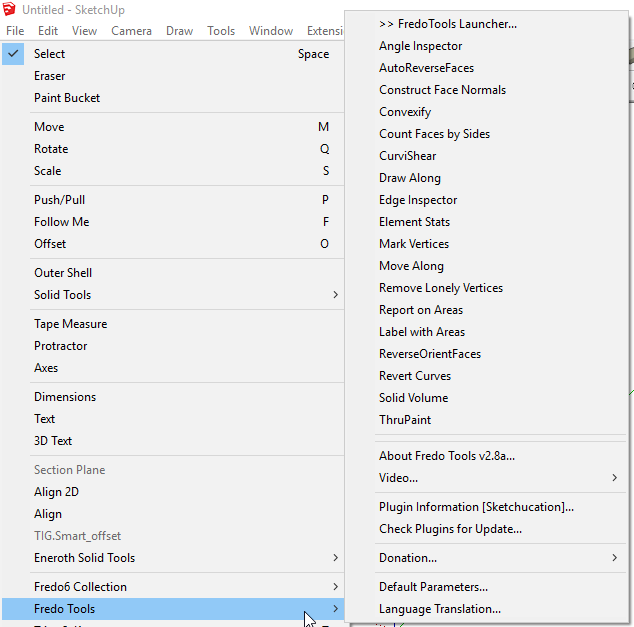
If it doesn't show up in Tools, go to Preferences>Extensions and make sure Fredo Tools is enabled.
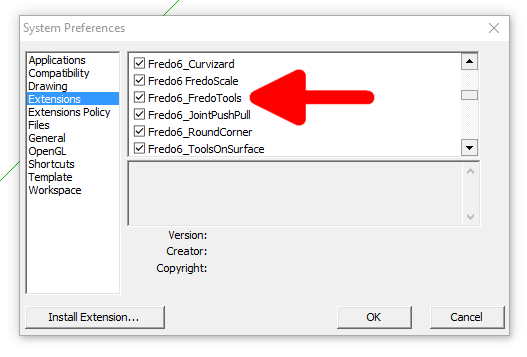
There's also a toolbar with a single button for Fredo Tools. You can turn it on from View>Toolbars.
-
Hi, Dave. Thanks for your help.
Something is wrong. FredTools is checked on Window->Preferences->Extensions but there isn't Fredotools menu under "Tools".What's your opinion about this?
Thanks
Pablo
-
Amazing, very good!
-
Did you ever get yours fixed? I'm having the same problem. I've installed the plugin, it shows that it's enabled, but there's nothing in the tools menu.
Any ideas?
@pabloalonso said:
Hi, Dave. Thanks for your help.
Something is wrong. FredTools is checked on Window->Preferences->Extensions but there isn't Fredotools menu under "Tools".What's your opinion about this?
Thanks
Pablo
-
Step one.
Download/Install the LibFredo RBZ...
http://sketchucation.com/pluginstore?pln=LibFredo6
This Lib is needed by virtually all of Fredo's tools.Step two.
Download/Install the desired Fredo extension's RBZ.His tool have different usage, so read there individual guides...
In the case of Fredo's Tools...
http://sketchucation.com/pluginstore?pln=FredoTools
It has a toolbar which you might need to activate, and it also should have a submenu under:
'Tools > FredoTools'...
Also check that its Extension is activated - otherwise these will not show up.PS:
Install the RBZ files using the native:
Preferences > Extensions > Install Extension... button
Or install and use the SketchUcation Toolset > ExtensionStor³ ...
which sidesteps the download, and auto-installs any extensions directly... -
NEW RELEASE: LibFredo6 v7.2a - 20 Oct 16
LibFredo6 7.2a is a release mainly dedicated to the beta program of Animator. It also includes bug fixes and adjustments for FredoTools
See main post of this thread for Download of LibFredo6.
Fredo
-
Hi,
I really need some help with solving instalation problem LibFredo6 v7.2a. After succsesful instalation and restarting SU pro 2013 I've got the following message:
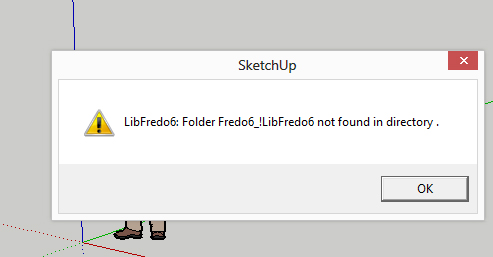
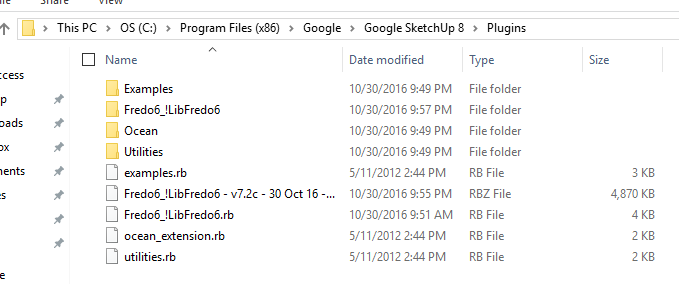
It seemed to be properly installed in the su folder:
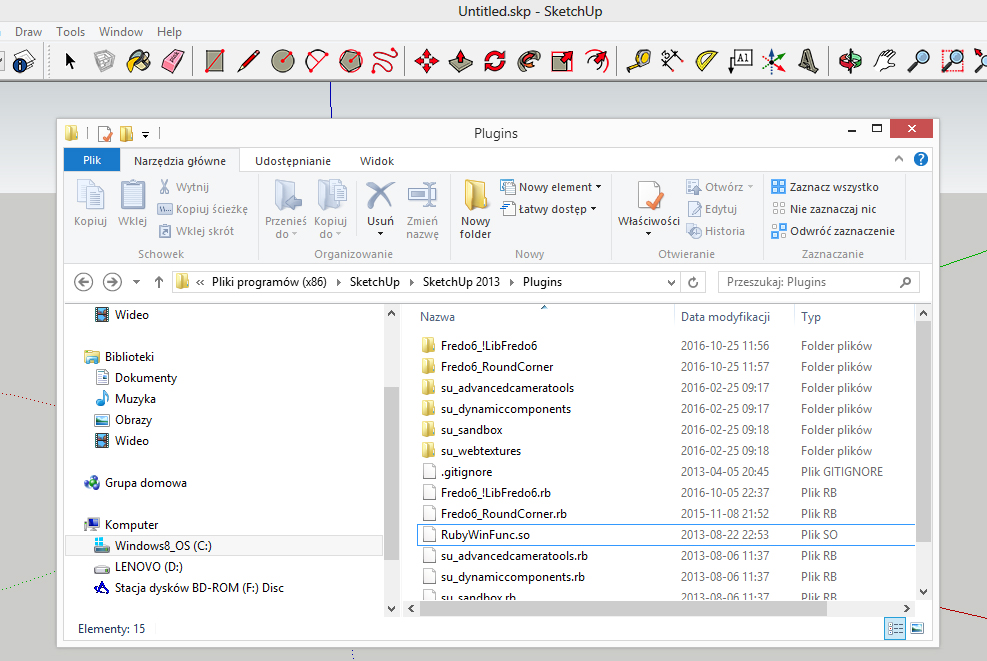
I don't even know where to search for solution. please help.
-
Older Ruby versions can break if there are accents in file-paths.
Usually this is due to ill-advised accented Windows User-names, but in your case the 'Programs' folder itself also has an accent in its name !
What is your language ?
Newer Ruby versions now shipped with >=v2014? have the ability to re-encode file-paths into UTF-8 [without BOM] so they are then compatible...
Unfortunately you have v2013, which is barely supported, and will soon be unsupported by its owners...
Can you try a newer version of SketchUp ? - this might well fix you issue... -
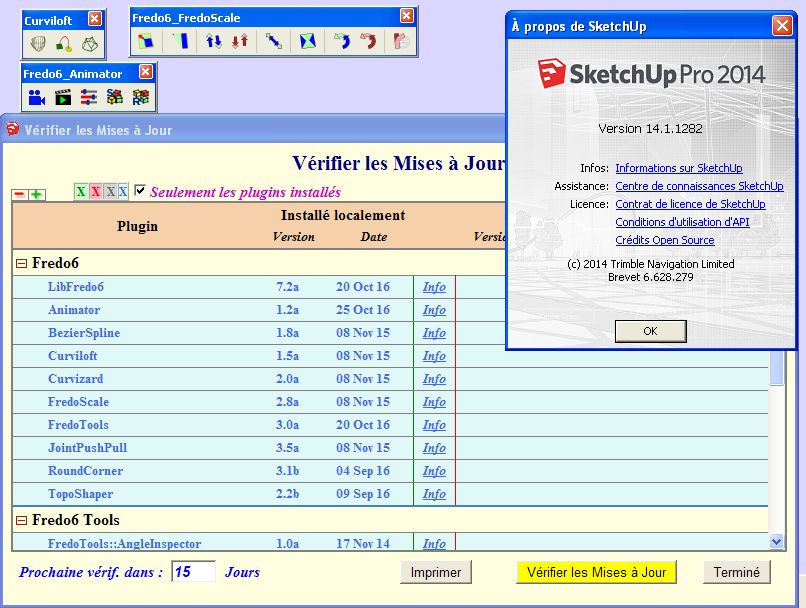
Hi
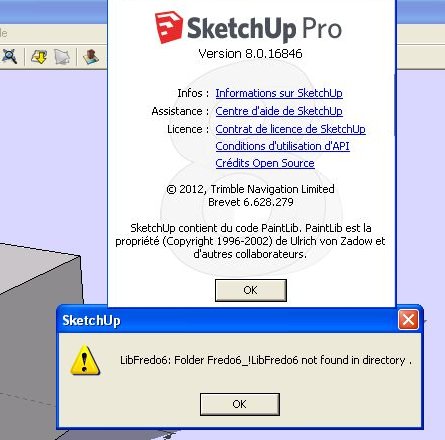
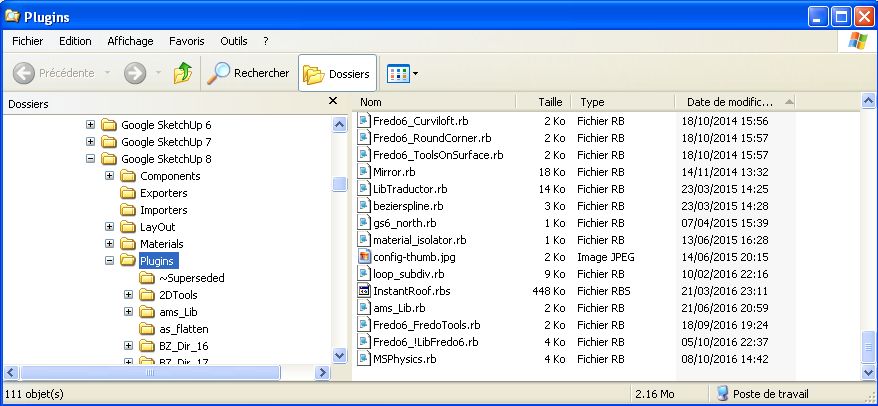
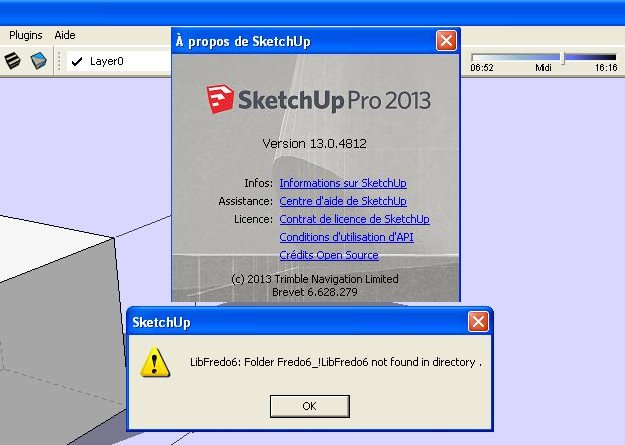
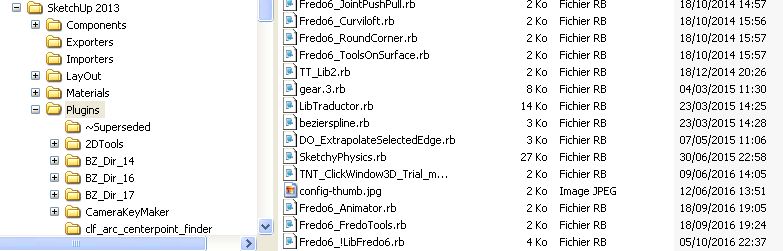
Same message for me with SKETCHUP 8 and SKETCHUP 2013
Works with SKETCHUP 2014
( windows XP )
chri
-
hi again
thank you very match for a quick response. I just installed SU 2014 and everythimg is finally working - problem fixed.
and the language I use is polish.warm regards
Neta -
Hi fredo6,
I'm getting the same error message from v7.2 regarding its corresponding folder.
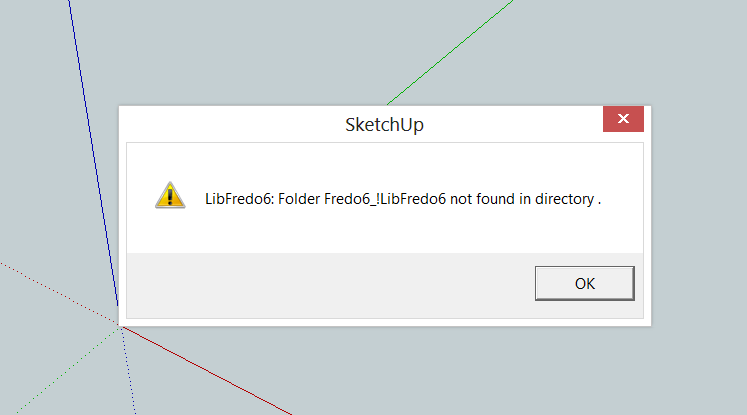
The folder appears to be there (the .rbz was installed through Sketchup's Extension Manager).
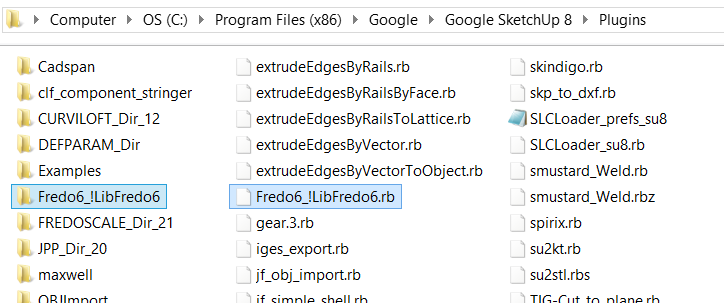
I see other users found workarounds through using 2014 or newer versions of Sketchup (apparently to bypass Ruby issues with accents); is this confirmed necessary? I'm running Sketchup 8 Free, on a Windows 8 machine (upgrading to a newer Sketchup is extremely undesirable), which previously was running LibFredo6 v4.7a (very very old version, I'm aware) with FredoScale/RoundCorner successfully. I've checked the file path to my Sketchup Plugins folder; no accented characters as far as I can tell. Is there a way to make this version of the library work on SU8, especially so I can test Animator's beta release?
Thanks for all the great plugins.

-
@treadshot A1
There is general problem for SU versions prior to v2014, running Ruby 1.8. I thought it was in Windows XP only, but since you have Windows 8, this may be more general. The issue is that I don't have the problem in my environment (Win 7, 64 bits), so I am a little bit blind.Fredo
-
Thanks for the quick reply, and the alternative file. I've tested the new file on the same machine (Win 8, 64 Bit, SU8Free) as before, unfortunately it's not working.
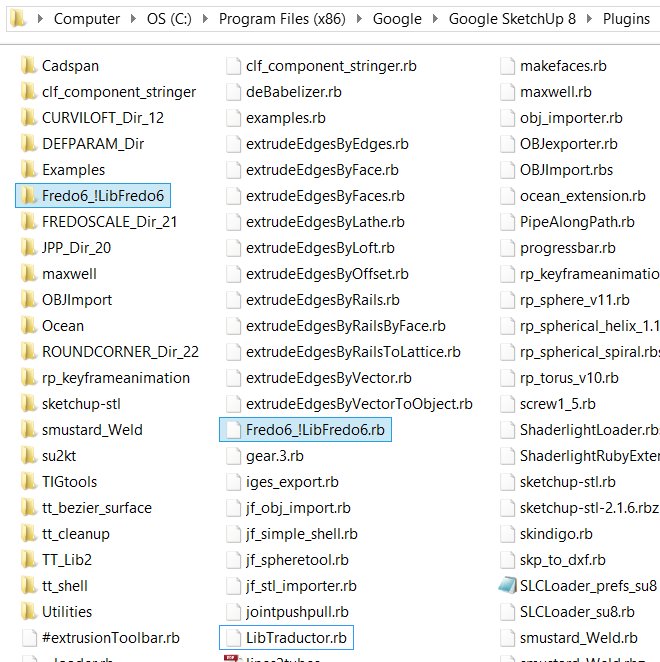
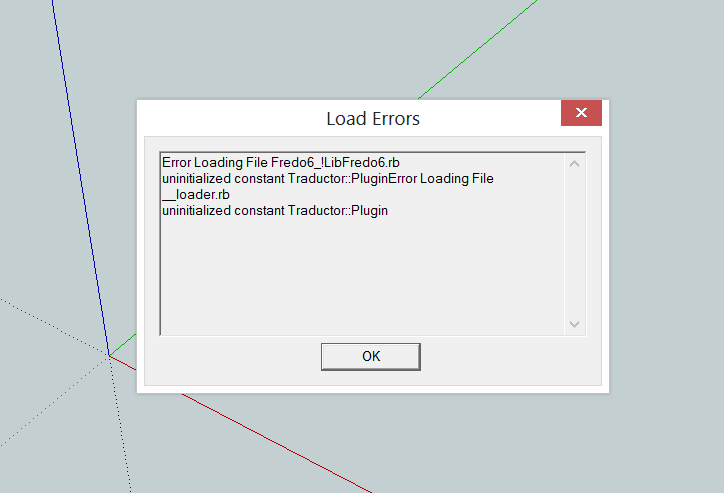
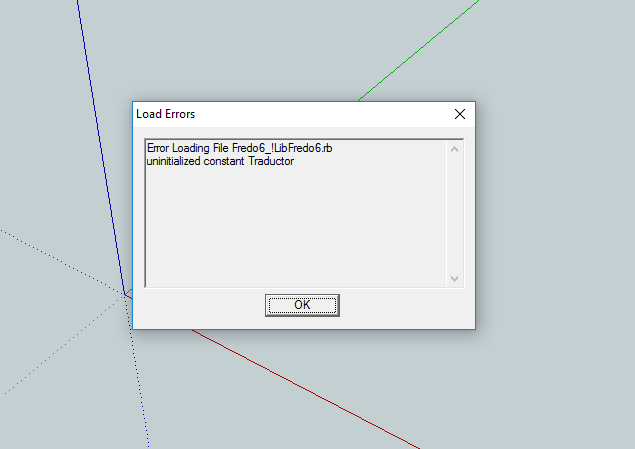
That said, it did improve somewhat. Previously, once I removed the old LibFredo6, none of the Fredo plugins worked. This time, the error message on startup mentioned "traductor" (either traductor.rb, or "uninitialised constant traductor" or variations thereof). I found a "traductor.rb" in my plugins, which was NOT put there by LibFredo6 v7.2, instead traductor.rb was there from the old v4.7 installation of LibFredo6. I don't know what traductor.rb does, but I tried deleting it, which had the side effect of making Joint Push Pull's toolbar show up again (sloppily highlighted below). I'm not sure why JointPushPull showed up but none of your other plugins did.

Side note: I tested the new encrypted version of LibFredo6 v7.2 on a different machine (Win10, 64Bit, SU8Free), with a fresh install of Win10 and SU8 (so no Plugins other than LibFredo6 v7.2 and whatever example/default plugins that come with SU8). Error Message shows Traductor as an uninitialised constant (I do NOT have the "traductor.rb" file on this machine, that the first machine had), and there is no LibFredo6 Settings option in the Tools nor Window menu in Sketchup.
Hope this information is in some way helpful. Thanks again.





Advertisement