sketchucation logo sketchucation
    • 登入
    Oops, your profile's looking a bit empty! To help us tailor your experience, please fill in key details like your SketchUp version, skill level, operating system, and more. Update and save your info on your profile page today!
    ⚠️ Important | Libfredo 15.6b introduces important bugfixes for Fredo's Extensions Update

    The "Duh!" thread (aka the Doh! thread)

    已排程 已置頂 已鎖定 已移動 SketchUp Discussions
    sketchup
    696 貼文 135 Posters 292.0k 瀏覽 135 Watching
    正在載入更多貼文
    • 從舊到新
    • 從新到舊
    • 最多點贊
    回覆
    • 在新貼文中回覆
    登入後回覆
    此主題已被刪除。只有擁有主題管理權限的使用者可以查看。
    • david_hD 離線
      david_h
      最後由 編輯

      okay. . .I'm not a wizard here. It seems to me I have done that. I obviously am missing something. Not ashamed to admit it. Check my posts above to get the history of this and then I am more than happy to be schooled.

      If I make it look easy...It is probably easy

      1 條回覆 最後回覆 回覆 引用 0
      • Dave RD 離線
        Dave R
        最後由 編輯

        David, I'm not trying to school you but here's what I have.

        Keyboard shortcut is set.
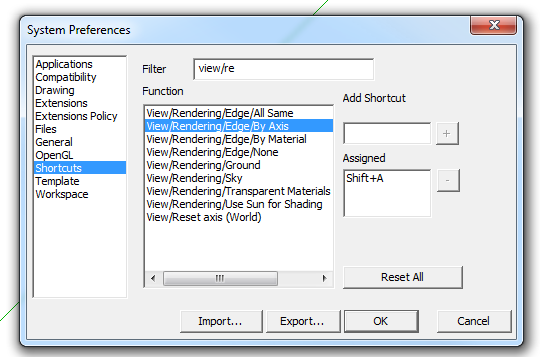
        Screenshot - 3_11_2016 , 10_13_30 AM.png

        Edge settings for my normal default style.
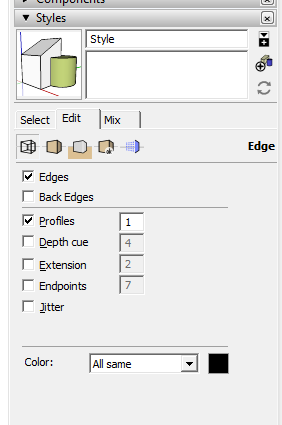
        Screenshot - 3_11_2016 , 10_13_58 AM.png

        After hitting Shift+A to toggle the edge color by axis. It even shows the on axis edges colored in the thumbnail. Note, I only chose that shortcut because I knew it wasn't already used.
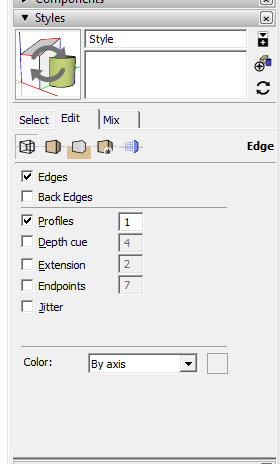
        Screenshot - 3_11_2016 , 10_14_26 AM.png

        It toggles back and forth as expected.

        Etaoin Shrdlu

        %

        (THERE'S NO PLACE LIKE)

        G28 X0.0 Y0.0 Z0.0

        M30

        %

        1 條回覆 最後回覆 回覆 引用 0
        • BoxB 離線
          Box
          最後由 編輯

          Is this what you want? Sorry I did ctrl e rather than your preferred ctrl shift a.
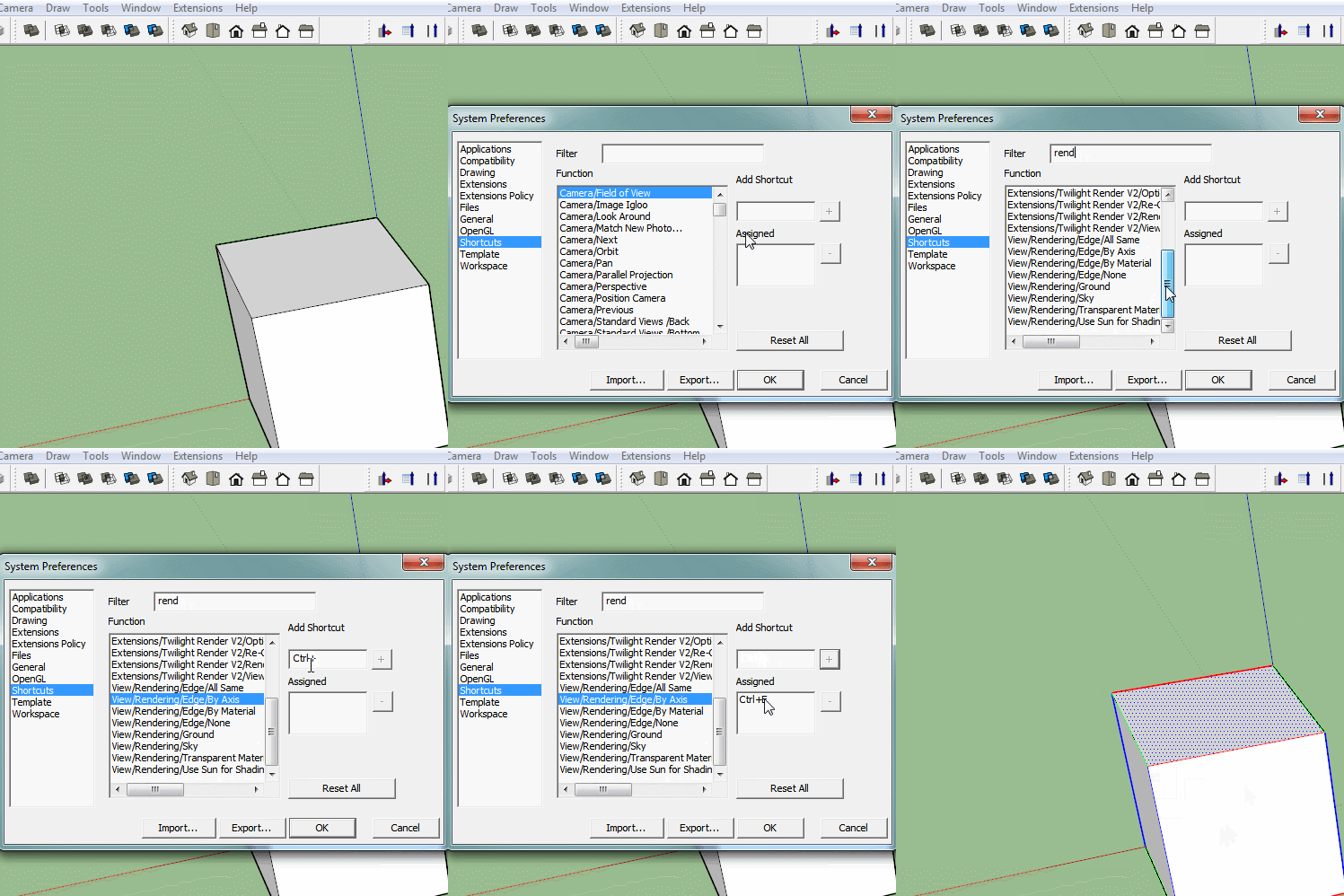

          By Axis.gif

          1 條回覆 最後回覆 回覆 引用 0
          • david_hD 離線
            david_h
            最後由 編輯

            Dave R and Box. Sorry. DIdn't mean to sound defensive or whatever. I need to turn in my Green 'Top Sketchucator Badge" it was erroneously bestowed anyway.

            I will re-look at this as per your hints. actually, I am not Skupping as much as I used to so I forget a lot of things.

            again. . it's not keeping me up at night. . .yet

            But It would be nice to get this resolved.

            thank you so much.

            D

            If I make it look easy...It is probably easy

            1 條回覆 最後回覆 回覆 引用 0
            • X 離線
              xone
              最後由 編輯

              Unsure if the right place to ask but I got a little issue with the new reference point stuff in Sketchup 2016.

              Previously whenever we reference something, the cursor / protractor will go to the point of transform ON the object I want to adjust.

              But now in Sketchup 2016, when I try to rotate something, I got mighty confused as the protractor appear at somewhere else, stuck behind/inside objects, parallel to the referred surface. INSTEAD of going to the point of rotation.

              Is there a setting or something to go back to the old way?

              http://i.imgur.com/deWhqAp.jpg

              1 條回覆 最後回覆 回覆 引用 0
              • Dave RD 離線
                Dave R
                最後由 編輯

                In your screen shot from 2016 you have back edges turned on. Do you get the same result if you have them turned off?

                Etaoin Shrdlu

                %

                (THERE'S NO PLACE LIKE)

                G28 X0.0 Y0.0 Z0.0

                M30

                %

                1 條回覆 最後回覆 回覆 引用 0
                • X 離線
                  xone
                  最後由 編輯

                  @dave r said:

                  In your screen shot from 2016 you have back edges turned on. Do you get the same result if you have them turned off?

                  Yes I have to turn on back edge to even see the protractor which appear behind/inside other objects.
                  If I turn off back edge then I can't see the protractor in this example as it appear behind the cylinder.

                  1 條回覆 最後回覆 回覆 引用 0
                  • S 離線
                    shawb
                    最後由 編輯

                    My most recent Duh! moment was finding that in the VCB (measurement field)if either of the two lengths was what you need just type the separator comma followed by a number or a number followed by the comma and Enter.

                    1 條回覆 最後回覆 回覆 引用 0
                    • S 離線
                      shawb
                      最後由 編輯

                      @bob james said:

                      @bob james said:

                      @jql said:

                      Apologies accepted if you post it on the Duh thread!

                      So here goes my duh:

                      @bob james said:

                      This seems so simple that it must already exist, but I could not find it.

                      For example: I want to make a 4" square post at a specific spot. If I wanted a round post there I would just select the circle tool, place the cursor at the point and drag out (or put a value in the VCB).

                      I'd like to be able to do that for a square: select tool, place the cursor at the point and drag out (or put a value in the VCB)

                      I apologize if this already exists

                      @jql said:

                      LOL bob you can make your life difficult if you draw a 4 sided circle and explode it.

                      Or you can make your life painless if you draw a 4 sided polygon without exploding it.

                      Those two are native tools. Do you forget sketchup also has native tools?

                      Your suggestions create 45 deg rotated squares.
                      Why can't someone just make a simple extension to make an orthogonally positioned square starting from a center point?

                      How about this?

                      Use the four sided polygon as suggested. Place an initial polygon on the line of axis (your fence line?) with the placement/inference line on this axis. You now have a rotated 4 sided polygon at 45 deg to the axis. Place the actual fence post polygon to the required centre spot and use its placement line to pick-up a perpendicular inference from the initial polygon. Your fence post is now square on to the fence line. Hope I have placed this reply correctly.

                      1 條回覆 最後回覆 回覆 引用 0
                      • david_hD 離線
                        david_h
                        最後由 編輯

                        Okay. serious gob-smacking d'oh here. I got it to work.

                        Thanks. Although. . I thought I did all this stuff. But whatever. .it works now.


                        Homer D'OH.gif

                        If I make it look easy...It is probably easy

                        1 條回覆 最後回覆 回覆 引用 0
                        • Z 離線
                          ZahariStoyanov
                          最後由 編輯

                          @boofredlay said:

                          One for me was when Gaieus was from Gaieus' talk at the Basecamp (I saw the video) and using the rotate tool.

                          When you click the rotate tool and click the rotation point, don't let go of the mouse button... drag it out to either red or green (or any other snap point you set up) then click to start. This relieves any need for a vertical plane to get your rotation set up.

                          See image for example.

                          [attachment=0:1ay9p7c2]<!-- ia0 -->ClickHold.jpg<!-- ia0 -->[/attachment:1ay9p7c2]

                          I have been using SU since V2 and never knew that until last year.

                          1. F##king 2009! I've been modelling with SU since 2006 and didn't know about this feature until today 😄
                          1 條回覆 最後回覆 回覆 引用 0
                          • Z 離線
                            ZahariStoyanov
                            最後由 編輯

                            Recent duh-moments in my modelling - watching Box's doodles to find out I've been using SU the wrong way for quite long. Again and again 😄

                            1 條回覆 最後回覆 回覆 引用 0
                            • Epix3DE 離線
                              Epix3D
                              最後由 編輯

                              Modelling small parts

                              I´ve had som problems with curves when modelling small parts. Rounded edges/corners will not close. I found a workaround that works: Scale the model two times or more, do the rounding with double radius, -then scale down 0,5 to normal size.
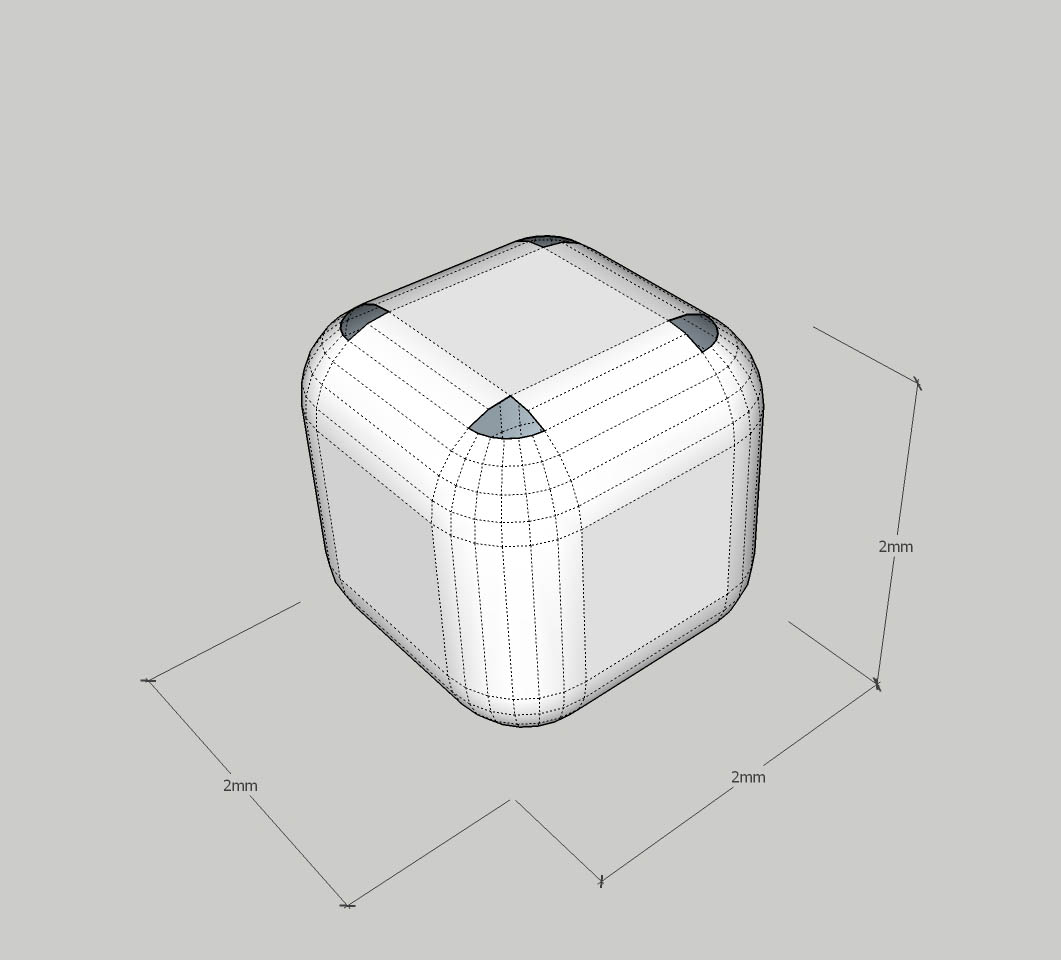
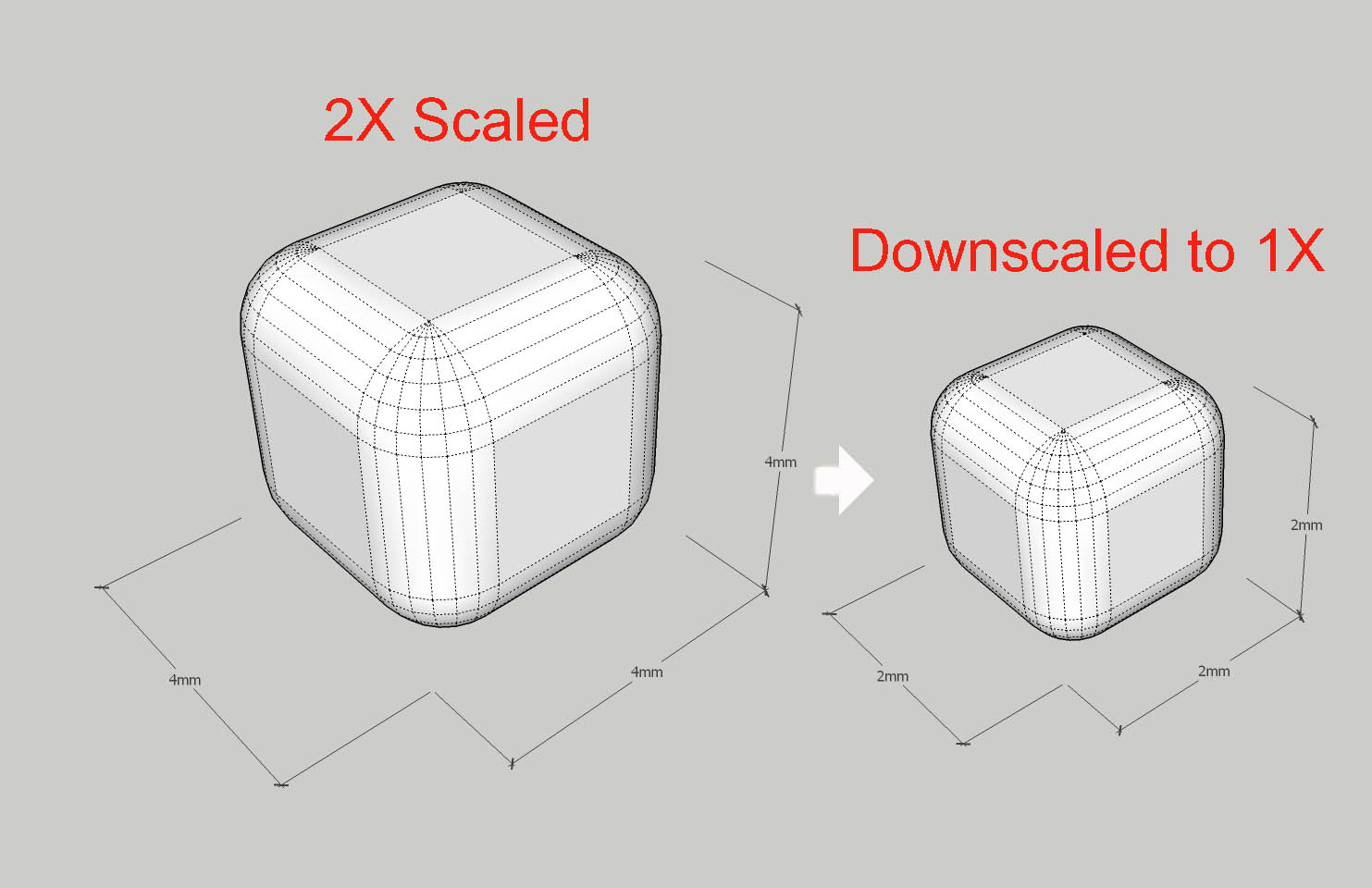
                              RoundEdgeNoClosed.jpg

                              RoundEdgeScaledClosed.jpg

                              1 條回覆 最後回覆 回覆 引用 0
                              • Dave RD 離線
                                Dave R
                                最後由 編輯

                                @unknownuser said:

                                Modelling small parts

                                I´ve had som problems with curves when modelling small parts. Rounded edges/corners will not close. I found a workaround that works: Scale the model two times or more, do the rounding with double radius, -then scale down 0,5 to normal size.

                                👍 Yep. That's a standard recommended procedure for drawing small items in SketchUp. I use a slightly different procedure that works better for me but yours is the method most people seem to use.

                                Etaoin Shrdlu

                                %

                                (THERE'S NO PLACE LIKE)

                                G28 X0.0 Y0.0 Z0.0

                                M30

                                %

                                1 條回覆 最後回覆 回覆 引用 0
                                • JQLJ 離線
                                  JQL
                                  最後由 編輯

                                  @dave r said:

                                  👍 Yep. That's a standard recommended procedure for drawing small items in SketchUp. I use a slightly different procedure that works better for me but yours is the method most people seem to use.

                                  I bet that method evolves making turning your geometry into a component (wich is default work for you) copy the component to the side and scale it up, work on the scaled up version and the correctly scaled version will update simultaneously.

                                  Repeat the process as needed!

                                  Right?

                                  That's what I do too, even if I have to turn my groups into components. (Sorry Dave, but I simply love the components vs groups discussion!)

                                  www.casca.pt
                                  Visit us on facebook!

                                  1 條回覆 最後回覆 回覆 引用 0
                                  • Rich O BrienR 離線
                                    Rich O Brien Moderator
                                    最後由 編輯

                                    you should have a group hug

                                    Download the free D'oh Book for SketchUp 📖

                                    1 條回覆 最後回覆 回覆 引用 0
                                    • BoxB 離線
                                      Box
                                      最後由 編輯

                                      http://i155.photobucket.com/albums/s296/storeben/Stuff/buthead.gif

                                      1 條回覆 最後回覆 回覆 引用 0
                                      • Rich O BrienR 離線
                                        Rich O Brien Moderator
                                        最後由 編輯

                                        why thank you Box

                                        Download the free D'oh Book for SketchUp 📖

                                        1 條回覆 最後回覆 回覆 引用 0
                                        • Dave RD 離線
                                          Dave R
                                          最後由 編輯

                                          @rich o brien said:

                                          you should have a group hug

                                          You mean a component hug, right? 😄

                                          Etaoin Shrdlu

                                          %

                                          (THERE'S NO PLACE LIKE)

                                          G28 X0.0 Y0.0 Z0.0

                                          M30

                                          %

                                          1 條回覆 最後回覆 回覆 引用 0
                                          • Rich O BrienR 離線
                                            Rich O Brien Moderator
                                            最後由 編輯

                                            no, if components hug you get a scaling issue

                                            Download the free D'oh Book for SketchUp 📖

                                            1 條回覆 最後回覆 回覆 引用 0
                                            • 1
                                            • 2
                                            • 26
                                            • 27
                                            • 28
                                            • 29
                                            • 30
                                            • 34
                                            • 35
                                            • 28 / 35
                                            • 第一個貼文
                                              最後的貼文
                                            Buy SketchPlus
                                            Buy SUbD
                                            Buy WrapR
                                            Buy eBook
                                            Buy Modelur
                                            Buy Vertex Tools
                                            Buy SketchCuisine
                                            Buy FormFonts

                                            Advertisement




