sketchucation logo sketchucation
    • Login
    Oops, your profile's looking a bit empty! To help us tailor your experience, please fill in key details like your SketchUp version, skill level, operating system, and more. Update and save your info on your profile page today!
    Mac User? | Join the Rayscaper Beta for Mac Learn More

    The "Duh!" thread (aka the Doh! thread)

    Scheduled Pinned Locked Moved SketchUp Discussions
    sketchup
    696 Posts 135 Posters 622.4k Views 135 Watching
    Loading More Posts
    • Oldest to Newest
    • Newest to Oldest
    • Most Votes
    Reply
    • Reply as topic
    Log in to reply
    This topic has been deleted. Only users with topic management privileges can see it.
    • BoxB
      Box
      last edited by

      I am preparing my eggs for the sucking lesson.

      1 Reply Last reply
      Reply Quote 0
      • JQLJ
        JQL
        last edited by

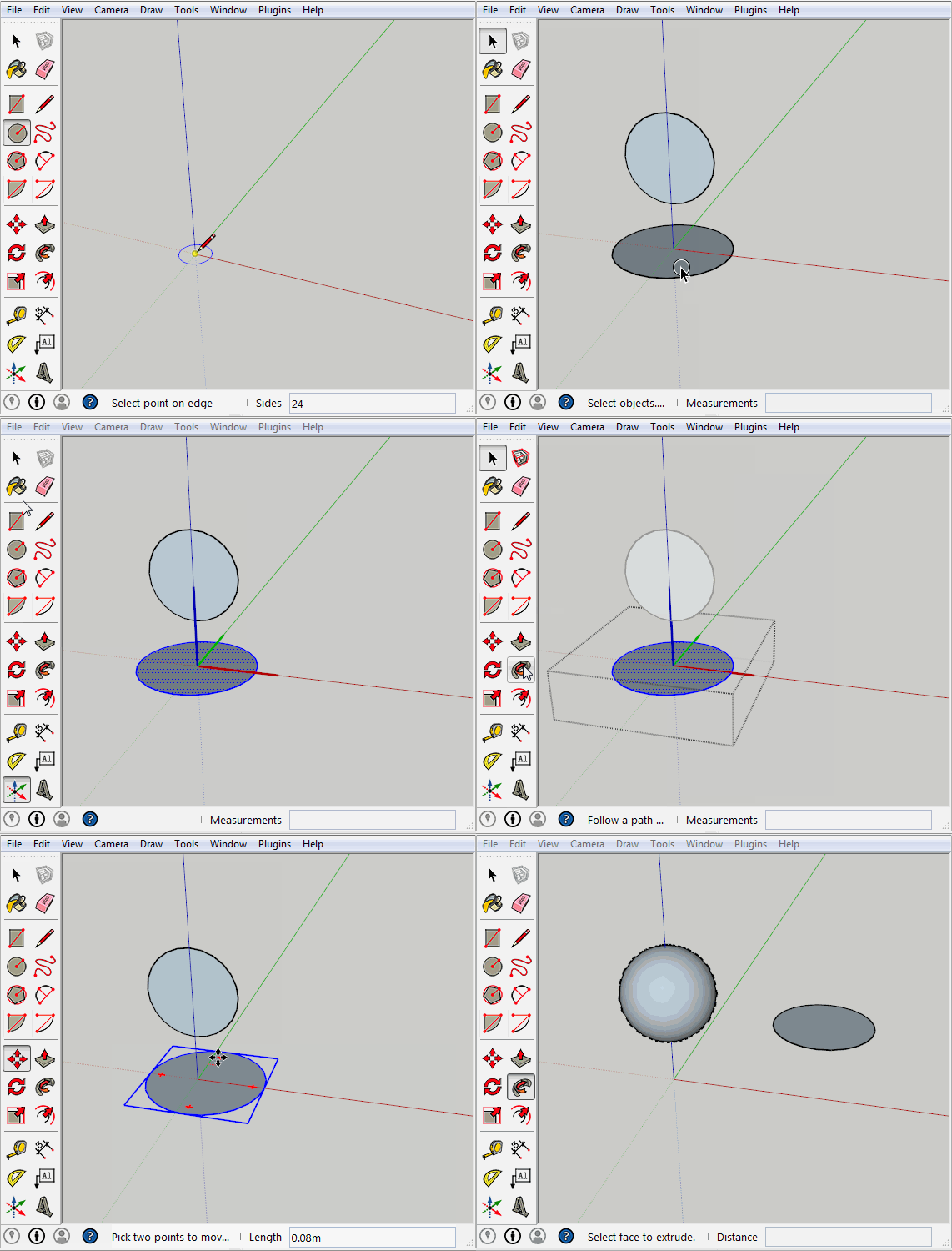
        You have to center the axis inside the circle group prior to follow me.

        www.casca.pt
        Visit us on facebook!

        1 Reply Last reply
        Reply Quote 0
        • JQLJ
          JQL
          last edited by

          Sh** I'm doing it right now in several ways, but can't gif it!!!!

          www.casca.pt
          Visit us on facebook!

          1 Reply Last reply
          Reply Quote 0
          • JQLJ
            JQL
            last edited by

            wait a moment... changing computer!

            www.casca.pt
            Visit us on facebook!

            1 Reply Last reply
            Reply Quote 0
            • BoxB
              Box
              last edited by

              I think you have made my point for me. If the profile is in a group it causes a different result because it relates the group axis to the global axis. But if the profile is in a group it simply uses the group Axis.
              QED

              1 Reply Last reply
              Reply Quote 0
              • Rich O BrienR
                Rich O Brien Moderator
                last edited by

                #handbags

                Download the free D'oh Book for SketchUp πŸ“–

                1 Reply Last reply
                Reply Quote 0
                • BoxB
                  Box
                  last edited by

                  at forty paces!

                  1 Reply Last reply
                  Reply Quote 0
                  • JQLJ
                    JQL
                    last edited by

                    circle.gif

                    Well what was your point exactly?

                    www.casca.pt
                    Visit us on facebook!

                    1 Reply Last reply
                    Reply Quote 0
                    • BoxB
                      Box
                      last edited by

                      Which proved my point, the follow me reacts differently if the profile is grouped rather than the path being grouped. The origin axis comes into play when the path is grouped.
                      So my original assertion that odd things occur when you group the path is true.
                      Also my original model was orthographically correct and shows the relationship between the global axis and the group axis. If I did the follow me the other way it would have produced a sphere.
                      Moving the axis of the path solves the problem but is unrelated to the original post.

                      I simply pointed out that while Carsten was showing something that works beautifully one way it doesn't work the same way when reversed.

                      I'll add this for luck.
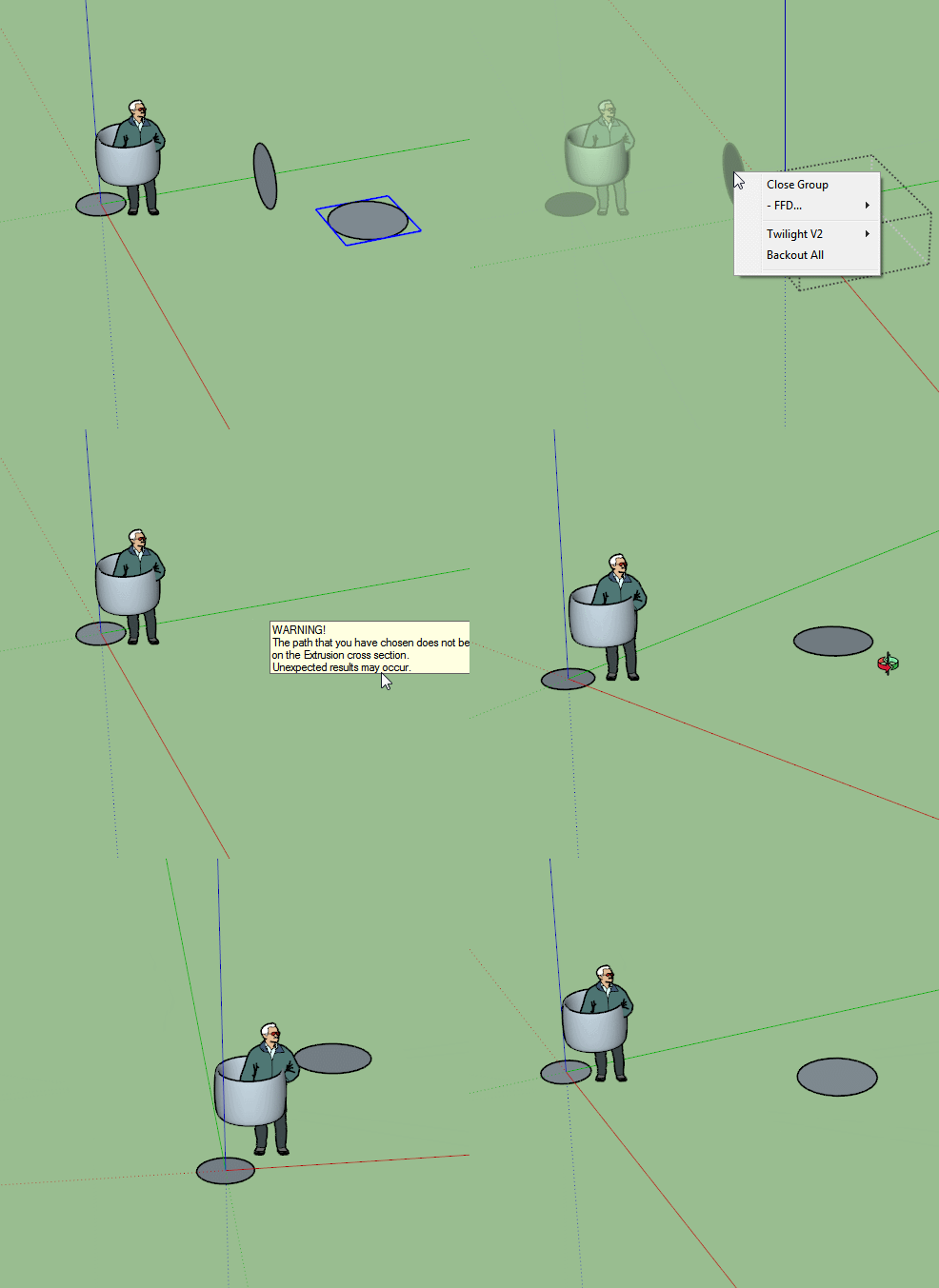

                      Unexpexted.gif

                      1 Reply Last reply
                      Reply Quote 0
                      • JQLJ
                        JQL
                        last edited by

                        Duh!

                        www.casca.pt
                        Visit us on facebook!

                        1 Reply Last reply
                        Reply Quote 0
                        • pmolsonP
                          pmolson
                          last edited by

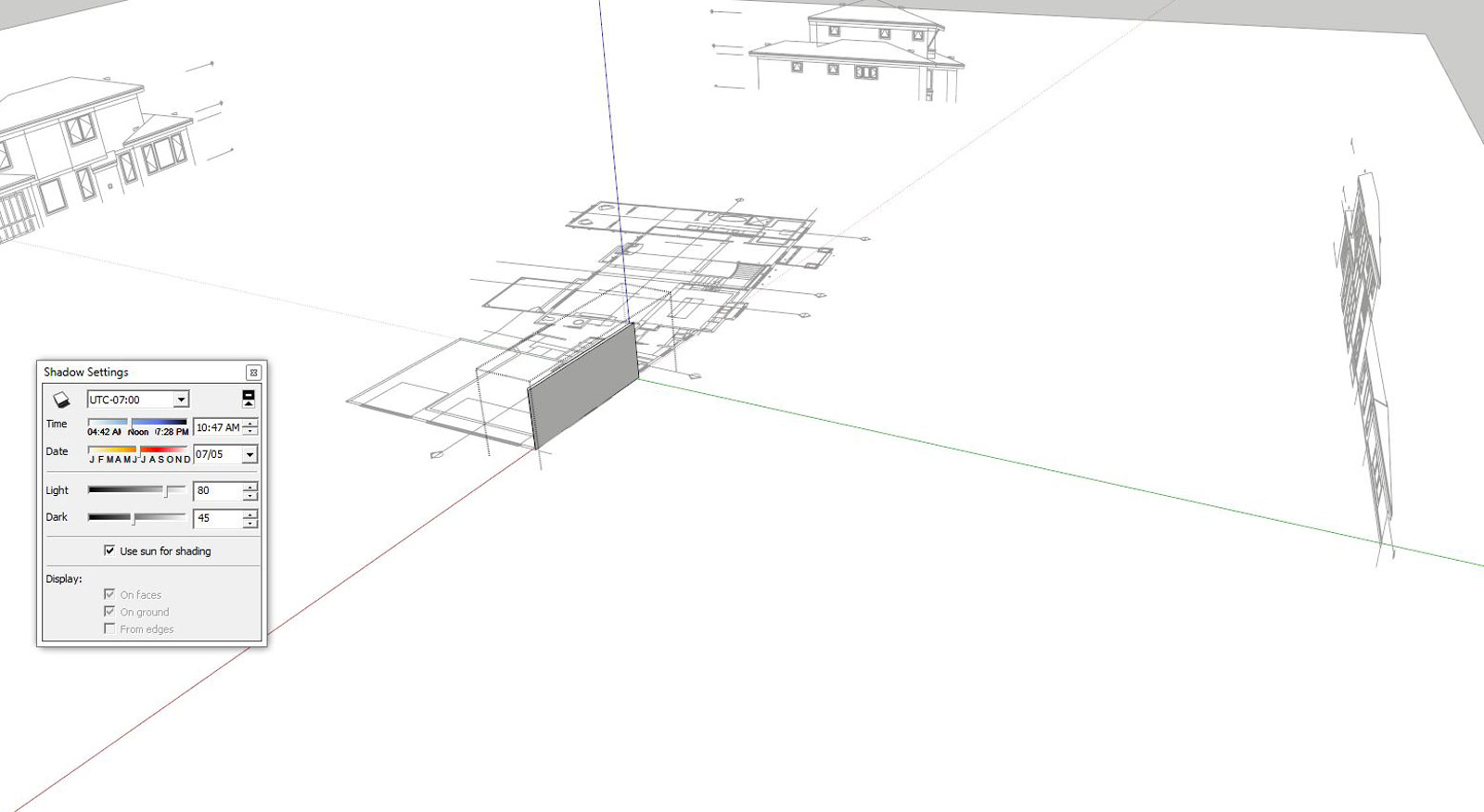
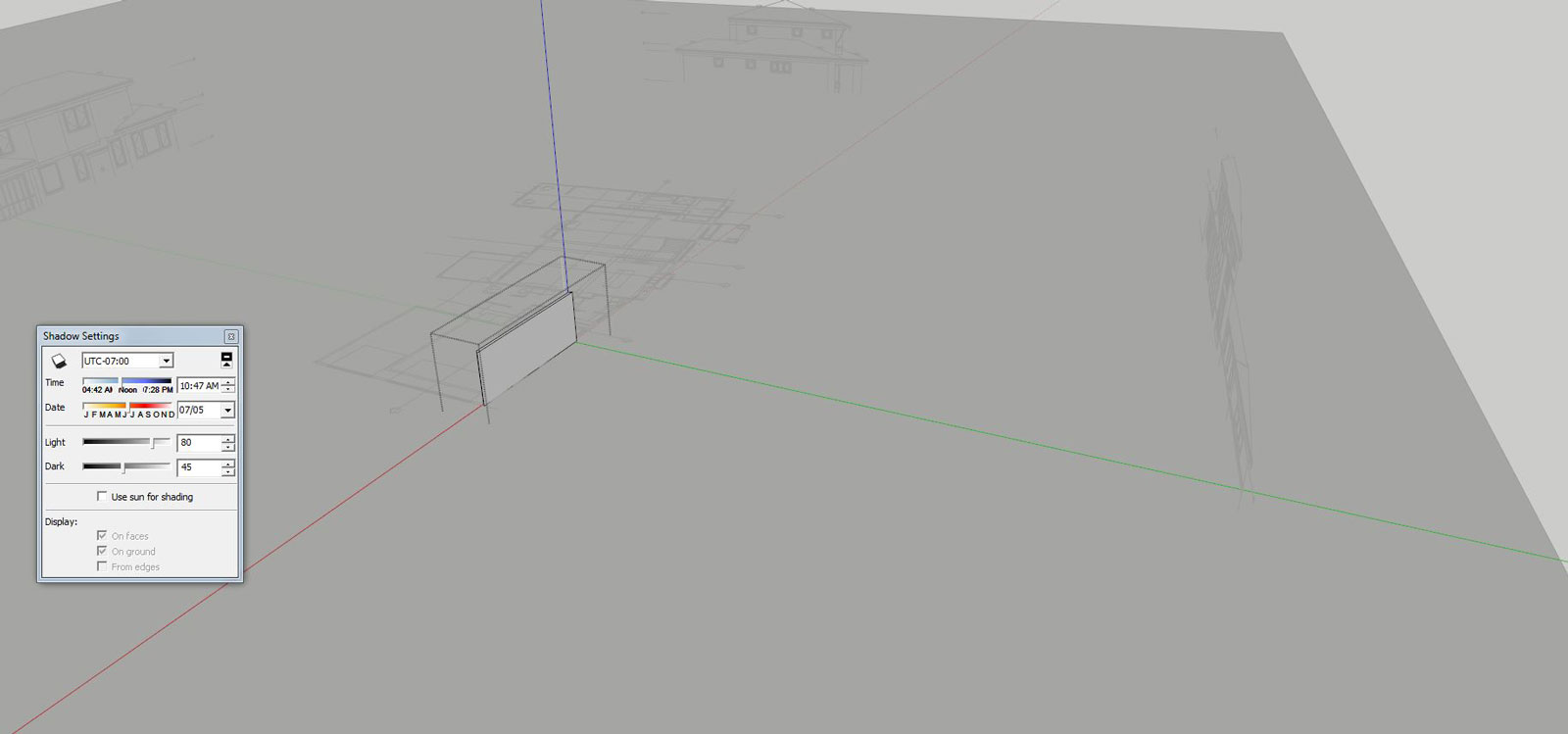
                          Did you know

                          When you have a group open and everything else is faded away and hard to see you can click on the
                          (use sun for shading button check box) and the rest of the model is then clear to see.

                          I like this option for when I want to reference my open group to other parts of the model.
                          01_group-open-shadows-off-s.JPG

                          02_group-open-shadows-off-s.JPG

                          1 Reply Last reply
                          Reply Quote 0
                          • cottyC
                            cotty
                            last edited by

                            πŸ‘
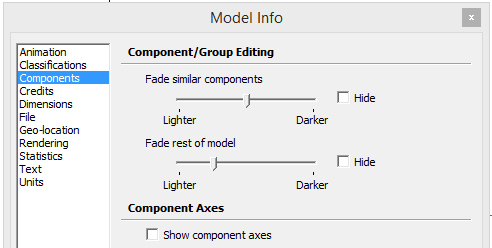
                            In addition, you can influence this here furthermore...
                            compfade.jpg

                            my SketchUp gallery

                            1 Reply Last reply
                            Reply Quote 0
                            • pbacotP
                              pbacot
                              last edited by

                              Just came across the follow me showdown. Maybe cause I'm coming off a cold ...I'm confused. Would be nice to know the best practice for other than circle paths. I have always thought it was a hassle needing to have the objects in the same context...but now I find you don't . Duh!!!

                              MacOSX MojaveSketchUp Pro v19 Twilight v2 Thea v3 PowerCADD

                              1 Reply Last reply
                              Reply Quote 0
                              • icedkaszI
                                icedkasz
                                last edited by

                                Just discovered that ctrl+shift+V pastes in place. Didn't know that for 3 versions. I've made messes out of contour maps by being millimeters off.

                                1 Reply Last reply
                                Reply Quote 0
                                • cottyC
                                  cotty
                                  last edited by

                                  @icedkasz said:

                                  Just discovered that ctrl+shift+V pastes in place. Didn't know that for 3 versions. I've made messes out of contour maps by being millimeters off.

                                  In the preferences, you can switch those two and use Ctrl+V for paste in place and Ctrl+Shift+V for simple pasting (I'm using pasting in place much more often).

                                  my SketchUp gallery

                                  1 Reply Last reply
                                  Reply Quote 0
                                  • Bob JamesB
                                    Bob James
                                    last edited by

                                    @icedkasz said:

                                    Just discovered that ctrl+shift+V pastes in place. Didn't know that for 3 versions.

                                    You're not alone

                                    i7-4930K 3.4Ghz, 2x GTX780 6GB, 32GB DDR3-1600 ECC, OCZ Vertex 4 500GB, WD Black 3TB, 32TB NAS, 4x 27" Monitors, SpaceMouse Pro, X-keys XK-60

                                    1 Reply Last reply
                                    Reply Quote 0
                                    • JQLJ
                                      JQL
                                      last edited by

                                      @bob james said:

                                      @icedkasz said:

                                      Just discovered that ctrl+shift+V pastes in place. Didn't know that for 3 versions.

                                      You're not alone

                                      I never found that myself because that was exactly the shortcut I used with V8. As I always imported shortcuts I thought that was exclusively my command... I guess that counts as a Duh!

                                      www.casca.pt
                                      Visit us on facebook!

                                      1 Reply Last reply
                                      Reply Quote 0
                                      • thomthomT
                                        thomthom
                                        last edited by

                                        Oh - wait - that shortcut is now out of the box?

                                        Thomas Thomassen β€” SketchUp Monkey & Coding addict
                                        List of my plugins and link to the CookieWare fund

                                        1 Reply Last reply
                                        Reply Quote 0
                                        • JQLJ
                                          JQL
                                          last edited by

                                          It isn't? I always export/import it before I try it... so how would I know?

                                          It seems this will get some more duhs!

                                          www.casca.pt
                                          Visit us on facebook!

                                          1 Reply Last reply
                                          Reply Quote 0
                                          • thomthomT
                                            thomthom
                                            last edited by

                                            I'm glad it's now a default - as it's the first shortcut I ever set up. (Though I also import so I missed this.)


                                            Thomas Thomassen β€” SketchUp Monkey & Coding addict
                                            List of my plugins and link to the CookieWare fund

                                            1 Reply Last reply
                                            Reply Quote 0

                                            Hello! It looks like you're interested in this conversation, but you don't have an account yet.

                                            Getting fed up of having to scroll through the same posts each visit? When you register for an account, you'll always come back to exactly where you were before, and choose to be notified of new replies (either via email, or push notification). You'll also be able to save bookmarks and upvote posts to show your appreciation to other community members.

                                            With your input, this post could be even better πŸ’—

                                            Register Login
                                            • 1
                                            • 2
                                            • 3
                                            • 4
                                            • 5
                                            • 34
                                            • 35
                                            • 3 / 35
                                            • First post
                                              Last post
                                            Buy SketchPlus
                                            Buy SUbD
                                            Buy WrapR
                                            Buy eBook
                                            Buy Modelur
                                            Buy Vertex Tools
                                            Buy SketchCuisine
                                            Buy FormFonts

                                            Advertisement