sketchucation logo sketchucation
    • 登入
    Oops, your profile's looking a bit empty! To help us tailor your experience, please fill in key details like your SketchUp version, skill level, operating system, and more. Update and save your info on your profile page today!
    🔌 Smart Spline | Fluid way to handle splines for furniture design and complex structures. Download

    [Plugin] FollowMe and keep (v0.04 update 20090210)

    已排程 已置頂 已鎖定 已移動 Plugins
    223 貼文 79 Posters 186.2k 瀏覽 79 Watching
    正在載入更多貼文
    • 從舊到新
    • 從新到舊
    • 最多點贊
    回覆
    • 在新貼文中回覆
    登入後回覆
    此主題已被刪除。只有擁有主題管理權限的使用者可以查看。
    • thomthomT 離線
      thomthom
      最後由 編輯

      How ironic is his nickname...? 😒

      Thomas Thomassen — SketchUp Monkey & Coding addict
      List of my plugins and link to the CookieWare fund

      1 條回覆 最後回覆 回覆 引用 0
      • Dave RD 離線
        Dave R
        最後由 編輯

        @destroyer1095 said:

        ITS NOT WORKING FOR SKETCH UP 8!!!!! 😡 👎

        Nice entrance to the forum. 😒

        Etaoin Shrdlu

        %

        (THERE'S NO PLACE LIKE)

        G28 X0.0 Y0.0 Z0.0

        M30

        %

        1 條回覆 最後回覆 回覆 引用 0
        • M 離線
          MartinK
          最後由 編輯

          @destroyer1095 said:

          ITS NOT WORKING FOR SKETCH UP 8!!!!! 😡 👎

          ASS

          1 條回覆 最後回覆 回覆 引用 0
          • J 離線
            JMdesigns
            最後由 編輯

            cant get this to work sor SU8 ?...any updates

            1 條回覆 最後回覆 回覆 引用 0
            • Dave RD 離線
              Dave R
              最後由 編輯

              Works fine on SU8 for me.

              If you want help, why not help us help you and give us some information about what's happening? Post an example SKP or something. 😒

              Etaoin Shrdlu

              %

              (THERE'S NO PLACE LIKE)

              G28 X0.0 Y0.0 Z0.0

              M30

              %

              1 條回覆 最後回覆 回覆 引用 0
              • J 離線
                jjshannon
                最後由 編輯

                Greeting. This is my first post here. I have been trying to model a roller coaster type object and the "follow me" tool in sketchup was twisting my shape. I think found the "follow me and keep" tool here which is great. My only problem now is that my shape is not symetrical and the follow me and keep tool is flipping my shape as it makes turns. It is one shape I am extruding by somehow it doesn't quite work. I tried this shape with the native follow me in sketchup and it does maintain the general shape but, as mentioned before it twists the shape. Is there something I am doing wrong, or is there any way to fix this? I have attached my sketchup file.

                Thanks!


                rollar coaster test 2.skp

                1 條回覆 最後回覆 回覆 引用 0
                • B 離線
                  blajnov
                  最後由 編輯

                  @jjshannon said:

                  Greeting. This is my first post here. I have been trying to model a roller coaster type object and the "follow me" tool in sketchup was twisting my shape. I think found the "follow me and keep" tool here which is great. My only problem now is that my shape is not symetrical and the follow me and keep tool is flipping my shape as it makes turns. It is one shape I am extruding by somehow it doesn't quite work. I tried this shape with the native follow me in sketchup and it does maintain the general shape but, as mentioned before it twists the shape. Is there something I am doing wrong, or is there any way to fix this? I have attached my sketchup file.

                  Thanks!

                  All works, simply draw again a structure...

                  07-03-2012 8-19-44.png


                  rollar coaster test 2.skp

                  1 條回覆 最後回覆 回覆 引用 0
                  • T 離線
                    tspco
                    最後由 編輯

                    I hate drawing railings on staircases, that said this plugin works fine, but it would be better if it didn't have auto-smoothing, or an option that would allow the user to turn it off. I have to explode the group the plugin created to make the railing look right. I also have to add lines between segments of railing, to make the railing look sharper. Any thoughts?

                    SU make 2017, /Twilight Render Hobby
                    Windows 10,64 bit,16GB ram, quad core Athlon 3.6 gHz proc. Anything else you want to know, ask me.

                    1 條回覆 最後回覆 回覆 引用 0
                    • Dave RD 離線
                      Dave R
                      最後由 編輯

                      I have just one thought. Well, two but one of them isn't related. 😛

                      Open the railing group for editing and then select all of the geometry. Right click Smooth/Soften and adjust the slider down slightly. That should give you the lines you're looking for at the turns.

                      Etaoin Shrdlu

                      %

                      (THERE'S NO PLACE LIKE)

                      G28 X0.0 Y0.0 Z0.0

                      M30

                      %

                      1 條回覆 最後回覆 回覆 引用 0
                      • brookefoxB 離線
                        brookefox
                        最後由 編輯

                        Thank you for FAK. Sometimes the path is repeated in the result, sometimes not. In my case, with a road centerline, I do not want it, or if it is there, I'd like it grouped or left as a curve and not exploded as this requires cleaning up.

                        ~ Brooke

                        1 條回覆 最後回覆 回覆 引用 0
                        • Dave RD 離線
                          Dave R
                          最後由 編輯

                          Have you tried setting up the path so it is not in contact with the profile? If you do that, you won't have to clean up the group that results from the extrusion operation.

                          Etaoin Shrdlu

                          %

                          (THERE'S NO PLACE LIKE)

                          G28 X0.0 Y0.0 Z0.0

                          M30

                          %

                          1 條回覆 最後回覆 回覆 引用 0
                          • S 離線
                            seabassvg
                            最後由 編輯

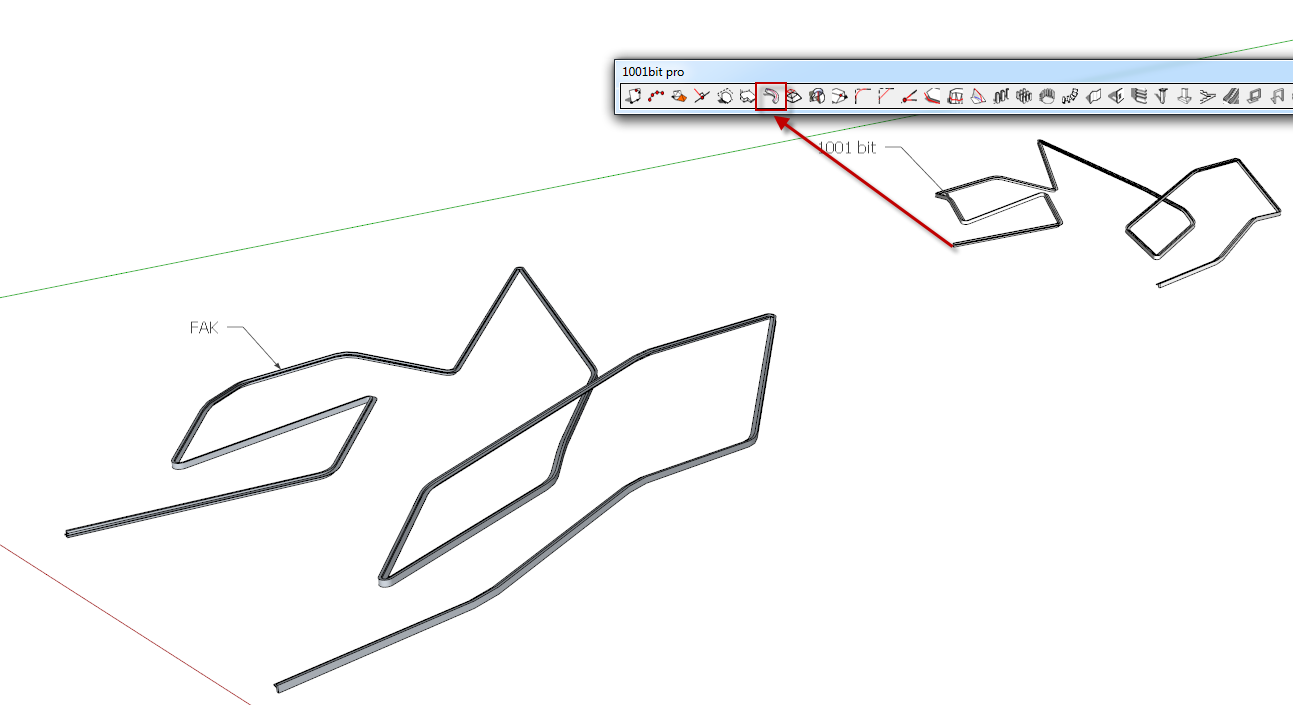
                            @wikii, I have just tried your plugin. Thank you very much for an awesome solution, that 1001.bit could not solve 😄

                            1 條回覆 最後回覆 回覆 引用 0
                            • brookefoxB 離線
                              brookefox
                              最後由 編輯

                              @dave r said:

                              Have you tried setting up the path so it is not in contact with the profile? If you do that, you won't have to clean up the group that results from the extrusion operation.

                              I either neglected to see this, Dave, or couldn't fit it in my little head, or it simply didn't compute for some reason; not sure.

                              Now it does. I'll try it. Thanks.

                              ~ Brooke

                              1 條回覆 最後回覆 回覆 引用 0
                              • Dave RD 離線
                                Dave R
                                最後由 編輯

                                Why are you expecting any more than that? That menu entry is enough to get the job done. 😒

                                Etaoin Shrdlu

                                %

                                (THERE'S NO PLACE LIKE)

                                G28 X0.0 Y0.0 Z0.0

                                M30

                                %

                                1 條回覆 最後回覆 回覆 引用 0
                                • R 離線
                                  ranytan
                                  最後由 編輯

                                  No further menu in plugin? Only show as FollowMeandKeep.
                                  SketchUp 8

                                  http://img443.imageshack.us/img443/200/iamdumb.jpg

                                  1 條回覆 最後回覆 回覆 引用 0
                                  • G 離線
                                    Gspahr
                                    最後由 編輯

                                    This is a great, great tool! I want in on the list of grateful people... Thank you very much Wikii! My ramps will never look skewed anymore!

                                    1 條回覆 最後回覆 回覆 引用 0
                                    • S 離線
                                      Snowy
                                      最後由 編輯

                                      Thanks for the plugin Wikii.

                                      U don't even know how many times i have been frustrated about the deformed follow me.
                                      Even tho i love Follow me, i also hated it sometimes. Gladly u solved that part for us. 😄

                                      1 條回覆 最後回覆 回覆 引用 0
                                      • McGyverM 離線
                                        McGyver
                                        最後由 編輯

                                        I have no idea why I never got what this plugin did... then I read about it in CatchUp 11... Follow and Keep... Brilliant! Thanks for this Plugin, I only wish I'd have read about it sooner!

                                        Visit My ShareCG Freebie Gallery

                                        1 條回覆 最後回覆 回覆 引用 0
                                        • X 離線
                                          xzoran
                                          最後由 編輯

                                          Big Thanks !

                                          1 條回覆 最後回覆 回覆 引用 0
                                          • Bryan KB 離線
                                            Bryan K
                                            最後由 編輯

                                            Thanks Wikii. I always wondered what I was doing wrong with the Follow Me tool, now I know. It was the tool itself.

                                            Excellent upgrade!

                                            See my portfolio at https://delphiscousin.blogspot.com/

                                            1 條回覆 最後回覆 回覆 引用 0
                                            • 1
                                            • 2
                                            • 5
                                            • 6
                                            • 7
                                            • 8
                                            • 9
                                            • 10
                                            • 11
                                            • 12
                                            • 7 / 12
                                            • 第一個貼文
                                              最後的貼文
                                            Buy SketchPlus
                                            Buy SUbD
                                            Buy WrapR
                                            Buy eBook
                                            Buy Modelur
                                            Buy Vertex Tools
                                            Buy SketchCuisine
                                            Buy FormFonts

                                            Advertisement



