sketchucation logo sketchucation
    • 登入
    Oops, your profile's looking a bit empty! To help us tailor your experience, please fill in key details like your SketchUp version, skill level, operating system, and more. Update and save your info on your profile page today!
    🔌 Smart Spline | Fluid way to handle splines for furniture design and complex structures. Download

    [Plugin] FollowMe and keep (v0.04 update 20090210)

    已排程 已置頂 已鎖定 已移動 Plugins
    223 貼文 79 Posters 186.0k 瀏覽 79 Watching
    正在載入更多貼文
    • 從舊到新
    • 從新到舊
    • 最多點贊
    回覆
    • 在新貼文中回覆
    登入後回覆
    此主題已被刪除。只有擁有主題管理權限的使用者可以查看。
    • mitcorbM 離線
      mitcorb
      最後由 編輯

      It's OK, rainfrog:
      I am just glad I was able to assist.
      By the way, when I looked at the replica I did, at first it had a bounding box like a group. I clicked somewhere and the box disappeared. I could not retrieve the group, but the model remained. Also, I noticed that a line segment was bridging one of the bends, like it did not get bent by the plugin, even though I selected the whole thing before bending.

      I take the slow, deliberate approach in my aimless wandering.

      1 條回覆 最後回覆 回覆 引用 0
      • jarynzlesaJ 離線
        jarynzlesa
        最後由 編輯

        works perfectly, thank you - good work 👍

        http://www.vizualizaceschodiste.mypage.cz/

        1 條回覆 最後回覆 回覆 引用 0
        • C 離線
          ciudadanochano
          最後由 編輯

          Hey!! I have a very stupid question...How can I download this plugin? I´m serching everywhere, but I can´t find the way. Thanks!!

          1 條回覆 最後回覆 回覆 引用 0
          • GaieusG 離線
            Gaieus
            最後由 編輯

            Hi Chano,

            Plugins published on these forums are generally attached at the bottom of the very first post in their respective topics - in this case, download/install FAK.rb (or extract it from the FAK.rar archive also attached).

            Gai...

            1 條回覆 最後回覆 回覆 引用 0
            • K 離線
              kienho
              最後由 編輯

              Thank you Wikii! Your plugin helps me alot in modeling.

              1 條回覆 最後回覆 回覆 引用 0
              • T 離線
                Tim Danaher
                最後由 編輯

                Is FMAK supposed to smooth the result automatically?

                I can't get this one to smooth -- the resulting sweep is nice, though...


                FMAK_Profile.skp

                Cheers,

                Tim

                http://vizarch.blogspot.com

                1 條回覆 最後回覆 回覆 引用 0
                • jeff hammondJ 離線
                  jeff hammond
                  最後由 編輯

                  @rainfrog said:

                  Basically, I want a profile to follow a path much like in the FollowMe and keep plugin, but in a way that preserves the proportions of the profile perpendicular to the path, whether that path is level or on a slope.

                  hey rainfrog,

                  that's possible using the extrude along path tool in the 1001bit suite
                  http://www.1001bit.com/
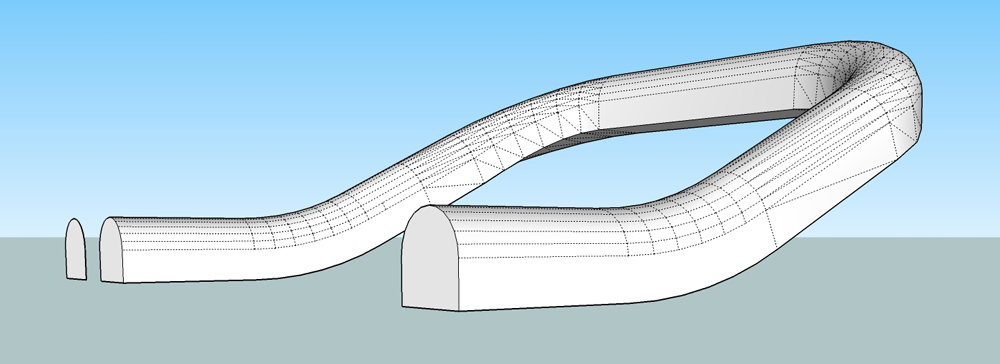
                  followmeproblem_fixed.skp

                  1001bitversion.jpg

                  dotdotdot

                  1 條回覆 最後回覆 回覆 引用 0
                  • X 離線
                    xrok1
                    最後由 編輯

                    @unknownuser said:

                    @rainfrog said:

                    Basically, I want a profile to follow a path much like in the FollowMe and keep plugin, but in a way that preserves the proportions of the profile perpendicular to the path, whether that path is level or on a slope.

                    the native follow me tool works this way???? did you try it?

                    “There are three classes of people: those who see. Those who see when they are shown. Those who do not see.”

                    http://www.Twilightrender.com try it!

                    1 條回覆 最後回覆 回覆 引用 0
                    • pilouP 離線
                      pilou
                      最後由 編輯

                      You can use also the TIG Extrude Edges by Rails by Face 😉
                      and maybe 2 faces + Path by Kirill2008

                      Frenchy Pilou
                      Is beautiful that please without concept!
                      My Little site :)

                      1 條回覆 最後回覆 回覆 引用 0
                      • jeff hammondJ 離線
                        jeff hammond
                        最後由 編輯

                        @unknownuser said:

                        You can use also the TIG Extrude Edges by Rails by Face 😉
                        and maybe 2 faces + Path by Kirill2008

                        they won't keep the bottom flat though.. i'm pretty sure 1001bit is the only ruby solution for this particular scenario.

                        dotdotdot

                        1 條回覆 最後回覆 回覆 引用 0
                        • X 離線
                          xrok1
                          最後由 編輯

                          i downloaded his file and to me 1001bit and native follow me are identical, except 1001 triangulates. 😕

                          “There are three classes of people: those who see. Those who see when they are shown. Those who do not see.”

                          http://www.Twilightrender.com try it!

                          1 條回覆 最後回覆 回覆 引用 0
                          • thomthomT 離線
                            thomthom
                            最後由 編輯

                            @unknownuser said:

                            @unknownuser said:

                            You can use also the TIG Extrude Edges by Rails by Face 😉
                            and maybe 2 faces + Path by Kirill2008

                            they won't keep the bottom flat though.. i'm pretty sure 1001bit is the only ruby solution for this particular scenario.

                            FollowMeAndKeep?

                            Thomas Thomassen — SketchUp Monkey & Coding addict
                            List of my plugins and link to the CookieWare fund

                            1 條回覆 最後回覆 回覆 引用 0
                            • X 離線
                              xrok1
                              最後由 編輯

                              @thomthom said:

                              @unknownuser said:

                              @unknownuser said:

                              You can use also the TIG Extrude Edges by Rails by Face 😉
                              and maybe 2 faces + Path by Kirill2008

                              they won't keep the bottom flat though.. i'm pretty sure 1001bit is the only ruby solution for this particular scenario.

                              FollowMeAndKeep?

                              FAK "squashes" the profile going up hill because it doesn't rotate.

                              “There are three classes of people: those who see. Those who see when they are shown. Those who do not see.”

                              http://www.Twilightrender.com try it!

                              1 條回覆 最後回覆 回覆 引用 0
                              • T 離線
                                Tim Danaher
                                最後由 編輯

                                I'm not having much luck with this at all...

                                Trying to sweep a spiral stair rail. I've got the path running smack through the midpoint of the balusters, and the profile lined up as centrally as possible, but the resulting handrail is never on the path.

                                The original path & Profile are in one group in the attached .skp, the resulting sweep in another...

                                Anyone point me to where I'm going wrong?

                                Ta,


                                Spiral Stairs_Baluster.skp

                                Cheers,

                                Tim

                                http://vizarch.blogspot.com

                                1 條回覆 最後回覆 回覆 引用 0
                                • jeff hammondJ 離線
                                  jeff hammond
                                  最後由 編輯

                                  @xrok1 said:

                                  i downloaded his file and to me 1001bit and native follow me are identical, except 1001 triangulates. 😕

                                  check this comparison..
                                  fm_vs_1001.skp

                                  [edit] oh, regarding the 1001bit triangulation.. i run the deletecoplanaredges ruby on it afterwards.. found here..
                                  http://www.cad-addict.com/2009/07/sketchup-plugins-delete-coplanar-edges.html

                                  dotdotdot

                                  1 條回覆 最後回覆 回覆 引用 0
                                  • jeff hammondJ 離線
                                    jeff hammond
                                    最後由 編輯

                                    @tim danaher said:

                                    I'm not having much luck with this at all...

                                    Trying to sweep a spiral stair rail. I've got the path running smack through the midpoint of the balusters, and the profile lined up as centrally as possible, but the resulting handrail is never on the path.

                                    The original path & Profile are in one group in the attached .skp, the resulting sweep in another...

                                    Anyone point me to where I'm going wrong?

                                    Ta,

                                    i really don't know what's going on there Tim and i don't have FAK.rb installed anymore but i tried it with the 1001bit extrude and it worked out..
                                    that said, we're talking a $30 tool set vs. a free plugin so...

                                    TD_baluster.skp

                                    dotdotdot

                                    1 條回覆 最後回覆 回覆 引用 0
                                    • T 離線
                                      Tim Danaher
                                      最後由 編輯

                                      @unknownuser said:

                                      @tim danaher said:

                                      I'm not having much luck with this at all...

                                      Trying to sweep a spiral stair rail. I've got the path running smack through the midpoint of the balusters, and the profile lined up as centrally as possible, but the resulting handrail is never on the path.

                                      The original path & Profile are in one group in the attached .skp, the resulting sweep in another...

                                      Anyone point me to where I'm going wrong?

                                      Ta,

                                      i really don't know what's going on there Tim and i don't have FAK.rb installed anymore but i tried it with the 1001bit extrude and it worked out..
                                      that said, we're talking a $30 tool set vs. a free plugin so...

                                      [attachment=0:afd99swm]<!-- ia0 -->TD_baluster.skp<!-- ia0 -->[/attachment:afd99swm]

                                      Thanks, Jeff -- Nice result... will have to pony up the dosh, then... 😮

                                      Cheers,

                                      Tim

                                      http://vizarch.blogspot.com

                                      1 條回覆 最後回覆 回覆 引用 0
                                      • X 離線
                                        xrok1
                                        最後由 編輯

                                        @unknownuser said:

                                        @tim danaher said:

                                        I'm not having much luck with this at all...

                                        Trying to sweep a spiral stair rail. I've got the path running smack through the midpoint of the balusters, and the profile lined up as centrally as possible, but the resulting handrail is never on the path.

                                        The original path & Profile are in one group in the attached .skp, the resulting sweep in another...

                                        Anyone point me to where I'm going wrong?

                                        Ta,

                                        i really don't know what's going on there Tim and i don't have FAK.rb installed anymore but i tried it with the 1001bit extrude and it worked out..
                                        that said, we're talking a $30 tool set vs. a free plugin so...

                                        [attachment=0:1ls3nueo]<!-- ia0 -->TD_baluster.skp<!-- ia0 -->[/attachment:1ls3nueo]

                                        thanks for clearing that up Jeff. i hadn't noticed that detail. i thought he was refering to the height difference on the slopes. 😳

                                        “There are three classes of people: those who see. Those who see when they are shown. Those who do not see.”

                                        http://www.Twilightrender.com try it!

                                        1 條回覆 最後回覆 回覆 引用 0
                                        • T 離線
                                          Tim Danaher
                                          最後由 編輯

                                          @tim danaher said:

                                          @unknownuser said:

                                          i really don't know what's going on there Tim and i don't have FAK.rb installed anymore but i tried it with the 1001bit extrude and it worked out..
                                          that said, we're talking a $30 tool set vs. a free plugin so...

                                          [attachment=0:3ewotani]<!-- ia0 -->TD_baluster.skp<!-- ia0 -->[/attachment:3ewotani]

                                          Thanks, Jeff -- Nice result... will have to pony up the dosh, then... 😮

                                          Hah! No I won't... the developers have made it free for academic use, and since I teach SU at a design school...

                                          Cheers,

                                          Tim

                                          http://vizarch.blogspot.com

                                          1 條回覆 最後回覆 回覆 引用 0
                                          • pilouP 離線
                                            pilou
                                            最後由 編輯

                                            @unknownuser said:

                                            a $30 tool

                                            It's free if you use it for personnal use 😎
                                            You will have just a starting message 😉

                                            Frenchy Pilou
                                            Is beautiful that please without concept!
                                            My Little site :)

                                            1 條回覆 最後回覆 回覆 引用 0
                                            • 1
                                            • 2
                                            • 3
                                            • 4
                                            • 5
                                            • 6
                                            • 7
                                            • 11
                                            • 12
                                            • 5 / 12
                                            • 第一個貼文
                                              最後的貼文
                                            Buy SketchPlus
                                            Buy SUbD
                                            Buy WrapR
                                            Buy eBook
                                            Buy Modelur
                                            Buy Vertex Tools
                                            Buy SketchCuisine
                                            Buy FormFonts

                                            Advertisement


