sketchucation logo sketchucation
    • 登入
    Oops, your profile's looking a bit empty! To help us tailor your experience, please fill in key details like your SketchUp version, skill level, operating system, and more. Update and save your info on your profile page today!
    🔌 Easy Offset | Offset selected faces in SketchUp in positive and negative offsets. Download

    [Plugin] Zorro2 (beta)

    已排程 已置頂 已鎖定 已移動 Plugins
    314 貼文 154 Posters 359.3k 瀏覽 154 Watching
    正在載入更多貼文
    • 從舊到新
    • 從新到舊
    • 最多點贊
    回覆
    • 在新貼文中回覆
    登入後回覆
    此主題已被刪除。只有擁有主題管理權限的使用者可以查看。
    • N 離線
      natmonday
      最後由 編輯

      This plug-in is just what I need. However I am getting a "bug splat" everytime i try to use it... any suggestions??

      @whaat said:

      Time for an update of Zorro. I think this release is much more polished than the first one. Plus, you now finally have the ability to render section cut views.

      New Features:

      -made cuts work with parallel projection views
      -added slice model at section plane (right click on a section plane for context menu)
      -added nested cuts using CTRL modifier
      -improved precision of cuts

      Somes notes on this release:

      • It is recommended to use 'Slice model at Section' on a backup of your SKP file. It is a destructive process.
      • Cutting through nested components results in creation of many unique components
      • Some code was used with permission from TIG's SectionCutFace script to create a cutting plane from a section plane. Thanks!
      • Script should work for older versions of SU and also on Mac systems

      I am calling this a beta version so please post any bugs or requests in this thread. Enjoy!

      EDIT: Updated version now attached which should fix the problems that have been reported. Also added tutorial.

      Whaat

      1 條回覆 最後回覆 回覆 引用 0
      • E 離線
        erentumer
        最後由 編輯

        when I try to slice from section plane sketchup turns off does anyone know why it closes itself?

        1 條回覆 最後回覆 回覆 引用 0
        • C 離線
          chango70
          最後由 編輯

          I think it crash with nested components and groups. I use it only when I've exploded everything.

          1 條回覆 最後回覆 回覆 引用 0
          • thomthomT 離線
            thomthom
            最後由 編輯

            I got a model that produces bugsplat when I try to use Zorro with it. I select the Section Cut and click "Slice Model at Section" - BugSplat!
            😞


            Crashed SketchUp

            Thomas Thomassen — SketchUp Monkey & Coding addict
            List of my plugins and link to the CookieWare fund

            1 條回覆 最後回覆 回覆 引用 0
            • TIGT 離線
              TIG Moderator
              最後由 編輯

              It's a simple thing to do manually, without Zorro.
              Make a group at the section-cut, explode it and intersect its geometry with model.
              Take a side view, perspective off, and select everything above the cut and group it, repeat below the cut, move the groups apart...ZorroCrashSplit.PNGZorroCrashSplit.skp
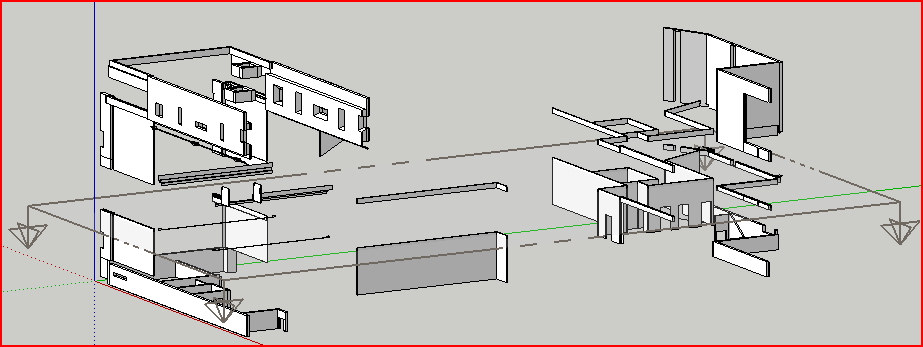
              TIG

              1 條回覆 最後回覆 回覆 引用 0
              • thomthomT 離線
                thomthom
                最後由 編輯

                @tig said:

                It's a simple thing to do manually, without Zorro.

                That was just a small part of my model. The original got many more components...

                Thomas Thomassen — SketchUp Monkey & Coding addict
                List of my plugins and link to the CookieWare fund

                1 條回覆 最後回覆 回覆 引用 0
                • TIGT 離線
                  TIG Moderator
                  最後由 編輯

                  It's the groups/components that take the time and cause the splats!

                  TIG

                  1 條回覆 最後回覆 回覆 引用 0
                  • thomthomT 離線
                    thomthom
                    最後由 編輯

                    @tig said:

                    It's the groups/components that take the time and cause the splats!

                    My sample model doesn't have any groups/components. Just edges and faces...

                    Thomas Thomassen — SketchUp Monkey & Coding addict
                    List of my plugins and link to the CookieWare fund

                    1 條回覆 最後回覆 回覆 引用 0
                    • Rich O BrienR 離線
                      Rich O Brien Moderator
                      最後由 編輯

                      Isn't the Zorro tool in Artisan more stable than this version?

                      Download the free D'oh Book for SketchUp 📖

                      1 條回覆 最後回覆 回覆 引用 0
                      • thomthomT 離線
                        thomthom
                        最後由 編輯

                        @unknownuser said:

                        Isn't the Zorro tool in Artisan more stable than this version?

                        Just tried the Knife tool - crashed SU, without bugsplat.

                        Thomas Thomassen — SketchUp Monkey & Coding addict
                        List of my plugins and link to the CookieWare fund

                        1 條回覆 最後回覆 回覆 引用 0
                        • Rich O BrienR 離線
                          Rich O Brien Moderator
                          最後由 編輯

                          Did you try a series of cuts rather than just one? I find that helps sometimes!

                          Download the free D'oh Book for SketchUp 📖

                          1 條回覆 最後回覆 回覆 引用 0
                          • dukejazzD 離線
                            dukejazz
                            最後由 編輯

                            I love useing this plugin Zorro2,
                            So I added a icon to the tool bar.

                            If you want to do this too,
                            then paste these lines between the last end statment of zorro2.rb and its file_loaded("Zorro2.rb")
                            useing notepad

                            end

                            #----copy this----------

                            adds a icon to tool bar

                            remeber to add the attachent zorro2.jpg to plugins folder

                               if( not file_loaded?("Zorro2.rb") )
                            tt_hh = UI::Toolbar.new "Zorro2"
                            cmd = UI::Command.new("Zorro2 ")  {(Sketchup.active_model.select_tool Zorro2Tool.new)}
                            cmd.small_icon = "zorro2.jpg"
                            cmd.large_icon = "zorro2.jpg"
                            cmd.tooltip = "Zorro2"
                            tt_hh.add_item cmd
                            

                            tt_hh.show
                            end
                            #add is compleated
                            #---copy to here---------------

                            file_loaded("Zorro2.rb")


                            zorro2.jpg

                            1 條回覆 最後回覆 回覆 引用 0
                            • X 離線
                              xplode35
                              最後由 編輯

                              Seems like this plugin badly needs an update. Nothing's changed in 2 years???

                              1 條回覆 最後回覆 回覆 引用 0
                              • GaieusG 離線
                                Gaieus
                                最後由 編輯

                                Why fix something that is not broken? There are much older plugins still performing perfectly what they were designed for 5-6 years ago.

                                Gai...

                                1 條回覆 最後回覆 回覆 引用 0
                                • Bob JamesB 離線
                                  Bob James
                                  最後由 編輯

                                  Beta for two years 😲 😄

                                  i7-4930K 3.4Ghz, 2x GTX780 6GB, 32GB DDR3-1600 ECC, OCZ Vertex 4 500GB, WD Black 3TB, 32TB NAS, 4x 27" Monitors, SpaceMouse Pro, X-keys XK-60

                                  1 條回覆 最後回覆 回覆 引用 0
                                  • thomthomT 離線
                                    thomthom
                                    最後由 編輯

                                    @bob james said:

                                    Beta for two years 😲 😄

                                    It's the Google-way! 😉 😄

                                    Thomas Thomassen — SketchUp Monkey & Coding addict
                                    List of my plugins and link to the CookieWare fund

                                    1 條回覆 最後回覆 回覆 引用 0
                                    • J 離線
                                      jwas
                                      最後由 編輯

                                      This is a great plugin, but it's not working for me with the model I'm working on now. The model is large and complex. Is that what's causing it to crash when trying to cut at the section?

                                      1 條回覆 最後回覆 回覆 引用 0
                                      • Rich O BrienR 離線
                                        Rich O Brien Moderator
                                        最後由 編輯

                                        The Zorro that's bundled with Artisan is apparently more stable than this I believe. Though I could be wrong.

                                        Give it a go http://www.artisan4sketchup.com

                                        Download the free D'oh Book for SketchUp 📖

                                        1 條回覆 最後回覆 回覆 引用 0
                                        • J 離線
                                          jwas
                                          最後由 編輯

                                          Thanks. Downloading and testing now.

                                          1 條回覆 最後回覆 回覆 引用 0
                                          • A 離線
                                            ankitsurti
                                            最後由 編輯

                                            slicing the entire model at a section plane Doesnt work for me.. Sketchup crashes and I get a bug splat!


                                            1 條回覆 最後回覆 回覆 引用 0
                                            • 1
                                            • 2
                                            • 3
                                            • 4
                                            • 5
                                            • 15
                                            • 16
                                            • 3 / 16
                                            • 第一個貼文
                                              最後的貼文
                                            Buy SketchPlus
                                            Buy SUbD
                                            Buy WrapR
                                            Buy eBook
                                            Buy Modelur
                                            Buy Vertex Tools
                                            Buy SketchCuisine
                                            Buy FormFonts

                                            Advertisement


