sketchucation logo sketchucation
    • 登入
    Oops, your profile's looking a bit empty! To help us tailor your experience, please fill in key details like your SketchUp version, skill level, operating system, and more. Update and save your info on your profile page today!
    🔌 Smart Spline | Fluid way to handle splines for furniture design and complex structures. Download

    [Obsolete] FredoScale 1.0e (Free Scaling, Taper Scaling)

    已排程 已置頂 已鎖定 已移動 Developers' Forum
    140 貼文 61 Posters 40.2k 瀏覽 61 Watching
    正在載入更多貼文
    • 從舊到新
    • 從新到舊
    • 最多點贊
    回覆
    • 在新貼文中回覆
    登入後回覆
    此主題已被刪除。只有擁有主題管理權限的使用者可以查看。
    • fredo6F 離線
      fredo6
      最後由 編輯

      @unknownuser said:

      P.S.: You do realize that you acomplished something the sketchup team couldn't in God-knows-how-much-time-and-sketchup-versions and your ruby just turns the skethcup scale tool completly obsolete right?

      Again: many thanks for this script

      David

      Thanks for the compliment.
      Keep in mind however that the Sketchup Scale tool does 'Smart' scaling of Dynamic components, which FreeScale does not do (i did not find any API for that).
      And for Taper Scale, this is actually just a small subset of what the powerful SketchyFFD can do.

      But I agree that since I have been a user of Sketchup, I have always wondered why you could not orient the Scaling box!

      Fred

      1 條回覆 最後回覆 回覆 引用 0
      • fredo6F 離線
        fredo6
        最後由 編輯

        @unknownuser said:

        Fredo,

        Big thanks for such amazing tool! I have watched the video and was almost sure you will release it as a commercial plugin. Do you have a Paypal account?
        I believe many would like to express their gratitude.

        Thank you
        Tomasz

        Tomasz,

        I am grateful to your attention, as a mark of appreciation for the plugins.
        I do have a paypal account at my email address fredosix a_t hotmail d_o_t com

        I had no commercial intention however, especially for a plugin that actually could be part of SU in standard.

        Fredo

        1 條回覆 最後回覆 回覆 引用 0
        • N 離線
          numerobis
          最後由 編輯

          😮 😮 😮
          WOW!!!! this is really GREAT!!! Thank you so much!!! 👍 😎

          1 條回覆 最後回覆 回覆 引用 0
          • L 離線
            l.frisken
            最後由 編輯

            The only problem I can find is that it is much slower (causes my computer to lag) when scaling big geometry

            1 條回覆 最後回覆 回覆 引用 0
            • JClementsJ 離線
              JClements
              最後由 編輯

              Fredo:

              Thank you!

              How many times have I been frustrated with scaling. Your script should now reduce a lot of that frustration.

              You foresight/anticipation of what many of us experience and wish could be remedied is remarkable.

              Regards, John

              John | Illustrator | Beaverton, Oregon

              1 條回覆 最後回覆 回覆 引用 0
              • J 離線
                johnsenior1973
                最後由 編輯

                @unknownuser said:

                I had no commercial intention however, especially for a plugin that actually should be part of SU in standard.

                Typo fixed.

                1 條回覆 最後回覆 回覆 引用 0
                • fredo6F 離線
                  fredo6
                  最後由 編輯

                  @l.frisken said:

                  The only problem I can find is that it is much slower (causes my computer to lag) when scaling big geometry

                  Yes, the algorithm to compute the best fitting box, even in 2D, depends on the number of entities in the selection. However, once done at startup of the tool, it should be faster to change the orientation and to perform the scaling, even interactively. So, unless you need to have a specific orientation, you should use the native Scale tool for big selections.

                  Taper Scale can also be slow to perform deformation for big selections. I think that in practice however, you would rarely taper a complex model, because the transformation is usually not ideal in the "real world".

                  fredo

                  1 條回覆 最後回覆 回覆 引用 0
                  • fredo6F 離線
                    fredo6
                    最後由 編輯

                    @unknownuser said:

                    Fred,

                    I think I have found an answer to why this is not working: http://www.sketchucation.com/forums/scf/viewtopic.php?p=61288#p61288 from this topic.
                    I don't know if recompiling those .rb files (if I say that correctly) is going to make them work, but in any case it would be nice if you could release separate Linux versions of your scripts. More and more people are switching to Linux these days. I for one am not going back to Windows. But I would still like to have this script working.

                    Coen,

                    I was not aware of this problem of character encoding on Linux.
                    The best would be that Linux users get this dostounixutility and perfrom the transformation on their machine, so that everything is under control.

                    Did you try, and does it solve the problem ?

                    Fredo

                    1 條回覆 最後回覆 回覆 引用 0
                    • B 離線
                      Ben Ritter
                      最後由 編輯

                      Fredo,

                      I just want to let you know how much I appreciate your efforts, and, your incredible generosity in making this script available.

                      Ben

                      1 條回覆 最後回覆 回覆 引用 0
                      • C 離線
                        craigbic
                        最後由 編輯

                        Fredo,

                        Absolutely awesome! Thank you so much for giving us some much need functionality in Sketchup. Brilliant!

                        Checkout the Sketchup Graphics Blog at http://sketchupgraphics.com

                        1 條回覆 最後回覆 回覆 引用 0
                        • S 離線
                          snowflake
                          最後由 編輯

                          Fredo6
                          This is an amazing tool. Indispensable.
                          The work you have put into it is really appreciated.
                          Thank you.

                          I played around with it today and have a small comment.
                          There is an interesting behaviour modification of the component/group elements when the scale is applied ON them, but not WITHIN them.
                          The angle between the axis changes to non perpendicular. (see screenshots).
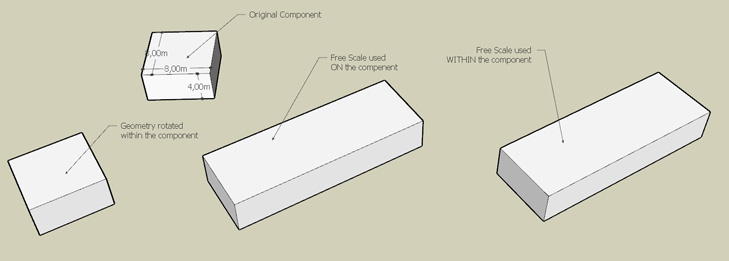
                          2009-01-27_151853_freescale1.jpg
                          2009-01-27_152606_freescale2.jpg
                          On both occasions the scale tool was used parallel to the wall of the box.
                          Was not aware this is possible.

                          Once again thank you for the toy.

                          1 條回覆 最後回覆 回覆 引用 0
                          • fredo6F 離線
                            fredo6
                            最後由 編輯

                            Interesting.
                            Actually, the Ruby API is very poor to tell what are the local axes of a component from within a component, so that I have to trust the chaining of transformations for obtaining teh right results in case of nested groups and components.

                            I hope that the cases where the local axes are no longer orthogonal does not mess up anything in the model.

                            Fredo

                            1 條回覆 最後回覆 回覆 引用 0
                            • T 離線
                              tomot
                              最後由 編輯

                              Fredo6: thanks for this great scale plugin adaptation

                              my plugins
                              tomot

                              1 條回覆 最後回覆 回覆 引用 0
                              • fredo6F 離線
                                fredo6
                                最後由 編輯

                                to ALL users,

                                I made a small update (dated 28 Jan 09, 23:30 CET) to include some fixes of problems that were reported so far and also to include the Spanish translation (kindly provided by Pichuneke).

                                You need to re-install both LibFredo6 and FreeScale

                                • LibFredo6 3.0a --> http://www.sketchucation.com/forums/scf/viewtopic.php?f=180&t=16020#p124684
                                • FreeScale 1.0a --> http://www.sketchucation.com/forums/scf/viewtopic.php?f=180&t=16021#p124685

                                Fredo

                                1 條回覆 最後回覆 回覆 引用 0
                                • D 離線
                                  Daniel S
                                  最後由 編輯

                                  Hi Fredo, I update to this new version.
                                  The first thing I try is a problem that I have in the previous version, but the problem is still there.
                                  I have some issues trying to scale about center (after press CTRL key).
                                  I attach a video showing what happens. Is like the center of the group is updated when you try to scale.

                                  Daniel S


                                  Scale about venter problem video .wmv

                                  1 條回覆 最後回覆 回覆 引用 0
                                  • JClementsJ 離線
                                    JClements
                                    最後由 編輯

                                    Fredo:

                                    Is there anyway for you to add a "Check for Update" function in LibFredo6 ?

                                    It could check for an internal date or variable in the User's version of LibFredo6 and compare it to one on a server OR simply have it display a message which shows the most recent rev level with a link to a download page.

                                    I can see where LibFredo6 might be the "heart" of many important scripts and we'll (your loyal users) want to make sure its always kepT current.

                                    John

                                    John | Illustrator | Beaverton, Oregon

                                    1 條回覆 最後回覆 回覆 引用 0
                                    • fredo6F 離線
                                      fredo6
                                      最後由 編輯

                                      Daniel,

                                      That's a bug, and actually quite subtle to fix. Thanks for signaling.
                                      Since you seem to know how to reproduce it, would you mind to try with the attached updated file.

                                      Again, many thanks

                                      Fredo


                                      to drop in subfolder FREESCALE_Dir_10

                                      1 條回覆 最後回覆 回覆 引用 0
                                      • D 離線
                                        Daniel S
                                        最後由 編輯

                                        Yes, now works very well! thank you!. For me was easy to reproduce because it happened every time I tried to scale about center.

                                        Another problem that I have is when trying to scale Red, Green, Blue (all togheter) with a negative number.
                                        I attach a video showing this.

                                        In the video you will see that if I try to scale only red axis negative, only green negative or only blue negative all works well... but if I take a red blue and green grip to a negative number it turns crazy. The same happens if I press the ctrl key. It works well if I scale one axis only.

                                        Daniel S


                                        video of the problem .wmv

                                        1 條回覆 最後回覆 回覆 引用 0
                                        • J 離線
                                          Jim57
                                          最後由 編輯

                                          Fred06— I can't thank you enough for this script. I've been begging for something like this, and it's so easy to use. I love the way it reads out in percentage and dimension, right on the screen where it's most visible. It's how the SU scale tool should have been done in the first place.

                                          Jim

                                          1 條回覆 最後回覆 回覆 引用 0
                                          • J 離線
                                            jmmad
                                            最後由 編輯

                                            Thxs a lot Fred for this plugin, your ruby scripts are amazing.
                                            Do you think you could add more transformations to it, like bend, twist, Bulge
                                            Maibe for a comercial plugin?
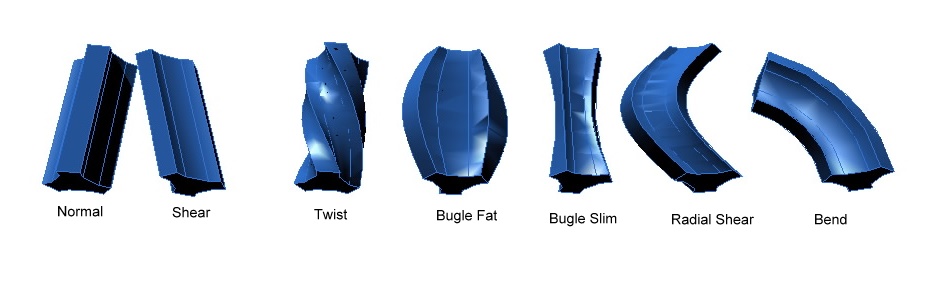
                                            Deform

                                            Get Upa !

                                            1 條回覆 最後回覆 回覆 引用 0
                                            • 1
                                            • 2
                                            • 3
                                            • 4
                                            • 5
                                            • 6
                                            • 7
                                            • 4 / 7
                                            • 第一個貼文
                                              最後的貼文
                                            Buy SketchPlus
                                            Buy SUbD
                                            Buy WrapR
                                            Buy eBook
                                            Buy Modelur
                                            Buy Vertex Tools
                                            Buy SketchCuisine
                                            Buy FormFonts

                                            Advertisement