sketchucation logo sketchucation
    • 登入
    Oops, your profile's looking a bit empty! To help us tailor your experience, please fill in key details like your SketchUp version, skill level, operating system, and more. Update and save your info on your profile page today!
    🔌 Smart Spline | Fluid way to handle splines for furniture design and complex structures. Download

    [Obsolete] FredoScale 1.0e (Free Scaling, Taper Scaling)

    已排程 已置頂 已鎖定 已移動 Developers' Forum
    140 貼文 61 Posters 40.2k 瀏覽 61 Watching
    正在載入更多貼文
    • 從舊到新
    • 從新到舊
    • 最多點贊
    回覆
    • 在新貼文中回覆
    登入後回覆
    此主題已被刪除。只有擁有主題管理權限的使用者可以查看。
    • fredo6F 離線
      fredo6
      最後由 fredo6 編輯

      [Edit - 29 Mar 09 - 11:00 CET] New version 2.0 is available at http://www.sketchucation.com/forums/scf/viewtopic.php?f=180&t=17948#p144180. It contains additional deformations, such as Shear, Stretch, Bend, Twist.

      [Edit - 10 Feb 09 - 21:40 CET] updated version 1.0ewith a big bug fixed concerning Scale to Target, and trapping of TAB on Mac for dimension dialog box). It includes the first translation in Italiankindly provided by Marco Cosedi.
      Also, do not forget to load LibFredo6 3.0e (10 Feb 09), so that you are up to date.

      [Edit - 03 Feb 09 - 00:20 CET] updated version 1.0dwith a big bug fixed when releasing the update 1.0c (thanks to Daniel S. again for signaling).
      Also, do not forget to load LibFredo6 3.0c (2 Feb 09), so that you are up to date.

      [Edit - 02 Feb 09 - 22:30 CET] updated version 1.0cwith bug fixed concerning the stability of scaling and tapering with negative scales (thanks to Daniel S. for signaling).

      [Edit - 28 Jan 09 - 23:30 CET] Refresh with translation to Spanish provided by Pichuneke, and support of Construction Points.
      Also, please make sure you download again LibFredo6 3.0a, same date and time, which contains a number of fixes.
      See http://www.sketchucation.com/forums/scf/viewtopic.php?f=180&t=16020#p124684

      FredoScale is a variant of the native Sketchup Scale tool, but with free orientation of the scaling box. I also derived Taper Scale, which uses a scaling box to perform tapering of the selection by scaling only one of its faces.

      I made a short video (English / French) to show the main concepts.
      http://fr.youtube.com/watch?v=sfXg4Q8J5pk

      [attachment=0:3qrmxd50]<!-- ia0 -->FredoScale Illustration.jpg<!-- ia0 -->[/attachment:3qrmxd50]

      There are a few additional features.

      • can scale single edges (or aligned edges)
      • mode “Scale To Target” to drive scaling by matching 2 points
      • drive scaling by entering the dimensions of the scaling box
      • wireframe preview (easier to use inference, when dragging the scaling handles)
      • selection of several entities in implicit selection mode (via Ctrl key)
      • you can control the display of icons, and the location of the menu (by default, it installs in Tools > Fredo6 Collection.
        One big caveat however is that it does not support Smart Scaling of the new Dynamic Components introduced in Sketchup 7

      The goal was also for me to release the first consolidated version of a shared library, LibFredo6, which I should use for other plugins (it used to be called LibTraductor in earlier times).

      The plugin is translated to English and French (but the doc is only in English). It is now possible for generous contributors to make the translation in other languages and share it with the Community.

      REQUIREMENT: You must download and install LibFredo6 version 3.0. See this post for the zip file and the instructions. It should install a small file LibFredo6.rb and a subfolder LIBFREDO6_Dir_30.
      see this post http://www.sketchucation.com/forums/scf/viewtopic.php?f=180&t=16020&p=124684#p124684

      INSTALLATION of FredoScale:. Unzip (with Select All) the attached file FreeScale_10.zip. It should install a small file ZLoader__FreeScale.rb and a subfolder FREESCALE_Dir_10.

      WARNING for Mac Users: FredoScale and LibFredo6 use Web Dialog Boxes, which have known problems on Mac platforms. As I don’t have a Mac myself, I cannot guarantee this works fine. This only concerns the dialog boxes for setting the default parameters and language translation however.

      Note for icon designers: if you wish to design alternate icons and cursors, just follow the naming convention (FSC…), respecting the hot spot for cursors, and then pack them in a folder with the naming IMAGES_xxxx, which can then be dropped into the FREESCALE_Dir_10 directory. Finally, go the Default Parameters… dialog box and set it as an alternate icon folder.

      Fredo6
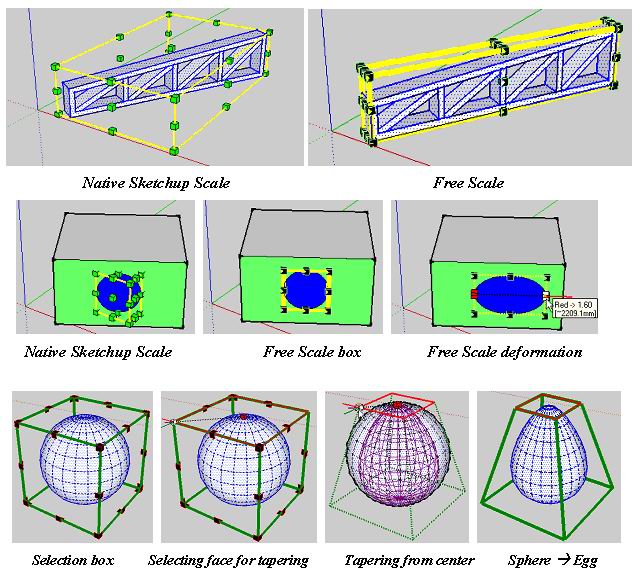

      FreeScale Illustration.jpg

      1 條回覆 最後回覆 回覆 引用 0
      • GaieusG 離線
        Gaieus
        最後由 編輯

        (<- AFAIK this smiley was introduced as an honour of your efforts by Coen back when you released TOS)

        Orientation of the scale tool: great!
        A big time saver (need not change axes) but
        Taper scale: fantastic!
        👍 👍 👍 👍 👍 👍 👍

        Thanks again for your generous work - these all could well be serious commercial plugins!

        (You can count on me for translations for sure) 😉

        Gai...

        1 條回覆 最後回覆 回覆 引用 0
        • R 離線
          remus
          最後由 編輯

          Cheers fredo, another indispensable script.

          http://remusrendering.wordpress.com/

          1 條回覆 最後回覆 回覆 引用 0
          • GaieusG 離線
            Gaieus
            最後由 編輯

            No, Fredo,I was wrong. Free scale is not "only" great - it is much more than that.

            Gai...

            1 條回覆 最後回覆 回覆 引用 0
            • pilouP 離線
              pilou
              最後由 編輯

              Super bestial ! Very tricky! 👍 😎

              Frenchy Pilou
              Is beautiful that please without concept!
              My Little site :)

              1 條回覆 最後回覆 回覆 引用 0
              • K 離線
                kwistenbiebel
                最後由 編輯

                Fantastic fredo!

                Very useful. It will be one of those tools you cannot live without once you used it.
                You guys (the wizard ruby masters) should take over the further development of sketchup as a whole.
                Thank you very much. 👍 👍

                1 條回覆 最後回覆 回覆 引用 0
                • J 離線
                  johnsenior1973
                  最後由 編輯

                  Thank you for another great plugin.

                  1 條回覆 最後回覆 回覆 引用 0
                  • W 離線
                    watkins
                    最後由 編輯

                    Dear Fredo6

                    I have just tried FreeScale. EXCELLENT!!!

                    Thank you for your generosity.

                    Kind regards,
                    Bob

                    1 條回覆 最後回覆 回覆 引用 0
                    • thomthomT 離線
                      thomthom
                      最後由 編輯

                      Yes! I was thinking just this week that it'd be so nice ot be able to taper scale objects. This is another must have plugin. Thank you very much Fredo.

                      Thomas Thomassen — SketchUp Monkey & Coding addict
                      List of my plugins and link to the CookieWare fund

                      1 條回覆 最後回覆 回覆 引用 0
                      • N 離線
                        notareal
                        最後由 編輯

                        Great! Thanks for your effort.

                        Welcome to try Thea Render, Thea support | kerkythea.net -team member

                        1 條回覆 最後回覆 回覆 引用 0
                        • J 離線
                          johnsenior1973
                          最後由 編輯

                          Solo is going to find his cartoon characters a great deal easier with this. This is clearly another great leap for Sketchup.

                          1 條回覆 最後回覆 回覆 引用 0
                          • T 離線
                            Teezer
                            最後由 編輯

                            Wonderful! Great! Excellent! Thank you, thank you, thank you... 🎉 😄

                            Real life is just another website, albeit a rather boring one.

                            1 條回覆 最後回覆 回覆 引用 0
                            • tbdT 離線
                              tbd
                              最後由 編輯

                              to be able to run on Mac I had to create DEFPARAM_Dir under plugins dir (due permissions restriction the mkdir command in Lib6Core_30 failed)

                              nice work Fredo

                              SketchUp Ruby Consultant | Podium 1.x developer
                              http://plugins.ro

                              1 條回覆 最後回覆 回覆 引用 0
                              • soloS 離線
                                solo
                                最後由 編輯

                                Bravo!!
                                http://users.atw.hu/swb/smile/taps.gif

                                Just what I need for my character modeling, thanks a ton.

                                http://www.solos-art.com

                                If you see a toilet in your dreams do not use it.

                                1 條回覆 最後回覆 回覆 引用 0
                                • W 離線
                                  watkins
                                  最後由 編輯

                                  Dear Fredo6,

                                  One little known option of the native SU Scale tool is the ability to input final dimensions via the VCB (example: 100mm,100mm,100mm). The scale box is then scaled to those dimensions. Is this something that could be include in your script?

                                  Kind regards,
                                  Bob

                                  1 條回覆 最後回覆 回覆 引用 0
                                  • O 離線
                                    otb designworks
                                    最後由 編輯

                                    Great script! Thank you thank you!.

                                    However, I, as you know, am on a MAC and I am having serious issues with this script.

                                    The standard scaling tool works beautifully and as expected. Being able to set the orientation is brilliant!.

                                    The taper scale tool, however, isn't working at all.

                                    It displays the bounding box and shows the results of all of the tool manipulations, but it never actually changes the object geometry. Picture attached. Hitting return or clicking outside the box erases the bounding box and the cube remains as is.

                                    Let me know what I can do to assist diagnosis.

                                    Thanks again.
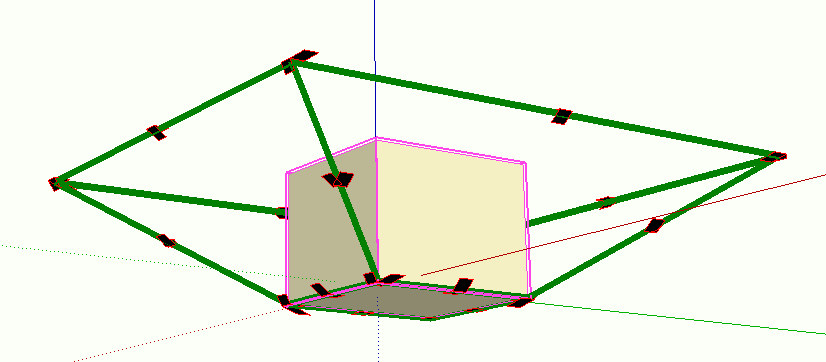

                                    Picture 1.png

                                    Cheers, Chuck

                                    OTB Designworks is on Youtube

                                    6 core nMP, 32 gig RAM, (2) D700 GPU's, dual monitors

                                    1 條回覆 最後回覆 回覆 引用 0
                                    • M 離線
                                      Matt666
                                      最後由 編輯

                                      😲 😲 Awesome !!! Thank you Fredo !

                                      Frenglish at its best !
                                      My scripts

                                      1 條回覆 最後回覆 回覆 引用 0
                                      • MALAISEM 離線
                                        MALAISE
                                        最後由 編輯

                                        Hi Fredo

                                        Incredible enhancement 👍 👍 ☀

                                        MERCI

                                        MALAISE

                                        La Connaissance n'a de valeur que partagée

                                        1 條回覆 最後回覆 回覆 引用 0
                                        • D 離線
                                          Daniel S
                                          最後由 編輯

                                          Awesome!!!
                                          Thank you Fredo!!!

                                          I only have a problem when set the dimension in the dialog box by pressing TAB. It dosen´t accept what I put.. just make a beep 😕
                                          I attach a video example of this.

                                          Daniel S


                                          a video of the problem (.wmv)

                                          1 條回覆 最後回覆 回覆 引用 0
                                          • fredo6F 離線
                                            fredo6
                                            最後由 編輯

                                            @daniel s said:

                                            I only have a problem when set the dimension in the dialog box by pressing TAB. It dosen´t accept what I put.. just make a beep 😕
                                            I attach a video example of this.

                                            Daniel S

                                            Daniel,

                                            Strange. What is the default decimal separator you normally use in your version of Sketchup.
                                            Just in case, can you turn the Ruby console on to see if anything is displayed.
                                            Can you also type in the Ruby console the following command:

                                            Traductor.string_to_length_formula "20"
                                            

                                            and see what it does.

                                            I don't know if any other users has found that problem?

                                            I will analyze what it could be in parallel.

                                            Fredo

                                            1 條回覆 最後回覆 回覆 引用 0
                                            • 1
                                            • 2
                                            • 3
                                            • 4
                                            • 5
                                            • 6
                                            • 7
                                            • 1 / 7
                                            • 第一個貼文
                                              最後的貼文
                                            Buy SketchPlus
                                            Buy SUbD
                                            Buy WrapR
                                            Buy eBook
                                            Buy Modelur
                                            Buy Vertex Tools
                                            Buy SketchCuisine
                                            Buy FormFonts

                                            Advertisement

