sketchucation logo sketchucation
    • 登入
    Oops, your profile's looking a bit empty! To help us tailor your experience, please fill in key details like your SketchUp version, skill level, operating system, and more. Update and save your info on your profile page today!
    🔌 Smart Spline | Fluid way to handle splines for furniture design and complex structures. Download

    [Obsolete] FredoScale 1.0e (Free Scaling, Taper Scaling)

    已排程 已置頂 已鎖定 已移動 Developers' Forum
    140 貼文 61 Posters 40.2k 瀏覽 61 Watching
    正在載入更多貼文
    • 從舊到新
    • 從新到舊
    • 最多點贊
    回覆
    • 在新貼文中回覆
    登入後回覆
    此主題已被刪除。只有擁有主題管理權限的使用者可以查看。
    • O 離線
      otb designworks
      最後由 編輯

      That's funny James, I was just logging on to describe exactly what you are talking about.

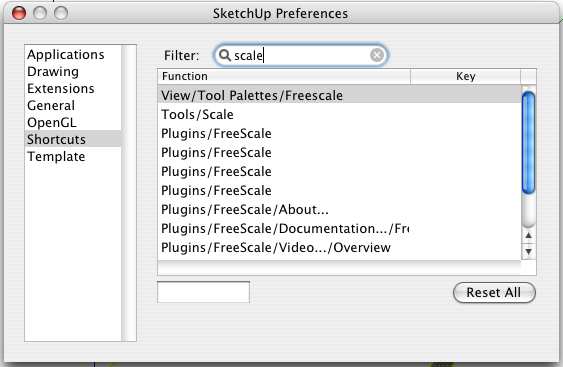
      I, too, wanted to change my shortcut, but, in the shortcut window, there are four freeform scales listed, but, if I assign S to one of them, it applies to all of them and then has no effect at all while modeling.

      The context menu, like James describes, is all blank, but each space, if clicked on, operates a different function.

      Still, I am loving this plugin! One of my most used 5, no doubt.

      Thanks Fredo!

      Cheers, Chuck

      OTB Designworks is on Youtube

      6 core nMP, 32 gig RAM, (2) D700 GPU's, dual monitors

      1 條回覆 最後回覆 回覆 引用 0
      • A 離線
        a4chitect
        最後由 編輯

        one of the most beautifully integrated scripts! thanks and bravo!!!

        1 條回覆 最後回覆 回覆 引用 0
        • M 離線
          Matt666
          最後由 編輯

          This awesome plugin must contains awesome icons...
          Icon master CadFather!!! This plum job is naturally for you! 😄

          Frenglish at its best !
          My scripts

          1 條回覆 最後回覆 回覆 引用 0
          • McGyverM 離線
            McGyver
            最後由 編輯

            Thank you, this ruby looks very interesting... I will try it as soon I possible!!

            Visit My ShareCG Freebie Gallery

            1 條回覆 最後回覆 回覆 引用 0
            • fredo6F 離線
              fredo6
              最後由 編輯

              @james fraser said:

              Second: how it works on the Mac. I didn't see many people writing about this, so I thought I would let you know. The good news is that generally works fine, the only problem is a couple of UI things. The web dialogs do display, but it fills the bottom half of the window with nothing (presumably stretching the little blankspace border you normally get around things), but you can get around this by resizing the window until you see everything.

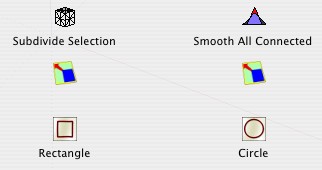
              The slightly bigger problem for me is labels. The mouseover description works fine, but the labels under icons are blank (when I turned them on), in the menu there are four blank lines, which work for selecting the tools, but have no names and I do not get anything in the flyout from the context menu (I mean there isn't a flyout, but there should be, the Freescale thing is there, but nothing happens). I don't care about the labels per se, but I use keyboard shortcuts a lot and without a label there is nothing to bind it to (I want to replace S for the normal scale tool 😄 ).

              to James, Kanonbal and other Mac users.

              Let's take things in order

              1. on the WebDialog UI, could anyone post a screenshot of the half visible dialog box.

              2. For the menus, FreeScale installs by default in Tools > Fredo6 Collection > FreeScale. From there, there are four command menus (i.e. the FreeScale tools), and 6 support menus (About..., support web, documentation, video, Translation and Default Parameters). Which ones do you see, and which ones do you not see ?. A screenshot would help as well.
                Additionally:

              • Do you get text in the status bar?
              • do you see the menus for LibFredo6 Settings (in Windowsmenu)?
              • could you switch to French, and advise if you see the FreeScale menu items?
              1. For the "labels", are you talking about the toolbar icon tooltips, or about the tooltips that appear at the cursor location (there may be a problem on Mac because may I use 2 lines tooltip)?

              Thanks very much for your feedback. As most of the problems mentioned are in functions managed in my Shared Library LibFredo6, I hope that fixing them for FreeScale will help to have a smoother release for my other plugins on Mac.

              Fredo

              1 條回覆 最後回覆 回覆 引用 0
              • fredo6F 離線
                fredo6
                最後由 編輯

                By the way, could some Mac User open the Ruby console and type the following command.

                
                FreeScale;;T6[;FSC_FREE_Menu]
                
                
                1 條回覆 最後回覆 回覆 引用 0
                • CadFatherC 離線
                  CadFather
                  最後由 編輯

                  ..more icons coming soon.. as i can 😄

                  1 條回覆 最後回覆 回覆 引用 0
                  • ely862meE 離線
                    ely862me
                    最後由 編輯

                    http://www.messentools.com/images/emoticones/varios/www.MessenTools.com-Varios-big-179.gif

                    Manny thanks.....

                    Elisei

                    Elisei (sketchupper)


                    Before no life was done on Earth it was THE LIFE ITSELF...GOD
                    Come and See EliseiDesign

                    1 條回覆 最後回覆 回覆 引用 0
                    • CadFatherC 離線
                      CadFather
                      最後由 編輯

                      Hi Matt, not the best, but here's a couple to start.. 😄

                      not much on line lately but i'll be back sometime soon - (got a couple of surprises)


                      Toolbar icons.rar

                      1 條回覆 最後回覆 回覆 引用 0
                      • J 離線
                        James Fraser
                        最後由 編輯

                        Hi Fredo, got some pictures for you.
                        customise_toolbar.jpg
                        This is what you get with 'Customise Toolbar', so what you would see if they were on the normal toolbar (instead of floating, like they do on the Mac).
                        plugins_menu.jpg
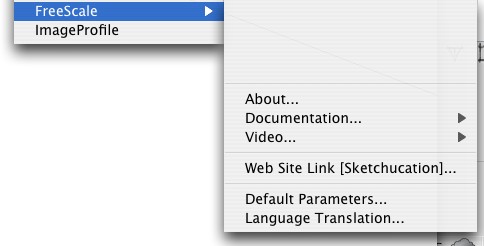
                        This is the drop-down from the plugins menu, showing the blank lines (which do work if you click on them and are ticked if you have already selected the tool from the toolbar).
                        context_menu.jpg
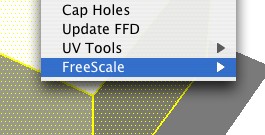
                        The context menu failing to fly out

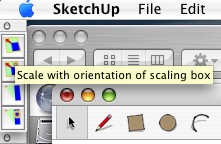
                        mouseover.jpg
                        Mouseover works

                        shortcuts.jpg
                        The real problem is the shortcuts

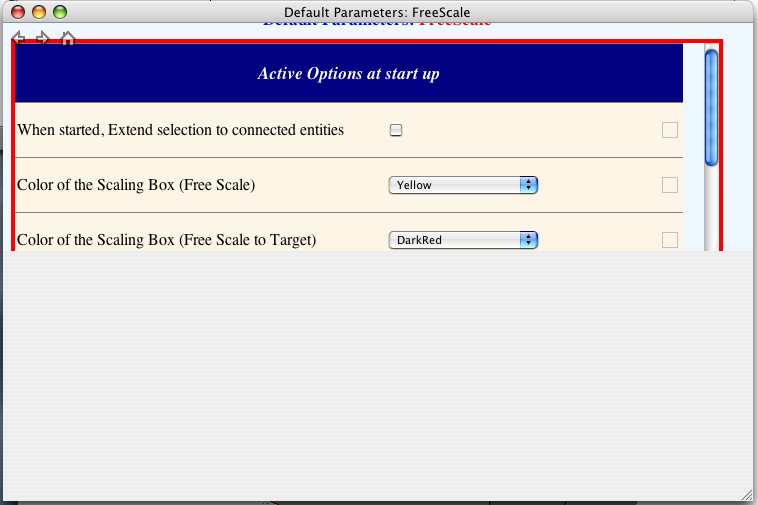
                        FS_prefs.jpg
                        The half covered preferences window. The bottom bit scales with the window, always covering half, if you stretch to twice the length you can see everything.

                        I hope that makes things a bit clearer. I did try the Ruby thing as well and it returned Free Scale, which is confusing.

                        I noticed in FreeScale.def that there was the line:
                        T_DEFAULT_ToolbarName = "Freescale"
                        I tried capitalising the S, but it seemed to make no difference.

                        I did change the language to both French and Spanish and the problems appeared to be the same.

                        Also, Tab doesn't work, but I can right-click for the dimensions box. I am not too bothered about that, but I thought you might want to know anyway. It might just be bound to something else on the Mac, I will let you know if I find it.

                        Thanks again for a great plugin, it is now my default scale tool 😄

                        http://www.FormFonts.com

                        1 條回覆 最後回覆 回覆 引用 0
                        • J 離線
                          James Fraser
                          最後由 編輯

                          Oops. Sorry, I forgot to mention that all the instructions show up fine in the status bar. I think everything works fine, apart from the bits in the screen caps.

                          http://www.FormFonts.com

                          1 條回覆 最後回覆 回覆 引用 0
                          • EdsonE 離線
                            Edson
                            最後由 編輯

                            james,

                            i have had problems with non appearing icons (which nonetheless worked if you clicked on the blank space) with other scripts. in most cases the problem went away with simply moving the script to user/library/application support/google sketchup/sketchup/plugins.

                            for some reason 2 plugins folders are created when you install skp on a mac. some scripts work better at the user level plugins folder.

                            edson mahfuz, architect| porto alegre • brasil
                            http://www.mahfuz.arq.br

                            1 條回覆 最後回覆 回覆 引用 0
                            • J 離線
                              James Fraser
                              最後由 編輯

                              Thanks Edson. I gave that a go, even migrating all my plugins, but that didn't seem to work this time. It did make me think about permissions and ownership, but they all seem fine. I think the rubies only need to be readable, as SU just reads them on startup and presumably then runs things from memory.

                              My own scripts work fine, despite having no execute permissions (644, must be something to do with Aquamacs, I will have to check the settings).

                              http://www.FormFonts.com

                              1 條回覆 最後回覆 回覆 引用 0
                              • M 離線
                                Matt666
                                最後由 編輯

                                As always, excellent work, CadFather! Thank you!

                                Frenglish at its best !
                                My scripts

                                1 條回覆 最後回覆 回覆 引用 0
                                • O 離線
                                  otb designworks
                                  最後由 編輯

                                  I couldn't help but notice that James' toolbar has four icons.

                                  Mine only has two! And not just 2 blank and 2 showing, but only 2.

                                  The rest of my behaviors match what James has posted.

                                  I, too, migrated all of my plugins to the user library from the root library with no noticeable change to Freescale.

                                  Picture 1.png

                                  Cheers, Chuck

                                  OTB Designworks is on Youtube

                                  6 core nMP, 32 gig RAM, (2) D700 GPU's, dual monitors

                                  1 條回覆 最後回覆 回覆 引用 0
                                  • J 離線
                                    James Fraser
                                    最後由 編輯

                                    Mine originally had two, but I changed it to show all of them down at the bottom of the preferences. You have to scroll down and resize the window in order to see it. I'll use the normal two more, but the target ones will be handy to have around.

                                    http://www.FormFonts.com

                                    1 條回覆 最後回覆 回覆 引用 0
                                    • O 離線
                                      otb designworks
                                      最後由 編輯

                                      Thanks James, I don't know how I missed that!

                                      Cheers, Chuck

                                      OTB Designworks is on Youtube

                                      6 core nMP, 32 gig RAM, (2) D700 GPU's, dual monitors

                                      1 條回覆 最後回覆 回覆 引用 0
                                      • W 離線
                                        watkins
                                        最後由 編輯

                                        Dear James,

                                        Can you be a bit more specific about where the icons are? I'm not too sure what you mean by 'at the bottom of the preferences'.

                                        Regards,
                                        Bob

                                        1 條回覆 最後回覆 回覆 引用 0
                                        • J 離線
                                          johnsenior1973
                                          最後由 編輯

                                          @watkins said:

                                          Dear James,

                                          Can you be a bit more specific about where the icons are? I'm not too sure what you mean by 'at the bottom of the preferences'.

                                          Regards,
                                          Bob

                                          Tools > Fredo6 Collection > Freescale > Default Paparameters

                                          Scroll down to Icons visible in the toolbar, click on the two that are unchecked.

                                          1 條回覆 最後回覆 回覆 引用 0
                                          • W 離線
                                            watkins
                                            最後由 編輯

                                            Dear Johnsenior,

                                            Many thanks,

                                            Bob

                                            1 條回覆 最後回覆 回覆 引用 0
                                            • 1
                                            • 2
                                            • 3
                                            • 4
                                            • 5
                                            • 6
                                            • 7
                                            • 6 / 7
                                            • 第一個貼文
                                              最後的貼文
                                            Buy SketchPlus
                                            Buy SUbD
                                            Buy WrapR
                                            Buy eBook
                                            Buy Modelur
                                            Buy Vertex Tools
                                            Buy SketchCuisine
                                            Buy FormFonts

                                            Advertisement