sketchucation logo sketchucation
    • 登入
    Oops, your profile's looking a bit empty! To help us tailor your experience, please fill in key details like your SketchUp version, skill level, operating system, and more. Update and save your info on your profile page today!
    🔌 Smart Spline | Fluid way to handle splines for furniture design and complex structures. Download

    [Plugin] 1001bit Tools - Architectural tools for SketchUp

    已排程 已置頂 已鎖定 已移動 Plugins
    243 貼文 65 Posters 234.6k 瀏覽 65 Watching
    正在載入更多貼文
    • 從舊到新
    • 從新到舊
    • 最多點贊
    回覆
    • 在新貼文中回覆
    登入後回覆
    此主題已被刪除。只有擁有主題管理權限的使用者可以查看。
    • TIGT 離線
      TIG Moderator
      最後由 編輯

      Why not ask the question on the 1001 forums?

      TIG

      1 條回覆 最後回覆 回覆 引用 0
      • opalO 離線
        opal
        最後由 編輯

        just me or is the link on the first page misdirecting to another place?

        1 條回覆 最後回覆 回覆 引用 0
        • J 離線
          Jim
          最後由 編輯

          @unknownuser said:

          just me or is the link on the first page misdirecting to another place?

          The link has been fixed.

          Hi

          1 條回覆 最後回覆 回覆 引用 0
          • opalO 離線
            opal
            最後由 編輯

            Ty.. downloaded latest version of sketchup.. rebuilding plugins folder 😄

            1 條回覆 最後回覆 回覆 引用 0
            • Mistro11M 離線
              Mistro11
              最後由 編輯

              I tried to register at 1001bit forums and got this message in red saying my IP address was blacklisted as a spammer (I have definitely NOT spammed anyone). Anyone else had this problem? Also I would like to know if this would be a problem for me when it comes to activating the product? I want buy it now. I understand the company is in the far east so I don't expect a response from them just yet. Can I just buy 1001bit without registering to the forums or would my email given during activation be treated in a separate way?

              BTW, this set looks really good! I'm shocked I have not heard of this plugin until I stumbled on it while shopping for plugins yesterday. I'm so late to this community.

              i7-4930k @3.4/3.7GHz, 32Gb RAM, NVidia GTX 980Ti 6Gb, Windows 7 Pro 64bit
              Structural Integrity is Not Just Physical...It's in the Design and Purpose

              1 條回覆 最後回覆 回覆 引用 0
              • Mistro11M 離線
                Mistro11
                最後由 編輯

                Well Goh got back to me sooner than I expected and explained what was going on (IP stuff). It's all sorted and I just bought my license. 😎

                i7-4930k @3.4/3.7GHz, 32Gb RAM, NVidia GTX 980Ti 6Gb, Windows 7 Pro 64bit
                Structural Integrity is Not Just Physical...It's in the Design and Purpose

                1 條回覆 最後回覆 回覆 引用 0
                • KrisidiousK 離線
                  Krisidious
                  最後由 編輯

                  Goh is always on top of customer service. welcome to the club of 1001... You're gonna love it.

                  By: Kristoff Rand
                  Home DesignerUnique House Plans

                  1 條回覆 最後回覆 回覆 引用 0
                  • ElibjrE 離線
                    Elibjr
                    最後由 編輯

                    Yes! I will echo that! The service is excellent! I wish most software was as responsive. Well worth every penny! I now won't work on a machine without this plugin loaded on it! I recommend it to anyone using Sketchup to do any architectural project! Can't wait till the next version upgrade!

                    1 條回覆 最後回覆 回覆 引用 0
                    • G 離線
                      gohch
                      最後由 編輯

                      hi guys,
                      I have been trying to catch the crashing bug for 1001bit in SU2013, the odd thing is, for some pcs, it crashes a few times and then seems to solve itself without me doing anything.
                      I tried to run 1001bit inside SU2014, Windows8.1;
                      it crashes initially, after i changed SU2014 to run under Win7 compatibility mode, it no longer crashes.
                      Thought I update everyone on this.
                      (BTW, i repeated this message across other topics that reported the crashes, hope you guys don't mind...)
                      Cheers!
                      GohCH

                      1 條回覆 最後回覆 回覆 引用 0
                      • G 離線
                        gohch
                        最後由 編輯

                        ok, this is really odd, i ran SU2014 in Win7 and the crash occurred,
                        and then i ran SU2014 on Win7 again with compatibility mode set to XP(service pack 3) and no more crashes.
                        Ran SU2014 on Win7 with compatibility set to Vista SP2 no crashes.
                        So, in Win8 i have to run as compatibility for Win7
                        and in Win7 i have to run as compatibility for XP or Vista
                        odd...

                        1 條回覆 最後回覆 回覆 引用 0
                        • AndrewSA 離線
                          AndrewS
                          最後由 編輯

                          @gohch said:

                          ok, this is really odd, i ran SU2014 in Win7 and the crash occurred,
                          and then i ran SU2014 on Win7 again with compatibility mode set to XP(service pack 3) and no more crashes.
                          Ran SU2014 on Win7 with compatibility set to Vista SP2 no crashes.
                          So, in Win8 i have to run as compatibility for Win7
                          and in Win7 i have to run as compatibility for XP or Vista

                          I don't know anything at all about the specific plugin you're running, but I can at least tell you this: When running on any operating system newer than Vista (7, 8, 8.1), using any version of SketchUp (8, 2013, 2014), SketchUp automatically executes in Windows Vista compatibility mode. You can force it down to an older XP compatibility mode, but even if you choose something newer, the highest it will actually go is Vista.

                          The reason is that we have not formally taken measures to embed any OS compatibility flags within the SketchUp Windows executable. As a result, the OS assumes an incompatibility on Win 7, 8 or 8.1, and therefore automatically runs it in Windows Vista compatibility mode. In theory, it should not make any difference that you are running a newer OS, or attempt to force it into a newer compatibility mode elsewhere.

                          Again, I know nothing about the use or design of your specific plugin, but I would suggest that compatibility modes are likely not the source of your problems. Any perceived connection may be largely circumstantial.

                          Good luck,

                          Andrew

                          Andrew S.
                          SketchUp Release Engineer

                          1 條回覆 最後回覆 回覆 引用 0
                          • G 離線
                            gohch
                            最後由 編輯

                            Thanks Andrew,
                            For some reason, setting it to run under compatibility mode seems to prevent the crash. Another user just reported that the tool no longer crash when he ran SU in compatibility mode too.
                            Thanks and cheers!

                            1 條回覆 最後回覆 回覆 引用 0
                            • G 離線
                              gohch
                              最後由 編輯

                              Managed to catch the BUG!!!
                              The bugs in the tools that caused the crashes:
                              "extend to edge or face"
                              "information between 2 points"
                              have been fixed in the latest rbz file:
                              http://www.1001bit.com/pro/download/1001bit_pro(v2.2).rbz

                              I have tested the other tools to work fine in SU2014,
                              if anyone has any issue, please let me know and i will look into it.
                              Thanks and cheers!
                              Goh

                              1 條回覆 最後回覆 回覆 引用 0
                              • ElibjrE 離線
                                Elibjr
                                最後由 編輯

                                @gohch said:

                                Managed to catch the BUG!!!
                                The bugs in the tools that caused the crashes:
                                "extend to edge or face"
                                "information between 2 points"
                                have been fixed in the latest rbz file:
                                http://www.1001bit.com/pro/download/1001bit_pro(v2.2).rbz

                                I have tested the other tools to work fine in SU2014,
                                if anyone has any issue, please let me know and i will look into it.
                                Thanks and cheers!
                                Goh

                                Just to let you know Goh that the link here is corrupted and cannot be downloaded. If this is a fix please re-post it again. Thank you. I love this plugin.

                                EliBjr

                                1 條回覆 最後回覆 回覆 引用 0
                                • G 離線
                                  gohch
                                  最後由 編輯

                                  hi EliBjr,
                                  Can you please try the link again, i managed to download the rbz file through the link.
                                  Thanks!
                                  Goh

                                  1 條回覆 最後回覆 回覆 引用 0
                                  • V 離線
                                    VJsku
                                    最後由 編輯

                                    Dear Goh,

                                    Thank you for an excellent plugin.

                                    I ran into a curious problem. My first attempt at using your plugin. Used it on Ver. 7 & 8 (both free).

                                    I made walls using the plugin. Then while making openings I made the internal doors in walls of varying thickness. No problems so far. Then I started on the windows on the 'external' walls. Here if the window was punched from 'outside', they would be made but only 3" deep without the back face. If the window was made on the same external wall from 'inside' it would punch through the full depth of the wall.

                                    Is this how it is supposed to work?

                                    VJsku

                                    Sent from my HTC One X using Tapatalk

                                    PS: Adding a screenshot of the behaviour...
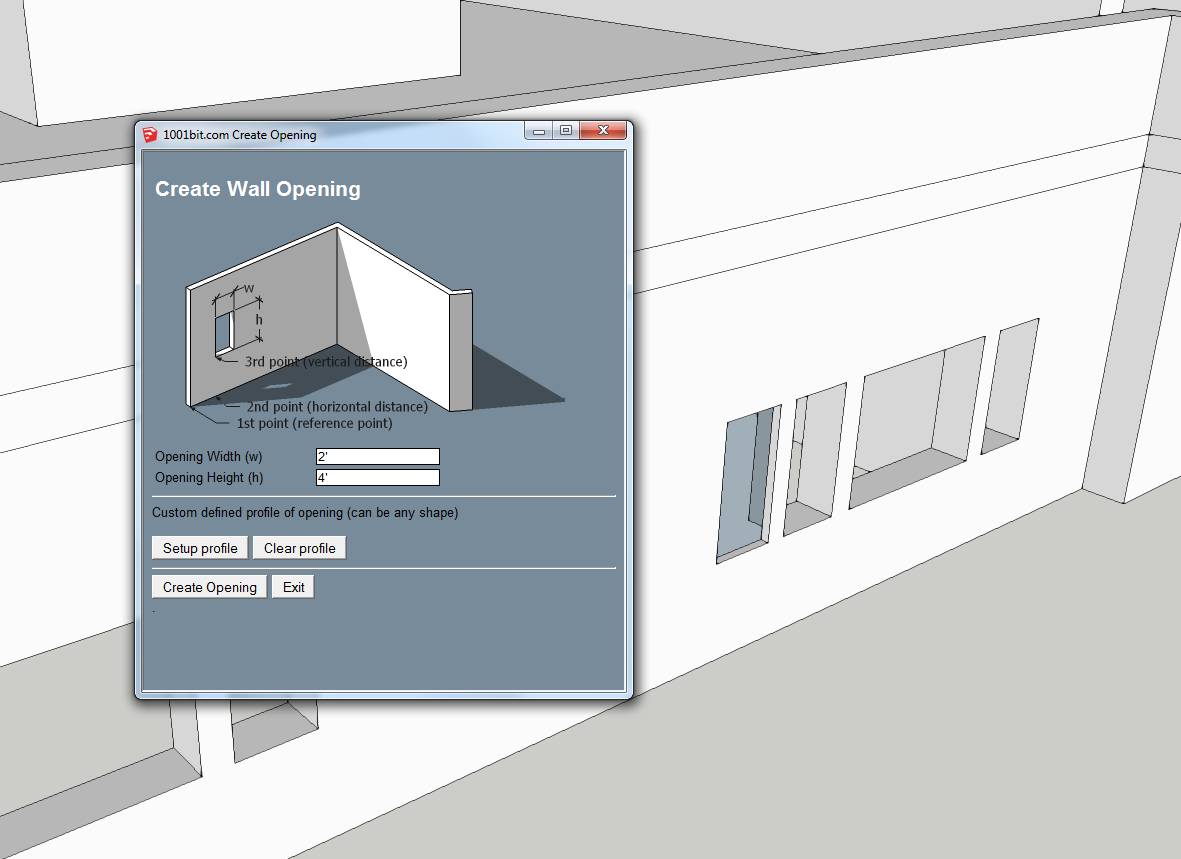
                                    Create Opening 2.PNG

                                    The left window is punched from 'outside', while the window on the right was punched from the 'inside' of the same wall. The wall is 15" thick in this example, but when an opening is created from 'outside' the opening goes 'in' by only 3".

                                    Unfortunately I am not able to recreate this on a fresh 3d. So it seems something unique has happened to this particular model...

                                    1 條回覆 最後回覆 回覆 引用 0
                                    • G 離線
                                      gohch
                                      最後由 編輯

                                      hi VJsku,
                                      Thanks for the feedback. This seems to be a bug... in how the tool identify the opposite face of the wall.
                                      I will look into this an come up with a patch.
                                      Thanks for bringing this up!
                                      Goh

                                      1 條回覆 最後回覆 回覆 引用 0
                                      • M 離線
                                        mohamed alaa155
                                        最後由 編輯

                                        thnxxx

                                        1 條回覆 最後回覆 回覆 引用 0
                                        • J 離線
                                          Justo79
                                          最後由 編輯

                                          Your site is down, temporarily I hope?

                                          edit - all good

                                          Cheers
                                          Justin

                                          1 條回覆 最後回覆 回覆 引用 0
                                          • Mistro11M 離線
                                            Mistro11
                                            最後由 編輯

                                            I want to bring my 1001bits Pro from Sketchup v8 free over to my Sketchup2014 Pro installation. I get a crash every time. I think I'm just doing something wrong. I uninstalled from v8 and copied the plugin files along with my Prokey file I downloaded to my 2014 plugins directory in windows XP. I cannot get it to work. I get a "syntax error" and within the message is "Invalid Break". Is there anything I should be aware of concerning 1001 and SU2014? I tried looking for it through the plugin store but do not see the pro version. Any help is appreciated.

                                            EDIT: Nevermind, I figured it out. I went to the official site and downloaded from the link to the rbz file. It came in as a regular zip file so I just renamed the extension to rbz and was able to install and put my key in. It works now.

                                            I left the original post in case anyone else ran into this issue.

                                            i7-4930k @3.4/3.7GHz, 32Gb RAM, NVidia GTX 980Ti 6Gb, Windows 7 Pro 64bit
                                            Structural Integrity is Not Just Physical...It's in the Design and Purpose

                                            1 條回覆 最後回覆 回覆 引用 0
                                            • 1
                                            • 2
                                            • 3
                                            • 4
                                            • 5
                                            • 6
                                            • 7
                                            • 8
                                            • 12
                                            • 13
                                            • 6 / 13
                                            • 第一個貼文
                                              最後的貼文
                                            Buy SketchPlus
                                            Buy SUbD
                                            Buy WrapR
                                            Buy eBook
                                            Buy Modelur
                                            Buy Vertex Tools
                                            Buy SketchCuisine
                                            Buy FormFonts

                                            Advertisement