[Plugin] BoolTools just released!
-
Is this 'Plugins' folder in the 'root' [Macinstosh HD] Library path ?
If NOT it should be.
If it is [or any other scripts are] in your 'User' Library path - they should NOT be moved...

-
Thanks for the replies Whaat & TIG, I appreciate it!
I do have the 3 toolbar gifs in the BoolTools folder, and the path is in the main library, MBP SSD is my boot drive.
I have installed BoolTools on a PC to check, and it works perfectly, I just can't get it to work on my Mac.
I thought it may be because the extension is missing in the file sketchup is trying to load??? As I can't find a 'booltools' file, only 'booltools.rbs'??? I really know nothing about Ruby scripts sorry!
More info too I should have included... I'm on OSX 10.6.8 on a mid 2009 (Intel) Mac Book Pro. Hope this helps close in on the problem.
Cheers again!
edit... I've just realised that booltools plugin does actually seem to be working, (the tool bar was hidden behind another), I assumed it wasn't working at all after the load error.
So, the plugin appears to be fully functioning but I still get the load error every time Sketchup launches? -
Unfortunately the .rbs file is encrypted so we can't see exactly what it's trying to do.
However, it works for the vast majority of users, so it's probably something specific to your setup...
Check the 'BoolTools' folder doesn't have a space or special character in its name etc...
The error relating to.../Plugins/booltoolsis possibly referring to an unfound folder.
Your MAC might have a 'case sensitive' file-system set in its formating ?
On a PC [and most MAC's by default]
.../Plugins/booltools
and
.../plugins/BoolTools
are synonymous paths to the same folder.
However, A Unix system treats them as two separate file/folder paths!
You can set up a MAC to use that system too.
So if the script is looking for the folder.../Plugins/booltoolsit won't then see.../plugins/BoolToolsas being it !
Try renaming.../plugins/BoolToolsas.../plugins/booltools(or perhaps even 'Plugins'?) and retrying... [of course it might then break something else ?]... OR better still reset your MAC to be sensible and case-insensitive [be re-formating it might be a bit extreme!] - I think it IS silly that two folders can coexist with such similar names... Here are some clues
http://superuser.com/questions/380330/mac-convert-from-case-sensitive-to-case-insensitive-file-system
http://www.mac-forums.com/forums/os-x-operating-system/250915-case-sensitive-case-insensitive.html -
Thanks again TIG!
My mac is using a case insensitive format, I always thought it wasn't but checked at your suggestion and found out it is case insensitive.
I had tried renaming the folder and it made no difference. Strange thing is, it actually appears to be working, but I'm still getting the load error.
-
Can I suggest you PM/email the author to see if he has any ideas...
Does everything work after it loads with that error?
Including any toolbar, prompts, dialogs etc ?
It's puzzling that only you seem to be getting the error [that's not even an error!]. -
Thanks again TIG.
Yes it is quite puzzling. I did exactly the same process to install it on my partners PC and it is working as expected. I haven't noticed anything not working... Yet
 . Just strange it says it can't load something and then goes on working anyway
 I'll see if Whaat replies again with more info when he gets time, and I'll PM him if not.
Big thanks again TIG, it's much appreciated!
-
@boostabeats said:
Thanks again TIG.
Yes it is quite puzzling.
yeah.. weird.. i've tried quite a few different things to get this to happen with booltools but i can't ..
maybe you should try repairing permissions? (probably won't clear this up.. won't hurt to try though)
i sort of wonder why the path in the error:
/Library/Application Support/Google SketchUp 8/SketchUp/Plugins/booltools
..has Plugins capitalized because the sketchup plugins folder has always been lowercase..i also wonder if the ssd has anything to do with it? there's a little quirk in the osx sketchup launch sequence with plugins (main symptom being the plugin icons not showing up in the custom toolbar upon a fresh launch).. maybe your fast drive is messing things up further?? (though i doubt that.. i'm sure someone else would of brought this up by now)..
so, in other words.. i have no clue as to what's going on

-
oh wait.. i found the problem..
it's the 000_AdditionalPluginFolders.rb causing this… remove it then the booltools load error will go away…
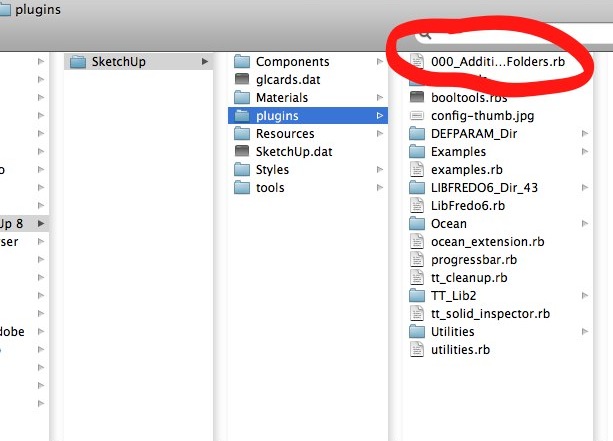
-
Well discovered !
-
Thank a million Jeff!!!
Works a treat now.
As an extra bonus, OSCoolean now works perfectly as well! I had tried it in the mean time and it seemed to load fine but would not work on solids at all.
Good stuff! I can't thank you all enough for taking the time to help.
I look forward to learning more and more here.
Cheers!
-
I am trying out BoolTools to see if it will work for someone who doesn't have Pro. I am testing on a specific project to see if it can handle it.
I am trying to cut vertical grooves into this coil tube. In the posted model I have already performed the subtraction with BoolTools three times. The object is still a solid (I had to do a little cleanup). The red component is to be subtracted from the yellow tube.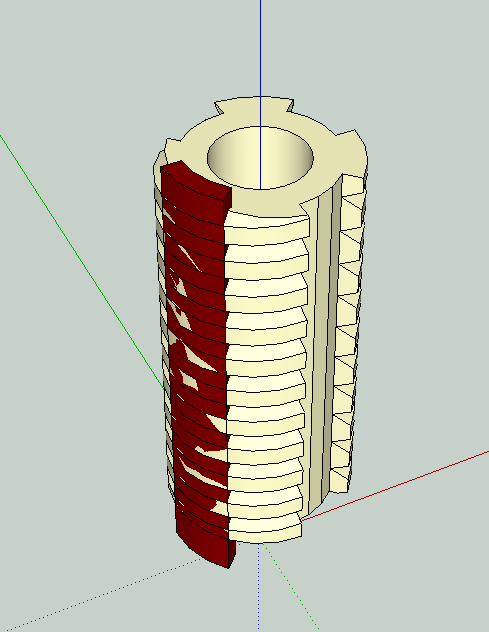
In the fourth attempt BoolTools fails. Can someone explain why or if BT or another plugin will ever be able to do this? This is a step that can also be done with "intersect with model", though it's more work. Several similar models need to be done--and I hope a methodology will develop that is useful to this person down the road.
It does work fine with Solid Tools.
Here is a screen shot of the results and the ruby console. So yeah, it worked, but also trashed the piece.
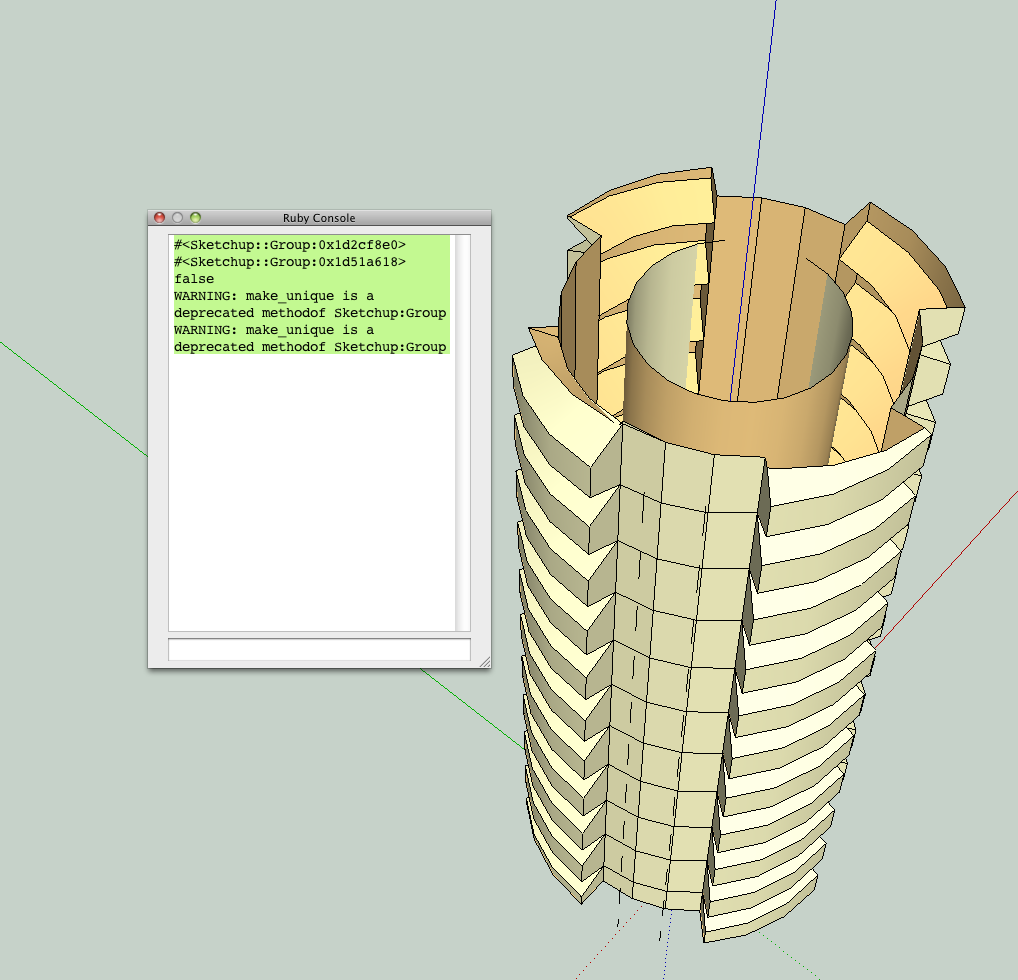
Thanks, Peter
[PS: How does someone without "Pro" identify (and fix) solids?)
-
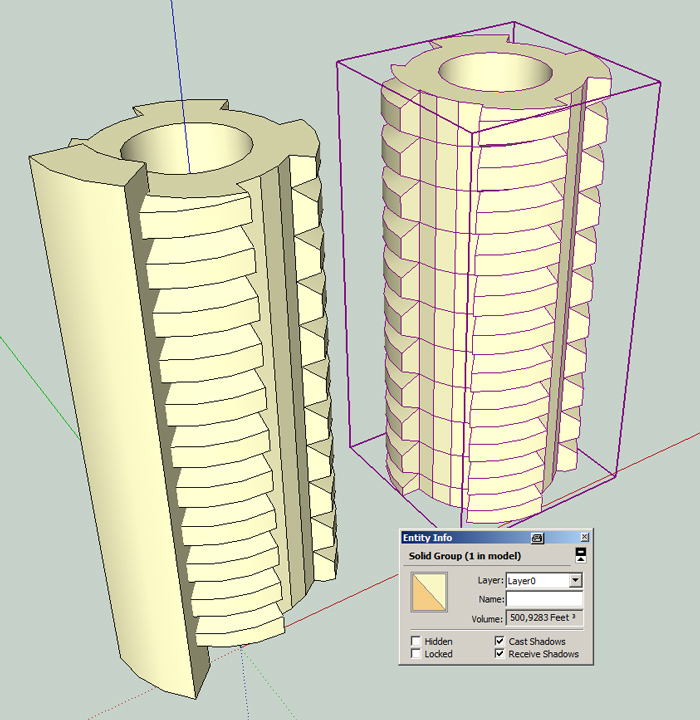
I don't know why, but it works if you grow the second group (in one direction with JPP) so that there are no coplanar faces anymore ...
-
Thanks, Cotty! It would be easy enough to create those wedges with a larger circumference in the first place. There's no reason to have them co-planar, just been doing it that way with solid tools. That solves that question, I think. Peter
-
So this thread is probably dead, but it's worth a try, anyway. I cannot purchase BoolTools on Smustard. The plugin does not show up in the SMustard's product list, but the link that's been provided to it in multiple Sketchucation threads still works. Any idea how I could get a hold of it? My free trial will run out soon, and I'd rather have a boolean plugin if possible. I'm using Sketchup 2016. Thanks!
-
@nutsandboltz said:
So this thread is probably dead, but it's worth a try, anyway. I cannot purchase BoolTools on Smustard. The plugin does not show up in the SMustard's product list, but the link that's been provided to it in multiple Sketchucation threads still works. Any idea how I could get a hold of it? My free trial will run out soon, and I'd rather have a boolean plugin if possible. I'm using Sketchup 2016. Thanks!
Hi NutsandBoltz,
I chose to temporarily take Booltools off the market as it was too unstable. I hope to relaunch an update in the near future but I can not guarantee when that will happen.






Advertisement