sketchucation logo sketchucation
    • 登入
    Oops, your profile's looking a bit empty! To help us tailor your experience, please fill in key details like your SketchUp version, skill level, operating system, and more. Update and save your info on your profile page today!
    🔌 Smart Spline | Fluid way to handle splines for furniture design and complex structures. Download

    [Plugin] BoolTools just released!

    已排程 已置頂 已鎖定 已移動 Plugins
    84 貼文 38 Posters 70.5k 瀏覽 38 Watching
    正在載入更多貼文
    • 從舊到新
    • 從新到舊
    • 最多點贊
    回覆
    • 在新貼文中回覆
    登入後回覆
    此主題已被刪除。只有擁有主題管理權限的使用者可以查看。
    • Gus RG 離線
      Gus R
      最後由 編輯

      Thanks Dale. Amazing what little old SU can do. Here's another drill bit this time with an edge.

      http://img214.imageshack.us/img214/1976/drillbitrobatto2ks2.jpg

      I've been practicing on the drill bits trying to find the best set-up. It's not easy because it means subtracting a helix from a cylinder. In the end it becomes a double helix subtraction.

      Cheers,

      Gus

      www.instagram.com/gusrobatto/

      www.facebook.com/gusrobatto

      www.flickr.com/photos/gusrobatto

      1 條回覆 最後回覆 回覆 引用 0
      • K 離線
        kwistenbiebel
        最後由 編輯

        Wow Whaat,
        Yet another marvelous compagnon to sketchup. Great work!

        Honestly, your plugins (together with plugs from other authors) are really the thing that keeps me using Sketchup.

        Thanks so much!

        Cheers,
        Kwistenbiebel

        1 條回覆 最後回覆 回覆 引用 0
        • pilouP 離線
          pilou
          最後由 編輯

          @unknownuser said:

          free Oscar tools

          Actually last version of Oscar avoid to start the prog so we are waiting the next version 😉

          Frenchy Pilou
          Is beautiful that please without concept!
          My Little site :)

          1 條回覆 最後回覆 回覆 引用 0
          • P 離線
            PeterCharles
            最後由 編輯

            @gus r said:

            This is an eyeballed version I just did without needing any clean up.

            The cut into the cylinder had to be copied twice (180 degrees). Basically this involved: 1) helix13; 2) curves to tubes; and 3) Bool Tools.

            Wow, they are impressive models of a twist drill. Takes me back 45 years to when I had to do a freehand drawing of one for my 0 level exam in Metalwork!
            Also nice to see my a use for my helix13 ruby.

            1 條回覆 最後回覆 回覆 引用 0
            • R 離線
              RickW
              最後由 編輯

              @gaieus said:

              As for a shortcut; Since Ctrl V is already for pasting things, I have assigned Shift Ctrl V to paste in place

              I use the same shortcut! Good thinking! 😄

              RickW
              [www.smustard.com](http://www.smustard.com)

              1 條回覆 最後回覆 回覆 引用 0
              • EdsonE 離線
                Edson
                最後由 編輯

                dale,

                the tool icons are not showing for mac users. may i suggest you talk with matt666 as he has dealt with a similar problem in relation to his toggle unit script.

                edson mahfuz, architect| porto alegre • brasil
                http://www.mahfuz.arq.br

                1 條回覆 最後回覆 回覆 引用 0
                • david_hD 離線
                  david_h
                  最後由 編輯

                  I am on PC and I can't see the icons Either? I just dragged/dropped to plugins folder. Toolbar is there. No icons. Did I do something wrong?

                  D

                  If I make it look easy...It is probably easy

                  1 條回覆 最後回覆 回覆 引用 0
                  • W 離線
                    Whaat
                    最後由 編輯

                    @unknownuser said:

                    I am on PC and I can't see the icons Either? I just dragged/dropped to plugins folder. Toolbar is there. No icons. Did I do something wrong?

                    D

                    Do you have a 'BoolTools' folder in your plugins folder? Are there three icons in the folder?

                    SketchUp Plugins for Professionals

                    1 條回覆 最後回覆 回覆 引用 0
                    • david_hD 離線
                      david_h
                      最後由 編輯

                      I didn't do that. So If I create the Booltools folder and drop the gifs in there, it should be okay?

                      D

                      Edit. . .GOT IT> Thanks! Great tool by the way. I am getting some Splats but i'll figure it out.

                      D

                      If I make it look easy...It is probably easy

                      1 條回覆 最後回覆 回覆 引用 0
                      • C 離線
                        Click Draw
                        最後由 編輯

                        I just bought it! Love it!!!! Thanks so much.
                        Cheers, Jeff

                        Have I mentioned how much of a laugh I get out of some of the Signatures on here!

                        1 條回覆 最後回覆 回覆 引用 0
                        • C 離線
                          Click Draw
                          最後由 編輯

                          Help??? What went wrong? They were both grouped.
                          Thanks,
                          Jeff
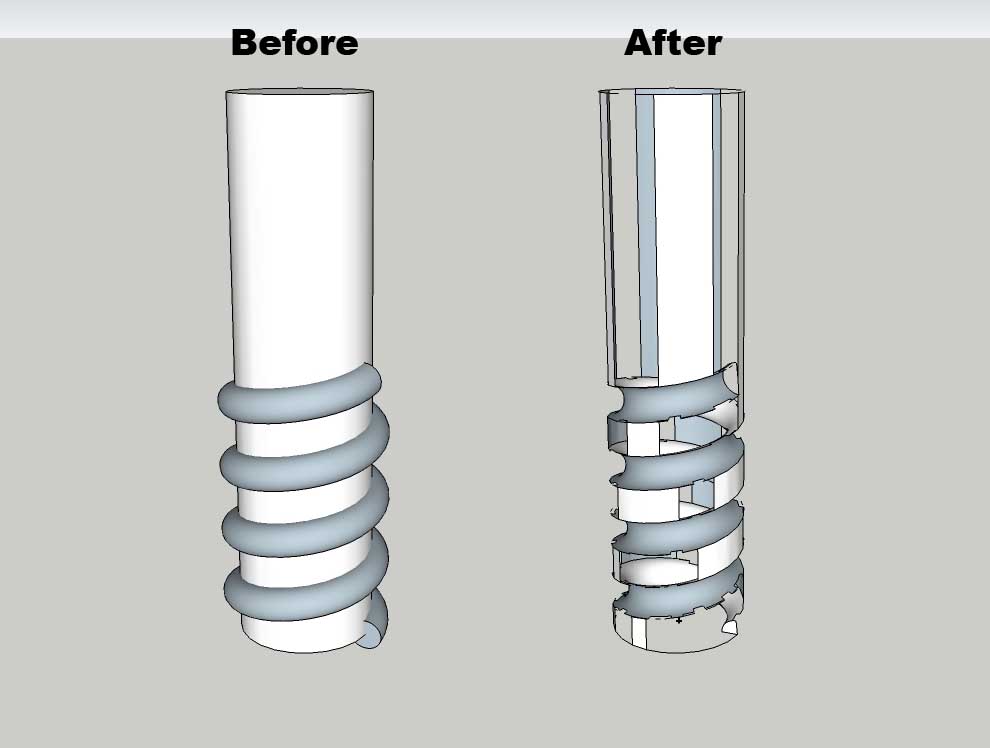

                          before and after.jpg

                          Have I mentioned how much of a laugh I get out of some of the Signatures on here!

                          1 條回覆 最後回覆 回覆 引用 0
                          • GaieusG 離線
                            Gaieus
                            最後由 編輯

                            Hi Jeff,

                            By any chance (and according to the model "normally"), are you not modeling in fairly small scale? You remember that SU has problems with the intersect operation (and the follow me tool) with very small faces that have about 1mm (or 1/16") long edges. I wouldn't be surprised although of course I'm not sure. But (modeling) plugins can only use SU's native tools so they are also limited by their glitches.

                            So try to scale your model up by 10 for instance, run the tool and see if it works. If okay, scale back.

                            Gai...

                            1 條回覆 最後回覆 回覆 引用 0
                            • C 離線
                              Click Draw
                              最後由 編輯

                              Hey G,
                              I tried your suggestion but still had the same result. Here's the SU file. Thanks for helping.
                              Jeff


                              drill bit wanna be.skp

                              Have I mentioned how much of a laugh I get out of some of the Signatures on here!

                              1 條回覆 最後回覆 回覆 引用 0
                              • GaieusG 離線
                                Gaieus
                                最後由 編輯

                                Hm... I seem to get weird results as well. Let me play more.

                                Gai...

                                1 條回覆 最後回覆 回覆 引用 0
                                • GaieusG 離線
                                  Gaieus
                                  最後由 編輯

                                  Okay, I did some more testing and came to an interesting issue (not with the plugin).

                                  I Copy > Pasted in place the spiral into the other group and did a "traditional" intersection and deleted unwanted geometry (came out pretty well and quick). Then I was saving it and SU said there are some minor problems in the model and if I want to fix them. I chose yes and see the details > A whole lot of them!

                                  I undid the fix and saved without it (see attached). I could guess that this is why the plugin resulted in that bad geometry but where it comes from,I don't know.

                                  Save the file first to your HD
                                  Open it and choose NOT to fix the problems on opening
                                  Save it and fix the problems but also choose to see the details there.


                                  drill bit wanna be.skp

                                  Gai...

                                  1 條回覆 最後回覆 回覆 引用 0
                                  • AnssiA 離線
                                    Anssi
                                    最後由 編輯

                                    I did as Gaieus but I scaled it up further 100 times. The result looked good but it still had a lot of errors, and letting SU fix them made some faces disappear. It might be that there are still quite small segments created in the intersections. The spiral has a lot of segments for a small part, I would guess that 10-12 would look almost as good.

                                    Anssi

                                    securi adversus homines, securi adversus deos rem difficillimam adsecuti sunt, ut illis ne voto quidem opus esset

                                    1 條回覆 最後回覆 回覆 引用 0
                                    • Gus RG 離線
                                      Gus R
                                      最後由 編輯

                                      Jeff,

                                      OK, as promised here's a tutorial I put together for creating a sketched drill bit with Bool Tools and SU. I say sketched since a drill bit has a few more geometric features involved. This is my first tutorial so bear with me and if it works perhaps I'll move it to the tutorial section of Sketchucation.

                                      Another way to make a bit involves using the rubies "grow" and "skin." That can create a more precise drill bit but is a bit more tedious since each profile has to be skinned.

                                      Give this a shot and let me know how it works out.

                                      Gus

                                      drill bit tutorial.skp

                                      www.instagram.com/gusrobatto/

                                      www.facebook.com/gusrobatto

                                      www.flickr.com/photos/gusrobatto

                                      1 條回覆 最後回覆 回覆 引用 0
                                      • C 離線
                                        Click Draw
                                        最後由 編輯

                                        Hey Gus,

                                        For your first Tutorial, really good! It helped for sure. Also, I'm going to get that ruby you used to make the helix a tube. That's for that too 👍
                                        Cheers,
                                        Jeff

                                        Have I mentioned how much of a laugh I get out of some of the Signatures on here!

                                        1 條回覆 最後回覆 回覆 引用 0
                                        • C 離線
                                          Click Draw
                                          最後由 編輯

                                          Wondering....does the precision of the helix and the edge count need to be at a certain amount or do they need to match?
                                          Cheers,
                                          Jeff

                                          Have I mentioned how much of a laugh I get out of some of the Signatures on here!

                                          1 條回覆 最後回覆 回覆 引用 0
                                          • Gus RG 離線
                                            Gus R
                                            最後由 編輯

                                            Jeff,

                                            Thanks and I'm glad the tutorial helped.

                                            As for the segments I match them overall in the model out of habit. The helix segmentation will match the cylinder however the tube will not since it twists around the helix. Thus having them match doesn't really serve a purpose since the tube segment intersections will never meet exactly with the cylinder. I just tried this with a 35 segment cylinder and it worked just fine.

                                            So I think no, they don't have to match. A smaller segmented tube will actually subtract more easily from the cylinder however it creates a rather rough looking object. 24 segments is good overall. I think the tubes default to ten segments.

                                            Gus

                                            www.instagram.com/gusrobatto/

                                            www.facebook.com/gusrobatto

                                            www.flickr.com/photos/gusrobatto

                                            1 條回覆 最後回覆 回覆 引用 0
                                            • 1
                                            • 2
                                            • 3
                                            • 4
                                            • 5
                                            • 2 / 5
                                            • 第一個貼文
                                              最後的貼文
                                            Buy SketchPlus
                                            Buy SUbD
                                            Buy WrapR
                                            Buy eBook
                                            Buy Modelur
                                            Buy Vertex Tools
                                            Buy SketchCuisine
                                            Buy FormFonts

                                            Advertisement


