sketchucation logo sketchucation
    • 登入
    Oops, your profile's looking a bit empty! To help us tailor your experience, please fill in key details like your SketchUp version, skill level, operating system, and more. Update and save your info on your profile page today!
    🔌 Smart Spline | Fluid way to handle splines for furniture design and complex structures. Download

    [Plugin] Selection Toys

    已排程 已置頂 已鎖定 已移動 Plugins
    594 貼文 121 Posters 398.5k 瀏覽 121 Watching
    正在載入更多貼文
    • 從舊到新
    • 從新到舊
    • 最多點贊
    回覆
    • 在新貼文中回覆
    登入後回覆
    此主題已被刪除。只有擁有主題管理權限的使用者可以查看。
    • D 離線
      dedmin
      最後由 編輯

      @thomthom said:

      Any errors in the Ruby Console?

      Nope.
      selection_toys.7z

      1 條回覆 最後回覆 回覆 引用 0
      • thomthomT 離線
        thomthom
        最後由 編輯

        All look at it when I get back from my vacation that starts now. I'll be gone for two week cycling - with little or no internet access.

        Thomas Thomassen — SketchUp Monkey & Coding addict
        List of my plugins and link to the CookieWare fund

        1 條回覆 最後回覆 回覆 引用 0
        • B 離線
          bruorlando
          最後由 編輯

          Hi Thom,

          This script helps me so much in my everyday work I have no words to thank you enough.

          I'm writing, though, trying to solve a bug I just can't figured out where it came from. Although the script works for every type of selection, it no longer runs for LINEAR DIMENSIONS. Not via the toolbar, nor contextual menu.

          I've tried reinstalling the plugin, updating the software (14.1.1283), but so far, that one remains "mute".

          Has anyone faced similar problem?
          Do you have any suggestions?

          Thanks in advance.

          Bruno

          1 條回覆 最後回覆 回覆 引用 0
          • Dan RathbunD 離線
            Dan Rathbun
            最後由 編輯

            The exposure of dimension objects changed in the Ruby API for SU2014.

            Do you have the latest version of of Selection Toys ?

            I'm not here much anymore.

            1 條回覆 最後回覆 回覆 引用 0
            • thomthomT 離線
              thomthom
              最後由 編輯

              Ah, yes - new classes where introduced in SU2014. I'll have to fix that.

              Thomas Thomassen — SketchUp Monkey & Coding addict
              List of my plugins and link to the CookieWare fund

              1 條回覆 最後回覆 回覆 引用 0
              • thomthomT 離線
                thomthom
                最後由 編輯

                Fix live on EW. Found a couple of other small bugs that I need to fix in another update. Will post that soon and make sure to update on PluginStore as well.

                Thomas Thomassen — SketchUp Monkey & Coding addict
                List of my plugins and link to the CookieWare fund

                1 條回覆 最後回覆 回覆 引用 0
                • plot-parisP 離線
                  plot-paris
                  最後由 編輯

                  I have a selection question. I guess if any plugin can help me, it is this one. But I am not sure how. Maybe someone can help me.

                  I have this model with many (non-quad) faces. And I would like to soften all the triangulation-edges so that I am left with seemingly quad faces.
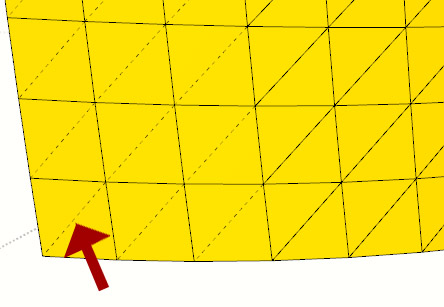
                  2014-08_HiddenEdges.jpg
                  I guess the best way would be to soften everything, then select the edge loops and unsoften them. But I don't know how.

                  Is it possible at all with this plugin?

                  If yes, how?

                  Any help would be appreciated.

                  Cheers,
                  Jakob

                  1 條回覆 最後回覆 回覆 引用 0
                  • thomthomT 離線
                    thomthom
                    最後由 編輯

                    It's unpredictable to try to determine the diagonals of pseudo-quads. I've tried but what is easy to our eyes is not easy to a script.

                    How did you create that mesh btw? Several extensions have support for QuadFace tools. which will create what you want.

                    Thomas Thomassen — SketchUp Monkey & Coding addict
                    List of my plugins and link to the CookieWare fund

                    1 條回覆 最後回覆 回覆 引用 0
                    • J 離線
                      jumpjack
                      最後由 編輯

                      I can't understand if and how I can use this plugin to select only edges delimiting holes inside a surface, rather than also external edges of the surface itself.

                      For example, in this case:
                      hole-example.png

                      I want only this selection:
                      hole-example-edges.png

                      1 條回覆 最後回覆 回覆 引用 0
                      • pbacotP 離線
                        pbacot
                        最後由 編輯

                        You might be able to select those edges more easily if you soften/smooth the surface first.

                        MacOSX MojaveSketchUp Pro v19 Twilight v2 Thea v3 PowerCADD

                        1 條回覆 最後回覆 回覆 引用 0
                        • Dave RD 離線
                          Dave R
                          最後由 編輯

                          Indeed! And then you could probably drag a selection box around the edges of the hole to select the edges. No plugin needed.

                          Etaoin Shrdlu

                          %

                          (THERE'S NO PLACE LIKE)

                          G28 X0.0 Y0.0 Z0.0

                          M30

                          %

                          1 條回覆 最後回覆 回覆 引用 0
                          • J 離線
                            jumpjack
                            最後由 編輯

                            This is only a small part of a very large model, it would take years to edit all holes by hand:

                            http://sketchucation.com/forums/download/file.php?id=124357&t=1

                            That's why I'm looking for some automation.

                            1 條回覆 最後回覆 回覆 引用 0
                            • thomthomT 離線
                              thomthom
                              最後由 編輯

                              Right Click > Select Only > Border Edges

                              Thomas Thomassen — SketchUp Monkey & Coding addict
                              List of my plugins and link to the CookieWare fund

                              1 條回覆 最後回覆 回覆 引用 0
                              • josephkim626J 離線
                                josephkim626
                                最後由 編輯

                                For some reason, "Select Coplanar Faces" results some other parallel faces selected that aren't necessarily "Coplanar"?

                                1 條回覆 最後回覆 回覆 引用 0
                                • Dave RD 離線
                                  Dave R
                                  最後由 編輯

                                  @josephkim626 said:

                                  For some reason, "Select Coplanar Faces" results some other parallel faces selected that aren't necessarily "Coplanar"?

                                  Could you post an example SKP file that exhibits this behavior?

                                  And please complete your profile with SketchUp version and operating system.

                                  Etaoin Shrdlu

                                  %

                                  (THERE'S NO PLACE LIKE)

                                  G28 X0.0 Y0.0 Z0.0

                                  M30

                                  %

                                  1 條回覆 最後回覆 回覆 引用 0
                                  • tt_suT 離線
                                    tt_su
                                    最後由 編輯

                                    @josephkim626 said:

                                    For some reason, "Select Coplanar Faces" results some other parallel faces selected that aren't necessarily "Coplanar"?

                                    The menu name is misleading - it's Same Direction instead of truly coplanar.

                                    1 條回覆 最後回覆 回覆 引用 0
                                    • josephkim626J 離線
                                      josephkim626
                                      最後由 編輯

                                      @dave r said:

                                      @josephkim626 said:

                                      For some reason, "Select Coplanar Faces" results some other parallel faces selected that aren't necessarily "Coplanar"?

                                      Could you post an example SKP file that exhibits this behavior?

                                      And please complete your profile with SketchUp version and operating system.

                                      Sorry, it is tested on windows 7 and sketchup 2014 (in different machines)
                                      Red circled face was the face that was used to execute "select coplanar face"
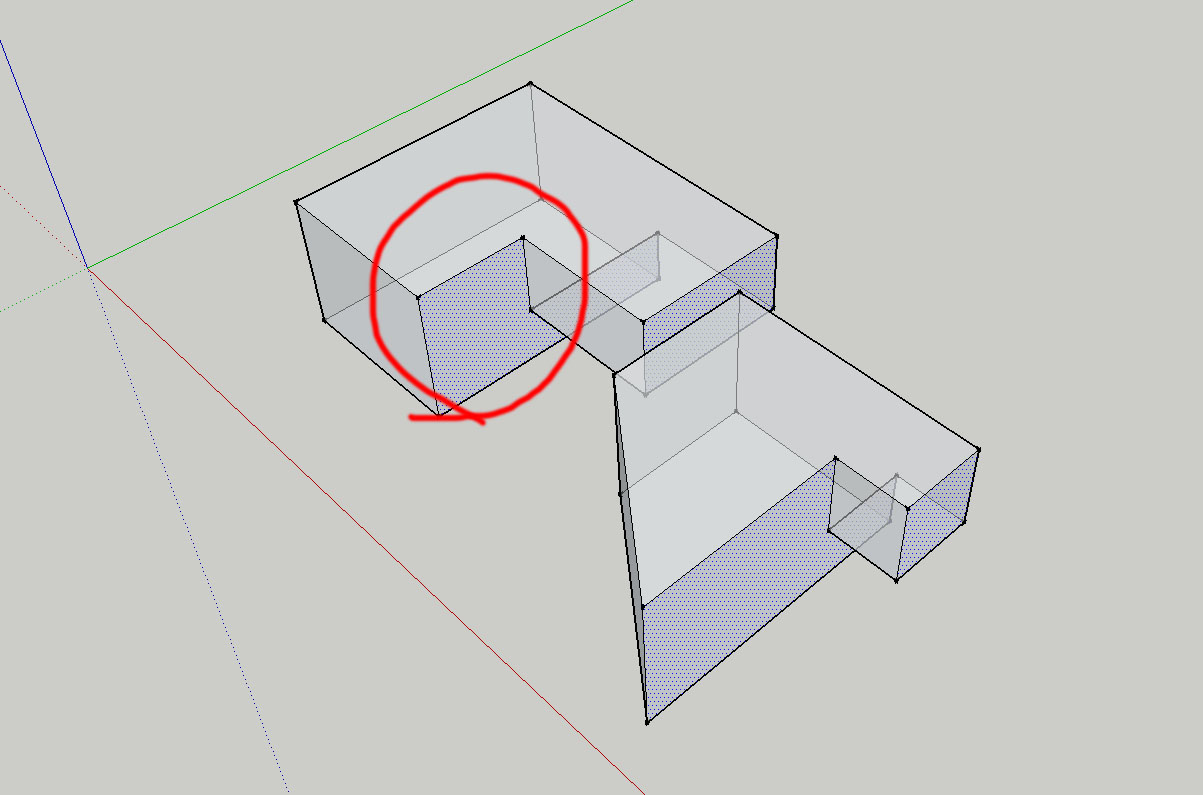
                                      example


                                      skp file

                                      1 條回覆 最後回覆 回覆 引用 0
                                      • Dave RD 離線
                                        Dave R
                                        最後由 編輯

                                        @tt_su said:

                                        The menu name is misleading - it's Same Direction instead of truly coplanar.

                                        So there's no bug. Just a naming confusion. it would appear that "Coplanar Faces" should read something like "Parallel Faces with Normals Facing the Same Direction". Select>Parallel Faces selects Parallel Faces regardless of the normal orientation.

                                        Etaoin Shrdlu

                                        %

                                        (THERE'S NO PLACE LIKE)

                                        G28 X0.0 Y0.0 Z0.0

                                        M30

                                        %

                                        1 條回覆 最後回覆 回覆 引用 0
                                        • TIGT 線上
                                          TIG Moderator
                                          最後由 編輯

                                          Perhaps 'CoNormal', rather than 'CoPlanar' ?

                                          TIG

                                          1 條回覆 最後回覆 回覆 引用 0
                                          • E 離線
                                            Esense3d
                                            最後由 編輯

                                            Hello
                                            Tomtom
                                            Can i Translate this somehow?
                                            Please Help

                                            Roland F.

                                            1 條回覆 最後回覆 回覆 引用 0
                                            • 1
                                            • 2
                                            • 3
                                            • 4
                                            • 5
                                            • 29
                                            • 30
                                            • 1 / 30
                                            • 第一個貼文
                                              最後的貼文
                                            Buy SketchPlus
                                            Buy SUbD
                                            Buy WrapR
                                            Buy eBook
                                            Buy Modelur
                                            Buy Vertex Tools
                                            Buy SketchCuisine
                                            Buy FormFonts

                                            Advertisement