sketchucation logo sketchucation
    • 登入
    Oops, your profile's looking a bit empty! To help us tailor your experience, please fill in key details like your SketchUp version, skill level, operating system, and more. Update and save your info on your profile page today!
    🔌 Smart Spline | Fluid way to handle splines for furniture design and complex structures. Download

    [Plugin] Selection Toys

    已排程 已置頂 已鎖定 已移動 Plugins
    594 貼文 121 Posters 398.9k 瀏覽 121 Watching
    正在載入更多貼文
    • 從舊到新
    • 從新到舊
    • 最多點贊
    回覆
    • 在新貼文中回覆
    登入後回覆
    此主題已被刪除。只有擁有主題管理權限的使用者可以查看。
    • thomthomT 離線
      thomthom
      最後由 編輯

      @unknownuser said:

      Thanks for the amazing plugin. I was wondering if for future that some extra things could be implemented although I ponder if this is impossible with SketchUp.

      Basically Maya has some sweet tools in this regard;

      Select an edge ring
      Select a path of edges between two edges

      Maya User's Guide

      favicon

      (download.autodesk.com)

      Just an idea.

      Check out QuadFace Tools: http://extensions.sketchup.com/en/content/quadface-tools

      It doesn't have Select path between two edges yes, but it's on the todo list.

      Thomas Thomassen — SketchUp Monkey & Coding addict
      List of my plugins and link to the CookieWare fund

      1 條回覆 最後回覆 回覆 引用 0
      • C 離線
        clubber2k
        最後由 編輯

        Is there, or will there be, a select all "seemingly" connected segments (lines)?

        when you have a few lines on a complex component and you want to select all of the connected ones you touch but not all the lines and not the faces.

        double clicking a line when theres no face selects all the lines but double clicking a line when on face selects the face as well and all lines around. I'd like to be able to select all the connected lines and nothing else..

        thanks!

        1 條回覆 最後回覆 回覆 引用 0
        • cottyC 離線
          cotty
          最後由 編輯

          What about double click and deselect the unwanted face(s)?

          my SketchUp gallery

          1 條回覆 最後回覆 回覆 引用 0
          • C 離線
            clubber2k
            最後由 編輯

            @cotty said:

            What about double click and deselect the unwanted face(s)?

            too tedious if you have like 100 faces and you only want the lines..

            1 條回覆 最後回覆 回覆 引用 0
            • Dave RD 離線
              Dave R
              最後由 編輯

              Switch to wire view and select only the edges.

              Etaoin Shrdlu

              %

              (THERE'S NO PLACE LIKE)

              G28 X0.0 Y0.0 Z0.0

              M30

              %

              1 條回覆 最後回覆 回覆 引用 0
              • cottyC 離線
                cotty
                最後由 編輯

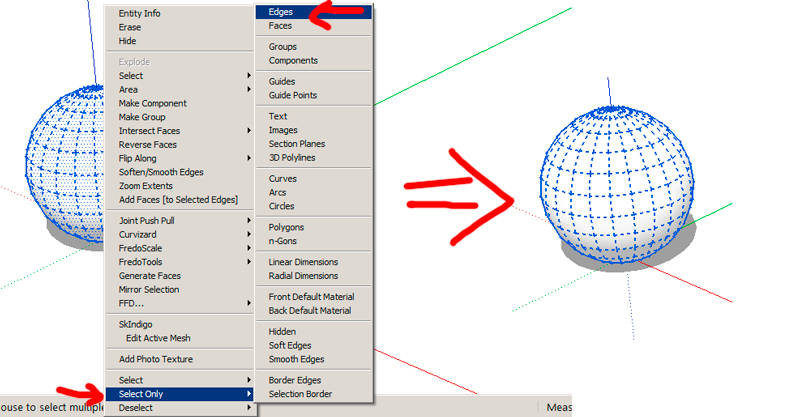
                @clubber2k said:

                @cotty said:

                What about double click and deselect the unwanted face(s)?

                too tedious if you have like 100 faces and you only want the lines..

                You can use the selection toys (this topic 😉 ) for this...


                onlyedges.jpg

                my SketchUp gallery

                1 條回覆 最後回覆 回覆 引用 0
                • tt_suT 離線
                  tt_su
                  最後由 編輯

                  What about Select Curve? http://sketchucation.com/forums/viewtopic.php?p=273423#p273423

                  1 條回覆 最後回覆 回覆 引用 0
                  • renderizaR 離線
                    renderiza
                    最後由 編輯

                    There is another plugin installed on my SketchUp that might be conflicting with Selection Toys. It is not letting me add more icons to the toolbar using UI Settings dialog. When I hit save it doesn't close the dialog.

                    I tested Selection Toys Plugin without other plugins and it works fine... 😕

                    There is also other plugins affected by this..."Plugin Store"!...When I try to disable a plugin for it doesn't do nothing.

                    Going through all the plugins to find the one responsible for this will be hard work but will let you know if I find it.

                    [url=https://www.sketchupcode.com/:z3kqsidd]My Extensions ...[/url:z3kqsidd]

                    1 條回覆 最後回覆 回覆 引用 0
                    • renderizaR 離線
                      renderiza
                      最後由 編輯

                      Ok this is weird... I went to my Plugin Folder and moved all of my other plugins except Selection Toys and it still is not working!

                      The other test I did that made it work was the following...

                      I copied my SketchUp Folder from Programs Files and pasted a new one to my Desktop. Doing this will make the plugin work.

                      Any ideas what can this be...This means what is causing this is not another plugin but something else.

                      IMPORTANT!

                      I uninstalled & reinstalled SketchUp to see if it will fix it and it didn't so something is wrong with the SketchUp folder being on my Programs Folder!?... Not sure but this is definitely weird. 😕

                      Maybe I need to restore my machine factory settings to see if it solves it. 😮 😢

                      [url=https://www.sketchupcode.com/:z3kqsidd]My Extensions ...[/url:z3kqsidd]

                      1 條回覆 最後回覆 回覆 引用 0
                      • TIGT 離線
                        TIG Moderator
                        最後由 編輯

                        Have you checked your Plugins folder Properties > Security > Edit = FULL for all listed users/groups ?
                        The OS defaults will limit it settings - even for Admins...
                        Messing on with reinstalls etc can screw things up...

                        TIG

                        1 條回覆 最後回覆 回覆 引用 0
                        • renderizaR 離線
                          renderiza
                          最後由 編輯

                          TIG you are right there is something wrong with my folder permission. I made new topic here to take this discussion there instead... http://sketchucation.com/forums/viewtopic.php?p=489984#p489984

                          Thanks

                          [url=https://www.sketchupcode.com/:z3kqsidd]My Extensions ...[/url:z3kqsidd]

                          1 條回覆 最後回覆 回覆 引用 0
                          • Dan RathbunD 離線
                            Dan Rathbun
                            最後由 編輯

                            FYI: On MS Windows, DO NOT assign a special (or custom) icon to the "Plugins" folder (or any of SketchUp's subfolders.) It causes folder permission errors.

                            I'm not here much anymore.

                            1 條回覆 最後回覆 回覆 引用 0
                            • renderizaR 離線
                              renderiza
                              最後由 編輯

                              Already did without even wanting to I think. 😢

                              Hope to find a way to undo it. 😕

                              [url=https://www.sketchupcode.com/:z3kqsidd]My Extensions ...[/url:z3kqsidd]

                              1 條回覆 最後回覆 回覆 引用 0
                              • Dan RathbunD 離線
                                Dan Rathbun
                                最後由 編輯

                                @renderiza said:

                                Hope to find a way to undo it. 😕

                                Easy.

                                1. Exit all SketchUp processes.
                                2. Navigate to the SketchUp program folder.
                                3. Rename the bad "Plugins" folder "Plugins_old" or whatever.
                                4. Create a NEW folder named "Plugins"
                                5. Copy the files and subfolders from the "old" folder.
                                6. Delete the old folder.
                                7. Restart SketchUp.

                                I'm not here much anymore.

                                1 條回覆 最後回覆 回覆 引用 0
                                • renderizaR 離線
                                  renderiza
                                  最後由 編輯

                                  Thanks Dan Rathbun!

                                  [url=https://www.sketchupcode.com/:z3kqsidd]My Extensions ...[/url:z3kqsidd]

                                  1 條回覆 最後回覆 回覆 引用 0
                                  • D 離線
                                    danielfagerberg
                                    最後由 編輯

                                    Hi Thomas,
                                    I am so grateful for your work!
                                    Is there a way to select components that have been scaled?
                                    Select the components that have been scaled to a certain scale so that i later can "make unique"
                                    reason is, i have 1 component that i have scaled in 6 different scales and the copied all over the shop in hundreds...
                                    I cant really find the ones with the same scale....
                                    Using TIG's Descaler gives me hundreds of components... it sort of make the model a bit slow 😄

                                    Again thank you for your wonderful work!

                                    BTW, the bowler hat that i see both on you and TIG, is that a special Sketchucation feature? i will sure run down the street to get one in emotional support for you guys! 😄

                                    1 條回覆 最後回覆 回覆 引用 0
                                    • tt_suT 離線
                                      tt_su
                                      最後由 編輯

                                      Hi Danel.
                                      There is no function in Selection Toys that selects based on size I'm afraid.

                                      The hat spread across the forum after last Basecamp in 2012 😄

                                      1 條回覆 最後回覆 回覆 引用 0
                                      • D 離線
                                        danielfagerberg
                                        最後由 編輯

                                        Ok, thank you!
                                        About the hat... im heading for the shop... will add a mustache as well 😄

                                        @tt_su said:

                                        Hi Danel.
                                        There is no function in Selection Toys that selects based on size I'm afraid.

                                        The hat spread across the forum after last Basecamp in 2012 😄

                                        1 條回覆 最後回覆 回覆 引用 0
                                        • gonashviliG 離線
                                          gonashvili
                                          最後由 編輯

                                          So umm pardon my lack of 'research' into these toys, but is there a function to recall previous selection? Sort of an 'Undo' / 'Redo' in the selection's 'universe'..

                                          No? Sheeeet 😄

                                          Cause ummm.... I don't know like you guys, but there's a lot of Homer-style D'OH's goin on when I .... select stuff 😄

                                          1 條回覆 最後回覆 回覆 引用 0
                                          • cottyC 離線
                                            cotty
                                            最後由 編輯

                                            @gonashvili said:

                                            So umm pardon my lack of 'research' into these toys, but is there a function to recall previous selection? Sort of an 'Undo' / 'Redo' in the selection's 'universe'..

                                            Not here, but there are others like Selection memory or Selection Manager...

                                            my SketchUp gallery

                                            1 條回覆 最後回覆 回覆 引用 0
                                            • 1
                                            • 2
                                            • 3
                                            • 4
                                            • 5
                                            • 6
                                            • 7
                                            • 8
                                            • 29
                                            • 30
                                            • 6 / 30
                                            • 第一個貼文
                                              最後的貼文
                                            Buy SketchPlus
                                            Buy SUbD
                                            Buy WrapR
                                            Buy eBook
                                            Buy Modelur
                                            Buy Vertex Tools
                                            Buy SketchCuisine
                                            Buy FormFonts

                                            Advertisement