sketchucation logo sketchucation
    • Login
    Oops, your profile's looking a bit empty! To help us tailor your experience, please fill in key details like your SketchUp version, skill level, operating system, and more. Update and save your info on your profile page today!
    Mac User? | Join the Rayscaper Beta for Mac Learn More

    Fractal Tree Maker for SketchUp - Free add-on

    Scheduled Pinned Locked Moved Extensions & Applications Discussions
    extensions
    158 Posts 44 Posters 68.2k Views 44 Watching
    Loading More Posts
    • Oldest to Newest
    • Newest to Oldest
    • Most Votes
    Reply
    • Reply as topic
    Log in to reply
    This topic has been deleted. Only users with topic management privileges can see it.
    • soloS
      solo
      last edited by

      Stu, yup.

      see image.


      http://img385.imageshack.us/img385/7035/treeeditoryy2.jpg

      However even with bend in editor the final image is straight.


      http://img149.imageshack.us/img149/3105/200811231527121m12sve4.jpg

      http://www.solos-art.com

      If you see a toilet in your dreams do not use it.

      1 Reply Last reply
      Reply Quote 0
      • S
        Stu
        last edited by

        [quote="solo"]Stu, yup.

        see image.

        SLAP!!! .....I missed that option all together 😳

        http://www.landesign.com.au

        1 Reply Last reply
        Reply Quote 0
        • Al HartA
          Al Hart
          last edited by

          Oof - (bent trunks) - This must not be being written to the XML file properly. We'll trace it down.

          See what happens the to the next tree you try to make after the bent one fails - does it start out straight or bent. (We reuse the last XML file for the next tree, so it should start with whatever settings you used for the last tree)

          Al Hart

          http://wiki.renderplus.com/images/e/ef/Render_plus_colored30x30).PNG
          IRender nXt from Render Plus

          1 Reply Last reply
          Reply Quote 0
          • S
            ScottPara
            last edited by

            Al,

            Thanks for this. Really nice of you. Just a couple notes or questions:

            Can we get this to not only export a PNG but also an alpha map? As these do not render at all in Vray. Without an Alpha map it makes it that much harder.

            Best regards,
            Scott

            Love the fact that some HATE my avatar.....

            1 Reply Last reply
            Reply Quote 0
            • S
              Stu
              last edited by

              @al hart said:

              Oof - (bent trunks) - This must not be being written to the XML file properly. We'll trace it down.

              See what happens the to the next tree you try to make after the bent one fails - does it start out straight or bent. (We reuse the last XML file for the next tree, so it should start with whatever settings you used for the last tree)

              Al, After trying with a bend the angle slider reverts to zero when opened again.
              [Im finding the angle and bending sliders work in conjunction]
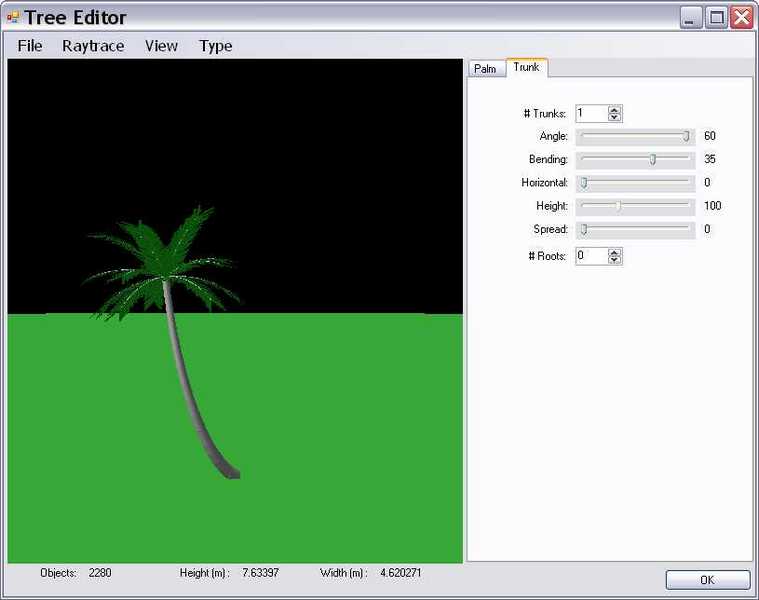
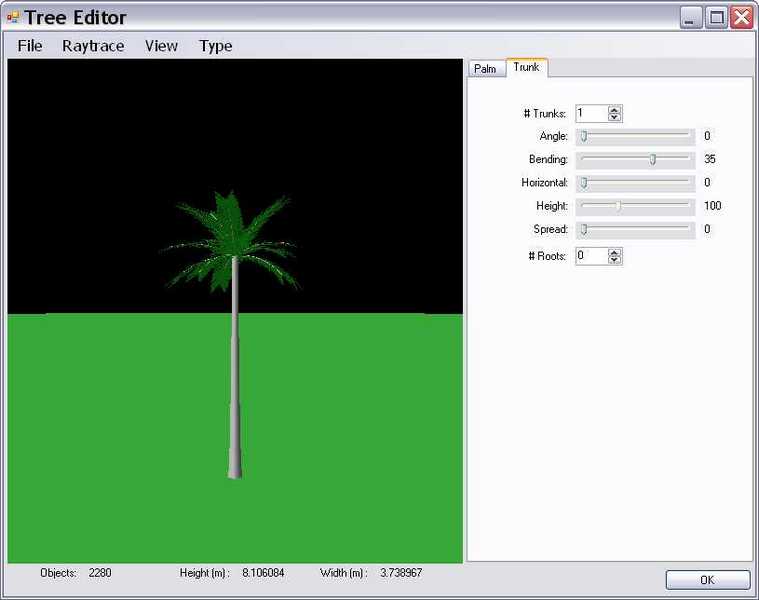
              PalmBend.jpgPalm angle.jpg

              http://www.landesign.com.au

              1 Reply Last reply
              Reply Quote 0
              • Al HartA
                Al Hart
                last edited by

                @unknownuser said:

                Al,

                Thanks for this. Really nice of you. Just a couple notes or questions:

                Can we get this to not only export a PNG but also an alpha map? As these do not render at all in Vray. Without an Alpha map it makes it that much harder.

                Best regards,
                Scott

                The PNG file contains an alpha channel. I am not sure what an alpha map is.

                When you render other alpha channel images from SketchUp to they work, or do you have to do anything special to make an Alpha Map?

                If you create an Alpha Map - do you store it in SketchUp, or apply it separately after you extract the alpha image from SketchUp?

                Are you sure you don't have the same problem that the Podium users have - that you need to explode the alpha-transparent SketchUp image into a face with an alpha material? If that is what is needed, we can make that an option for SketchUp, and perhaps set the face not to cast a rectangular shadow.

                Podium users - if I set the alpha transparent rectangular face not to cast a shadow in Sketchup - does it still cast a shadow in Podium?

                Al Hart

                http://wiki.renderplus.com/images/e/ef/Render_plus_colored30x30).PNG
                IRender nXt from Render Plus

                1 Reply Last reply
                Reply Quote 0
                • Al HartA
                  Al Hart
                  last edited by

                  @gaieus said:

                  And the link to the WH:

                  The trees you are making do have the .ArPlant information, so go ahead and upload them.

                  If you use custom leaves or bark, we will want to upload them again after we make a new version next week which stores the custom images on the tree as well.

                  Al Hart

                  http://wiki.renderplus.com/images/e/ef/Render_plus_colored30x30).PNG
                  IRender nXt from Render Plus

                  1 Reply Last reply
                  Reply Quote 0
                  • EarthMoverE
                    EarthMover
                    last edited by

                    Prior to rendering in Vray, I had to explode the Faceme component twice, then return it to a faceme component. I had to generate a transparency/alpha/clipmap (I use Deep Exploration)to plug into the transparency slot in Vray. This worked fine and the trees rendered well. The process is a bit of a pain, but who can complain about such nice trees for free!

                    http://img224.imageshack.us/img224/6563/fractaltreetestka3.th.jpg

                    http://img224.imageshack.us/images/thpix.gif

                    It would be nice to see an option added to put in a flower map. This would open up the possibility of doing and assortment of flowering shrubs and trees.

                    3D Artist at Clearstory 3D Imaging
                    Guide Tool at Winning With Sketchup
                    Content Creator at Skapeup

                    1 Reply Last reply
                    Reply Quote 0
                    • Gus RG
                      Gus R
                      last edited by

                      Al,

                      Thank you very much for this application. Works great and the trees and the options all work like a charm. Even tested it with other leaves as someone suggested -- having converted them to PNGs.

                      Thanks again.

                      Gus

                      www.instagram.com/gusrobatto/

                      www.facebook.com/gusrobatto

                      www.flickr.com/photos/gusrobatto

                      1 Reply Last reply
                      Reply Quote 0
                      • S
                        ScottPara
                        last edited by

                        Al,

                        As earthmover stated we (vray users) will still need to generate a alpha/clipmap for these to work. I am not sure how much trouble it would be for the program to export out the associated clipmap at export but it would be a huge time saver.

                        Thanks again,
                        Scott

                        Love the fact that some HATE my avatar.....

                        1 Reply Last reply
                        Reply Quote 0
                        • K
                          kwistenbiebel
                          last edited by

                          Hi Al,
                          Just wanted to get back on the 2D/3D subject.
                          As I understand, the treegenerator is actually 3D based by default right?
                          So what about the option to have the full 3D tree as output?
                          Would be great for us render headz. šŸ‘

                          cheers,
                          Kwistenbiebel

                          1 Reply Last reply
                          Reply Quote 0
                          • S
                            ScottPara
                            last edited by

                            I second (or third) the 3D request.

                            Scott

                            Love the fact that some HATE my avatar.....

                            1 Reply Last reply
                            Reply Quote 0
                            • thomthomT
                              thomthom
                              last edited by

                              Third! (fourth?) šŸ˜Ž

                              Thomas Thomassen — SketchUp Monkey & Coding addict
                              List of my plugins and link to the CookieWare fund

                              1 Reply Last reply
                              Reply Quote 0
                              • Al HartA
                                Al Hart
                                last edited by

                                @unknownuser said:

                                Al,

                                As earthmover stated we (vray users) will still need to generate a alpha/clipmap for these to work. I am not sure how much trouble it would be for the program to export out the associated clipmap at export but it would be a huge time saver.

                                Thanks again,
                                Scott

                                Send me, or upload, a .SKP file or .PNG of a RpTreeMaker tree and a alpha/clipmap of the same tree so I will know what it is you need. Is the clipmap stored in SketchUp anywhere, or separately?

                                We store all the old .PNG files in the RPS_TreeMaker_Images sub-folder of your temporary folder. If we can easily make a clipmap we could store it there as well.

                                Al Hart

                                http://wiki.renderplus.com/images/e/ef/Render_plus_colored30x30).PNG
                                IRender nXt from Render Plus

                                1 Reply Last reply
                                Reply Quote 0
                                • Al HartA
                                  Al Hart
                                  last edited by

                                  @unknownuser said:

                                  Got it working. It's a pretty neat tool. Can you change color? If so, how? This would be very important.

                                  Thanks,

                                  Huck

                                  To change color, you can take the raster images for the leaves or bark, change the color, and save them with a new name.

                                  These are stored in:

                                  C:\Program Files\Render Plus Systems\RpTreeMaker\Support\Plants

                                  in a Bark and a Leaves sub-folder.

                                  Here I took the standard leaf, made it yellow, saved it as a new leaf, and used it to render the tree.

                                  yellow-leaf.jpg

                                  You can create your won bark and leaf images by altering the color of existing images.

                                  You will need a paint program which respects the Alpha Channel.

                                  (I don't have one, but there is a tool in RpTools which will convert the background color of an image to an alpha channel which I used.)

                                  Al Hart

                                  http://wiki.renderplus.com/images/e/ef/Render_plus_colored30x30).PNG
                                  IRender nXt from Render Plus

                                  1 Reply Last reply
                                  Reply Quote 0
                                  • Alan FraserA
                                    Alan Fraser
                                    last edited by

                                    There are methods of obtaining a clipmap from a png using any decent image editor. What you effectively end up with is an alpha-channel image. That is a separate image of the tree, exactly the same size as the png, in which every transparent pixel is represented as black and every opaque one as white.
                                    I'm assuming Rick has already worked this out in his image profile ruby in order to generate the path of the vector outlines....but that'll be the encrypted or server-side bit. šŸ˜‰

                                    3D Figures
                                    Were you required to walk 500 miles? Were you advised to walk 500 more?
                                    You could be entitled to compensation. Call the Pro Claimers now!

                                    1 Reply Last reply
                                    Reply Quote 0
                                    • Al HartA
                                      Al Hart
                                      last edited by

                                      @unknownuser said:

                                      I second (or third) the 3D request.

                                      Scott

                                      I will try this out (creating full 3D plants) and see if it works and or is practical.

                                      However, this may effect the "Free" aspect of RpTreeMaker. I will have to discuss this with the developer, since he includes this product as a tool in his own rendering package (nXt) - which is not free.

                                      Al Hart

                                      http://wiki.renderplus.com/images/e/ef/Render_plus_colored30x30).PNG
                                      IRender nXt from Render Plus

                                      1 Reply Last reply
                                      Reply Quote 0
                                      • Al HartA
                                        Al Hart
                                        last edited by

                                        @alan fraser said:

                                        There are methods of obtaining a clipmap from a png using any decent image editor. What you effectively end up with is an alpha-channel image. That is a separate image of the tree, exactly the same size as the png, in which every transparent pixel is represented as black and every opaque one as white.
                                        I'm assuming Rick has already worked this out in his image profile ruby in order to generate the path of the vector outlines....but that'll be the encrypted or server-side bit. šŸ˜‰

                                        That will be easy to do - to create a second PNG image.

                                        The RpTreeMaker images are not all-on / all-off transparent. the edge pixels are partially transparent.

                                        partially-transparent.jpg

                                        See how the horizon is partially visible through the pixels at the edge of the leaf. This helps make the tree blend in better at the edges.

                                        I presume a clipmap uses gray pixels to represent partial transparency?

                                        Also, is there a naming convention which would make these easier for V-ray users to use?

                                        Al Hart

                                        http://wiki.renderplus.com/images/e/ef/Render_plus_colored30x30).PNG
                                        IRender nXt from Render Plus

                                        1 Reply Last reply
                                        Reply Quote 0
                                        • Alan FraserA
                                          Alan Fraser
                                          last edited by

                                          I'd imagine that there would need to be a degree of feathering around the outline, Al. A pixelated all-or-nothing outline would be just plain nasty.

                                          3D Figures
                                          Were you required to walk 500 miles? Were you advised to walk 500 more?
                                          You could be entitled to compensation. Call the Pro Claimers now!

                                          1 Reply Last reply
                                          Reply Quote 0
                                          • Al HartA
                                            Al Hart
                                            last edited by

                                            @alan fraser said:

                                            I'd imagine that there would need to be a degree of feathering around the outline, Al. A pixelated all-or-nothing outline would be just plain nasty.

                                            The sample clipmap Scott sent me does indeed have feathering around the edges:

                                            feathering.png

                                            Al Hart

                                            http://wiki.renderplus.com/images/e/ef/Render_plus_colored30x30).PNG
                                            IRender nXt from Render Plus

                                            1 Reply Last reply
                                            Reply Quote 0

                                            Hello! It looks like you're interested in this conversation, but you don't have an account yet.

                                            Getting fed up of having to scroll through the same posts each visit? When you register for an account, you'll always come back to exactly where you were before, and choose to be notified of new replies (either via email, or push notification). You'll also be able to save bookmarks and upvote posts to show your appreciation to other community members.

                                            With your input, this post could be even better šŸ’—

                                            Register Login
                                            • 1
                                            • 2
                                            • 3
                                            • 4
                                            • 5
                                            • 6
                                            • 7
                                            • 8
                                            • 2 / 8
                                            • First post
                                              Last post
                                            Buy SketchPlus
                                            Buy SUbD
                                            Buy WrapR
                                            Buy eBook
                                            Buy Modelur
                                            Buy Vertex Tools
                                            Buy SketchCuisine
                                            Buy FormFonts

                                            Advertisement