sketchucation logo sketchucation
    • 登入
    Oops, your profile's looking a bit empty! To help us tailor your experience, please fill in key details like your SketchUp version, skill level, operating system, and more. Update and save your info on your profile page today!
    🔌 Smart Spline | Fluid way to handle splines for furniture design and complex structures. Download

    Windowizer4 now available!

    已排程 已置頂 已鎖定 已移動 Developers' Forum
    55 貼文 12 Posters 15.2k 瀏覽 12 Watching
    正在載入更多貼文
    • 從舊到新
    • 從新到舊
    • 最多點贊
    回覆
    • 在新貼文中回覆
    登入後回覆
    此主題已被刪除。只有擁有主題管理權限的使用者可以查看。
    • R 離線
      RickW
      最後由 RickW 編輯

      Windowizer4 is now available! It includes the following features:

      1. Full 3D storefront windows (front-only Windowizer3-style windows are optional)
      2. Window styles can be saved to the model for easy recall
      3. Resulting windows can be grouped or ungrouped
      4. Zero-width outer frames are now possible
      5. Polygons are now supported
      6. Local language support (tied to SketchUp localization, where volunteers have provided localized files)

      Planned free updates for this version include:

      1. Export and import window styles for use in different models
      2. Window editing
      3. Window style matching (apply one window's settings to another window)
      4. Zero-width mullion support for butt-glazed storefront & curtainwall windows
      5. Style Manager dialog for renaming/exporting/importing/deleting window styles

      Thanks to all the volunteers who helped with localization, and to all users for your patience as I worked to create this.

      Windowizer 4 Visual Reference.pdf

      RickW
      www.smustard.com

      1 條回覆 最後回覆 回覆 引用 0
      • GaieusG 離線
        Gaieus
        最後由 編輯

        Hi Rick,

        I have unzipped everything simply to the Plugins folder (or should I have installed it differently?). After opening SU, I found windowizer 4 in the plugin menu and tried to run but the webdialog says "The page cannot be displayed" (practically a 404 eror). When I right click and go to Properties, I see the below URL

        res;//C;\WINDOWS\System32\shdoclc.dll/dnserror.htm#file;//C;\Program%20Files\Google\Google%20SketchUp%206\Plugins\windowizer4-en-US.html
        

        Also see my screenshot (the webdialog and the propertie panel in Hungarian).

        BTW - how am I supposed to select my language?

        Sorry for being a pain with this...

        Gai...

        1 條回覆 最後回覆 回覆 引用 0
        • R 離線
          RickW
          最後由 編輯

          When you unzipped the files, did you retain folder names? All the .html files (except windowizer4-en-US.html) should be in a subfolder called "windowizer4languages".

          After verifying that, close the dialog, open the Ruby Console, then select Plugins>Windowizer4 from the menu. If there are any errors in the Ruby Console, please copy & paste them in a message to me (either here or in email).

          Windowizer should automatically select the proper dialog language file based on the Sketchup localization. It works in theory (and it works for selecting US English), but I can't test it on other localizations. If you continue to have problems after verifying all the files are located correctly, let me know and I'll see if some international ruby gurus (Didier? TBD?) can help solve the problem.

          RickW
          www.smustard.com

          1 條回覆 最後回覆 回覆 引用 0
          • GaieusG 離線
            Gaieus
            最後由 編輯

            I haven't changed anything in the folder and name structure. Note however that I don't have windowizer4-en-US.html anywhere; neither in the main plugins folder nor in the subfolder.

            I tried it with the ruby console but nothing appears in there.

            I removed all other scripts but still no avail.

            Gai...

            1 條回覆 最後回覆 回覆 引用 0
            • GaieusG 離線
              Gaieus
              最後由 編輯

              Okay, I think the mising file was the culprit. I copied the Hungarian html file to the main Plugins folder, renamed it to ...en-US.html and the window pops up just fine. (in Hungarian). I'll start testing my translation immediately.

              Thanks Rick! 👍

              Gai...

              1 條回覆 最後回覆 回覆 引用 0
              • R 離線
                RickW
                最後由 編輯

                Somehow, the windowizer4-en-US.html file was omitted from the .zip download. I've uploaded a new .zip file with the missing file included. Try re-downloading and let me know what you get.

                Thanks,

                RickW
                www.smustard.com

                1 條回覆 最後回覆 回覆 引用 0
                • GaieusG 離線
                  Gaieus
                  最後由 編輯

                  Downloading...

                  In the previous zip file there was a "Program files" folder as well. It is missing from this one; is it not needed? There were deeply nested subfolders in it but eventually all empty).

                  OK, downloaded but it's not working.

                  The window appears but whatever I do (trying to apply the default settings) and press "Apply" (still testing with the US version) nothing happens.

                  Gai...

                  1 條回覆 最後回覆 回覆 引用 0
                  • GaieusG 離線
                    Gaieus
                    最後由 編輯

                    Wait. Me stupid. I looked at the script and it says requires sketchup.rb and I don't have it in the folder at the moment. 😳

                    Gai...

                    1 條回覆 最後回覆 回覆 引用 0
                    • R 離線
                      RickW
                      最後由 編輯

                      No, that was some strange anomaly in the old .zip file, and was unnecessary. You should have the following files in the Plugins folder:

                      array_to.rb
                      arraysum.rb
                      getMaterials.rb
                      offset.rb
                      windowizer4.rb
                      windowizer4stylemanager.rb
                      windowizer4-en-US.html

                      The first 4 are "library" files that are used by other scripts. The last 3 are unique to Windowizer4. You should also have a subfolder called "windowizer4languages" in your Plugins folder. The localized .html files go in here, and you can safely delete all but your language's .html file.

                      Does anything appear in the Ruby Console when you click "Apply"?

                      RickW
                      www.smustard.com

                      1 條回覆 最後回覆 回覆 引用 0
                      • R 離線
                        RickW
                        最後由 編輯

                        The sketchup.rb file should be in the Tools folder, not the Plugins folder.

                        RickW
                        www.smustard.com

                        1 條回覆 最後回覆 回覆 引用 0
                        • GaieusG 離線
                          Gaieus
                          最後由 編輯

                          BTW - where do I get sketchup.rb? I don't seem to have it at all! 😲

                          Me stupid agan. It's in the Tools folder by default.

                          Now copied to the Plugins folder but still no avail.

                          Gai...

                          1 條回覆 最後回覆 回覆 引用 0
                          • R 離線
                            RickW
                            最後由 編輯

                            It should stay in the Tools folder. Any messages in the Ruby Console?

                            RickW
                            www.smustard.com

                            1 條回覆 最後回覆 回覆 引用 0
                            • S 離線
                              seasdes
                              最後由 編輯

                              Hooray thank you so much for this plugin Rick. So far it works as expected. It even cuts both sides of a wall.

                              Trully amazing.

                              Walter

                              Using Sketchup Pro 2019

                              1 條回覆 最後回覆 回覆 引用 0
                              • GaieusG 離線
                                Gaieus
                                最後由 編輯

                                @rickw said:

                                It should stay in the Tools folder.

                                I left a copy there...

                                @unknownuser said:

                                Any messages in the Ruby Console?

                                Nope.

                                Gai...

                                1 條回覆 最後回覆 回覆 引用 0
                                • GaieusG 離線
                                  Gaieus
                                  最後由 編輯

                                  Okay, I have figured it out.

                                  On my "European" keyboard layout the decimal separator is comma. All the sizes appear with commas except the max wall thicknes which is separated bz a dot (period / full stop - call it as you wish) by default in the webdialog. If I manually change that to a comma, the script works.

                                  I guess this will be an issue with other localisations, too.


                                  Now I will get into the translation at last.

                                  Gai...

                                  1 條回覆 最後回覆 回覆 引用 0
                                  • R 離線
                                    RickW
                                    最後由 編輯

                                    Gai,

                                    Glad you figured that out. I'll have to make some notes for using it and humbly ask the great volunteers who helped with the dialog to help once again with translating the documents.

                                    Thanks,

                                    RickW
                                    www.smustard.com

                                    1 條回覆 最後回覆 回覆 引用 0
                                    • T 離線
                                      thinkbuild
                                      最後由 編輯

                                      Dear Rick -

                                      I haven't downloaded W4 yet (but I will soon) and I was just thinking - I've got a small project in Sweden, and there, we have triple-glazed windows. Do you think it would be possible to add an option, "# of panes of glass"? In Germany, we also use double-glazing and so on...I was thinking, I could perhaps just make a "thick" single pane but there might be situations in which it would be useful to model the "real" situation...

                                      I imagine it might at some point get a bit much, but since you are already working at such a high level of detail...

                                      Just a thought.

                                      best wishes,

                                      Jason

                                      1 條回覆 最後回覆 回覆 引用 0
                                      • david_hD 離線
                                        david_h
                                        最後由 編輯

                                        RICK. I just purchased and am using it. It is awesome. Anyway to put it in a context menu rather than the pull down?

                                        It's much more friendlier that way> . . . 💚

                                        If I make it look easy...It is probably easy

                                        1 條回覆 最後回覆 回覆 引用 0
                                        • C 離線
                                          cheffey
                                          最後由 編輯

                                          I just purchased it as well, and that's my only request is to add to a right-click dialog as David mentions.
                                          Works flawless though, going to be such a time saver.

                                          BROS RŌMAN BRÄUN

                                          1 條回覆 最後回覆 回覆 引用 0
                                          • C 離線
                                            chango70
                                            最後由 編輯

                                            Rick I can't get it to work for some reason. I've unzipped everything into the plugins folder. When I use the Windowizer4 dialogue it creates a single group. Am I doing something wrong?
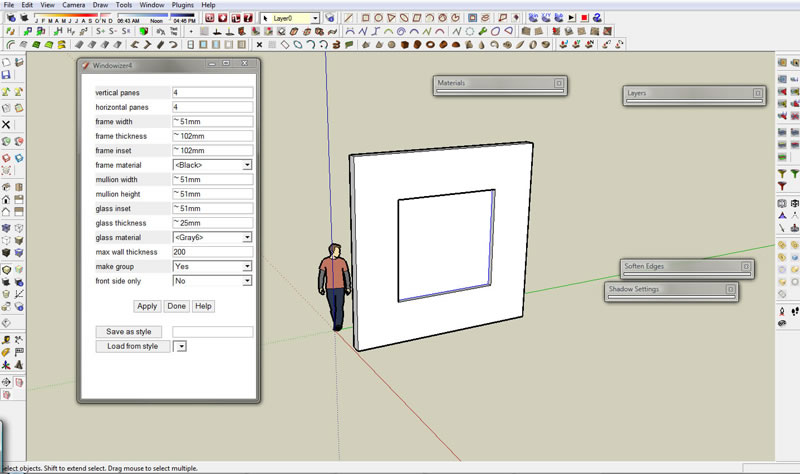
                                            Windowizer4 Question.jpg

                                            1 條回覆 最後回覆 回覆 引用 0
                                            • 1
                                            • 2
                                            • 3
                                            • 1 / 3
                                            • 第一個貼文
                                              最後的貼文
                                            Buy SketchPlus
                                            Buy SUbD
                                            Buy WrapR
                                            Buy eBook
                                            Buy Modelur
                                            Buy Vertex Tools
                                            Buy SketchCuisine
                                            Buy FormFonts

                                            Advertisement
