sketchucation logo sketchucation
    • Anmelden
    Oops, your profile's looking a bit empty! To help us tailor your experience, please fill in key details like your SketchUp version, skill level, operating system, and more. Update and save your info on your profile page today!
    ⚠️ Important | Libfredo 15.6b introduces important bugfixes for Fredo's Extensions Update

    Pipe-along-path

    Geplant Angeheftet Gesperrt Verschoben Newbie Forum
    sketchup
    64 Beiträge 9 Kommentatoren 4.7k Aufrufe 9 Watching
    Lade mehr Beiträge
    • Älteste zuerst
    • Neuste zuerst
    • Meiste Stimmen
    Antworten
    • In einem neuen Thema antworten
    Anmelden zum Antworten
    Dieses Thema wurde gelöscht. Nur Nutzer mit entsprechenden Rechten können es sehen.
    • P Offline
      pipingguy
      zuletzt editiert von

      I thought I had the latest version which I downloaded from the rhin.crai.archi site. (if said site is obsolete, why does it still exist?) Then I accessed TIG via the the author pull-down menu in sketchucation's plugin store and did not see 'pipe-along-path' listed. (I was not provided with the option to scroll to a next page). Then I used the plugin store's search feature and found it. So now that I am up to date, I would suggest giving the users a way to change the input box default to suit their typical work habits. With me, it's always inches and the inside diameter is always zero.

      1 Antwort Letzte Antwort Antworten Zitieren 0
      • Dave RD Offline
        Dave R
        zuletzt editiert von

        You didn't read TIG's last post? He gave you a way to change the default settings.

        If you're always going to want a zero inside diameter and no C points, you could use Tube Along Path instead.

        Etaoin Shrdlu

        %

        (THERE'S NO PLACE LIKE)

        G28 X0.0 Y0.0 Z0.0

        M30

        %

        1 Antwort Letzte Antwort Antworten Zitieren 0
        • BoxB Offline
          Box
          zuletzt editiert von

          Or Didier's Lines2Tubes which is available from the plugin store.
          http://sketchucation.com/forums/viewtopic.php?p=88592#p88592

          1 Antwort Letzte Antwort Antworten Zitieren 0
          • cottyC Offline
            cotty
            zuletzt editiert von

            @pipingguy said:

            Then I accessed TIG via the the author pull-down menu in sketchucation's plugin store and did not see 'pipe-along-path' listed. (I was not provided with the option to scroll to a next page).

            You have to change from "recent" to "full list" to see all the plugins from one author...

            my SketchUp gallery

            1 Antwort Letzte Antwort Antworten Zitieren 0
            • P Offline
              pipingguy
              zuletzt editiert von

              column lines - xlines - guides.skp
              As to Dave R's question, "Why are you using guidelines as "permanent" features in your model? They weren't intended for that." In AutoCAD I create XLINEs and place them in a locked and faded layer and assign them a specific color. This now establishes a secure column line grid upon which the rest of the model is measured and coordinated from. I suppose I could create a grid using intersecting lines in sketchup, erase the resulting faces, and put them in a locked group. But they would blend into the remaining myriad of lines. At least with construction lines, they are dashed so they don't stand out to much, yet are quickly recognizable. (see attached SU partial model) Perhaps you can tell me of a popular plugin that generates dashed lines? BTW - what does 'place inline' mean in the reply editor regarding the attachment of a file?

              1 Antwort Letzte Antwort Antworten Zitieren 0
              • P Offline
                pipingguy
                zuletzt editiert von

                Sorry. OK - I will look at the script with notepad. But I literally have not dealt with any kind of of computer code since an introductory course into Fortran or whatever it was back in the early seventies. something about flowcharts / if yes, then / if false then....blah blah. And then we put the code into an IBM punchcard machine. (junior high school) LOL!!!!

                1 Antwort Letzte Antwort Antworten Zitieren 0
                • P Offline
                  pipingguy
                  zuletzt editiert von

                  so after two hours purging malware/bloatware/spyware and every other ware that came along for the ride when I downloaded the fusion installer required to install notepad++, I think I will stay away from fiddling with codes and the like.

                  1 Antwort Letzte Antwort Antworten Zitieren 0
                  • TIGT Offline
                    TIG Moderator
                    zuletzt editiert von

                    Notepad++ is a respectable product and if installed from their site it should not have other hidden baddies... http://notepad-plus-plus.org/download/v6.5.4.html
                    I'll be reissuing PipeAlongPath shortly [edited entirely in Notepad++ !]
                    I will be adding some optimistation tools...

                    TIG

                    1 Antwort Letzte Antwort Antworten Zitieren 0
                    • P Offline
                      pipingguy
                      zuletzt editiert von

                      yeah - that's where I got the infection from (http://notepad-plus-plus.org/download/v6.5.4.html) 😞

                      1 Antwort Letzte Antwort Antworten Zitieren 0
                      • Dave RD Offline
                        Dave R
                        zuletzt editiert von

                        So I guess my suggestion of Tube Along Path didn't work for you?

                        Etaoin Shrdlu

                        %

                        (THERE'S NO PLACE LIKE)

                        G28 X0.0 Y0.0 Z0.0

                        M30

                        %

                        1 Antwort Letzte Antwort Antworten Zitieren 0
                        • TIGT Offline
                          TIG Moderator
                          zuletzt editiert von

                          I use the latest version of Notepad++ everyday.
                          I have never had problems with it.
                          All downloaded files are auto-virus-checked.
                          My whole system is regularly virus-checked/scanned.
                          Very rarely is anything found untoward - out of millions of files...

                          To double-check your assertion, I just re-downloaded the latest exe installer version [6.5.4].

                          I virus-scanned it...
                          Nothing was found.

                          I reinstalled it...
                          Nothing was found.

                          It works fine.

                          Strange... 😕

                          What is this 'fusion installer' you speak of ?
                          The downloaded .exe received direct from Notepad++ is in its own installer - just run it as an admin...
                          Why did you think that you need another application to install it ?
                          You seem to be making the proverbial rod for your own back 😒

                          TIG

                          1 Antwort Letzte Antwort Antworten Zitieren 0
                          • P Offline
                            pipingguy
                            zuletzt editiert von

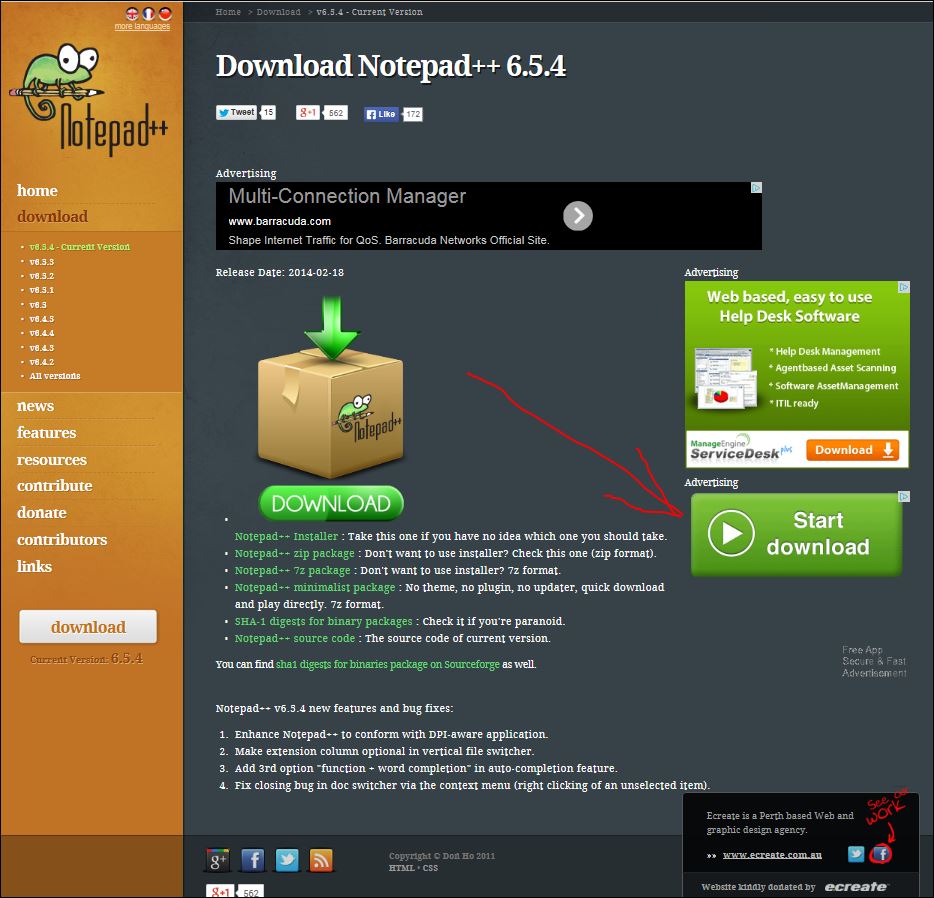
                            I THINK I clicked the incorrect download button on the attached printscreen. And so, I probably did not look at the fineprint to opt out of certain choices in the fusion installer because I was in a hurry to try out the notepad++. I would like to re-trace those steps - but obviously I'm too spooked. So even though Norton allowed it,I ended up with trash like perk prize, security protect, password box, optimizer pro, movie mode, my pc backup, enhance tronic and conduit search. Full scans with Norton and Kaspersky fail to remove the last one which plants itself into the search box when I launch Firefox. And I'm sure there are other fragments of un-purgeable garbage I have yet to discover. But that's my problem. I would like to examine the properties of the installer, but I shift-deleted it. [attachment=0]notepad++ site.

                            notepad++  site.JPG

                            1 Antwort Letzte Antwort Antworten Zitieren 0
                            • TIGT Offline
                              TIG Moderator
                              zuletzt editiert von

                              You should click on the download button for Notepad++... NOT the download button for one of its site's advertisers !
                              So you downloaded a quite unnecessary unconnected third-party application, which the Notepad++ author derives some income from through them advertising...
                              So that's where all of the guff came from...
                              Nothing to do with Notepad++...
                              All to do with you installing something else 😒

                              TIG

                              1 Antwort Letzte Antwort Antworten Zitieren 0
                              • BoxB Offline
                                Box
                                zuletzt editiert von

                                Correct me if I wrong Tig, but isn't it possible to make small edits to .rb files just using normal notepad. I've certainly done it in the past but now I'm second guessing myself.

                                1 Antwort Letzte Antwort Antworten Zitieren 0
                                • TIGT Offline
                                  TIG Moderator
                                  zuletzt editiert von

                                  It probably is OK for a simple edit.

                                  BUT remember that Notepad makes its new files as ANSI, which then mess up v2014.
                                  Whereas Notepad++ can reset any file's encoding to the required UTF8-without-BOM.

                                  Plain Notepad can be used to edit a UTF-without-BOM file and then 'save' keeping the original encoding: even 'save_as' keeps that encoding too... 😄
                                  BUT any new files from Notepad are unlikely to work 😕

                                  Notepad++ is must better as it can display colored syntax and show line-numbers etc making it easy to say find line ~#567 and edit between "" ... 😄

                                  TIG

                                  1 Antwort Letzte Antwort Antworten Zitieren 0
                                  • BoxB Offline
                                    Box
                                    zuletzt editiert von

                                    Thanks, that makes sense as I have only ever had to edit something simple like number of segments or a yes to a no and then just saved.

                                    1 Antwort Letzte Antwort Antworten Zitieren 0
                                    • mitcorbM Offline
                                      mitcorb
                                      zuletzt editiert von

                                      @pipingguy:
                                      Absolutely get rid of Conduit Search, unless, perhaps, you enjoy it. 😒

                                      I take the slow, deliberate approach in my aimless wandering.

                                      1 Antwort Letzte Antwort Antworten Zitieren 0
                                      • TIGT Offline
                                        TIG Moderator
                                        zuletzt editiert von

                                        An updated version [v1.9] of PipeAlongPath is now available http://sketchucation.com/forums/viewtopic.php?p=513484#p513484

                                        TIG

                                        1 Antwort Letzte Antwort Antworten Zitieren 0
                                        • P Offline
                                          pipingguy
                                          zuletzt editiert von

                                          Good work!! I love the fact that ver 1.9 retains the settings from the previous session!!
                                          And I like the way I can install it directly through the sketchup extensions menu.
                                          But I'm not crazy about the repeated warning that must be acknowledged with a key press.
                                          Just stash that in the read me. And the skin produced is not smooth unless I open the group for editing and click the pipe.
                                          Every click and every key press matters in the world of fast-track sketching. 😄
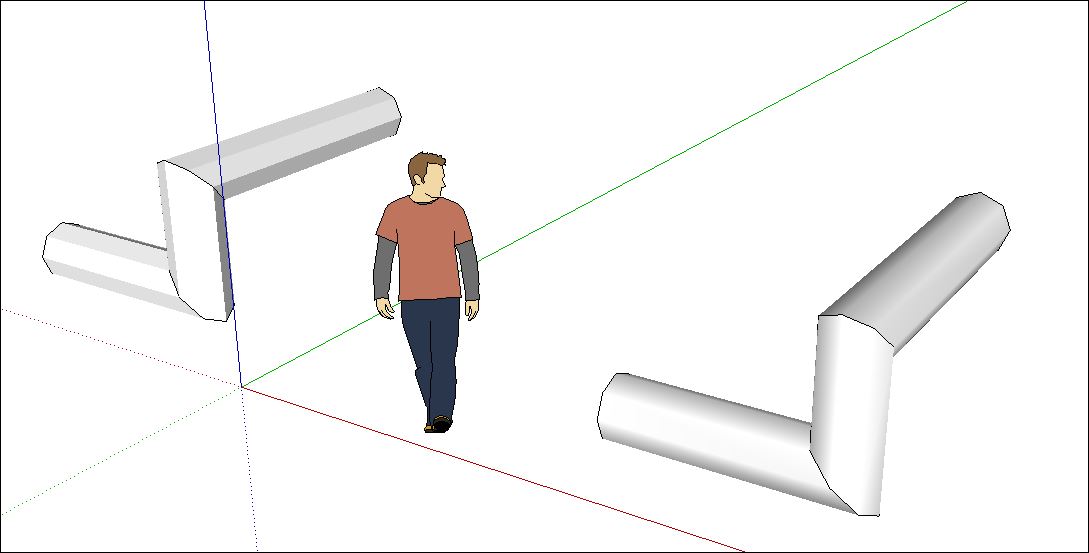

                                          smooth vs. unsmooth extrusion.JPG

                                          1 Antwort Letzte Antwort Antworten Zitieren 0
                                          • TIGT Offline
                                            TIG Moderator
                                            zuletzt editiert von

                                            The warning should only appear if you have a slight 'skew' on the path, with a change of angle, which might cause SketchUp to lockup.
                                            Most of the time users will never see it !
                                            BUT I have discovered a glitch in the frequency of this dialog and I will be issuing v2.0 later today to address the problem ! 😒

                                            You seem to like adding 1" falls to your pipe-runs, which have been found to cause these issues, which you initially reported.
                                            These 'skews' do not always cause problems: so you have the choice to 'Cancel' to Abort and then Save before repeating the PipeAlongPath and risking disaster, 'No' to carry on and risk it - probably safe enough if you have done similar diameter pipes with similar paths, or 'Yes' to 'fix it' - the slight slopes get 'flattened' as needed to avoid the problems...
                                            If you want to stop the warning open the PipeAlongPath.rb file with Notepad or Notepad++, go to line #402, find the text:
                                            if skewed
                                            change it to read
                                            if skewed*==911*
                                            Note the double =
                                            Save it.
                                            Restart SketchUp...
                                            Because skewed will never be 911 then the dialog never appears.
                                            BUT of course then you are not warned of impending doom, and lock-ups could occur unexpectedly...
                                            Your choice - your risk... 😉

                                            I do not get that 'unsmoothed' pipe "unless it's edited" effect in v8/v2013 - perhaps it a Graphics-Card issue your end ?
                                            BUT I see that I do get it in v2014 IF there was the 'skewed?' -> No ! 😕
                                            So I'm trying to see the differences and ensure it's as good as it gets in v2.0 😒

                                            TIG

                                            1 Antwort Letzte Antwort Antworten Zitieren 0
                                            • 1
                                            • 2
                                            • 3
                                            • 4
                                            • 2 / 4
                                            • Erster Beitrag
                                              Letzter Beitrag
                                            Buy SketchPlus
                                            Buy SUbD
                                            Buy WrapR
                                            Buy eBook
                                            Buy Modelur
                                            Buy Vertex Tools
                                            Buy SketchCuisine
                                            Buy FormFonts

                                            Advertisement



