sketchucation logo sketchucation
    • Anmelden
    Oops, your profile's looking a bit empty! To help us tailor your experience, please fill in key details like your SketchUp version, skill level, operating system, and more. Update and save your info on your profile page today!
    ⚠️ Important | Libfredo 15.6b introduces important bugfixes for Fredo's Extensions Update

    Pipe-along-path

    Geplant Angeheftet Gesperrt Verschoben Newbie Forum
    sketchup
    64 Beiträge 9 Kommentatoren 4.7k Aufrufe 9 Watching
    Lade mehr Beiträge
    • Älteste zuerst
    • Neuste zuerst
    • Meiste Stimmen
    Antworten
    • In einem neuen Thema antworten
    Anmelden zum Antworten
    Dieses Thema wurde gelöscht. Nur Nutzer mit entsprechenden Rechten können es sehen.
    • P Offline
      pipingguy
      zuletzt editiert von

      This script is very useful to me. After extruding a pipe connected to another pipe with a 6 segmented tangent arc, is there away to erase the 90 degree elbow (arc) and be left with the two pipe ends being perpendicular to their paths?

      1 Antwort Letzte Antwort Antworten Zitieren 0
      • GaieusG Offline
        Gaieus
        zuletzt editiert von

        Hi Pipingguy,

        The pipe created this way will be a group. Double click on the group to edit it then turn on hidden geometry (View menu) and now you can select the facets of the bending part separately. Simply delete them.

        Gai...

        1 Antwort Letzte Antwort Antworten Zitieren 0
        • P Offline
          pipingguy
          zuletzt editiert von

          attached, find an object that causes this plugin to freeze the program. let me know what you think. follow-me works, however.PIPE-ALONG-PATH CRASHES BUT FOLLOW-ME WON''T.skp

          1 Antwort Letzte Antwort Antworten Zitieren 0
          • Dave RD Offline
            Dave R
            zuletzt editiert von

            I can run Pipe along path along your path using the default settings with no trouble. Maybe it has to do with some setting you're making for the plugin. Can you show us the settings you're trying to use?

            Etaoin Shrdlu

            %

            (THERE'S NO PLACE LIKE)

            G28 X0.0 Y0.0 Z0.0

            M30

            %

            1 Antwort Letzte Antwort Antworten Zitieren 0
            • TIGT Online
              TIG Moderator
              zuletzt editiert von

              I get fine results, BUT if I set the diameter to say 50" it does lock up.
              FollowMe using a similar sized circular face works.
              I have reviewed the code and whilst I can make a few minor improvements, in speed etc I can't see why it fails in code but succeeds in a manual FollowMe 😕
              I'm still looking at it...

              TIG

              1 Antwort Letzte Antwort Antworten Zitieren 0
              • P Offline
                pipingguy
                zuletzt editiert von

                Please see attached. 10.625" relates to 8" steel pipe with 1" insul in case you were wondering.


                pipe along path set-up screenshot.pdf

                1 Antwort Letzte Antwort Antworten Zitieren 0
                • Dave RD Offline
                  Dave R
                  zuletzt editiert von

                  Those numbers work for me.

                  PIPE-ALONG-PATH CRASHES BUT FOLLOW-ME WON%27%27T.png

                  It looks like you're using an old version of the plugin, though. Why aren't you using the current version?

                  Etaoin Shrdlu

                  %

                  (THERE'S NO PLACE LIKE)

                  G28 X0.0 Y0.0 Z0.0

                  M30

                  %

                  1 Antwort Letzte Antwort Antworten Zitieren 0
                  • P Offline
                    pipingguy
                    zuletzt editiert von

                    i just replaced it with a new one from the ruby library and the bugsplat / lockup continues. What made you think it was outdated in the first place?

                    1 Antwort Letzte Antwort Antworten Zitieren 0
                    • Dave RD Offline
                      Dave R
                      zuletzt editiert von

                      The appearance of the input box in your PDF file made me think that.

                      I wonder if you have some other plugin causing a conflict. As I showed, it worked for me.

                      Etaoin Shrdlu

                      %

                      (THERE'S NO PLACE LIKE)

                      G28 X0.0 Y0.0 Z0.0

                      M30

                      %

                      1 Antwort Letzte Antwort Antworten Zitieren 0
                      • P Offline
                        pipingguy
                        zuletzt editiert von

                        I see. Hey - the plugin rarely crashes - so I am not losing sleep over it. However, if the author is reading this (TIG?) and he feels inclined to fiddle with the code, I would suggest giving the users a way to change the input box default to suit their typical work habits. With me, it's always inches and the inside diameter is always zero. And if the linework upon which the pipe is extruded can automatically become part of the component instead of my having to cut and paste in in place as a separate operation, well that would be good.

                        1 Antwort Letzte Antwort Antworten Zitieren 0
                        • TIGT Online
                          TIG Moderator
                          zuletzt editiert von

                          I have an update 'in progress'.
                          Which will allow you to work in any units/formats.
                          It's be easy to set an alternative default in the code too...
                          But I still can't see where the splat is coming from 😕

                          TIG

                          1 Antwort Letzte Antwort Antworten Zitieren 0
                          • P Offline
                            pipingguy
                            zuletzt editiert von

                            GREAT

                            1 Antwort Letzte Antwort Antworten Zitieren 0
                            • TIGT Online
                              TIG Moderator
                              zuletzt editiert von

                              Well... 😲
                              I found the cause, 😄
                              but I can't find a coded workaround... 😞
                              I noticed that some of the lines forming the path were not quite horizontal... SlightSkew.PNG If the pipe's extrusion diameter is at a certain threshold then the coded FollowMe fails, I suspect its something to do with tolerances as the pipe twists around the form the side's segments can't intersect and form the pipe-run.
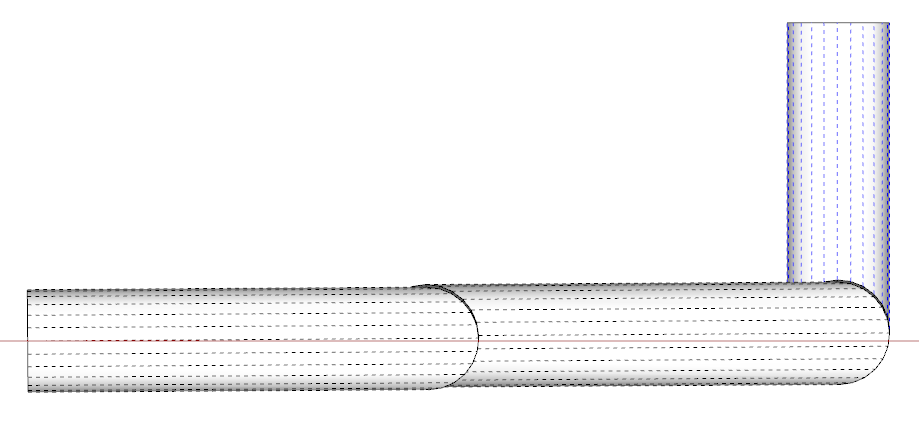
                              See the screen-grab when I use it on two individual pieces successfully...
                              Hidden Geometry ON, exploded and intersected. Bits.PNG If I 'flatten' the slightly sloping lines it will 'PipeAlongPath' just fine [front one]. Capture.PNG If I copy the top-most circle from that one and paste it onto the original path [or simply draw a flat circle on the top-end of the path] [the back-one], then select the path and use the native FollowMe on that circular face it will make the pipe with the slightly sloping sections... NativeFollowMe.PNG Because the slight slopes of the paths and the diameter threshold are not obviously linked I can't see how to trap it consistently.
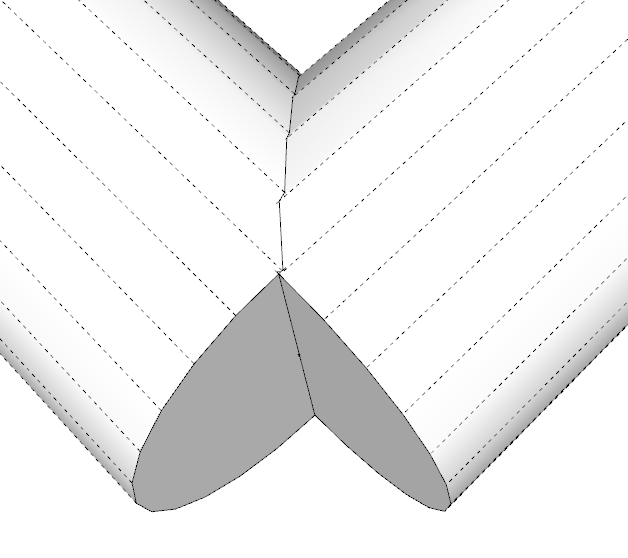
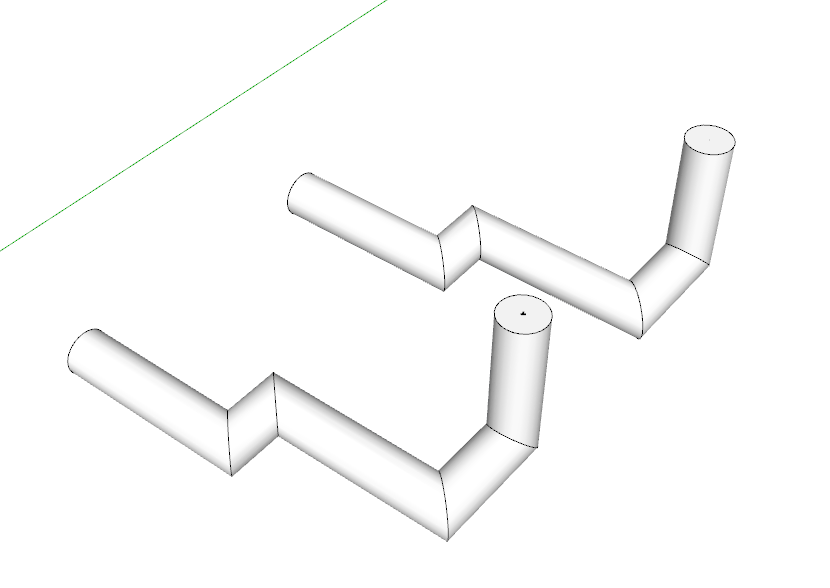
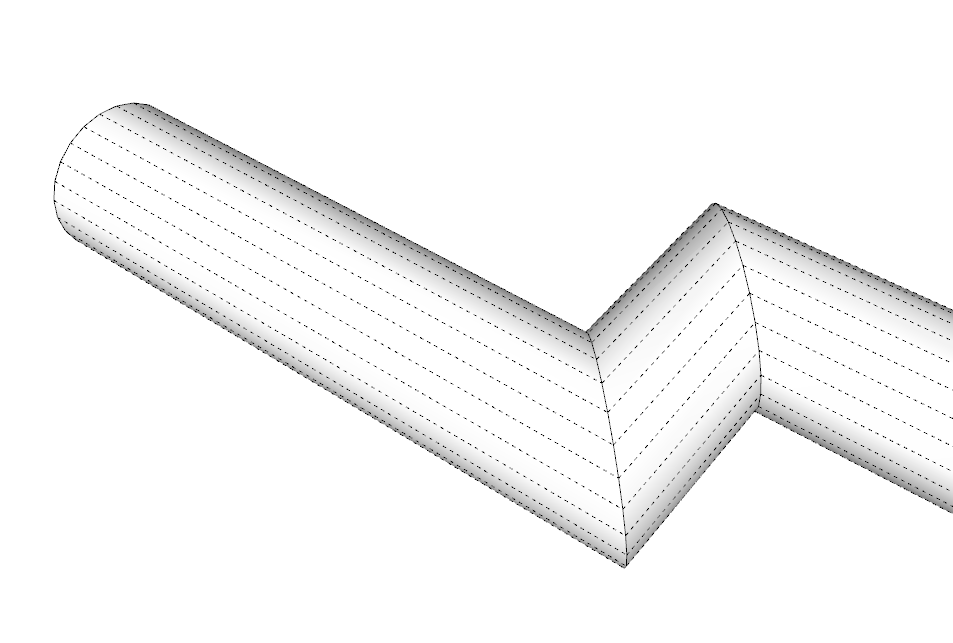
                              I tried introducing a vector check on a pipe sections of multiple part pipes, and if that piece of pipe is within a limit of being coplanar with the next section etc, then it was made as if it were coplanar [the vertices are slightly adjusted in the Z]... But it's clunky and awkward... 😕 This example in Xray shows that some of the verties in the paths have to be adjusted by ~1" to get PipeAlongPath to make the extrusion with the coded-followme, but the native-FollowMe works OK without that tweak - it's plain weird 😒ForcedCoplanarLines.PNG Comments appreciated - I'll hold off issuing any updates until someone responds... 🤓

                              TIG

                              1 Antwort Letzte Antwort Antworten Zitieren 0
                              • Dave RD Offline
                                Dave R
                                zuletzt editiert von

                                Interesting. I see the issue but it did work for me. I wonder how the path got drawn with those very small errors.

                                Etaoin Shrdlu

                                %

                                (THERE'S NO PLACE LIKE)

                                G28 X0.0 Y0.0 Z0.0

                                M30

                                %

                                1 Antwort Letzte Antwort Antworten Zitieren 0
                                • TIGT Online
                                  TIG Moderator
                                  zuletzt editiert von

                                  It works for me too, at say 4" or 6" diamter, but when I go up to ~40" if freezes as the coded-followme gets stuck in an unbreakable loop, trying to decide how to proceed around the slight twist!!
                                  The native-FollowMe succeeds using the same geometry... BUT one might reasonably supposed that both of the methods used very similar algorithms!
                                  Unfortunately there is no 'direct access': in code it's simply face.followme(edges) - which works 99/9% of the time, until someone contrives a combo of very slightly skewed paths that trips it up...

                                  Sometimes pipes do need a slight fall to 'drain' etc.
                                  But this is <0.375 degrees - aka 'flat'.
                                  So if I force it 'flat' in parts as I've indicated, then it works...
                                  BUT I don't want to make the pipe's path subtly different from the user's selected edges, unless I really need to...

                                  TIG

                                  1 Antwort Letzte Antwort Antworten Zitieren 0
                                  • C Offline
                                    CRASHWORTHY1
                                    zuletzt editiert von

                                    Please do not fret about the rare freezes. Kindly work on the default input box stuff mentioned above - if you so feel inclined. Speaking of 'inclined' - yes this particular pipe run is sloped for drainage. Even with such runs the plugin rarely freezes and Mr.TIG deserves accolades.

                                    1 Antwort Letzte Antwort Antworten Zitieren 0
                                    • P Offline
                                      pipingguy
                                      zuletzt editiert von

                                      Construction points are appearing when I explode a pipe-along-path group. This only seems to be happening recently - maybe after I updated to the latest version? If it was engineered into the script, I am interested to know the purpose. I can't delete them by "edit>delete guides" because guides that I have set up permanently in my model will disappear - regardless of being in a locked group. And selecting and erasing each guide point is time consuming.

                                      1 Antwort Letzte Antwort Antworten Zitieren 0
                                      • cottyC Offline
                                        cotty
                                        zuletzt editiert von

                                        @pipingguy said:

                                        I can't delete them by "edit>delete guides" because guides that I have set up permanently in my model will disappear - regardless of being in a locked group. And selecting and erasing each guide point is time consuming.

                                        You can use Thomthoms selection tools to select all guide points in a group and delete them in one step.

                                        my SketchUp gallery

                                        1 Antwort Letzte Antwort Antworten Zitieren 0
                                        • Dave RD Offline
                                          Dave R
                                          zuletzt editiert von

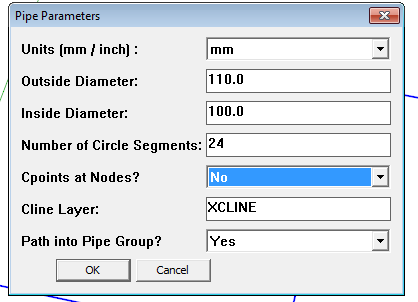
                                          Why not just opt for no C points when you make the pipe?
                                          Screenshot - 3_2_2014 , 5_46_17 AM.png

                                          I can see that some folks could use those C points as data points for locating the pipe in space. You could export their coordinates to a spreadsheet, for example, and manipulate them.

                                          Why are you using guidelines as "permanent" features in your model? They weren't intended for that.

                                          Etaoin Shrdlu

                                          %

                                          (THERE'S NO PLACE LIKE)

                                          G28 X0.0 Y0.0 Z0.0

                                          M30

                                          %

                                          1 Antwort Letzte Antwort Antworten Zitieren 0
                                          • TIGT Online
                                            TIG Moderator
                                            zuletzt editiert von

                                            The Cpoints are optional.
                                            Answer 'No' to stop them being added during that session.
                                            Their function is to allow snapping at nodes etc.
                                            If you want to edit the script with Notepad++, so the default is 'No' find the line reading:
                                            @cpoints = "Yes"
                                            and change it to
                                            @cpoints = "No"
                                            You can also change other defaults - for example if you always want 12 segments...

                                            TIG

                                            1 Antwort Letzte Antwort Antworten Zitieren 0
                                            • 1
                                            • 2
                                            • 3
                                            • 4
                                            • 1 / 4
                                            • Erster Beitrag
                                              Letzter Beitrag
                                            Buy SketchPlus
                                            Buy SUbD
                                            Buy WrapR
                                            Buy eBook
                                            Buy Modelur
                                            Buy Vertex Tools
                                            Buy SketchCuisine
                                            Buy FormFonts

                                            Advertisement