sketchucation logo sketchucation
    • 登入
    Oops, your profile's looking a bit empty! To help us tailor your experience, please fill in key details like your SketchUp version, skill level, operating system, and more. Update and save your info on your profile page today!
    🔌 Smart Spline | Fluid way to handle splines for furniture design and complex structures. Download

    Driving Dimensions

    已排程 已置頂 已鎖定 已移動 Extensions & Applications Discussions
    extensions
    70 貼文 21 Posters 26.9k 瀏覽 21 Watching
    正在載入更多貼文
    • 從舊到新
    • 從新到舊
    • 最多點贊
    回覆
    • 在新貼文中回覆
    登入後回覆
    此主題已被刪除。只有擁有主題管理權限的使用者可以查看。
    • V 離線
      viga1978
      最後由 編輯

      Driving Dimensions
      Driving Dimensions is the software that you can use to edit any 2D and 3D models in very simple and intuitive way.
      Just add dimensions to the elements of your model and edit their values — your geometry will be automatically updated to satisfy these dimensions. You can add as many dimensions as needed — all of them will be satisfied simultaneously.

      403 Forbidden

      favicon

      (drivingdimensions.com)

      Free plugin

      1 條回覆 最後回覆 回覆 引用 0
      • GaieusG 離線
        Gaieus
        最後由 編輯

        Well, I clicked here and clicked there but didn't get anything.
        What exactly did you se, James?

        And Vincenzo; did you experience anything when visiting?

        Gai...

        1 條回覆 最後回覆 回覆 引用 0
        • V 離線
          viga1978
          最後由 編輯

          I downloaded the files without problems from the site reported.

          1 條回覆 最後回覆 回覆 引用 0
          • BurkhardB 離線
            Burkhard
            最後由 編輯

            Seems really nice. It comes up with an .exe. I seperate (for the non fearless) the .rb
            Hope it works by copying into the plugins folder.


            ldd.rar

            http://www.ia-plus.de

            1 條回覆 最後回覆 回覆 引用 0
            • D 離線
              Dmitry Ushakov
              最後由 編輯

              Hello everybody!

              Now you can download Driving Dimensions plugin at download.com (Tested spyware free)

              Please don't hesitate to share your feedback with the developers!

              Sincerely yours,
              Dmitry Ushakov
              Director of Product Management
              LEDAS Ltd.

              http://www.DrivingDimensions.com - parametric plugins for SketchUp and Rhino

              1 條回覆 最後回覆 回覆 引用 0
              • thomthomT 離線
                thomthom
                最後由 編輯

                Parametrics for SketchUp??

                I gotto try this!

                Thomas Thomassen — SketchUp Monkey & Coding addict
                List of my plugins and link to the CookieWare fund

                1 條回覆 最後回覆 回覆 引用 0
                • BurkhardB 離線
                  Burkhard
                  最後由 編輯

                  Thanks Dmitry for sharing it. Will give feedback by time.
                  And welcome to SCF

                  http://www.ia-plus.de

                  1 條回覆 最後回覆 回覆 引用 0
                  • GaieusG 離線
                    Gaieus
                    最後由 編輯

                    Hi Dmitry and welcome!

                    Thanks for the feedback and for this plugin! 👍

                    Gai...

                    1 條回覆 最後回覆 回覆 引用 0
                    • MALAISEM 離線
                      MALAISE
                      最後由 編輯

                      Really usefull, I sketch models and then I can scale them with accuracy.

                      Thanks a lot Dmitry 👍 👍

                      And a good morning to all Friends

                      MALAISE

                      La Connaissance n'a de valeur que partagée

                      1 條回覆 最後回覆 回覆 引用 0
                      • GaieusG 離線
                        Gaieus
                        最後由 編輯

                        What? Good morning at half past ten? 😲
                        I was up and working at 5:30 already! 😒

                        Gai...

                        1 條回覆 最後回覆 回覆 引用 0
                        • MALAISEM 離線
                          MALAISE
                          最後由 編輯

                          @Gaius

                          At this moment, somewhere on the planet, the sun is just rising 🤣

                          MALAISE 😄

                          La Connaissance n'a de valeur que partagée

                          1 條回覆 最後回覆 回覆 引用 0
                          • GaieusG 離線
                            Gaieus
                            最後由 編輯

                            But you are in the same time zone as me 😒

                            Gai...

                            1 條回覆 最後回覆 回覆 引用 0
                            • K 離線
                              ktkoh
                              最後由 編輯

                              I must be a little slow. I downloaded driving dim and it shows up in tools but I can't figure out how to create driving dim. I need some help to get started.

                              Keith

                              1 條回覆 最後回覆 回覆 引用 0
                              • F 離線
                                fefillo
                                最後由 編輯

                                @unknownuser said:

                                I can't figure out how to create driving dim. I need some help to get started.

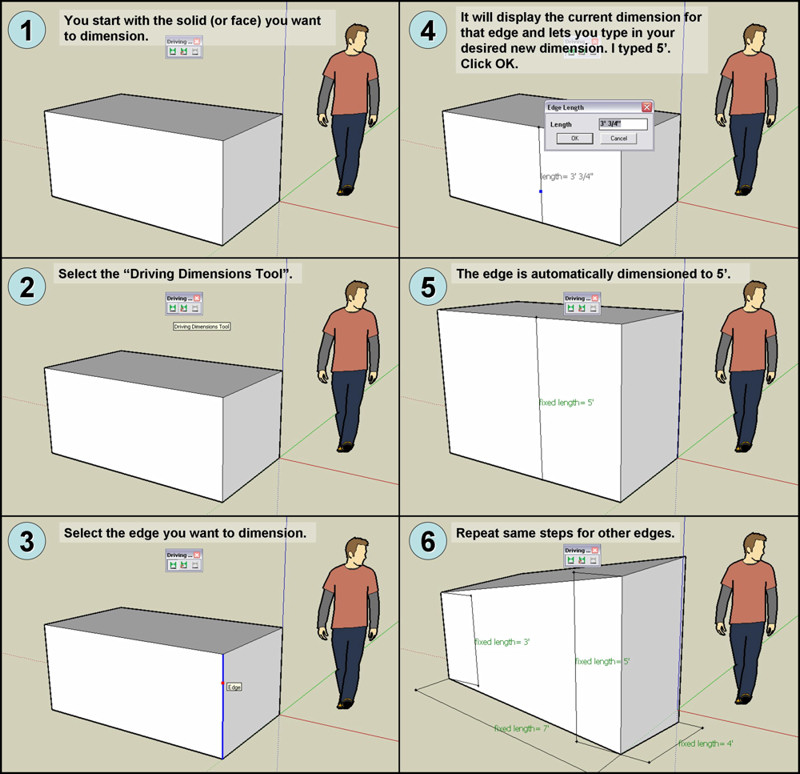
                                Here's a little mini tutorial I just made. Hopefully it will explain the basics of the tool.
                                Start playing with that and then go on and try moving faces around and then clicking the "Recalculate Model with Driving Dimensions" button to see your model adjust itself to match your changes and the "Driving Dimensions" you previously set.

                                BTW, this tool is great! 😍
                                Now... if we could get some angles too, then I wouldn't be missing much from my SolidWorks days. 😉

                                • Fefo

                                Driving Dimensions - Mini Tut.jpg

                                1 條回覆 最後回覆 回覆 引用 0
                                • S 離線
                                  sepo
                                  最後由 編輯

                                  video tut
                                  http://drivingdimensions.com/SketchUp/videos.php

                                  1 條回覆 最後回覆 回覆 引用 0
                                  • D 離線
                                    Dmitry Ushakov
                                    最後由 編輯

                                    @ktkoh said:

                                    I must be a little slow. I downloaded driving dim and it shows up in tools but I can't figure out how to create driving dim. I need some help to get started.

                                    Keith

                                    You can use Help/Driving Dimensions Help from the top menu to access the online help on this plugin.
                                    Here is the direct link to the help page: http://drivingdimensions.com/SketchUp/help.php

                                    @fefillo said:

                                    Here's a little mini tutorial I just made. Hopefully it will explain the basics of the tool.

                                    It's great!

                                    Sincerely yours,
                                    Dmitry Ushakov
                                    Director of Product Management
                                    LEDAS Ltd.

                                    http://www.DrivingDimensions.com - parametric plugins for SketchUp and Rhino

                                    1 條回覆 最後回覆 回覆 引用 0
                                    • D 離線
                                      dtrarch
                                      最後由 編輯

                                      Dmitry
                                      Very interesting concept and thank you for a free look at the plugin.

                                      Some feedback for your use.
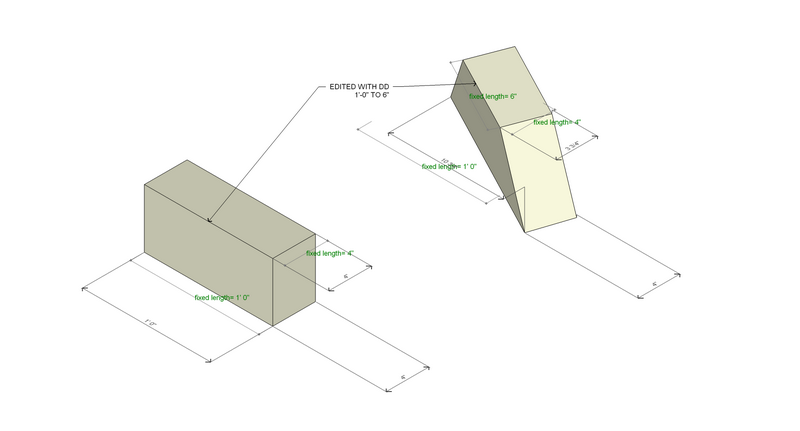
                                      Big bug-splat when deleting a DD dimention.
                                      Some unpredictable distortion when more than one DD edit of edges of same face.
                                      Perhaps an option for multiple edge selection or ?? for retention of the geometry form.

                                      In any case a view and file that I hope will be helpfull

                                      Regards

                                      dtr Architect

                                      DRIVE-DIMEN DISTORTION-01.png

                                      1 條回覆 最後回覆 回覆 引用 0
                                      • D 離線
                                        dtrarch
                                        最後由 編輯

                                        Dmitry

                                        Here is the file

                                        dtr


                                        DRIVING DIMEN DISTORTION.skp

                                        1 條回覆 最後回覆 回覆 引用 0
                                        • D 離線
                                          Dmitry Ushakov
                                          最後由 編輯

                                          Thanx for this model, dtr!

                                          Currently we collect cases with unexpected solutions to work on them and improve the natural behavior of our solver.
                                          So I'd like to know what solution did you expect here?

                                          Sincerely yours,
                                          Dmitry Ushakov
                                          Director of Product Management
                                          LEDAS Ltd.

                                          http://www.DrivingDimensions.com - parametric plugins for SketchUp and Rhino

                                          1 條回覆 最後回覆 回覆 引用 0
                                          • D 離線
                                            dtrarch
                                            最後由 編輯

                                            Dmitry

                                            I would have expected that the upper segment that was edited would affect the related face and the object would stay in place not rotate and distort/displace.
                                            Also the distortion did not occur on an adjacent face that was edited in a similar way.

                                            As this is segment driven how would groups and components be parametric without opening same ?

                                            A convert to SU mode dimensions & back to DD would be very useful too.

                                            2d for layout seems best use for the beta iteration.

                                            Just some thoughts.

                                            dtr

                                            1 條回覆 最後回覆 回覆 引用 0
                                            • 1
                                            • 2
                                            • 3
                                            • 4
                                            • 1 / 4
                                            • 第一個貼文
                                              最後的貼文
                                            Buy SketchPlus
                                            Buy SUbD
                                            Buy WrapR
                                            Buy eBook
                                            Buy Modelur
                                            Buy Vertex Tools
                                            Buy SketchCuisine
                                            Buy FormFonts

                                            Advertisement