sketchucation logo sketchucation
    • 登入
    Oops, your profile's looking a bit empty! To help us tailor your experience, please fill in key details like your SketchUp version, skill level, operating system, and more. Update and save your info on your profile page today!
    🔌 Smart Spline | Fluid way to handle splines for furniture design and complex structures. Download

    Driving Dimensions

    已排程 已置頂 已鎖定 已移動 Extensions & Applications Discussions
    extensions
    70 貼文 21 Posters 26.9k 瀏覽 21 Watching
    正在載入更多貼文
    • 從舊到新
    • 從新到舊
    • 最多點贊
    回覆
    • 在新貼文中回覆
    登入後回覆
    此主題已被刪除。只有擁有主題管理權限的使用者可以查看。
    • MALAISEM 離線
      MALAISE
      最後由 編輯

      Small Post to thank you Dmitry to share that plugin quite useful 👍

      MALAISE

      La Connaissance n'a de valeur que partagée

      1 條回覆 最後回覆 回覆 引用 0
      • X 離線
        xrok1
        最後由 編輯

        😍 I've been waiting for this since the first time I used sketckup!!!!!!! 😍

        THANKYOU

        if i had 1 request it would be for equations eg. dim1=dim2/2 or dim1=dim2+dim3*2 etc... although the dimensions would need to be named for this to be possible; but then it would truly be THE #1 architectural/design plugin for Sketchup!!

        “There are three classes of people: those who see. Those who see when they are shown. Those who do not see.”

        http://www.Twilightrender.com try it!

        1 條回覆 最後回覆 回覆 引用 0
        • D 離線
          Dmitry Ushakov
          最後由 編輯

          MALAISE, xrok1,

          Thank you for the interest to our plugin!
          Support of engineering equations linking dimension parameters is one of our short term objectives.

          Sincerely yours,
          Dmitry Ushakov
          Director of Product Management
          LEDAS Ltd.

          http://www.DrivingDimensions.com - parametric plugins for SketchUp and Rhino

          1 條回覆 最後回覆 回覆 引用 0
          • X 離線
            xrok1
            最後由 編輯

            😍 SWEET 😍 👍

            “There are three classes of people: those who see. Those who see when they are shown. Those who do not see.”

            http://www.Twilightrender.com try it!

            1 條回覆 最後回覆 回覆 引用 0
            • Mike LuceyM 離線
              Mike Lucey
              最後由 編輯

              Thank You Dmitry for a great plugin. I can see lots of ways this can be used to great effect in the Design Process.

              I must compliment you on your excellent response times also. Its great to have this 'friendly' attitude shown here on SketchUcation.

              I'm looking forward to trying out Driving Dimension as soon as time permits, BTW will it work with Mac? If not we Mac users can always switch to Win via Bootcamp.

              Mike

              Support us so we can support you! Upgrade to Premium Membership!

              1 條回覆 最後回覆 回覆 引用 0
              • I 離線
                ilay7k
                最後由 編輯

                Dmitry, thank you for update!

                Also Dmitry or anybody from SU dev.team, can add expression of DD(Driving Dimensions) to library of dynamic-component's expressions/formulas?

                Into Russian:
                Спасибо еще раз! Дмитрий, вы наверно видели уже о вводе формул в параметры динам.компонентов, можно ли туда добавить ваши выражения плуга для управления компонентом?

                1 條回覆 最後回覆 回覆 引用 0
                • RayOchoaR 離線
                  RayOchoa
                  最後由 編輯

                  excuse me but can you use this on more complex things like maybe Automobiles and things like that?

                  CaR DeSiGnS bY mE
                  http://ray-ochoa.com

                  1 條回覆 最後回覆 回覆 引用 0
                  • D 離線
                    Dmitry Ushakov
                    最後由 編輯

                    Hello Mike,

                    Thank you for the interest to Driving Dimensions!

                    We will definitely port our plugin to Mac OS, but first we have to release a Mac version of our geometric solver LGS 3D, which is the base for the plugin. We are already working on that.

                    Sincerely yours,
                    Dmitry Ushakov
                    Director of Product Management
                    LEDAS Ltd.

                    http://www.DrivingDimensions.com - parametric plugins for SketchUp and Rhino

                    1 條回覆 最後回覆 回覆 引用 0
                    • D 離線
                      Dmitry Ushakov
                      最後由 編輯

                      Dear ilay7k,

                      Thank you for the interesting idea of the integration of Driving Dimensions with Dynamic Components! We have no particular plans for that yet, but in the forthcoming versions of our plugin one will be able to use variables and formalas when specifying values of driving dimensions.

                      Sincerely yours,
                      Dmitry Ushakov
                      Director of Product Management
                      LEDAS Ltd.

                      http://www.DrivingDimensions.com - parametric plugins for SketchUp and Rhino

                      1 條回覆 最後回覆 回覆 引用 0
                      • D 離線
                        Dmitry Ushakov
                        最後由 編輯

                        @rayochoa said:

                        excuse me but can you use this on more complex things like maybe Automobiles and things like that?

                        Why not? The only limitation of our plugin is that it cannot be used to dimension grouped entities (ones placed inside components).

                        But if one speaks about automotive design, he/she usually means things like class A surfaces or at least the possibility to specify G0/G1/G2 connections between curves and surfaces. Current version of Driving Dimensions does not support them. In the forthcoming versions we plan to support a tangency constraint with arc curves.

                        Sincerely yours,
                        Dmitry Ushakov
                        Director of Product Management
                        LEDAS Ltd.

                        http://www.DrivingDimensions.com - parametric plugins for SketchUp and Rhino

                        1 條回覆 最後回覆 回覆 引用 0
                        • EdsonE 離線
                          Edson
                          最後由 編輯

                          as usual, windows only!

                          edson mahfuz, architect| porto alegre • brasil
                          http://www.mahfuz.arq.br

                          1 條回覆 最後回覆 回覆 引用 0
                          • X 離線
                            xrok1
                            最後由 編輯

                            and there's a prime example of why i don't own a MAC.

                            it could be a nuclear powered ,thermo dynamic ,speed of light*2 ,quadruple core ,16 pipeline ,32gig of genetically enhanced organic ram computer ,that can read my thoughts but if you can't get the software?????? 👊

                            “There are three classes of people: those who see. Those who see when they are shown. Those who do not see.”

                            http://www.Twilightrender.com try it!

                            1 條回覆 最後回覆 回覆 引用 0
                            • Mike LuceyM 離線
                              Mike Lucey
                              最後由 編輯

                              For the Intel Macs its just a matter of switching over to SketchUp via Bootcamp .... a bit mesy but no big deal 😉

                              Mike

                              PS: Am I being smug 😄

                              Support us so we can support you! Upgrade to Premium Membership!

                              1 條回覆 最後回覆 回覆 引用 0
                              • EdsonE 離線
                                Edson
                                最後由 編輯

                                @mike lucey said:

                                For the Intel Macs its just a matter of switching over to SketchUp via Bootcamp .... a bit mesy but no big deal 😉

                                Mike

                                PS: Am I being smug 😄

                                or via Fusion/Parallels, which is even easier... 😉 😉

                                edson mahfuz, architect| porto alegre • brasil
                                http://www.mahfuz.arq.br

                                1 條回覆 最後回覆 回覆 引用 0
                                • GaieusG 離線
                                  Gaieus
                                  最後由 編輯

                                  @edson said:

                                  as usual, windows only!

                                  Don't be impatient, Edson!

                                  @dmitry ushakov said:

                                  We will definitely port our plugin to Mac OS, but first we have to release a Mac version of our geometric solver LGS 3D, which is the base for the plugin. We are already working on that.

                                  😉

                                  Gai...

                                  1 條回覆 最後回覆 回覆 引用 0
                                  • X 離線
                                    xrok1
                                    最後由 編輯

                                    @dtrarch said:

                                    Dmitry

                                    2d lines can be used to generate 3d walls and as reference for plan development too.
                                    (Also one can convert lines to construction lines and vice-versa with existing scripts for grid and reference use.)

                                    Parametric line adjustment when developing design schemes is very useful.

                                    A constraint to retain the angle at corners would be helpful in this regard.
                                    (a lock corner/angle/geometry function perhaps)

                                    dtr

                                    could you elaborate on this, i've been looking for a way to do this.

                                    “There are three classes of people: those who see. Those who see when they are shown. Those who do not see.”

                                    http://www.Twilightrender.com try it!

                                    1 條回覆 最後回覆 回覆 引用 0
                                    • PixeroP 離線
                                      Pixero
                                      最後由 編輯

                                      Is anyone able to use it on groups/components or inside a group/component?
                                      (I almost never have ungrouped parts in my models.)

                                      1 條回覆 最後回覆 回覆 引用 0
                                      • D 離線
                                        Dmitry Ushakov
                                        最後由 編輯

                                        Dear Driving Dimensions users!

                                        Today we launched the version 1.0 of our DD plugin. You can download it at DrivingDimensions.com. Since October 2008, when we released the version 0.1 more than 5000 users from 95 countries (according to Google Analytics) downloaded preliminary versions (from 0.1 to 0.4). We did not expect such a high demand for parametric plugin for SketchUp - it was a pleasant surprise for us. Thank you for that!

                                        With release 1.0 we are going to attract the attention of professional SketchUp users. So now we propose two versions of our plugin: free and Pro. The free version is not intended for commercial usage and has one functional limitation: you cannot add more than 25 driving dimensions to one SketchUp model. No other limitations exist. We consider this limitation as insignificant for non-professional users, since 25 dimensions are generally enough to play with DD and to create simple parametric models.

                                        Pro versions (for only $45 per single user license) is intended for professional users who create complex designs. For them we also propose a new feature called inreffed dimensions that consists in automatic generation of implied driving dimensions when you draw a rectangle or apply a Push/Pull tool. We have prepared a special tutorial that introduces inferred dimensions feature. This feature can also be switched on in the free version, but be aware that the limit of 25 dimensions is reached very fast with inferred dimensions.

                                        Among other improvements of version 1.0 I can mention:

                                        • New look and feel (icons, cursors, message boxes, menus, "About" window)
                                        • New types of driving dimensions (between an edge and a face, between two faces)
                                        • "Update Dimension Values" tool (in addition to "Update geometry")
                                        • Options dialog

                                        Please read the full press release to learn more about Driving Dimensions 1.0. And don't hesitate to criticize 👊
                                        I wish you to enjoy the new parametric possibilities in SketchUp!
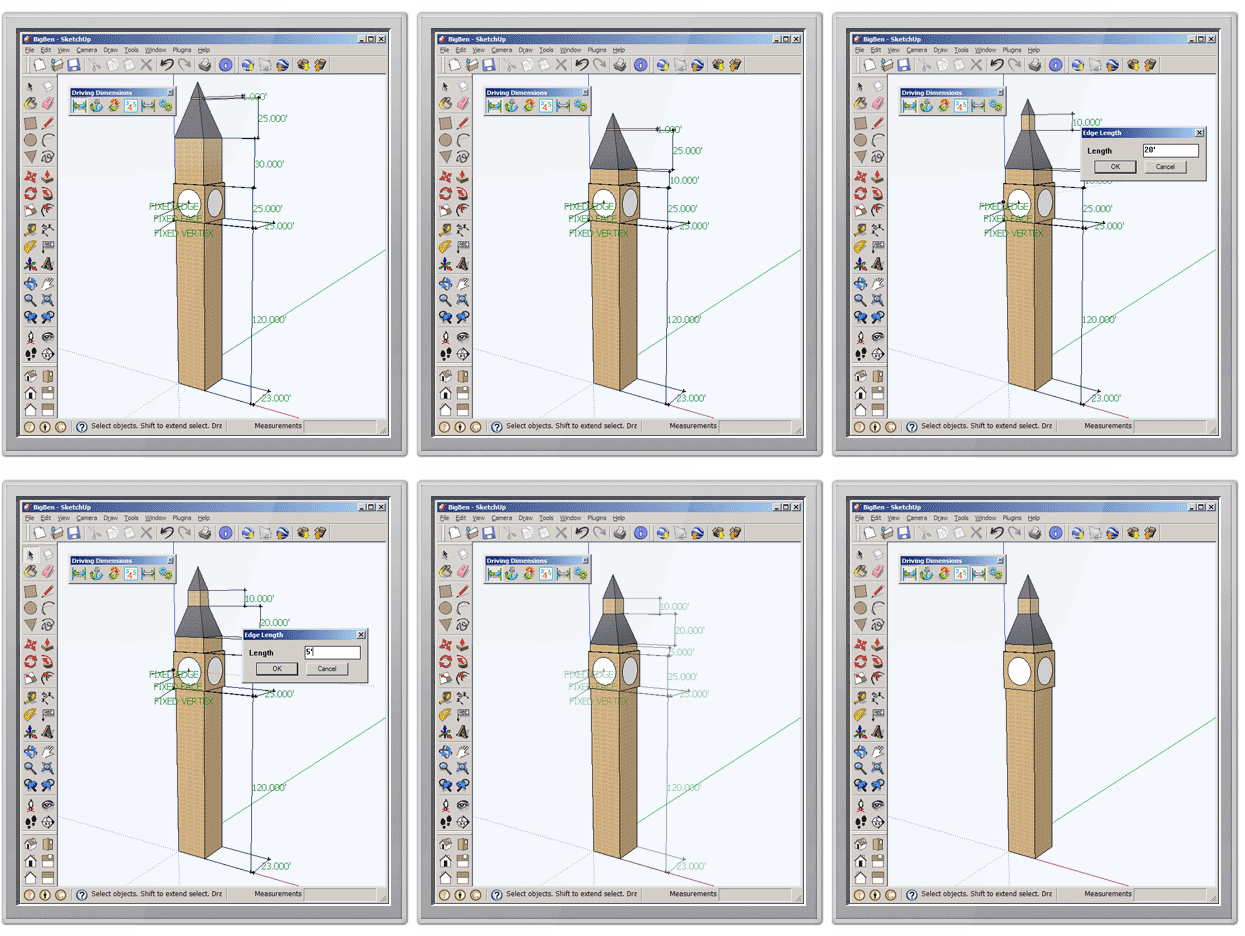

                                        Parametric Big Ben

                                        Sincerely yours,
                                        Dmitry Ushakov
                                        Director of Product Management
                                        LEDAS Ltd.

                                        http://www.DrivingDimensions.com - parametric plugins for SketchUp and Rhino

                                        1 條回覆 最後回覆 回覆 引用 0
                                        • X 離線
                                          xrok1
                                          最後由 編輯

                                          awsome! simply awsome!

                                          “There are three classes of people: those who see. Those who see when they are shown. Those who do not see.”

                                          http://www.Twilightrender.com try it!

                                          1 條回覆 最後回覆 回覆 引用 0
                                          • Mike LuceyM 離線
                                            Mike Lucey
                                            最後由 編輯

                                            Well done Dmitry on a great product also a well thought out business plan that caters for both Pro and Free users 👍

                                            Mike

                                            Support us so we can support you! Upgrade to Premium Membership!

                                            1 條回覆 最後回覆 回覆 引用 0
                                            • 1
                                            • 2
                                            • 3
                                            • 4
                                            • 3 / 4
                                            • 第一個貼文
                                              最後的貼文
                                            Buy SketchPlus
                                            Buy SUbD
                                            Buy WrapR
                                            Buy eBook
                                            Buy Modelur
                                            Buy Vertex Tools
                                            Buy SketchCuisine
                                            Buy FormFonts

                                            Advertisement