sketchucation logo sketchucation
    • Login
    Oops, your profile's looking a bit empty! To help us tailor your experience, please fill in key details like your SketchUp version, skill level, operating system, and more. Update and save your info on your profile page today!
    Mac User? | Join the Rayscaper Beta for Mac Learn More

    [Plugin] Archiland Toolbar

    Scheduled Pinned Locked Moved Plugins
    58 Posts 40 Posters 90.1k Views 40 Watching
    Loading More Posts
    • Oldest to Newest
    • Newest to Oldest
    • Most Votes
    Reply
    • Reply as topic
    Log in to reply
    This topic has been deleted. Only users with topic management privileges can see it.
    • C
      cyan.archnet
      last edited by

      EXCEPTIONALLY SUPERB plugin!, thanks a lot! 👍 👍

      1 Reply Last reply
      Reply Quote 0
      • T
        tomot
        last edited by

        Great addition!
        But whats the point of doing a huge scramble file containing coded Rubies that were formerly not scrambled?

        my plugins
        tomot

        1 Reply Last reply
        Reply Quote 0
        • CadFatherC
          CadFather
          last edited by

          ..because some were scrambled - and thanks for the window/doors 👍

          1 Reply Last reply
          Reply Quote 0
          • C
            cyan.archnet
            last edited by

            Dear CadFather,just have a query regarding Archiland Plugin, i did copy it in the plugins but when i open my sketchup this is what appears
            Error Loading File cd_architect.rb
            C:/Program Files/Google/Google SketchUp 6/Plugins/sketchup.rb:99: undefined method get_i18n_datfile_info' for Sketchup:ModuleError Loading File Sketchup.rb undefined method get_i18n_datfile_info' for Sketchup:Module, any help on this?, THANKS A LOT!

            1 Reply Last reply
            Reply Quote 0
            • CadFatherC
              CadFather
              last edited by

              have you unzipped all the contents in plugins?

              1 Reply Last reply
              Reply Quote 0
              • C
                cyan.archnet
                last edited by

                I did unzip the file, but i still get the same error, don't know what is the problem.

                1 Reply Last reply
                Reply Quote 0
                • CadFatherC
                  CadFather
                  last edited by

                  try replacing this


                  Sketchup.rb

                  1 Reply Last reply
                  Reply Quote 0
                  • C
                    cyan.archnet
                    last edited by

                    Dear CadFather, It's working perfectly well now, THANKS A WHOLE LOT!

                    1 Reply Last reply
                    Reply Quote 0
                    • arqpadaoA
                      arqpadao
                      last edited by

                      Hi CadFather
                      Many thanks, good ideia,
                      But
                      I have a problem. Installed and appeared all the items on the menu but Plugins to open the window of the icons they do not appear. The folder - Archiland Toolbar are in the plugins folder and the 4 files. RB were copied to the plugins folder of Sketchup. It could help me.

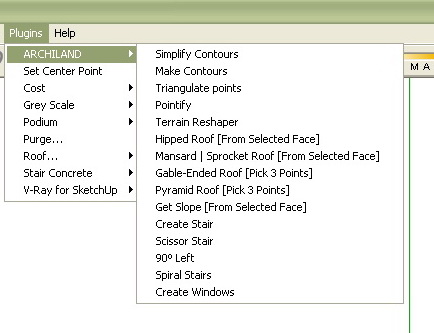
                      Capture_15.jpg


                      Capture_16.jpg

                      fernando padão
                      arquiteto

                      porto alegre - brasil

                      http://arqpadao.blogspot.com

                      1 Reply Last reply
                      Reply Quote 0
                      • CadFatherC
                        CadFather
                        last edited by

                        make sure the folder cd_icons is in the plugins folder

                        1 Reply Last reply
                        Reply Quote 0
                        • david_hD
                          david_h
                          last edited by

                          Very cool. Thanks.

                          If I make it look easy...It is probably easy

                          1 Reply Last reply
                          Reply Quote 0
                          • arqpadaoA
                            arqpadao
                            last edited by

                            Thanks
                            small detail.
                            There are tutorials on how to use the plugins...
                            I do not understand the use of Spiral Stairs, Simplify Contours, Make Contourns, Triangulate points, Pontify and Terrain Reshaper...

                            fernando padão
                            arquiteto

                            porto alegre - brasil

                            http://arqpadao.blogspot.com

                            1 Reply Last reply
                            Reply Quote 0
                            • CadFatherC
                              CadFather
                              last edited by

                              i'm working on a new set of toolbars and also planning some tutorials - it's just a matter of squeezing it all in 24 hour cycles

                              but in short they are easy to start with - try and see

                              draw a jagged curve with the freehand tool - simplify contours will reduce the jagginess (and segmentation)

                              draw a cone or any 3d shape (not cube), group it - make contours will create new contour lines around the 3d shape

                              on the same shape (explode the group) run pointify - the result is c-points on every vertex (corner)

                              trangulate points does the reverse - delete the 3d shape, select all c-points - run the script

                              you will also find many tutorials in pdf on Didier Bur's site

                              http://www.crai.archi.fr/RubyLibraryDepot/Ruby/RUBY_Library_Depot.htm

                              .

                              1 Reply Last reply
                              Reply Quote 0
                              • A
                                AthidhiTM
                                last edited by

                                thanks

                                1 Reply Last reply
                                Reply Quote 0
                                • arqpadaoA
                                  arqpadao
                                  last edited by

                                  thanks
                                  this will be very good

                                  fernando padão
                                  arquiteto

                                  porto alegre - brasil

                                  http://arqpadao.blogspot.com

                                  1 Reply Last reply
                                  Reply Quote 0
                                  • F
                                    Frank0503
                                    last edited by

                                    Thanks CADfather, I've already download your ruby in another 4r & it's really really useful. But I wonder why you don't more develop it more, like could I change the style of stair tread like Sketchup?

                                    1 Reply Last reply
                                    Reply Quote 0
                                    • CadFatherC
                                      CadFather
                                      last edited by

                                      ..now that we have dynamic components, the stairs might be less important - in any case i'm working on an update..

                                      also remember the rubies have been created by the ruby masters - all i did was integrate them into the toolbar with command and icons

                                      1 Reply Last reply
                                      Reply Quote 0
                                      • L
                                        lorenzo
                                        last edited by

                                        thanks a lot Cadfather!!!
                                        that's great!!!

                                        1 Reply Last reply
                                        Reply Quote 0
                                        • CadFatherC
                                          CadFather
                                          last edited by

                                          your welcome Lorenzo 😄

                                          1 Reply Last reply
                                          Reply Quote 0
                                          • R
                                            Ross Macintosh
                                            last edited by

                                            Max - you truly are the CadFather! Your tool bar is a great addition to the neighborhood.

                                            I have one little problem relating to the roof tools. On my toolbar the mansard & gable roof buttons are transposed. Clicking the gable produces the mansard etc. -- The tooltips are correct so it seems its just the images are referenced wrong.

                                            Regards, Ross

                                            1 Reply Last reply
                                            Reply Quote 0

                                            Hello! It looks like you're interested in this conversation, but you don't have an account yet.

                                            Getting fed up of having to scroll through the same posts each visit? When you register for an account, you'll always come back to exactly where you were before, and choose to be notified of new replies (either via email, or push notification). You'll also be able to save bookmarks and upvote posts to show your appreciation to other community members.

                                            With your input, this post could be even better 💗

                                            Register Login
                                            • 1
                                            • 2
                                            • 3
                                            • 3 / 3
                                            • First post
                                              Last post
                                            Buy SketchPlus
                                            Buy SUbD
                                            Buy WrapR
                                            Buy eBook
                                            Buy Modelur
                                            Buy Vertex Tools
                                            Buy SketchCuisine
                                            Buy FormFonts

                                            Advertisement
