sketchucation logo sketchucation
    • 登入
    Oops, your profile's looking a bit empty! To help us tailor your experience, please fill in key details like your SketchUp version, skill level, operating system, and more. Update and save your info on your profile page today!
    🔌 Smart Spline | Fluid way to handle splines for furniture design and complex structures. Download

    [Plugin] BezierSpline - v2.2a - 22 Apr 21

    已排程 已置頂 已鎖定 已移動 Plugins
    460 貼文 183 Posters 2.0m 瀏覽 183 Watching
    正在載入更多貼文
    • 從舊到新
    • 從新到舊
    • 最多點贊
    回覆
    • 在新貼文中回覆
    登入後回覆
    此主題已被刪除。只有擁有主題管理權限的使用者可以查看。
    • W 離線
      webdeladelineacion
      最後由 編輯

      would be important to also be translated into Spanish

      Please. Great tool!!!

      1 條回覆 最後回覆 回覆 引用 0
      • M 離線
        mozzie
        最後由 編輯

        Download link for 1.4 does not appear to be working? (for me, at least).

        1 條回覆 最後回覆 回覆 引用 0
        • Dave RD 離線
          Dave R
          最後由 編輯

          Mozzie, I just tried it and it downloaded for me just fine. What browser are you using?

          Etaoin Shrdlu

          %

          (THERE'S NO PLACE LIKE)

          G28 X0.0 Y0.0 Z0.0

          M30

          %

          1 條回覆 最後回覆 回覆 引用 0
          • pietervP 離線
            pieterv
            最後由 編輯

            First of all: Thanks A LOT Fredo, for your very handy plugin. Thanks to your plugin I was able to make things like this: http://forums.sketchucation.com/viewtopic.php?f=15&t=29881 Without your plugin this would be very difficult to make.

            I would like to continue on something that has been discussed earlier:

            @unknownuser said:

            @plot-paris said:

            I've got one question though, that I wanted to ask you for quite some time now:
            when I transform a polyline (or now just a series of linesegments 😉 ) into a Polyline Arc Corners, sometimes the distribution of vertexes is a bit strange, showing some corner with very high polygon detail, leaving others almost unrounded... is there a way to influence that? like to tell the plugin to distribute the vertexes evenly per corner?
            [attachment=1:tyktxzq2]<!-- ia1 -->bz_round_corner-problem01.jpg<!-- ia1 -->[/attachment:tyktxzq2]

            The number of vertices for the rounding is based on the Precision parameter given on a Full Circle basis. So for Precision = 24s, you'll get 24 points for 360°. Depending on the arc angle of the rounding, you'll get less or more points.
            Is that the explanation or do you see another issue or bug?

            Fredo

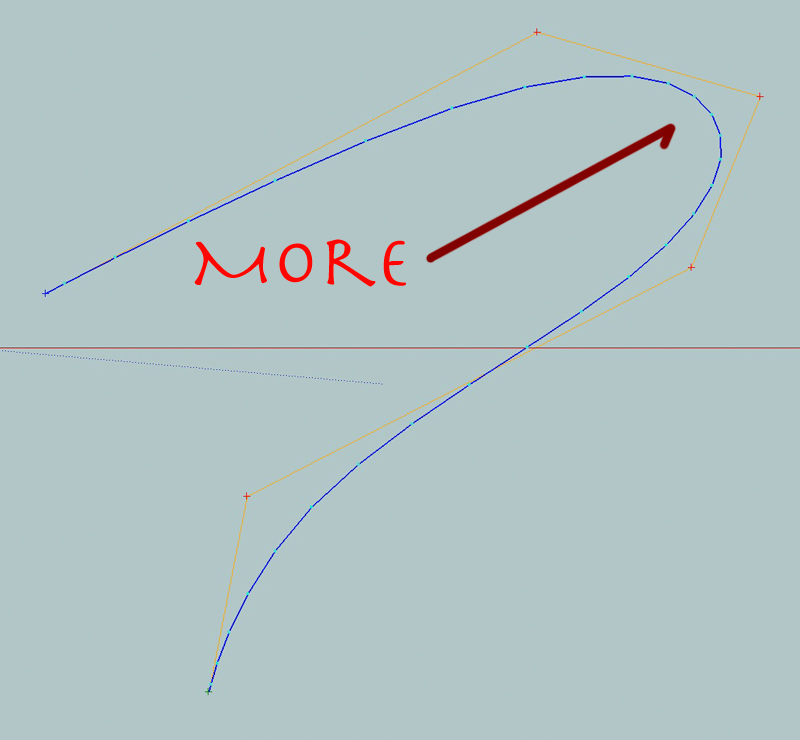
            I think I experience the same thing (see attachement): There are more vertexes towards the end of the curve. The main problem with this for me is that I have to put in a lot of sides sometimes (like 60s) untill the big part with the least number of vertexes becomes smooth. Is there something you can do about this? Or is there just no other way?

            Thanks in advance man!

            Pieter

            blezierspline-02.jpg

            This is my website:
            Citypixels - 3d Visualisatie Architectuur

            1 條回覆 最後回覆 回覆 引用 0
            • jeff hammondJ 離線
              jeff hammond
              最後由 編輯

              @pieterv said:

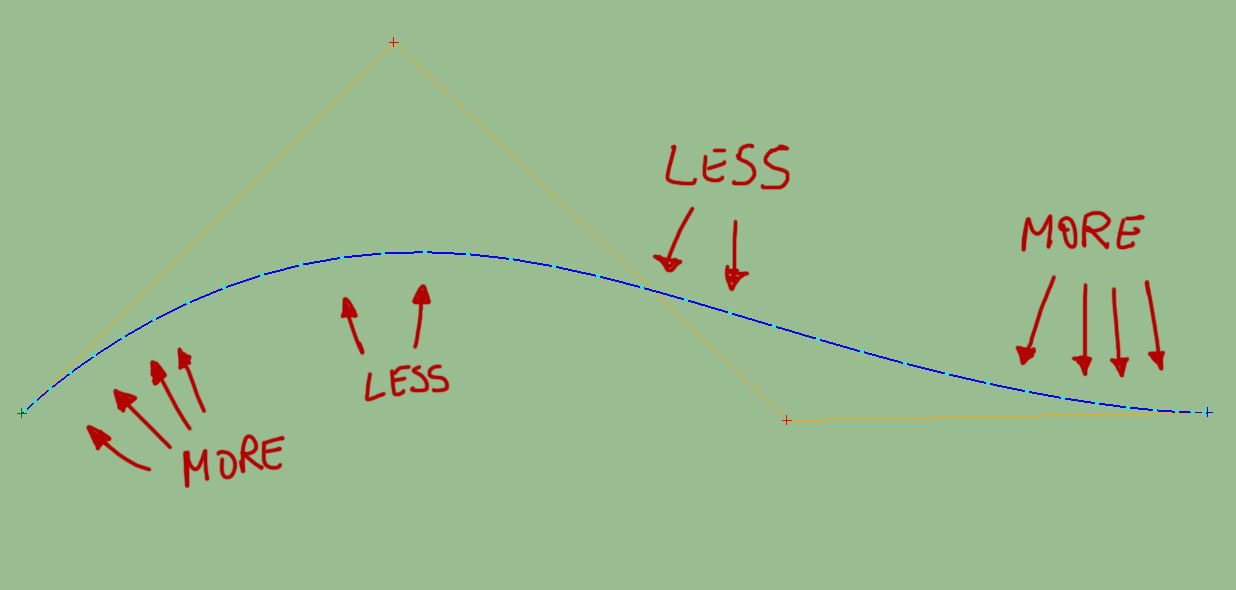
              I think I experience the same thing (see attachement): There are more vertexes towards the end of the curve.

              it's not that there are more vertices towards the ends, it's that there are more when the bend is a tighter curve..
              here it's shown with the vertices closer together in the middle of the line.

              bezexample.jpg

              dotdotdot

              1 條回覆 最後回覆 回覆 引用 0
              • S 離線
                seraphix
                最後由 編輯

                very nice plugin thanks.

                1 條回覆 最後回覆 回覆 引用 0
                • thomthomT 離線
                  thomthom
                  最後由 編輯

                  "Classic Bezier" - what does that refer to?
                  I was under the impression that Cubic Bezier was the most common one - so what is the classic?

                  Thomas Thomassen — SketchUp Monkey & Coding addict
                  List of my plugins and link to the CookieWare fund

                  1 條回覆 最後回覆 回覆 引用 0
                  • thomthomT 離線
                    thomthom
                    最後由 編輯

                    Oh wait - I'm getting confused... Is Cubic the Classic?

                    Thomas Thomassen — SketchUp Monkey & Coding addict
                    List of my plugins and link to the CookieWare fund

                    1 條回覆 最後回覆 回覆 引用 0
                    • fredo6F 離線
                      fredo6
                      最後由 編輯

                      @thomthom said:

                      Oh wait - I'm getting confused... Is Cubic the Classic?

                      Classic Bezier is the true bezier curve, which does not pass thorugh the control points, except the first and the last ones. It is often referred to as simply "Bezier".

                      In contrast, Cubic Bezier is a spline passing through all control points. It is made of portions of Bezier curves for 3 consecutive points, with derivative continuity. There are other type of splines, but this one is quite fast to compute with direct formulas.

                      Fredo

                      1 條回覆 最後回覆 回覆 引用 0
                      • mitcorbM 離線
                        mitcorb
                        最後由 編輯

                        Thank you, Fredo, for that clarification, and best that you did.

                        I take the slow, deliberate approach in my aimless wandering.

                        1 條回覆 最後回覆 回覆 引用 0
                        • M 離線
                          meganm
                          最後由 編輯

                          Hi there,

                          I'm trying to download this plugin but am receiving a message saying I'm not authorised to download it...
                          I'm registered on this site. Are there other steps I need to take to be able to run BezierSpline?

                          Thanks,

                          Megan

                          1 條回覆 最後回覆 回覆 引用 0
                          • GaieusG 離線
                            Gaieus
                            最後由 編輯

                            Hi Megan,

                            There should not be any further steps and you shuld be able to access any attachments once you are logged in. Please, have a look at this topic however and see what the problem can be (essentially the issue is that the forum software logs people ooff once in a while):
                            http://forums.sketchucation.com/viewtopic.php?f=15&t=19797

                            Gai...

                            1 條回覆 最後回覆 回覆 引用 0
                            • L 離線
                              LannorMov
                              最後由 編輯

                              Gracias Fredo.you are wonderful in the art of making plugin, great is thy heart to give. Muy agradecido.

                              1 條回覆 最後回覆 回覆 引用 0
                              • S 離線
                                Scott M
                                最後由 編輯

                                Need help loading this file.I saved it to desktop and exracted to su 8 plugins restarted su 8 but it is not there.I see that the file ext. is efw how do I get it to load as rb. I am new to plugins.

                                https://www.youtube.com/user/ecabinetstips

                                1 條回覆 最後回覆 回覆 引用 0
                                • GaieusG 離線
                                  Gaieus
                                  最後由 編輯

                                  efw? I have never seen that. Maybe try to rename it to rb (or rbs)?
                                  Also, Bezier Spline may need to be enabled under Window > Preferences > Extensions (and then you find a whole toolbar for it under View > Toolbars)

                                  Gai...

                                  1 條回覆 最後回覆 回覆 引用 0
                                  • L 離線
                                    LannorMov
                                    最後由 編輯

                                    @scott m said:

                                    Need help loading this file.I saved it to desktop and exracted to su 8 plugins restarted su 8 but it is not there.I see that the file ext. is efw how do I get it to load as rb. I am new to plugins.

                                    Scott M. you excuse my English is not so good. I use Sket8. What I did was to delete the first folder icons (without removing the internal folder containing the images), because it appeared to me the bar and showed me and the bar, but no picture and then I went back to get Images folder in the folder icons (which is the same, what happens is that it comes two in one) and do not know why but it appeared to me and icons. Not if you understand me, maybe you serve.

                                    1 條回覆 最後回覆 回覆 引用 0
                                    • D 離線
                                      danbig
                                      最後由 編輯

                                      I have a question:

                                      First, let me add my thanks to the many who have already said it: this tool should ship with SketchUp, and it really provides some key functionality.

                                      I'm curious about the details of how you control the curves of a bezier curve: this plugin seems to have a different mode of control than say, Illustrator or even LayOut. In each of the latter programs, curves can be controlled with the two-sided handle, as shown here:

                                      http://www.webopedia.com/FIG/BEZIER.gif

                                      My question really has two parts:

                                      1. Is the functionality of the bezier curves in this plugin the same as the curves in Illustrator and LayOut?
                                      2. Would it be possible to change the mode of curve control to the two-sided handles for this plugin?
                                      1 條回覆 最後回覆 回覆 引用 0
                                      • thomthomT 離線
                                        thomthom
                                        最後由 編輯

                                        The Bezier curves you see in Illustrator and similar are series of Bezier curves connected together. While the splines in this plugin are all one segment.

                                        It would be interesting to see a variant like you describe, would allow for better local control.

                                        Thomas Thomassen — SketchUp Monkey & Coding addict
                                        List of my plugins and link to the CookieWare fund

                                        1 條回覆 最後回覆 回覆 引用 0
                                        • T 離線
                                          tfdesign
                                          最後由 編輯

                                          This is a brilliant plugin. Thanks Fredo6! When I've got some money again, I'll send you a donation 😄
                                          (In fact I'll send donations to all whose plugins I use, once the work gets flowing again! 😳 😄 ).

                                          My book "Let's SketchUp!" Download from here

                                          1 條回覆 最後回覆 回覆 引用 0
                                          • S 離線
                                            Scott M
                                            最後由 編輯

                                            @gaieus said:

                                            efw? I have never seen that. Maybe try to rename it to rb (or rbs)?
                                            Also, Bezier Spline may need to be enabled under Window > Preferences > Extensions (and then you find a whole toolbar for it under View > Toolbars)

                                            If you go to the download link clik on save it will show the file type as a EFW file. When I save it too my desk top it is a EFW file. I then clck on send too zip folder.Then extract all into plugin folder. It showes up in this folder as a EFW file type.Am I doing something wrong.


                                            https://www.youtube.com/user/ecabinetstips

                                            1 條回覆 最後回覆 回覆 引用 0
                                            • 1
                                            • 2
                                            • 12
                                            • 13
                                            • 14
                                            • 15
                                            • 16
                                            • 22
                                            • 23
                                            • 14 / 23
                                            • 第一個貼文
                                              最後的貼文
                                            Buy SketchPlus
                                            Buy SUbD
                                            Buy WrapR
                                            Buy eBook
                                            Buy Modelur
                                            Buy Vertex Tools
                                            Buy SketchCuisine
                                            Buy FormFonts

                                            Advertisement



